

You’ll want a mouse that feels natural, just works with your Mac, and stays out of your way all day. I’ll guide you through five top picks for 2026 that balance comfort, precise tracking, and reliable connectivity-from a compact Logitech with Flow and fast charging, to stylish rose gold wireless and Bluetooth options, and dependable Macally wired models with fine DPI control. Keep this list in mind as you compare features and comfort for your setup.
| Logitech MX Anywhere 2S Bluetooth Compact Wireless Mouse |

| Best for Portability | Connectivity: Bluetooth | Compatibility: Mac & Windows computers/laptops | Power Source: Rechargeable battery (micro‑USB charging) | CHECK LATEST PRICE | Read Our Analysis |
| Wireless Rose Gold USB/USB-C Mouse for Mac & PC |

| Best Budget Style | Connectivity: 2.4 GHz USB receiver | Compatibility: Mac & Windows (plus Chromebook/PC brands) | Power Source: Built‑in rechargeable battery (USB charging) | CHECK LATEST PRICE | Read Our Analysis |
| Rose Gold Bluetooth Wireless Rechargeable Silent Mouse |

| Best Quiet Choice | Connectivity: Bluetooth | Compatibility: Mac, Windows, Linux, Android | Power Source: Built‑in rechargeable Li‑polymer battery | CHECK LATEST PRICE | Read Our Analysis |
| Macally Wired USB-C Mouse for Mac and PC |

| Best for USB-C Laptops | Connectivity: Wired USB‑C | Compatibility: Mac, Windows, Linux (USB‑C devices) | Power Source: Corded (bus‑powered via USB‑C) | CHECK LATEST PRICE | Read Our Analysis |
| Macally Silent Slim USB Wired Mouse (White) |
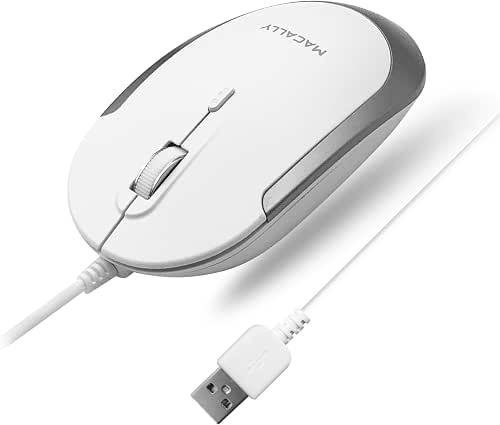
| Best Compact Wired Option | Connectivity: Wired USB‑A | Compatibility: Mac & Windows PCs | Power Source: Corded (USB‑A, no battery) | CHECK LATEST PRICE | Read Our Analysis |
More Details on Our Top Picks
Logitech MX Anywhere 2S Bluetooth Compact Wireless Mouse
If you travel with a laptop or juggle a few machines at home, the Logitech MX Anywhere 2S is built to make your workflow smoother and more reliable. You’ll like that it links via Bluetooth only, so there’s no dongle to lose. You can switch control across three Macs or PCs using Logitech Flow, which helps when you move between devices. Darkfield tracking means the pointer works on glass and other surfaces, and 4,000 DPI keeps movements crisp. The compact shape fits your hand for long use. Fast charging gives a day’s power in three minutes and up to 70 days per full charge.
- Connectivity:Bluetooth
- Compatibility:Mac & Windows computers/laptops
- Power Source:Rechargeable battery (micro‑USB charging)
- Noise Level:Standard clicks (noted normal; has click‑to‑click mode)
- DPI / Tracking:Darkfield tracking; up to 4,000 DPI
- Form Factor / Design:Compact, mobile design (ergonomic for travel)
- Additional Feature:Logitech Flow multi-computer control
- Additional Feature:Works on glass surfaces
- Additional Feature:Fast-charge micro-USB
Wireless Rose Gold USB/USB-C Mouse for Mac & PC
You’ll love this Wireless Rose Gold USB/USB-C Mouse if you want a stylish, fuss-free companion for both your Mac and PC workstations. You’ll plug the tiny USB receiver into any laptop or desktop and enjoy reliable 2.4 GHz wireless up to 10 m without pairing hassles. The rechargeable 450 mAh battery runs up to 500 hours and sleeps when idle, so you don’t worry about sudden power loss. Switch DPI between 800, 1200, and 1600 for precise control. The soft, anti-fingerprint body fits your hand, the rubber scroll wheel grips, and the quiet clicks keep shared spaces calm.
- Connectivity:2.4 GHz USB receiver
- Compatibility:Mac & Windows (plus Chromebook/PC brands)
- Power Source:Built‑in rechargeable battery (USB charging)
- Noise Level:Quiet/silent click design
- DPI / Tracking:Adjustable DPI 800 / 1200 / 1600 (max 1600)
- Form Factor / Design:Classic skin‑friendly ergonomic shape (rose gold)
- Additional Feature:2.4 GHz USB receiver
- Additional Feature:Quiet/silent clicks
- Additional Feature:Anti-fingerprint finish
Rose Gold Bluetooth Wireless Rechargeable Silent Mouse
The Rose Gold Bluetooth Wireless Rechargeable Silent Mouse is perfect for anyone who wants a stylish yet quiet companion for daily Mac and PC use, especially commuters and creative professionals who value portability and low noise. You’ll pair it via Bluetooth by holding the connect button three seconds until the blue light flashes, then select it in Mac Bluetooth. If a PIN appears, click OK instead of typing numbers. It charges in two to four hours and runs three to four weeks with typical use. The mini slim shape fits your hand, offers silent clicks, auto sleep after eight minutes, and wakes on any button press.
- Connectivity:Bluetooth
- Compatibility:Mac, Windows, Linux, Android
- Power Source:Built‑in rechargeable Li‑polymer battery
- Noise Level:Silent/soft click buttons
- DPI / Tracking:Laser/optical tracking (no numeric DPI specified)
- Form Factor / Design:Mini, slim profile with curved grip
- Additional Feature:Quick Bluetooth pairing button
- Additional Feature:Auto energy‑saving sleep
- Additional Feature:Mac PIN workaround
Macally Wired USB-C Mouse for Mac and PC
Looking for a simple, no-fuss mouse that just works with your MacBook or iMac and keeps noise to a minimum? You’ll like the Macally Wired USB-C Mouse for Mac and PC. It plugs into USB-C and works right away with MacBooks, iMacs, iPads, Linux and Windows machines. The slim white design feels light and neat on your desk. Silent buttons cut click noise by about 90 percent, so you won’t distract others. Use the three-button layout and scroll wheel, and switch DPI between 800, 1200, 1600 and 2400 for smooth cursor control. It’s corded and reliable.
- Connectivity:Wired USB‑C
- Compatibility:Mac, Windows, Linux (USB‑C devices)
- Power Source:Corded (bus‑powered via USB‑C)
- Noise Level:Silent buttons (reduces ~90% click noise)
- DPI / Tracking:4 DPI modes – 800 / 1200 / 1600 / 2400
- Form Factor / Design:Slim, low‑profile wired design (white)
- Additional Feature:USB‑C plug‑and‑play
- Additional Feature:Very slim profile
- Additional Feature:Model/ASIN identifiers included
Macally Silent Slim USB Wired Mouse (White)
If you want a quiet, compact mouse that fits small desks and shared spaces, the Macally Silent Slim USB Wired Mouse (White) makes a solid choice. You’ll enjoy clicks that are 90% quieter, so you won’t distract coworkers or family. It’s slim and ambidextrous, so it sits neat on tight desks and feels natural left or right. The optical sensor tracks reliably, and a DPI button shifts between 800, 1200, 1600, and 2400 for precise work or faster movement. Plug-and-play via a 5 ft USB-A cable means no drivers, no batteries, and stable, low latency use across Macs and PCs.
- Connectivity:Wired USB‑A
- Compatibility:Mac & Windows PCs
- Power Source:Corded (USB‑A, no battery)
- Noise Level:Silent/quiet operation (noise reduced ~90%)
- DPI / Tracking:DPI adjustable – 800 / 1200 / 1600 / 2400
- Form Factor / Design:Slim, compact ambidextrous shape (white)
- Additional Feature:5 ft USB‑A cable
- Additional Feature:Ambidextrous shape
- Additional Feature:Dedicated DPI button
Factors to Consider When Choosing Mac Computer Mice
When you pick a mouse for your Mac, think first about compatibility with macOS versions so features and gestures work smoothly. Then weigh wired versus wireless, ergonomics and comfort, and battery life and charging, since those choices shape your daily comfort and workflow. Also pay attention to tracking accuracy and DPI because precise cursor control ties all the other factors together.
Compatibility With macOS Versions
Because macOS changes how accessories talk to your Mac, you should check compatibility before you buy a mouse so you won’t lose features or run into installation trouble. Look at the product description for macOS version support. Many mice need macOS 10.12 or newer or specific Bluetooth protocol support to enable advanced features. Also check Bluetooth profiles and HID standards since older macOS builds may not work with Bluetooth LE only devices without an adapter. Verify driver and software needs because recent macOS often blocks unsigned drivers and can stop customization apps. Confirm the configuration app lists Big Sur, Monterey, Ventura, and later. Finally, if you have Apple Silicon versus Intel, make sure the mouse software is compiled or notarized for ARM or universal use to avoid install problems.
Wired Versus Wireless
Although you might love a tidy desk and the freedom to move, you still want a mouse that feels reliable and responsive, so picking wired or wireless matters more than you’d think. You’ll pick wired when you need steady, low-latency input that never dies. That matters for precise work and long sessions. You’ll pick wireless when you want portability and a cleaner setup. Rechargeable models can run weeks to months, while disposables depend on use. Bluetooth frees a USB port but can take pairing and may show slightly higher latency. 2.4 GHz with a USB receiver usually feels snappier and steadier, though it uses a port and can face interference. Think about your workflow, battery habits, and available ports to choose what fits you.
Ergonomics And Comfort
If you want your hands to stay comfortable through long workdays, start by matching the mouse shape to how you naturally hold it. Choose palm, claw, or fingertip fit so your wrist and forearm avoid extra strain. Then pick a size and contoured profile that lets your hand rest without splaying fingers or curling the wrist, which helps prevent tendon stress. Also look for tactile features like thumb rests, textured grips, and well placed buttons to cut down on forceful gripping and reaching. Think about weight and balance too. Lighter mice reduce fatigue during long pointer movement, while adjustable weight improves control. Finally check click and scroll resistance. Low actuation force and smooth scrolling lower cumulative finger strain and feel nicer.
Battery Life And Charging
You’ll often overlook battery life until it becomes a problem, so start by thinking about how you use your Mac during a typical day. Check battery type and capacity, since higher mAh for rechargeable models usually gives longer runtime, while AA or AAA replaceables offer quick swaps. Look at claimed runtime and standby times so you know if a mouse lasts hours, days, or weeks between charges. Also consider fast charge and the connector type like USB‑C or micro‑USB because a few minutes of charging can restore hours of use and make cable sharing easy. Finally, weigh power saving features such as auto sleep, auto off, and adjustable polling rates, and decide if rechargeable convenience or replaceable backups suit your need for uninterrupted use.
Tracking Accuracy And DPI
Now that you’ve thought about how long a mouse will run between charges, it helps to look at how well it actually moves the cursor. You want DPI to match tasks. DPI means how far the pointer travels per inch of movement. Lower DPI like 800 to 1200 gives steady control for editing and detailed work. Midrange around 800 to 1600 often feels most natural for productivity. Higher DPI above 1600 helps if you use multiple monitors or need fast pointer travel. Sensor type matters too. Optical sensors work well on most surfaces. Advanced tracking can follow on glass and glossy desks. Check for low lift off distance and minimal acceleration so the cursor tracks your hand linearly. Adjustable DPI buttons or profiles let you switch quickly between tasks.




