

You’ll want a scroll wheel mouse that fits your hands, your workflow, and your patience for scrolling. These five picks mix smooth metal wheels for flipping long documents, crisp notched rollers for precise edits, and side-scroll or free-spin modes for timeline work. They come in ergonomic vertical and handshake shapes to ease wrist strain, offer Bluetooth plus 2.4 GHz or wired options for multi-device use, and use durable encoders and textured wheels so they last. Keep this list in mind as you compare comfort, connectivity, battery life, and wheel feel-then pick the one that feels right for your daily tasks and pauses.
| Acer Wireless Ergonomic Rechargeable Bluetooth Mouse |
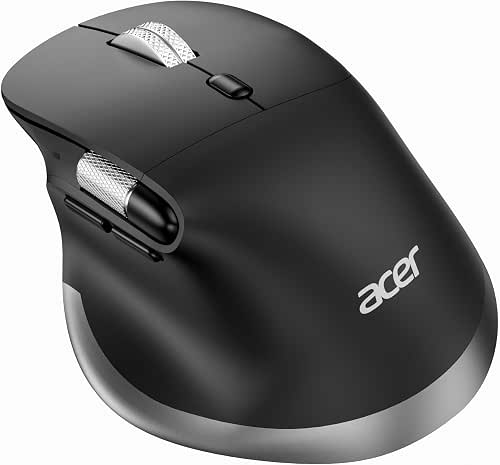
| Best for Multitaskers | Connectivity: Bluetooth 5.2 + 2.4 GHz wireless (dual-mode) | Scroll Wheel Present: Vertical scroll wheel + side (thumb) horizontal scroll wheel | Ergonomic Design: Ergonomic handshake posture, medium–large hands | CHECK LATEST PRICE | Read Our Analysis |
| Logitech M705 Marathon Wireless Mouse (Black) |
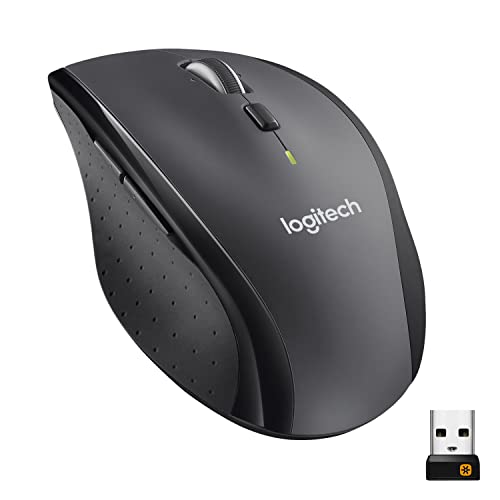
| Longest Battery Life | Connectivity: 2.4 GHz wireless (Logitech Unifying receiver) | Scroll Wheel Present: Metal hyper-fast scroll wheel | Ergonomic Design: Sculpted right-hand ergonomic shape | CHECK LATEST PRICE | Read Our Analysis |
| HP X3000 G2 Wireless Ambidextrous Mouse (Black) |

| Best Ambidextrous Option | Connectivity: 2.4 GHz wireless (USB-A receiver) | Scroll Wheel Present: Integrated scroll wheel (3-button design) | Ergonomic Design: Contoured ambidextrous shape (both-hand use) | CHECK LATEST PRICE | Read Our Analysis |
| Acer Ergonomic Wireless Bluetooth & 2.4GHz Vertical Mouse |

| Best for Ergonomics | Connectivity: Bluetooth 5.2 + 2.4 GHz wireless (dual-mode) | Scroll Wheel Present: 3-in-1 side scroll wheel with central button (horizontal/zoom/window toggle) | Ergonomic Design: 59° vertical tilt handshake posture, small–medium hands | CHECK LATEST PRICE | Read Our Analysis |
| Amazon Basics 3-Button USB Wired Mouse 1000 DPI |
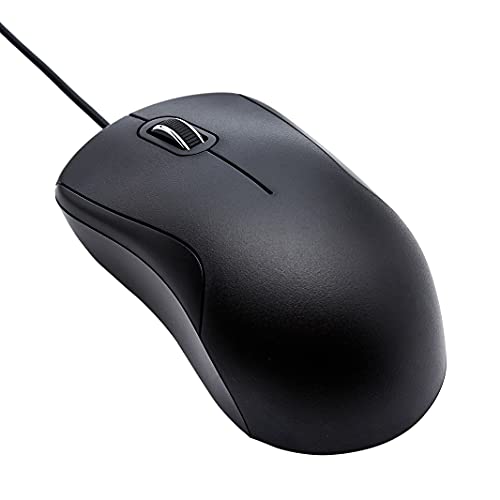
| Budget Wired Pick | Connectivity: Wired USB-A | Scroll Wheel Present: Precision scroll wheel (middle button) | Ergonomic Design: Full-size standard ergonomic shape | CHECK LATEST PRICE | Read Our Analysis |
More Details on Our Top Picks
Acer Wireless Ergonomic Rechargeable Bluetooth Mouse
If you spend long hours editing videos, juggling spreadsheets, or switching between three devices, the Acer Wireless Ergonomic Rechargeable Bluetooth Mouse is built to make your work easier and kinder to your wrist. You’ll notice the handshake shape keeps your wrist neutral, so pressure and pain drop during long sessions. Switch between 2.4G and two Bluetooth devices with one button, and store the USB receiver inside the mouse for safekeeping. The side scroll wheel moves left and right for timelines and wide sheets, while eight buttons speed navigation. Recharge via USB-C and trust the 500 mAh battery for long use.
- Connectivity:Bluetooth 5.2 + 2.4 GHz wireless (dual-mode)
- Scroll Wheel Present:Vertical scroll wheel + side (thumb) horizontal scroll wheel
- Ergonomic Design:Ergonomic handshake posture, medium–large hands
- DPI / Sensitivity:6-level DPI: 800 / 1200 / 1600 / 2400 / 3200 / 4800
- Buttons:8 buttons (includes forward/back and side-scroll controls)
- Power Type:Built-in rechargeable battery (500 mAh), USB-C charging
- Additional Feature:USB-C rechargeable battery
- Additional Feature:Built-in receiver storage
- Additional Feature:Side horizontal scroll
Logitech M705 Marathon Wireless Mouse (Black)
You’ll love the M705 if long battery life and comfortable daily use matter most to you, because it delivers up to three years on a single set of batteries and a sculpted righthand shape that fits your hand for long work sessions. You’ll also enjoy its tiny 2.4 GHz Unifying USB-A receiver that stays in your laptop, so you don’t fumble or lose it, and you can pair other Logitech devices. Laser-grade tracking handles shiny or wood surfaces with ease, and the nearly frictionless metal scroll wheel makes flipping through long documents fast. Five programmable buttons, including two thumb keys, keep shortcuts within reach.
- Connectivity:2.4 GHz wireless (Logitech Unifying receiver)
- Scroll Wheel Present:Metal hyper-fast scroll wheel
- Ergonomic Design:Sculpted right-hand ergonomic shape
- DPI / Sensitivity:(Not specified exact DPI) Laser-grade tracking for precise cursor control
- Buttons:5 programmable buttons (including two thumb buttons)
- Power Type:Replaceable batteries – up to 3 years (low-power)
- Additional Feature:Up to 3-year battery
- Additional Feature:Logitech Unifying receiver
- Additional Feature:Hyper-fast metal scroll
HP X3000 G2 Wireless Ambidextrous Mouse (Black)
Choose the HP X3000 G2 when you want a simple, reliable mouse that feels comfortable in either hand and lasts for months without a fuss. You’ll notice its contoured ambidextrous shape fits naturally, so you can switch hands without awkwardness. It has three buttons plus an integrated scroll wheel for easy navigation. The blue LED sensor tracks smoothly on most surfaces and the 1600 DPI delivers steady, accurate control you can trust. It connects via a 2.4 GHz USB-A receiver and works up to 30 feet. It runs on one AA battery and can last up to 15 months, which feels freeing.
- Connectivity:2.4 GHz wireless (USB-A receiver)
- Scroll Wheel Present:Integrated scroll wheel (3-button design)
- Ergonomic Design:Contoured ambidextrous shape (both-hand use)
- DPI / Sensitivity:1600 DPI optical sensor
- Buttons:3 buttons (left, right, middle/wheel)
- Power Type:Single AA battery (up to 15 months)
- Additional Feature:Ambidextrous contoured shape
- Additional Feature:Operates up to 30 ft
- Additional Feature:Single AA long-life battery
Acer Ergonomic Wireless Bluetooth & 2.4GHz Vertical Mouse
For people who spend long hours at a desk and want less wrist pain, the Acer Ergonomic Wireless Bluetooth and 2.4 GHz Vertical Mouse offers a clear comfort-first choice because its 59° vertical tilt puts your hand in a natural handshake position to ease strain. You’ll notice neutral wrist alignment and less pressure during long sessions. It connects via Bluetooth 5.2 or the tucked 2.4 GHz USB receiver, and you can switch among three devices by double-clicking the DPI button. The 3-in-1 side scroll wheel and forward/back buttons speed up work. Choose among four DPI levels, and power it with AAA batteries.
- Connectivity:Bluetooth 5.2 + 2.4 GHz wireless (dual-mode)
- Scroll Wheel Present:3-in-1 side scroll wheel with central button (horizontal/zoom/window toggle)
- Ergonomic Design:59° vertical tilt handshake posture, small–medium hands
- DPI / Sensitivity:4-level DPI: 1200 / 2400 / 3200 / 4000
- Buttons:Forward/back plus multi-function side scroll controls (multiple buttons)
- Power Type:AAA batteries (not included), not rechargeable
- Additional Feature:59° vertical tilt
- Additional Feature:3-in-1 side scroll
- Additional Feature:Receiver stored in battery compartment
Amazon Basics 3-Button USB Wired Mouse 1000 DPI
If you want a simple, reliable mouse that just works for everyday tasks, the Amazon Basics 3-Button USB Wired Mouse is a solid pick for students, office workers, and anyone who prefers fuss-free gear. You’ll get a full-size black mouse that fits your hand comfortably. It has three buttons and a precision scroll wheel, so you can click, scroll, and middle-click with ease. The 1000 DPI optical sensor gives you steady control for web browsing, document work, and light editing. Plug the USB-A cable into your computer and it works right away. If your laptop only has USB-C, use a small adapter.
- Connectivity:Wired USB-A
- Scroll Wheel Present:Precision scroll wheel (middle button)
- Ergonomic Design:Full-size standard ergonomic shape
- DPI / Sensitivity:1000 DPI optical sensor
- Buttons:3 buttons (left, right, middle/wheel)
- Power Type:Powered via USB cable (bus-powered)
- Additional Feature:6-foot attached cable
- Additional Feature:Full-size compact dimensions
- Additional Feature:Plug-and-play USB-A
Factors to Consider When Choosing Scroll Wheel Computer Mice
When you pick a scroll wheel mouse, think about the wheel type and how smooth the scrolling feels because those affect comfort and control. You’ll want programmable scroll functions and horizontal scrolling support if you work with spreadsheets or creative apps, and you’ll appreciate a durable build that lasts through daily use. Keep these factors in mind together so you can match features to your workflow and avoid regrets later.
Scroll Wheel Types
Pick the scroll wheel that fits how you work, because the right wheel changes your everyday computer comfort. You’ll choose between mechanical ratchet wheels, free-spin types, side thumb wheels, and newer optical or magnetic systems. Mechanical ratchet wheels give clear click-by-click movement and often switch to free-spin for fast pages. Free-spin wheels let you zip through long documents with low friction. Thumb or horizontal wheels add left and right panning, which helps with spreadsheets and timelines without holding keys. Optical and magnetic wheels feel silent, resist wear, and often let you program resistance. Also check detents and clicks per revolution. Finer detents give small, precise jumps. Coarser detents make each scroll more deliberate. Match type to tasks and comfort.
Scroll Smoothness Level
Because your scroll wheel is where your hand meets the screen, smoothness matters more than you might think, and you’ll notice the difference in comfort and speed every day. You want a wheel with a reliable mechanism, like ball-bearing designs that spin quietly and reduce jitter. You’ll also decide between stepped detents for controlled, precise moves and free-spin modes when you need fast, continuous scrolling. Pay attention to materials and finish since rubberized surfaces give better grip and cut finger slip, improving perceived smoothness. Check encoder and sensor quality because poor parts cause skipping or uneven steps. Finally, think long term: sealed bearings and sturdy housings resist debris and keep the feel consistent over months and years.
Programmable Scroll Functions
Think about your scroll wheel as a tiny command center you use all the time, and make sure it can be reshaped to match how you work and play. You’ll want a wheel that lets you program vertical scrolling, horizontal tilt, and the middle click independently so each action does what you need. Check how many profiles or layers you can store so you can switch between browsing, editing, and gaming setups. See if free spin and notched modes are switchable in software and bindable to commands like smooth scroll, page jumps, or macro playback. Look for granular controls: speed, acceleration, lines per notch, and debounce timing. Also confirm modifier combos and scroll-tied macro recording for complex tasks like timeline scrubbing.
Horizontal Scrolling Support
Horizontal scrolling makes wide work feel natural, so look closely at how a mouse delivers left and right movement and whether it fits your daily tasks. You’ll find three common methods: a dedicated side scroll wheel, a tilting main wheel that registers lateral input, or assigning horizontal pan to extra side buttons. Check whether the mouse offers true hardware support or uses software emulation, because hardware feels smoother and reacts faster. Also see if the control is programmable and supports modes like continuous pan, stepped moves, or modifier-assisted actions to match spreadsheets, timelines, or documents. Pay attention to encoder resolution and latency for fine edits. Finally confirm OS and app compatibility since some systems need drivers or mapping tools to make horizontal scrolling work.
Durability And Build
When you pick a mouse, imagine it surviving years of daily use without a wobbling wheel or sudden dead spots, and you’ll know why durability matters so much. You should check the scroll wheel mechanism type and aim for switches rated at least 5 to 10 million actuations so the click feel stays steady. Also inspect wheel material and finish; metal or high grade polymer with textured rubber grips holds up and keeps control precise. Look for sealed or dust resistant housings and optical encoders rather than exposed contacts to cut failure from dirt. Consider chassis construction around the wheel, reinforced mounts, and a stable shaft to stop wobble. Finally review warranty length and user replaceable modules as signs of real longevity.




