

You want a tilt TV mount that feels secure, installs without drama, and fits your screen and space, and I’ve picked five that do just that. Each model here supports extra weight beyond your TV, matches a wide range of VESA patterns, and uses tested hardware so you won’t worry about sag or safety. I’ll walk you through options from compact tilt-and-swivel designs to heavy-duty full-motion arms, note installation tips for studs and masonry, point out quick-release latches and tool-free tilt, and highlight which mounts suit curved screens and big rooms, so you can pick the right one and move on to enjoying your setup.
| Mount-It! Tilt & Swivel Small TV Wall Mount |

| Space-Saving Pick | Supported TV Size: 19–32″ | Weight Capacity: Up to 44 lb | VESA Compatibility: 75 x 75 mm, 100 x 100 mm | CHECK LATEST PRICE | Read Our Analysis |
| USX STAR Tilt TV Wall Mount for 37–82″ TVs |

| Heavy-Duty Value | Supported TV Size: 37–82″ | Weight Capacity: Up to 132 lb | VESA Compatibility: Up to 600 x 400 mm | CHECK LATEST PRICE | Read Our Analysis |
| Mounting Dream Full-Motion TV Wall Mount (26–55″) |
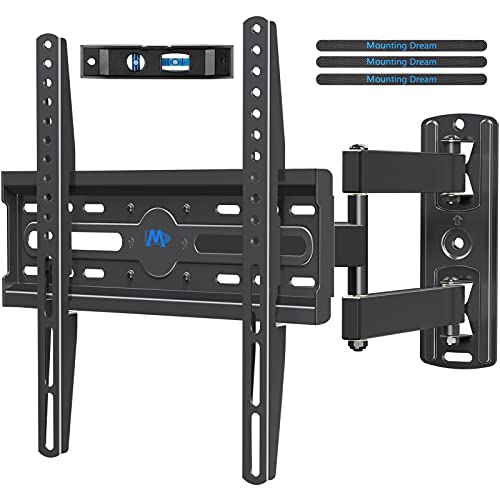
| Best Versatility | Supported TV Size: 26–55″ | Weight Capacity: Up to 60 lb | VESA Compatibility: Up to 400 x 400 mm | CHECK LATEST PRICE | Read Our Analysis |
| Perlegear Full Motion TV Wall Mount (26–74″) |

| Premium Full-Motion | Supported TV Size: 26–74″ | Weight Capacity: Up to 99 lb | VESA Compatibility: 100 x 100 mm to 400 x 400 mm | CHECK LATEST PRICE | Read Our Analysis |
| Perlegear Tilting TV Wall Mount for 42–90″ TVs |

| Best for Large TVs | Supported TV Size: 42–90″ | Weight Capacity: Up to 132 lb | VESA Compatibility: 200 x 100 mm to 600 x 400 mm | CHECK LATEST PRICE | Read Our Analysis |
More Details on Our Top Picks
Mount-It! Tilt & Swivel Small TV Wall Mount
If you want a compact, reliable mount for a small TV in a tight space, the Mount-It! Tilt & Swivel Small TV Wall Mount offers practical, confidence-building features. You’ll fit 19 to 32 inch screens and trust up to 44 pounds on VESA 75×75 or 100×100 patterns. You’ll appreciate the 2.4 inch low profile that keeps your room tidy. You can tilt down 12 degrees to cut glare and swivel 30 degrees each way for better sightlines. Installation uses one stud or solid concrete, and the steel build, included hardware, US support, and lifetime warranty keep you covered.
- Supported TV Size:19–32″
- Weight Capacity:Up to 44 lb
- VESA Compatibility:75 x 75 mm, 100 x 100 mm
- Mount Type / Motion:Tilt & swivel
- Installation Surface / Stud Compatibility:Single wood stud or concrete (not drywall-only)
- Included Hardware & Support:All hardware, tools, step-by-step instructions; US-based support; lifetime warranty
- Additional Feature:Low-profile 2.4″ design
- Additional Feature:Single-stud installation
- Additional Feature:Lifetime warranty
USX STAR Tilt TV Wall Mount for 37–82″ TVs
You’ll appreciate the USX STAR Tilt TV Wall Mount if you want a sturdy, low-profile solution that makes your big screen feel secure and polished. You’ll like that it holds up to 132 lbs and is UL certified, so your TV sits firm without wobble. It fits 37 to 82 inch flat and curved TVs and supports VESA up to 600 x 400 mm. The mount hugs the wall at about 1.3 inches and tilts 9 degrees to cut glare. It works with 8, 16, and 24 inch studs and the bracket slides to center your set. Hardware and clear instructions are included.
- Supported TV Size:37–82″
- Weight Capacity:Up to 132 lb
- VESA Compatibility:Up to 600 x 400 mm
- Mount Type / Motion:Tilt (low-profile)
- Installation Surface / Stud Compatibility:Fits 8″, 16″, 24″ stud spacing (wall studs)
- Included Hardware & Support:Hardware and instructions included; no paper template; 10-year support
- Additional Feature:UL certified safety
- Additional Feature:Slides to center
- Additional Feature:1.3″ ultra-low profile
Mounting Dream Full-Motion TV Wall Mount (26–55″)
Choose the Mounting Dream Full-Motion TV Wall Mount when you want strong, flexible support for a 26 to 55 inch TV that makes daily viewing easy and worry free. You’ll get full-motion tilt, swivel, and extension so glare fades and everyone gets a clear view. It holds up to 60 lbs and fits VESA up to 400 x 400 mm, retracting to 3.1″ and extending to 17.1″. Installation is straightforward with labeled hardware, a bubble level, and ties, though you must mount to studs or use concrete anchors. The welds are solid, customer service is US based, and authenticity is verified.
- Supported TV Size:26–55″
- Weight Capacity:Up to 60 lb
- VESA Compatibility:Up to 400 x 400 mm
- Mount Type / Motion:Full-motion (tilt, swivel, extend)
- Installation Surface / Stud Compatibility:Not for drywall-only; concrete anchors available
- Included Hardware & Support:Pre-labeled hardware, bubble level, cable ties, instructions; US-based support; Amazon Transparency
- Additional Feature:Extends to 17.1″
- Additional Feature:Post-install leveling ±3°
- Additional Feature:Amazon Transparency protected
Perlegear Full Motion TV Wall Mount (26–74″)
For anyone who wants a sturdy, flexible mount that makes their living room feel polished and easy to use, the Perlegear Full Motion TV Wall Mount is a great pick. You’ll fit most flat or curved 26″ to 74″ TVs and support up to 99 lbs with VESA from 100×100 to 400×400. Installation is friendly: preassembled arms, labeled hardware, a drilling template, and anchors let you finish in under 15 minutes. You can tilt 5° up and 15° down, swivel ±45°, and extend 17.3″ or retract to 3″. Its automotive-grade steel, safety locks, and rigorous testing give real peace of mind.
- Supported TV Size:26–74″
- Weight Capacity:Up to 99 lb
- VESA Compatibility:100 x 100 mm to 400 x 400 mm
- Mount Type / Motion:Full-motion (articulating)
- Installation Surface / Stud Compatibility:12″ or 16″ studs, concrete, brick (optional up to 24″)
- Included Hardware & Support:Pre-divided hardware, drilling template, wall anchors, bubble level; US-based support; security features
- Additional Feature:Three height settings
- Additional Feature:Passed 60,000 cycles
- Additional Feature:Security locks included
Perlegear Tilting TV Wall Mount for 42–90″ TVs
If you want a sturdy tilting mount that fits big screens and gives you simple adjustability, the Perlegear Tilting TV Wall Mount for 42–90″ TVs is a strong choice. You’ll fit most flat or curved TVs and VESA patterns from 200 x 100 mm to 600 x 400 mm. It holds up to 132 lbs on reinforced cold-rolled steel that passed heavy load and cycle tests. You can tilt +5° and -15° with an Allen wrench and lock it in place, then fine-tune level ±4°. The low 2.2″ profile saves space, quick-release latches add security, and the kit and US support ease installation.
- Supported TV Size:42–90″
- Weight Capacity:Up to 132 lb
- VESA Compatibility:200 x 100 mm to 600 x 400 mm
- Mount Type / Motion:Tilting
- Installation Surface / Stud Compatibility:8″/12″/16″/24″ studs, concrete, brick (not drywall-only)
- Included Hardware & Support:Hardware kit, drilling template, bubble level, socket/Allen wrench; US-based support
- Additional Feature:2.2″ low profile
- Additional Feature:Quick-release security latches
- Additional Feature:Tilt lock with Allen wrench
Factors to Consider When Choosing Tilt TV Mounts
When you pick a tilt TV mount, start by matching the mount to your TV size, weight, and VESA pattern so it fits securely. You’ll also want to check your wall type and studs and think about how much tilt range you need for glare and viewing height. If installation feels intimidating, plan for professional help or an easier-to-install model to avoid damage and stress.
TV Size & Weight
Since your TV’s size and weight determine almost everything about the mount you need, start by getting exact numbers for both and then double-checking them against the mount specs. Measure the diagonal screen size and match it to the mount’s compatible range so the TV sits balanced and looks right. Weigh the set and pick a tilt mount rated at least 20% above that number for safety and peace of mind. Add any accessory weight from soundbars, adapters, or heavy cables into your total. For bigger screens, choose mounts with higher capacity, wider wall plates, and options to secure into multiple studs or reinforced anchors to spread the load. Compare specs carefully, and don’t skimp on a stronger mount when in doubt.
VESA Pattern Compatibility
Because the pattern of holes on the back of your TV tells you exactly what mount will fit, you’ll want to check VESA measurements before you buy anything. VESA patterns are standardized in millimeters like 75×75, 100×100, 200×200, up to 600×400. First, read your TV manual or the manufacturer label to find its VESA spec. Then compare that to the mount’s supported VESA range so the bolt spacing lines up. Smaller sets usually use 75×75 or 100×100, while bigger screens need 200×200, 400×200, or larger. If your spacing sits between sizes, use an adapter plate or universal bracket rated for the TV weight and bolt spacing. Also confirm the mount’s weight capacity at that VESA size so the TV stays safe.
Wall Type & Studs
You’ve picked the right mount size and checked the VESA pattern, so now look at the wall and studs to make sure the TV will stay put. First, find vertical studs in drywall. They’re usually 16 or 24 inches apart. Anchor into the stud center. Drywall alone won’t hold the weight unless you add solid backing. If studs sit wider than your mount plate, choose a mount rated for wider spacing or install a plywood backer secured to multiple studs. Check stud material and condition. Solid wood differs from engineered lumber. Rot, splits, or thin studs need reinforcement or a new location. For concrete or brick, use proper masonry anchors and drill bits. Single stud installs must match the stud’s rated capacity or use dual-stud support.
Tilt Range Needed
When you pick a tilt mount, think about where the TV will sit and how people will watch it, because the wrong angle makes even a great picture feel wrong. You’ll usually see tilt ranges from about +5° up to -15° or -20° down. A small 5° to 10° downward tilt works well when viewers sit at eye level. If you mount above seating, aim for at least 12° to 15° downward tilt so everyone sees comfortably and glare drops. Also decide how often you’ll change the angle. Tool-free or Allen-wrench adjustments suit frequent tweaks, while a fixed tilt is fine if you set it once. Finally, always check the tilt range with your TV’s weight and VESA pattern so the mount safely supports the screen.
Installation Difficulty
After you pick the right tilt range, think about how hard the mount will be to install so the whole job doesn’t turn into a weekend headache. You’ll want to know if the bracket needs a single stud, dual studs, or multiple studs because single-stud setups are quicker but may not hold large TVs. Next, confirm your wall type wood stud, concrete, or brick and whether you need anchors or concrete bolts since drywall alone won’t cut it. Measure stud spacing and your TV’s VESA pattern first to avoid awkward adjustments. Check required tools drill size, socket or Allen wrench, level and toggle anchors and see if the mount includes a template and clear instructions. Plan for cable routing, obstructions, and final leveling which add time.
Build Quality & Warranty
Because your TV sits on that mount every day, choose a bracket that’s built like it was meant to last. Pick heavy gauge steel with robot or precision welding and reinforced brackets so the structure stays solid. Look for corrosion resistant finishes that keep parts strong over time. Check rated load capacity and safety tests that beat your TV weight by 20 to 30 percent so you never worry.
Also confirm VESA compatibility and hardware rated for your wall type, including bolts, spacers, and anchors to stop slipping. Prefer mounts with post installation leveling and secure locking mechanisms, like anti drop or reliable quick release latches. Finally, choose a model with clear warranty terms and reachable manufacturer support plus documented durability testing or certification.


