

Like finding a trusted compass in uncharted water, you’ll want a laser printer that guides heavy workloads without fail. You’ll look for speed, security, and low running costs-plus the flexibility to grow with your team. This list highlights five Kyocera models that balance those needs, from high-volume office workhorses to compact network-ready options, and one choice that surprises for its value. Keep going to see which fits your setup.
| KYOCERA ECOSYS MA6000ifx Monochrome All-in-One Laser Printer |
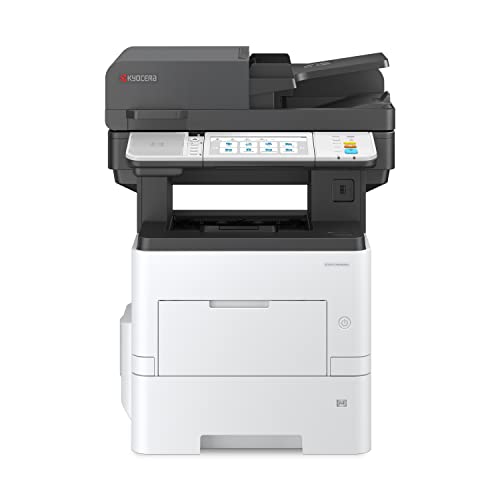
| High-Volume All-in-One | Color Mode: Monochrome | Functions: Print / Copy / Scan / Fax (All-in-One) | Max Resolution: Up to 1200 x 1200 dpi (fine) | CHECK LATEST PRICE | Read Our Analysis |
| HP LaserJet Pro MFP 3101sdw Wireless All-in-One Printer |

| Small-Team Reliable | Color Mode: Monochrome (black-and-white) | Functions: Print / Copy / Scan / Fax (All-in-One) | Max Resolution: Professional-quality B/W (implied high; specifics not listed) – supports sharp output (HP cartridges) | CHECK LATEST PRICE | Read Our Analysis |
| Kyocera ECOSYS P2040dw Monochrome Network Laser Printer |

| Compact Workhorse | Color Mode: Monochrome | Functions: Print | Max Resolution: 600 x 600 dpi (up to Fine 1200 dpi) | CHECK LATEST PRICE | Read Our Analysis |
| KYOCERA ECOSYS PA4500x Monochrome Laser Printer |

| Heavy-Duty Performer | Color Mode: Monochrome | Functions: Print | Max Resolution: 600 x 600 dpi (up to Fine 1200 dpi) | CHECK LATEST PRICE | Read Our Analysis |
| KYOCERA ECOSYS MA2600cwfx Color Laser All-in-One Printer |
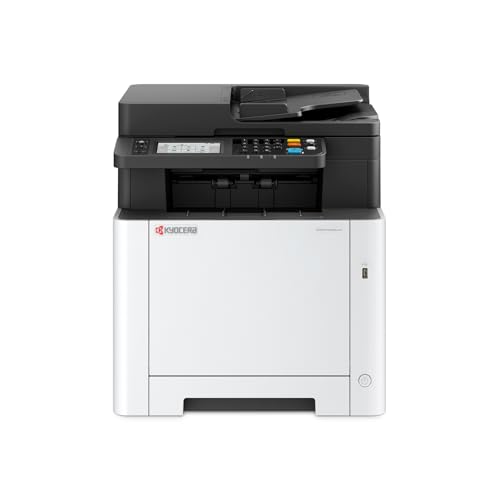
| Color Office Versatile | Color Mode: Color | Functions: Print / Copy / Scan / Fax (All-in-One) | Max Resolution: True 1200 x 1200 dpi | CHECK LATEST PRICE | Read Our Analysis |
More Details on Our Top Picks
KYOCERA ECOSYS MA6000ifx Monochrome All-in-One Laser Printer
If you need a high-volume, no-nonsense monochrome workhorse, the KYOCERA ECOSYS MA6000ifx is built for your office – it prints up to 62 ppm at a crisp 1200 x 1200 dpi, handles printing, copying, scanning and faxing, and offers Gigabit Ethernet and HyPAS capability so you can integrate and scale without fuss. You’ll manage jobs from a 7-inch color touchscreen, rely on 512 MB memory for steady throughput, and secure workflows with optional K-Level protections. Designed for heavy duty environments, it focuses on durability, straightforward network integration, and minimal downtime so you can keep teams productive.
- Color Mode:Monochrome
- Functions:Print / Copy / Scan / Fax (All-in-One)
- Max Resolution:Up to 1200 x 1200 dpi (fine)
- Connectivity:Gigabit Ethernet (network)
- Memory:512 MB
- Duplexing:(Not explicitly stated) – likely supports duplex (All-in-One business model)
- Additional Feature:7-inch color touchscreen
- Additional Feature:HyPAS application platform
- Additional Feature:Optional K-Level security
HP LaserJet Pro MFP 3101sdw Wireless All-in-One Printer
Choose the HP LaserJet Pro MFP 3101sdw when your small team needs fast, reliable black-and-white output with minimal fuss. You’ll get professional-quality documents at up to 35 ppm, plus quick scanning and copying through a 50-sheet ADF. The 250-sheet input tray and automatic duplex printing keep workflows moving without constant refills. Dependable Wi‑Fi selects the best connection to stay online, and HP’s firmware updates help maintain security and performance. Toner delivers sharp results, but the printer requires cartridges with HP chips or circuitry, blocking non‑HP alternatives-so factor that into operating costs and supply planning.
- Color Mode:Monochrome (black-and-white)
- Functions:Print / Copy / Scan / Fax (All-in-One)
- Max Resolution:Professional-quality B/W (implied high; specifics not listed) – supports sharp output (HP cartridges)
- Connectivity:Wi‑Fi (reliable wireless)
- Memory:(Not specified) – designed for small teams; memory unspecified
- Duplexing:Auto 2-sided (duplex) printing
- Additional Feature:50-sheet auto document feeder
- Additional Feature:250-sheet input tray
- Additional Feature:Periodic firmware updates
Kyocera ECOSYS P2040dw Monochrome Network Laser Printer
Small offices and workgroups that need fast, reliable black‑and‑white printing will find the Kyocera ECOSYS P2040dw a strong fit, thanks to its 42 ppm output, stackless duplexing, and up to 850‑sheet capacity. You’ll get crisp text at 600 x 600 dpi with optional Fine 1200 dpi, a 256 MB memory buffer, and support for media from statement to legal (5.5 x 8.5–8.5 x 14) weighing 60–163 gsm. Built‑in wireless, Wi‑Fi Direct, and mobile printing (AirPrint, Mopria, KYOCERA Mobile Print) simplify workflows. Fleet Services readiness, secure cloud monitoring, and a 2‑line LCD help you manage uptime and costs.
- Color Mode:Monochrome
- Functions:Print
- Max Resolution:600 x 600 dpi (up to Fine 1200 dpi)
- Connectivity:Wireless + Wi‑Fi Direct (network)
- Memory:256 MB
- Duplexing:Standard stackless duplex
- Additional Feature:Up to 850-sheet capacity
- Additional Feature:Wireless + Wi‑Fi Direct
- Additional Feature:KYOCERA Fleet Services ready
KYOCERA ECOSYS PA4500x Monochrome Laser Printer
The KYOCERA ECOSYS PA4500x is ideal for busy offices that need fast, reliable black-and-white output and a high monthly duty cycle-it’s built to handle up to 150,000 pages while delivering sharp 600 x 600 dpi prints (up to Fine 1200 dpi) at 47 ppm. You’ll get robust paper handling with a 600-sheet tray plus a 100-sheet multi-purpose tray and automatic duplexing for efficient workflows. A 5-line LCD with hard keys keeps operation simple, while 512 MB memory smooths large jobs. Gigabit Ethernet and USB provide secure connectivity. If you need dependable, high-volume monochrome printing, this model fits.
- Color Mode:Monochrome
- Functions:Print
- Max Resolution:600 x 600 dpi (up to Fine 1200 dpi)
- Connectivity:Gigabit Ethernet, USB
- Memory:512 MB
- Duplexing:Automatic duplex printing
- Additional Feature:150,000 pages monthly duty
- Additional Feature:100-sheet multi-purpose tray
- Additional Feature:5-line LCD hard keys
KYOCERA ECOSYS MA2600cwfx Color Laser All-in-One Printer
If you need a compact color laser that handles everything from duplex prints to scans and faxes without a fuss, the KYOCERA ECOSYS MA2600cwfx is a solid choice-its true 1200 x 1200 dpi output and up to 27 ppm speed make it well suited for small offices or workgroups that want crisp color and reliable performance. You’ll get print, copy, scan and fax in one unit, backed by 1 GB memory for smoother jobs. Setup is simple with Wi‑Fi Direct and easy mobile-device connection to your network. A 4.3-inch color touch screen keeps controls intuitive and fast.
- Color Mode:Color
- Functions:Print / Copy / Scan / Fax (All-in-One)
- Max Resolution:True 1200 x 1200 dpi
- Connectivity:Wi‑Fi Direct (wireless/mobile)
- Memory:1 GB
- Duplexing:(Not explicitly stated) – typical All-in-One features suggest duplex available
- Additional Feature:True 1200 x 1200 dpi
- Additional Feature:Wi‑Fi Direct setup
- Additional Feature:4.3-inch color touchscreen
Factors to Consider When Choosing Kyocera Laser Printers
When choosing a Kyocera laser printer, you’ll want to match print speed to your workload and set clear expectations for output quality. Decide if you need color or monochrome, check paper handling capacity for your typical jobs, and confirm the connectivity and mobile support you rely on. These factors will help you pick a model that fits both performance and workflow.
Print Speed Needs
Match a Kyocera’s pages-per-minute (ppm) rating to your daily print volume so you’re not stuck waiting during peak tasks. Pick a model whose ppm covers your busiest days; higher ppm trims wait times for large monochrome runs and helps when several users print concurrently. Check the monthly duty cycle and whether the rated speed holds up under sustained loads to prevent slowdowns during prolonged jobs. Remember that faster engines need stronger memory and network throughput to keep complex documents moving at rated speeds. Finally, balance speed with acquisition and operating costs-very high-speed devices boost workflow but can raise purchase price and energy use. Choose the lowest speed that meets peak demand reliably.
Output Quality Requirements
Because output quality shapes how your documents present and how professional materials read, start by defining the minimum resolution, color fidelity, and consistency you need so you can pick a Kyocera that delivers those results day after day. Decide if 600 x 600 dpi suffices for text or if 1200 x 1200 dpi is necessary for fine graphics. Match print speed to workload-higher ppm keeps queues short and prevents repeated passes that can harm quality. Assess toner technology and halftoning even for mono setups to preserve grayscale gradients and crisp line art. Verify monthly duty cycle and engine robustness to avoid premature fuser or drum wear. Finally, check memory and processor specs so high-resolution jobs aren’t downsampled or excessively spooled.
Color Versus Monochrome
Decide whether color is a must for your work or just a nice-to-have, because that choice shapes cost, speed, and maintenance. If you mostly print drafts, invoices, or reports, a monochrome Kyocera will save money with faster speeds, lower cost-per-page, simpler upkeep, and quicker first-page-out times. Color models deliver full-color output for charts and marketing materials, but they use four toners (CMYK), raising consumable complexity and replacement costs. They can also be slower for black-and-white throughput compared with monochrome units. If color is occasional, consider whether the extra purchase price and higher running costs justify the benefit. Match your printer to the proportion of color versus B/W jobs to optimize budget and efficiency.
Paper Handling Capacity
Often you’ll overlook paper handling until a printer’s trays can’t keep up with your workflow, so check capacity and flexibility early. You should total maximum paper capacity (all trays plus optional feeders) to match your monthly volume and avoid constant reloading. Confirm size range and max media dimensions-like legal 8.5″ x 14″-so envelopes, labels, and specialty sheets fit. Verify a multi-purpose tray exists and its capacity, letting you run mixed media and heavier stock without disturbing the main tray. Look for reliable automatic duplexing to cut paper use on high-volume documents. Finally, review supported media weights (gsm or lb) and the recommended duty cycle to make certain the paper path tolerates heavier stocks and continuous use.
Connectivity And Mobile Support
When evaluating Kyocera laser printers, prioritize modern connectivity and mobile support so your team can print quickly and securely from any device-look for Gigabit Ethernet for fast wired transfers, built-in Wi‑Fi and Wi‑Fi Direct for flexible wireless access, and compatibility with Apple AirPrint, Mopria, and cloud-print protocols for seamless mobile printing. Choose Gigabit Ethernet if you have heavy network traffic. Prefer Wi‑Fi Direct when users need peer‑to‑peer printing without a router. Verify AirPrint, Mopria and cloud-print support so smartphones and tablets print reliably. Check USB and optional direct‑print interfaces for simple local file transfers and offline jobs. Also confirm encrypted network protocols and secure authentication are present to safeguard data during wireless or remote print sessions without delving into centralized security management.
Security And Management
After confirming connectivity and mobile support, shift focus to security and management to keep print workflows safe and under control. You should pick models offering optional enhanced K-Level or equivalent multi-layer security to protect data at rest, in transit, and on the device. Assure support for secure network protocols like TLS and IPsec plus Gigabit Ethernet for encrypted, speedy connections. Verify memory capacity-512 MB–1 GB or higher-and active firmware update support so security features run smoothly and patches arrive promptly. Choose printers compatible with fleet management and cloud monitoring for remote policy enforcement, device auditing, and uptime optimization. Finally, confirm administrative controls: user authentication, secure print/release, and role-based access to restrict faxing, scanning, and configuration changes.
Total Cost Of Ownership
Because purchase price only tells part of the story, you should calculate total cost of ownership by adding the initial cost to expected consumable expenses (toner and developer), replacement parts and service over the printer’s useful life, and projected energy and productivity-related costs. Estimate toner yield and cost-per-page by dividing replacement toner price by its rated yield at standard coverage so you can compare ongoing expenses. Factor in periodic drum, fuser, and transfer unit replacements plus any onsite service or extended-warranty fees, spreading those costs across the device’s lifecycle. Include energy consumption-idle, sleep, and active wattage-to forecast electricity costs for high-volume use. Finally, account for productivity impacts: speed, uptime, reliability, and consumable change frequency affect labor and downtime expenses.




