

If you’re upgrading your home network in 2026, you’ll want a Tenda router that fits your speed, coverage, and security needs without wasting features. I’ll highlight five models that balance whole‑home mesh, gigabit wired ports, budget value, Wi‑Fi 6 improvements, and a Wi‑Fi 7 flagship – plus what matters when you pick one – so you can quickly spot the right fit for your setup.
| Tenda Nova AC1200 Mesh WiFi System (3-Pack) |

| Best for Whole-Home Coverage | Wi‑Fi Bands: Dual‑band (AC1200) | Security Protocols: WPA2‑PSK | Parental / Guest Controls: Guest network (isolated); app management | CHECK LATEST PRICE | Read Our Analysis |
| Tenda AC1200 Dual-Band Gigabit WiFi Router (AC10) |
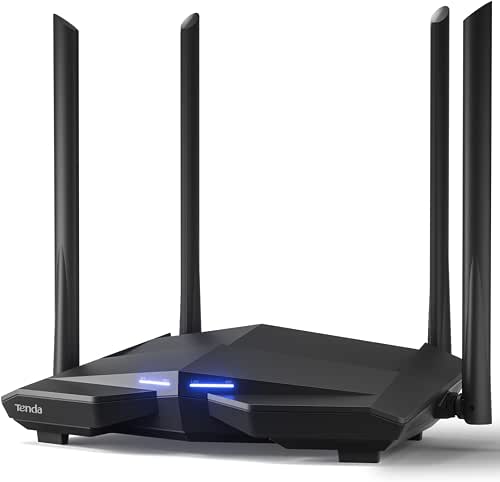
| Best Value Performance | Wi‑Fi Bands: Dual‑band (AC1200) | Security Protocols: WPA2‑PSK | Parental / Guest Controls: Guest WiFi; parental control | CHECK LATEST PRICE | Read Our Analysis |
| Tenda BE5100 Dual-Band WiFi 7 Router (RE6L Pro) |

| Performance Powerhouse | Wi‑Fi Bands: Dual‑band (WiFi 7) | Security Protocols: WPA3 (also firewall/DDoS protection) | Parental / Guest Controls: Parental controls (filtering, limits); guest not explicitly listed | CHECK LATEST PRICE | Read Our Analysis |
| Tenda AC1200 Dual-Band Smart WiFi Router (AC6) |

| Budget Home Router | Wi‑Fi Bands: Dual‑band (AC1200) | Security Protocols: WPA2‑PSK | Parental / Guest Controls: Parental controls; Guest WiFi | CHECK LATEST PRICE | Read Our Analysis |
| Tenda AX1500 WiFi 6 Dual-Band Gigabit Router |

| Best for Future-Proofing | Wi‑Fi Bands: Dual‑band (Wi‑Fi 6, AX1500) | Security Protocols: WPA3 | Parental / Guest Controls: Built‑in parental controls; guest network tools via app | CHECK LATEST PRICE | Read Our Analysis |
More Details on Our Top Picks
Tenda Nova AC1200 Mesh WiFi System (3-Pack)
If you need reliable whole‑home Wi‑Fi without fuss, the Tenda Nova AC1200 Mesh (3‑pack) is a smart pick: it covers up to 3,500 sq.ft., runs an AC1200 dual‑band mesh with MU‑MIMO and beamforming, and keeps devices on the strongest node so you get steady, low‑lag connections across the house. You’ll replace extenders and get one network name and password for seamless roaming. The system supports about 40 devices, offers WPA2‑PSK security and a guest network, and lets you add nodes in three steps via the Tenda app. Consider MW6 if your broadband tops 100 Mbps.
- Wi‑Fi Bands:Dual‑band (AC1200)
- Security Protocols:WPA2‑PSK
- Parental / Guest Controls:Guest network (isolated); app management
- App / Easy Setup:Tenda Wi‑Fi app for setup and management
- Multi‑device Support / MU‑MIMO:MU‑MIMO; supports up to 40 devices
- Wired Ports (Ethernet):(Mesh units include Ethernet – typical mesh LAN/WAN ports; 3‑pack coverage)
- Additional Feature:Whole‑home mesh coverage
- Additional Feature:Seamless single SSID roaming
- Additional Feature:Add nodes in three steps
Tenda AC1200 Dual-Band Gigabit WiFi Router (AC10)
The AC1200 (AC10) is a smart pick for small households or first-time router buyers who want reliable dual-band speeds and simple management without breaking the bank. You’ll get combined AC1200 throughput (867 Mbps on 5 GHz, 300 Mbps on 2.4 GHz) and a 1 GHz CPU that handles multiple devices. Four 6 dBi external antennas and beamforming extend coverage and stability through walls, while MU-MIMO boosts simultaneous performance. Four Gigabit Ethernet ports serve wired devices. Security includes WPA2, guest WiFi, IPv6, and parental controls. Setup and ongoing control are simple via web or the mobile smart app.
- Wi‑Fi Bands:Dual‑band (AC1200)
- Security Protocols:WPA2‑PSK
- Parental / Guest Controls:Guest WiFi; parental control
- App / Easy Setup:Web browser or mobile app setup; smart app management
- Multi‑device Support / MU‑MIMO:MU‑MIMO for simultaneous streams
- Wired Ports (Ethernet):Four Gigabit Ethernet ports
- Additional Feature:Four high‑gain antennas
- Additional Feature:1 GHz CPU
- Additional Feature:Four Gigabit LAN ports
Tenda BE5100 Dual-Band WiFi 7 Router (RE6L Pro)
Power users who need blistering wired and wireless performance will find the Tenda BE5100 (RE6L Pro) hard to beat, thanks to Wi‑Fi 7 speeds up to a combined 5,011 Mbps, 4K‑QAM and MLO dual‑band aggregation for smoother 8K streaming and VR, plus a 2.5 Gbps WAN/LAN port that keeps NAS and consoles well fed. You’ll get 5 high‑gain external antennas, five FEM amplifiers, and 360° coverage that penetrates walls to reach large‑home corners. Vertical airflow improves heat dissipation for sustained speeds. Security includes WPA3, DDoS protection, parental controls, VPN, AP mode, NFC, and easy setup.
- Wi‑Fi Bands:Dual‑band (WiFi 7)
- Security Protocols:WPA3 (also firewall/DDoS protection)
- Parental / Guest Controls:Parental controls (filtering, limits); guest not explicitly listed
- App / Easy Setup:Easy setup options (including NFC); app options implied
- Multi‑device Support / MU‑MIMO:MLO aggregation and high‑capacity design for many devices (modern multi‑device focus)
- Wired Ports (Ethernet):1 × 2.5 Gbps WAN/LAN + 3 × 1 Gbps LAN ports
- Additional Feature:WiFi 7 dual‑band speeds
- Additional Feature:2.5 Gbps WAN/LAN port
- Additional Feature:Vertical heat‑dissipating design
Tenda AC1200 Dual-Band Smart WiFi Router (AC6)
For homes that need reliable streaming and gaming on a budget, the Tenda AC1200 (AC6) delivers solid dual-band speeds-up to 1.2 Gbps combined-while keeping setup and management simple via the Tenda Wi‑Fi app. You’ll get 867 Mbps on 5 GHz and 300 Mbps on 2.4 GHz, MU‑MIMO on 5 GHz for multiple simultaneous high-speed links, and four 6 dBi external antennas with beamforming to boost coverage. Four 100 Mbps Ethernet ports and AP mode give wired flexibility. The app handles parental controls, guest Wi‑Fi, and monitoring. IPv6 support and standard AC1200 features round out a capable budget router.
- Wi‑Fi Bands:Dual‑band (AC1200)
- Security Protocols:WPA2‑PSK
- Parental / Guest Controls:Parental controls; Guest WiFi
- App / Easy Setup:Tenda Wi‑Fi app for setup and management
- Multi‑device Support / MU‑MIMO:MU‑MIMO (5 GHz) for multiple devices
- Wired Ports (Ethernet):Four 100 Mbps Fast Ethernet ports
- Additional Feature:Four 6 dBi antennas
- Additional Feature:Access Point mode
- Additional Feature:Four 100 Mbps ports
Tenda AX1500 WiFi 6 Dual-Band Gigabit Router
If you need budget-friendly Wi‑Fi 6 performance for gaming and HD streaming, the Tenda AX1500 delivers up to 1.5 Gbps across dual bands and uses OFDMA and MU‑MIMO to keep multiple devices responsive. You’ll get 1201 Mbps on 5 GHz and 300 Mbps on 2.4 GHz, four Gigabit Ethernet ports for wired gear, and a vertical design that helps heat dissipation and stability. Five external high‑gain antennas plus two signal modules improve reach to corner rooms, and Tenda WiFi+ lets you link compatible routers. WPA3 protection, parental controls, and easy setup via app or web GUI round out this value choice.
- Wi‑Fi Bands:Dual‑band (Wi‑Fi 6, AX1500)
- Security Protocols:WPA3
- Parental / Guest Controls:Built‑in parental controls; guest network tools via app
- App / Easy Setup:Web GUI or Tenda Wi‑Fi app setup
- Multi‑device Support / MU‑MIMO:OFDMA and MU‑MIMO for simultaneous multi‑device transmissions
- Wired Ports (Ethernet):Four Gigabit Ethernet (GE) ports
- Additional Feature:Wi‑Fi 6 (AX) standard
- Additional Feature:Tenda WiFi+ interconnect
- Additional Feature:Five external antennas
Factors to Consider When Choosing Tenda WiFi Routers
When choosing a Tenda router, you’ll want to check supported Wi‑Fi standards and maximum throughput to match your internet plan and devices. Consider antenna design and coverage, available Ethernet ports, security features, and privacy settings to fit your home network needs. Also weigh multi‑device performance and QoS options so connected gadgets stay fast and reliable.
Speed And Standards
Although newer Wi‑Fi standards like Wi‑Fi 6 and Wi‑Fi 7 deliver far higher theoretical throughput and efficiency, you should match the standard to your devices and needs so the router’s capabilities actually get used. Pick Wi‑Fi 6/7 if you need higher maximum rates and efficiency and your client devices support them; otherwise Wi‑Fi 5/AC can still be sufficient. Check combined dual‑ or multi‑band throughput (Mbps/Gbps) so the router won’t bottleneck your internet plan or local transfers. Look for MU‑MIMO, OFDMA, multi‑link or multi‑radio aggregation to maintain simultaneous throughput and lower latency with many devices. Favor routers with higher QAM (e.g., 1024‑QAM) and multi‑link features for better per‑client speeds. Match WAN/LAN port speeds (1Gbps, 2.5Gbps) to your broadband and wired devices to avoid limiting transfers.
Coverage And Antennas
Beyond raw speed and standards, coverage and antenna design determine whether that performance reaches every room. You’ll want higher‑gain external antennas (dBi) and multiple elements to boost reach and wall penetration in larger homes. Choose dual‑band or multi‑band routers so 2.4 GHz handles long‑range needs while 5 GHz serves nearby high‑throughput devices; where you place the router affects which band covers distant rooms best. Look for beamforming and more antenna count to focus energy toward active devices, improving distant signal strength and stability. If dead zones are a problem, opt for a mesh system with additional nodes that create one seamless network. Also consider form factor and thermal layout-vertical units often allow better antenna placement and sustained performance.
Wired Port Options
Plan your wired layout before buying: check how many LAN ports you need and whether those ports are Gigabit or only Fast Ethernet, because a 100 Mbps port will bottleneck modern broadband and NAS transfers. You should verify LAN port count and speeds, and prefer Gigabit (1 Gbps) for everyday use. If you have very fast internet or heavy NAS activity, look for multi‑gig (2.5 Gbps) WAN/LAN ports to avoid limitations. Check support for LAN‑port aggregation or VLANs if you need segmentation or higher throughput across links. For mesh setups or performance clients, confirm Gigabit or multi‑gig wired backhaul and any dedicated uplink ports. Also consider USB or SFP slots for external storage, printers, or fiber connectivity to extend wired options.
Security And Privacy
Wired connections give you speed and control, but they’re only part of the picture – a fast LAN won’t help if your router’s security is weak. You should pick a Tenda router that supports WPA3; at minimum make sure WPA2‑PSK is available to protect against brute‑force and replay attacks. Check for built‑in firewall and DDoS protection to block malicious traffic and reduce exposure. Choose devices with guest network isolation so visitors can’t reach your primary LAN or IoT gear. Verify secure remote management options (HTTPS, SSH, or an encrypted app) and the ability to disable remote administration when you don’t need it. Finally, use parental controls and device‑level controls (MAC filtering, time limits, URL blocking, per‑device rules) to enforce privacy.
Multi‑Device Performance
Performance matters when every device wants a slice of your bandwidth, so choose a Tenda router that handles many simultaneous users without choking. Look for MU‑MIMO and OFDMA support so multiple streams and low latency coexist during concurrent uploads and downloads. Check combined and per‑band throughput-gigabit‑class 5 GHz rates matter for streaming, gaming, and big transfers. Prefer dual‑ or tri‑band designs and multi‑link aggregation to distribute traffic and raise sustained capacity. Verify the router’s rated concurrent‑client count if you run a dense smart home or shared household; models rated for hundreds or more stay responsive. Finally, prioritize a strong CPU, ample RAM, and beamforming/antenna/amp enhancements to preserve per‑device throughput through walls and interference.
Setup And Management
After you pick a Tenda router that handles many devices, you’ll want setup and management that won’t slow you down. Check whether the router offers a mobile app and/or web GUI for guided initial setup, remote monitoring, and firmware updates, since apps often simplify those tasks. Verify easy network setup features like QR-code pairing, WPS, or one-click mesh node addition to streamline adding devices or expanding coverage. Confirm parental controls, guest network creation, and device-level access scheduling in the interface so you can control and isolate access. Make certain firmware updates are available via app or web and support automatic updates or clear prompts. Finally, look for connected-device lists, real-time traffic monitoring, and QoS controls to prioritize devices and troubleshoot bandwidth.




