

If you want a true pocket cinema that actually performs, you’ll want to compare brightness, resolution and battery life before you buy. You’ll notice models that trade a little lumen count for sharper native resolution, sealed optics for durability, or built‑in batteries and tripods for real portability. I’ll walk you through five top picks for 2026 and the key factors that separate useful mini projectors from gimmicks-so you can pick one that fits how you’ll use it.
| KODAK Luma 150 Ultra Mini Pocket Pico Projector |
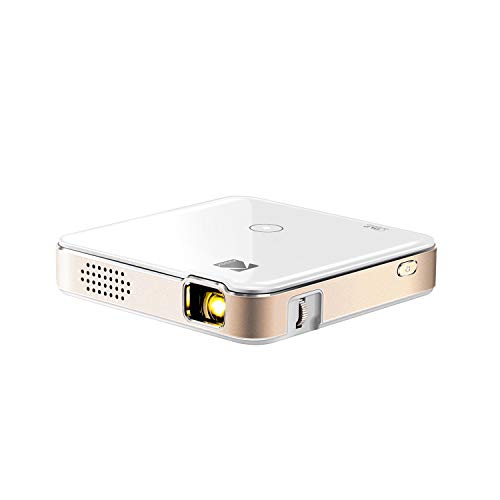
| Travel Companion | Power Source: Built-in rechargeable battery (up to 2.5 hours) | Native/Supported Resolution: Native 854×480 (supports 4K input) | Wireless Connectivity / Mirroring: AirPlay and Miracast (mobile-to-projector mirroring) | CHECK LATEST PRICE | Read Our Analysis |
| AKASO WT50 Mini WiFi Bluetooth 1080P Portable Projector |
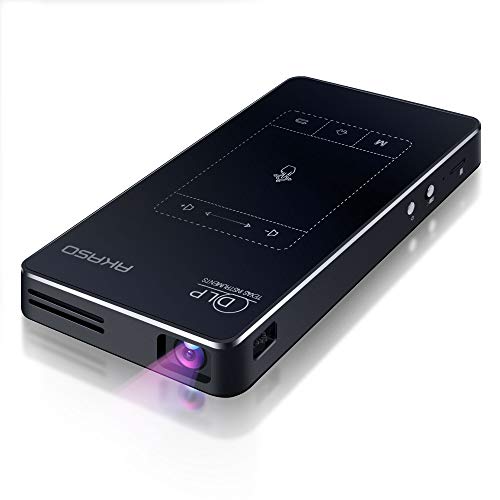
| Smart Streaming | Power Source: Built-in 5000 mAh battery (≈2 hours) | Native/Supported Resolution: 1080p (DLP chip; marketed as 1080P) | Wireless Connectivity / Mirroring: AirPlay, Miracast, EShare, DLNA (WiFi mirroring) | CHECK LATEST PRICE | Read Our Analysis |
| PVO Mini Portable LED Pico Projector for Home Theater |

| Kid-Friendly Pick | Power Source: External power only (Type‑C; no built‑in battery) | Native/Supported Resolution: Not explicitly native; designed for cartoons/home theater (up to 170″ projection) – HDMI input supported | Wireless Connectivity / Mirroring: No Wi‑Fi for screen mirroring (wired mirroring via cable); Bluetooth for audio | CHECK LATEST PRICE | Read Our Analysis |
| Mini Portable Rechargeable Pico Projector with Speaker & Tripod |
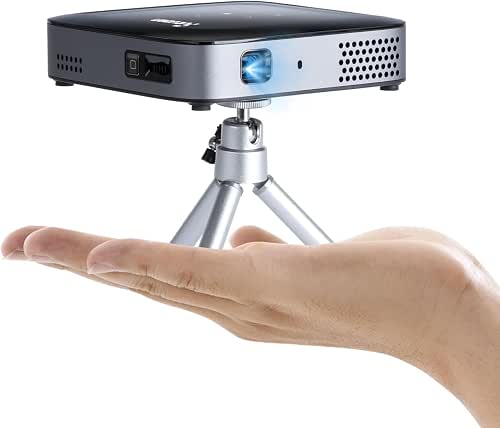
| Best Battery & Extras | Power Source: Built-in 8000 mAh rechargeable battery (up to 3 hours) | Native/Supported Resolution: Supports 1080P video with 4K input (DLP) | Wireless Connectivity / Mirroring: Wi‑Fi 2.4G/5G with built‑in Smart OS (apps + mirroring) | CHECK LATEST PRICE | Read Our Analysis |
| KODAK Luma 150 Mini Pocket Pico Projector |

| Compact Everyday | Power Source: Built-in rechargeable battery | Native/Supported Resolution: Native 640×360 (DLP) | Wireless Connectivity / Mirroring: Wi‑Fi with Miracast and AirPlay | CHECK LATEST PRICE | Read Our Analysis |
More Details on Our Top Picks
KODAK Luma 150 Ultra Mini Pocket Pico Projector
If you want a truly pocketable projector for on-the-go movies and casual 4K gaming, the KODAK Luma 150 Ultra delivers-its 60 ANSI lumens and up-to-150″ projection give surprisingly big visuals from a compact rechargeable unit that runs about 2.5 hours and supports AirPlay/Miracast for effortless mirroring. You’ll get 16:9 widescreen at 854×480 native resolution with 4K input support and 1000:1 contrast, plus a built-in speaker and illuminated controls. Connect via HDMI or micro‑USB to devices or use a Firestick/Roku for protected streaming. It’s ideal for travel, photo sharing, casual gaming, and portable presentations.
- Power Source:Built-in rechargeable battery (up to 2.5 hours)
- Native/Supported Resolution:Native 854×480 (supports 4K input)
- Wireless Connectivity / Mirroring:AirPlay and Miracast (mobile-to-projector mirroring)
- HDMI Input:HDMI input (wired)
- Built-in Audio:Built-in speaker
- Portability / Travel-friendly:Pocket-sized, compact for travel
- Additional Feature:Supports 4K input
- Additional Feature:Illuminated onboard controls
- Additional Feature:2.5-hour battery runtime
AKASO WT50 Mini WiFi Bluetooth 1080P Portable Projector
Choose the AKASO WT50 if you want a truly portable projector that’s ready for both backyard movie nights and quick presentations – its 5000 mAh battery gives about two hours of untethered use, and the compact 5.71 x 3.15 x 0.79-inch body weighs just 0.64 lbs so you can grab it and go. You’ll get DLP clarity from a 0.2 DMD chip, richer colors and less pixelation than LCDs, plus touchscreen controls and a remote. Android 9.0 lets you install Google Play apps; wireless mirroring and HDMI, USB, Micro SD, Bluetooth, and audio out cover connections. Check accessories on arrival.
- Power Source:Built-in 5000 mAh battery (≈2 hours)
- Native/Supported Resolution:1080p (DLP chip; marketed as 1080P)
- Wireless Connectivity / Mirroring:AirPlay, Miracast, EShare, DLNA (WiFi mirroring)
- HDMI Input:HDMI port (wired)
- Built-in Audio:Built-in speaker; Bluetooth for external audio
- Portability / Travel-friendly:Very compact (5.71×3.15×0.79 in; 0.64 lb)
- Additional Feature:Built-in Android 9.0
- Additional Feature:DLP with 0.2 DMD chip
- Additional Feature:Touchscreen control panel
PVO Mini Portable LED Pico Projector for Home Theater
Perfect for parents and travelers who want a kid-friendly, pocketable projector, the PVO Mini brings bright, easy setup home theater to bedrooms, patios, and campsites. You’ll enjoy cartoons and videos on a portable device kids can hold; it discourages screen time on phones and tablets. Project up to 170 inches (50–100 inches recommended) and plug in HDMI devices, phones via original data cable, or use phone-brand adapters for phone-to-HDMI. It has built-in stereo speaker, Bluetooth 5.4 for wireless audio, Type-C power (5V/2.5A), multiple ports, FCC/CE/RoHS/UKCA/PSE certifications, and 24/7 support. Simple, brighter images.
- Power Source:External power only (Type‑C; no built‑in battery)
- Native/Supported Resolution:Not explicitly native; designed for cartoons/home theater (up to 170″ projection) – HDMI input supported
- Wireless Connectivity / Mirroring:No Wi‑Fi for screen mirroring (wired mirroring via cable); Bluetooth for audio
- HDMI Input:HDMI input supported (acts as monitor for HDMI devices)
- Built-in Audio:Built-in stereo speaker; Bluetooth 5.4 for audio output
- Portability / Travel-friendly:Small/pocketable; easy for kids to carry
- Additional Feature:Bluetooth 5.4 audio
- Additional Feature:No built-in battery
- Additional Feature:Up to 170″ projection
Mini Portable Rechargeable Pico Projector with Speaker & Tripod
For anyone who wants a true grab‑and‑go entertainment solution, this mini rechargeable pico projector delivers: its 8000 mAh battery and pocketable 0.88 lb body give you up to three hours of cordless viewing, while the included 135° rotatable tripod lets you aim at walls or ceilings without extra gear. You’ll get DLP clarity with 1080p support and 4K input, 150 ANSI lumens, sealed optics to cut dust, and 25%–100% zoom for 10″–100″ screens. Smart TV apps, dual‑band Wi‑Fi, Bluetooth 5.2, built‑in speakers, multiple ports, and broad device compatibility make it ideal for travel.
- Power Source:Built-in 8000 mAh rechargeable battery (up to 3 hours)
- Native/Supported Resolution:Supports 1080P video with 4K input (DLP)
- Wireless Connectivity / Mirroring:Wi‑Fi 2.4G/5G with built‑in Smart OS (apps + mirroring)
- HDMI Input:HDMI port included (wired)
- Built-in Audio:Built-in speakers; four sound modes; Bluetooth audio output
- Portability / Travel-friendly:Compact (4.7×4.7×1.1 in; 0.88 lb) with tripod; pocketable for travel
- Additional Feature:8000 mAh battery
- Additional Feature:Includes rotatable tripod
- Additional Feature:Smart TV OS with certified apps
KODAK Luma 150 Mini Pocket Pico Projector
If you need a truly pocketable projector that’s ready for travel, the KODAK Luma 150 fits in a jacket pocket at just 7.5 oz and lets you set up movies, presentations, or DIY projections anywhere. You’ll get a DLP engine with 55 ANSI lumens and 640×360 native resolution that can throw images up to 100 inches-good for home entertainment, presentations, or creative projects. It includes HDMI, USB-A, microSD, Wi‑Fi with Miracast and AirPlay, and works with external streamers like Firestick or Roku. A built-in battery and speaker keep it mobile, though protected streaming services won’t mirror.
- Power Source:Built-in rechargeable battery
- Native/Supported Resolution:Native 640×360 (DLP)
- Wireless Connectivity / Mirroring:Wi‑Fi with Miracast and AirPlay
- HDMI Input:HDMI input available
- Built-in Audio:Built-in speaker
- Portability / Travel-friendly:Lightweight, compact (7.5 oz) for travel and portable use
- Additional Feature:55 ANSI lumens brightness
- Additional Feature:microSD card support
- Additional Feature:Lightweight 7.5 oz design
Factors to Consider When Choosing Pico Projectors
When you’re choosing a pico projector, focus first on brightness (lumens) and native resolution so your image stays clear in different lighting. Check battery life and size for true portability, and confirm the connectivity options and audio performance match how you’ll use it. Balancing those factors helps you pick a model that fits your viewing habits and environments.
Brightness And Lumens
Brightness and lumens are the most important specs you’ll check first, because they directly determine how large and clear an image will appear in different lighting conditions. For pico projectors, ANSI lumens is the useful standard: under ~100 ANSI lumens suits dark rooms, while 100–300 ANSI lumens can handle dimmer spaces. Higher lumen counts boost visible size and clarity in ambient light-each doubling of lumens roughly counters a one‑stop increase in ambient light. Watch for manufacturers quoting LED or peak lumens; always compare ANSI ratings for real‑world brightness. Remember brightness interacts with contrast and resolution, so high lumens don’t guarantee a crisp picture if those lag. Battery models often trade brightness for runtime, so expect shorter battery life at max settings.
Native Resolution Quality
After you’ve sized up lumens, check native resolution-the projector’s true pixel count (for example, 854×480 or 1280×720) that determines how sharp text and fine details will appear without scaling. You’ll want higher native resolutions-720p or 1080p-if you need readable text, crisp slides, or detailed video; lower resolutions (480p, 360p) often look soft or pixelated as image size grows. Remember that resolution interacts with screen size and viewing distance: enlarging the picture magnifies each pixel, so bigger images need better resolution to avoid visible pixel structure. Also assess optics, contrast, and brightness alongside resolution, since a high-res panel can still produce poor-looking images if lenses or contrast are weak. Aim for at least 720p for presentations; pick 1080p+ for larger, detailed viewing.
Battery Life And Portability
You’ll want to balance battery capacity, weight, and charging options to match how and where you’ll use the pico projector. Check mAh and stated runtime: units with 5000–8000 mAh commonly deliver about 2–3 hours, but that drops if you run max brightness. Built‑in rechargeable batteries give true portability; models lacking batteries force you to carry power banks or chargers and limit outdoor use. Factor size and weight together-pocket‑sized projectors under ~1 lb are easiest to carry, though they often trade off shorter runtimes. Prefer devices with fast charging or USB‑C Power Delivery so you cut downtime and can top up from common portable batteries. Finally, test runtime at typical brightness settings rather than relying solely on peak lumen claims.
Connectivity And Inputs
When choosing a pico projector, prioritize the ports and wireless options that match how you’ll actually connect devices-HDMI, USB-C, and microSD let you plug in laptops, streaming sticks, and drives directly, while robust Wi‑Fi and support for AirPlay, Miracast, or app-based streaming determine how smoothly you’ll mirror or stream from phones and tablets. Check available ports (USB-A, 3.5 mm) to cover legacy gear and wired audio passthrough. Verify wireless features-AirPlay, Miracast, DLNA, Wi‑Fi Direct-and whether the unit installs apps or only mirrors, since many mirroring methods block protected streams. Confirm Bluetooth and its profiles if you’ll pair speakers or headphones, and review supported input resolutions, 4K pass‑through, and codecs so sources render without scaling artifacts.
Audio Performance Options
Sound matters as much as image, so don’t skimp on audio when picking a pico projector. Check whether it has built-in speakers, but expect limited volume and weak bass-fine for personal or small-room use, not large groups. If you’ll use external speakers or headphones, confirm Bluetooth output and AUX/headphone ports. Compare Bluetooth versions and supported codecs; newer standards and higher-quality codecs cut latency and keep audio synced with video. Look for audio power ratings (watts) or documented battery runtime under AV load if you plan outdoor or group use. Prefer models with multiple audio modes or an equalizer so you can boost dialogue or switch to cinema mode without external gear. These choices shape real-world listening more than advertised picture specs.
Smart Features And OS
Because a pico projector’s software shapes how you’ll access content and control the device, check its OS, app support, and wireless features before buying. Built‑in operating systems-Android-based or proprietary smart TV OS-let you install apps and stream without extra boxes, so verify OS version and available apps. Certified streaming apps (Netflix, Prime Video) matter because simple mirroring often won’t play DRM‑protected content. Native app stores or Google Play expand possibilities for media, games, and productivity. Assess wireless options: dual‑band Wi‑Fi, AirPlay, Miracast, DLNA, or vendor casting affect mirroring ease, multi‑device use, and network streaming stability. Finally, note Bluetooth support and version-useful for speakers or headphones but usually limited to audio output, not full media control.
Build Quality And Accessories
Software and wireless features only get you so far if the hardware can’t keep up, so check how a pico projector is built and what it ships with before you buy. Inspect the enclosure and optical assembly: sealed or dust‑resistant optical cores and sturdy housings help prevent debris, black spots, and long‑term image degradation. Prefer solid‑state controls with illuminated buttons or a responsive touchscreen, plus a reliable remote to minimize mechanical failures. Pay attention to battery capacity and thermal integration-5,000–8,000 mAh cells usually extend runtime without overheating. Value bundled accessories like tripods, HDMI/USB cables, and protective cases; they improve out‑of‑box usability and cut aftermarket costs. Finally, review warranty length and service options for easier repairs and manufacturer confidence.




