

If you’re planning a network refresh in 2026, you’ll want switches that balance power, PoE, and simple management without breaking the budget. I’ll compare five Cisco models that suit small offices to growing SMBs, focusing on port density, uplinks, efficiency, and noise. You’ll see which option fits your environment and why one might outpace the others – but first, consider this key trade-off.
| Cisco Catalyst 1200-48P-4X 48-Port PoE Smart Switch |

| Best Overall | Port Count: 48 × 10/100/1000 | PoE Support: PoE / PoE+ | Uplink SFP Ports: 4 × 10GE SFP+ | CHECK LATEST PRICE | Read Our Analysis |
| Cisco Catalyst 1300-48P-4X Managed PoE Switch |

| Enterprise Ready | Port Count: 48 × 10/100/1000 | PoE Support: PoE / PoE+ | Uplink SFP Ports: 4 × 10GE SFP+ | CHECK LATEST PRICE | Read Our Analysis |
| Cisco Catalyst 1200-48P-4G 48-Port PoE Smart Switch |
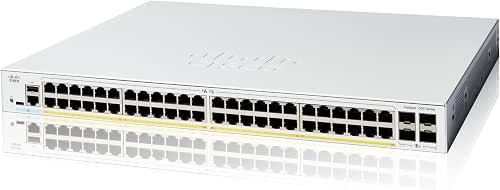
| Small-Business Power | Port Count: 48 × 10/100/1000 | PoE Support: PoE / PoE+ | Uplink SFP Ports: 4 × 1GE SFP | CHECK LATEST PRICE | Read Our Analysis |
| Cisco Catalyst 1300-24P-4G 24-Port PoE Managed Switch |

| Mid-Size Favorite | Port Count: 24 × 10/100/1000 | PoE Support: PoE / PoE+ | Uplink SFP Ports: 4 × 1GE SFP | CHECK LATEST PRICE | Read Our Analysis |
| Cisco CBS110-24T 24-Port Unmanaged Gigabit Switch |

| Plug-and-Play Budget | Port Count: 24 × 10/100/1000 | PoE Support: PoE supported on applicable models (series) | Uplink SFP Ports: 2 × 1G SFP (shared) | CHECK LATEST PRICE | Read Our Analysis |
More Details on Our Top Picks
Cisco Catalyst 1200-48P-4X 48-Port PoE Smart Switch
If you need a compact, easy-to-manage 48-port PoE switch for small to mid-sized offices or branch sites, the Cisco Catalyst 1200-48P-4X delivers-offering 48 Gigabit PoE/PoE+ ports with a 375W budget and four 10GE SFP+ uplinks for uplink performance and future growth. You’ll set it up via the Cisco Business mobile app, local web GUI, or Dashboard, following guided steps that don’t demand deep IT skills. It enforces IEEE 802.1X, ACLs, and DoS protections, supports Energy Efficient Ethernet, and often ships fanless. Core features need no extra licenses, include limited lifetime hardware protection, and one year of support.
- Port Count:48 × 10/100/1000
- PoE Support:PoE / PoE+
- Uplink SFP Ports:4 × 10GE SFP+
- Energy Efficiency Standard:IEEE 802.3az (Energy Efficient Ethernet)
- Management / Setup Options:Cisco Business mobile app, local web UI, Cisco Business Dashboard
- Warranty & Support:Limited lifetime hardware protection; 1 year complimentary tech support
- Additional Feature:Fanless design option
- Additional Feature:DoS attack prevention
- Additional Feature:No-license required
Cisco Catalyst 1300-48P-4X Managed PoE Switch
Choose the Cisco Catalyst 1300-48P-4X when you need a compact, easy-to-manage PoE switch that delivers 48 Gigabit ports and four 10GE uplinks with a 375 W PoE budget for small to midsize offices or distributed sites. You’ll manage it via the Cisco Business mobile app, local web interface, or Dashboard with guided setup-no IT degree or subscriptions required. It supports PoE and PoE+, offers select fanless models, and conserves energy with IEEE 802.3az compliance. Security includes IP-MAC port binding and IPv6 First Hop protections. You get limited lifetime hardware warranty plus one year of complimentary technical support.
- Port Count:48 × 10/100/1000
- PoE Support:PoE / PoE+
- Uplink SFP Ports:4 × 10GE SFP+
- Energy Efficiency Standard:IEEE 802.3az (Energy Efficient Ethernet)
- Management / Setup Options:Cisco Business mobile app, local web UI, Cisco Business Dashboard
- Warranty & Support:Limited lifetime hardware protection; 1 year complimentary tech support
- Additional Feature:IP‑MAC port binding
- Additional Feature:IPv6 First Hop Security
- Additional Feature:No-license required
Cisco Catalyst 1200-48P-4G 48-Port PoE Smart Switch
The Cisco Catalyst 1200-48P-4G is ideal for small businesses that need a compact, easy-to-manage PoE switch with plenty of ports-48 Gigabit Ethernet ports plus four SFP uplinks-and a 375 W PoE budget to power cameras, phones, and APs without extra hardware. You’ll get 48×10/100/1000 ports, 4×1GE SFP uplinks, IEEE 802.3az energy efficiency, and PoE/PoE+ support in a 17.5×13.78×1.73-inch chassis. Manage it via the Cisco Business app, web GUI, or Dashboard with no licenses required. Security includes 802.1X, ACLs, and DoS prevention; hardware has limited lifetime protection and one-year support.
- Port Count:48 × 10/100/1000
- PoE Support:PoE / PoE+
- Uplink SFP Ports:4 × 1GE SFP
- Energy Efficiency Standard:IEEE 802.3az (Energy Efficient Ethernet)
- Management / Setup Options:Cisco Business mobile app, local web UI, Cisco Business Dashboard
- Warranty & Support:Limited lifetime hardware protection; 1 year complimentary tech support
- Additional Feature:4 × 1GE SFP uplinks
- Additional Feature:Physical dimensions listed
- Additional Feature:UPC / ASIN identifiers
Cisco Catalyst 1300-24P-4G 24-Port PoE Managed Switch
For small offices and branch sites that need reliable Power over Ethernet without complex IT overhead, the Cisco Catalyst 1300-24P-4G delivers 24 Gigabit ports with a 195 W PoE budget and four SFP uplinks, so you can power cameras, phones, and access points while keeping setup and management simple via the Cisco Business app or local web interface. You’ll get PoE and PoE+ support, select fanless models for quiet operation, and IEEE 802.3az energy efficiency to reduce costs. Management through the mobile app, dashboard, or local UI requires no IT expertise. Security includes IP-MAC binding and IPv6 first-hop protections; lifetime warranty and one year of support are included.
- Port Count:24 × 10/100/1000
- PoE Support:PoE / PoE+
- Uplink SFP Ports:4 × 1GE SFP
- Energy Efficiency Standard:IEEE 802.3az (Energy Efficient Ethernet)
- Management / Setup Options:Cisco Business mobile app, local web UI, Cisco Business Dashboard
- Warranty & Support:Limited lifetime hardware warranty; 1 year complimentary tech support
- Additional Feature:195W PoE budget
- Additional Feature:IPv6 First Hop Security
- Additional Feature:IP‑MAC port binding
Cisco CBS110-24T 24-Port Unmanaged Gigabit Switch
If you need a simple, reliable gigabit switch for a small office or retail space, the Cisco Business CBS110-24T gives you 24 PoE-capable 10/100/1000 ports plus two shared 1G SFP slots in a fanless metal case, so you’ll get plug-and-play performance, energy-efficient operation (IEEE 802.3az), and quiet, compact deployment without IT configuration. You’ll appreciate Gigabit throughput, basic QoS for voice and video, and a rugged metal chassis sized for open areas. It’s unmanaged-ideal when you don’t want setup complexity. Warranty includes limited-lifetime return-to-factory replacement and one year of technical support if you need help.
- Port Count:24 × 10/100/1000
- PoE Support:PoE supported on applicable models (series)
- Uplink SFP Ports:2 × 1G SFP (shared)
- Energy Efficiency Standard:IEEE 802.3az (Energy Efficient Ethernet)
- Management / Setup Options:Plug-and-play unmanaged (no management app); physical setup only
- Warranty & Support:Limited lifetime protection (return-to-factory); 1 year technical support
- Additional Feature:Plug-and-play unmanaged
- Additional Feature:Metal case construction
- Additional Feature:Compact/outside-closet design
Factors to Consider When Choosing Cisco Switches
When choosing a Cisco switch, you’ll want to match port count to current needs and future growth so you don’t outgrow the box. Check whether you need Power over Ethernet, which management features suit your team, and what security capabilities are built in. Also compare energy efficiency to lower operating costs over the device’s lifetime.
Port Count Needs
Start by tallying every wired device you’ve got-PCs, phones, access points, printers, cameras-and add about 20–30% spare ports for growth or unexpected needs. Next, match port speeds to actual device needs: use Gigabit for endpoints and reserve 10 Gbps uplinks for aggregation to prevent bottlenecks. Think physically-pick higher‑port (48) switches if rack space allows, or stack smaller switches when density or cabling favors modularity. Account for network design by reserving ports for routers, firewalls, uplinks, and redundant switch links rather than allocating everything to end devices. If you’ll deploy PoE devices, verify the switch provides enough PoE ports and total budget to cover peak draw across all powered endpoints.
Power Over Ethernet
Don’t overlook PoE capacity: check a switch’s total wattage, per-port limits (802.3af/at/bt), and the number of PoE ports to make certain your phones, cameras, and APs get enough power without tripping the budget. You should verify the switch’s total PoE budget against combined device draw, allowing headroom for peak usage. Confirm supported standards-af (~15.4W), at (~30W), or bt (up to 60–100W)-so each port meets device needs. Count PoE-capable ports and make certain per-port allocation or priority settings prevent one device from exhausting power. Look for energy-saving features like 802.3az and power-optimization to lower operating costs when devices are idle. Finally, reserve 20–30% extra PoE capacity for future growth.
Management Options
Power requirements are only part of the story; management decides how easily you’ll configure, monitor, and secure those powered devices at scale. Decide if you need unmanaged plug-and-play simplicity or managed switches that offer VLANs, QoS, and granular configuration. Choose interfaces that match your workflow-web GUI, CLI/SSH, SNMP, or REST APIs-to integrate with existing tools and automation. If you administer remotely or on the go, prefer cloud dashboards or mobile apps over local-only access. Verify role-based access control and authentication options (local users, RADIUS/TACACS+, 802.1X) so you can delegate safely. Finally, confirm centralized monitoring and reporting-syslog, NetFlow/sFlow, telemetry-for troubleshooting, capacity planning, and compliance audits.
Security Capabilities
Because network breaches can happen at any layer, you’ll want switches with robust security features that stop unauthorized access, contain attacks, and protect management interfaces. You should make sure IEEE 802.1X port‑based access control is supported so devices authenticate before getting network access. Look for built‑in ACLs to filter traffic at layer 2/3 and restrict unauthorized hosts. Verify DoS and traffic‑attack prevention-SYN flood protection and broadcast storm mitigation-so uptime holds during attacks. Check for IP‑MAC binding and first‑hop protection to prevent address spoofing and reduce man‑in‑the‑middle risks. Finally, confirm secure management options like HTTPS, SSH, role‑based access control, and all‑inclusive logging to protect admin access and enable auditing for compliance and incident response.
Energy Efficiency
When evaluating Cisco switches, weigh energy efficiency as a practical cost and sustainability factor: look for IEEE 802.3az (Energy Efficient Ethernet) support, compare maximum versus typical/idle wattage to estimate operating costs, and confirm PoE power budgets and per‑port allocation to avoid oversized draws. You should prioritize switches with power optimization features like idle‑port shutoff and dynamic power allocation so the hardware trims consumption during low usage. For deployments where noise and cooling matter, choose fanless designs to cut power draw and simplify thermal management. Always check PoE per‑port limits against your device mix to prevent inefficient overprovisioning. By focusing on these metrics, you’ll reduce long‑term operational expenses and meet sustainability goals without sacrificing performance.


