

If you’re upgrading your PC’s wireless setup in 2026, you’ll want a card that balances fast Wi‑Fi with modern Bluetooth features. I’ll walk you through six top picks-M.2 and PCIe options that cover Wi‑Fi 6E/7 and Bluetooth 5.2–5.4-so you can match performance, form factor, and value to your build. Keep going to find which card fits your priorities and why it stands out.
| GIGABYTE WiFi 6E GC-WBAX210 PCIe Wi‑Fi/Bluetooth Card |

| Reliable High‑Performance | Form Factor: PCIe x1 expansion card | Wi‑Fi Generation: Wi‑Fi 6 / 6E (802.11ax) | Bluetooth Version: Bluetooth 5.2 | CHECK LATEST PRICE | Read Our Analysis |
| Intel AX210 Wi‑Fi 6E Bluetooth 5.3 M.2 Adapter |

| Compact Powerhouse | Form Factor: M.2 2230 A/E module | Wi‑Fi Generation: Wi‑Fi 6E (802.11ax) | Bluetooth Version: Bluetooth 5.3 | CHECK LATEST PRICE | Read Our Analysis |
| Cudy AX3000 WiFi 6 PCIe Card (Bluetooth 5.2) |

| Value Gaming Upgrade | Form Factor: PCIe card (full/low‑profile) | Wi‑Fi Generation: Wi‑Fi 6 (802.11ax) | Bluetooth Version: Bluetooth 5.2 | CHECK LATEST PRICE | Read Our Analysis |
| TP-Link Archer T5E AC1200 PCIe WiFi Card |

| Budget-Friendly Essential | Form Factor: PCIe card (standard/low‑profile) | Wi‑Fi Generation: Wi‑Fi 5 (802.11ac) – marketed as AC1200 | Bluetooth Version: Bluetooth 5.0 | CHECK LATEST PRICE | Read Our Analysis |
| OKN WiFi 6E AX5400 PCIe WiFi & Bluetooth Card |
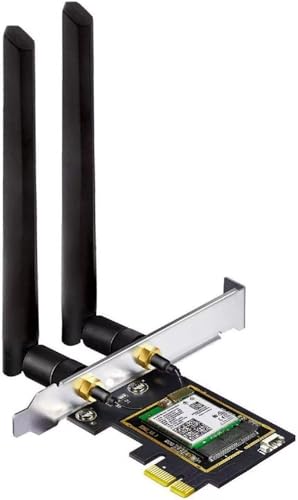
| Best for 6E Performance | Form Factor: PCIe card (standard/low‑profile) | Wi‑Fi Generation: Wi‑Fi 6 / 6E (802.11ax) | Bluetooth Version: Bluetooth 5.3 | CHECK LATEST PRICE | Read Our Analysis |
| TP-Link Archer BE9300 PCIe Wi‑Fi 7 Card |
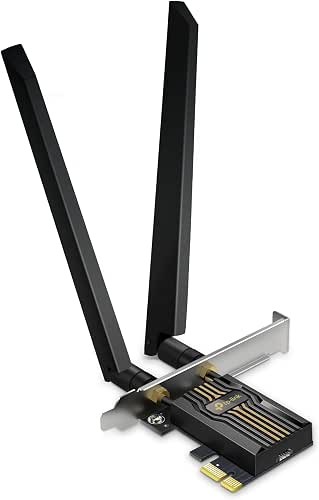
| Cutting‑Edge Futureproof | Form Factor: PCIe card (desktop PCIe) | Wi‑Fi Generation: Wi‑Fi 7 (next‑gen) | Bluetooth Version: Bluetooth 5.4 (BLE) | CHECK LATEST PRICE | Read Our Analysis |
More Details on Our Top Picks
GIGABYTE WiFi 6E GC-WBAX210 PCIe Wi‑Fi/Bluetooth Card
If you want the fastest, lowest-latency wireless and up-to-date Bluetooth in a desktop build, the GIGABYTE WiFi 6E GC-WBAX210 is a clear pick – it uses Intel’s AX210 module to add tri-band Wi‑Fi (including the new 6 GHz band) and Bluetooth 5.2 over a simple PCIe x1 card, giving you up to 2400 Mbps and MU‑MIMO performance with AORUS 2×2 antennas. You’ll get dual‑stream 802.11ax across 2.4/5/6 GHz, dedicated 6 GHz spectrum for ultra-low latency, and fully qualified Bluetooth 5.2. The card’s compact dimensions and 8.8-ounce weight fit most towers, and warranty support is available.
- Form Factor:PCIe x1 expansion card
- Wi‑Fi Generation:Wi‑Fi 6 / 6E (802.11ax)
- Bluetooth Version:Bluetooth 5.2
- Multi‑Band Support:Tri‑band (2.4/5/6 GHz)
- Antenna(s) Included:External AORUS 2×2 antenna (included)
- OS / Driver Requirement:Windows (drivers via manufacturer/Intel)
- Additional Feature:Intel AX210 module
- Additional Feature:MU‑MIMO TX/RX support
- Additional Feature:AORUS 2Tx2R antenna
Intel AX210 Wi‑Fi 6E Bluetooth 5.3 M.2 Adapter
For power users who need the fastest, most future‑proof wireless on an M.2 2230 board, the Intel AX210 NGW delivers tri‑band Wi‑Fi 6E plus Bluetooth 5.3 for low‑latency, interference‑resistant connections. You’ll get up to 5374 Mbps combined (2400 Mbps @6 GHz, 2400 Mbps @5 GHz, 574 Mbps @2.4 GHz) and Bluetooth 5.3’s LE enhancements for lower latency and better battery life. Install it in an M.2 2230 A/E key slot on an Intel CPU‑based motherboard-don’t use CNVi/CNVio2 or mini‑PCIe slots. Windows 10/11 64‑bit requires Intel AX210NGW drivers. It ships with a one‑year warranty and lifetime technical support.
- Form Factor:M.2 2230 A/E module
- Wi‑Fi Generation:Wi‑Fi 6E (802.11ax)
- Bluetooth Version:Bluetooth 5.3
- Multi‑Band Support:Tri‑band (2.4/5/6 GHz)
- Antenna(s) Included:(M.2 module – typically requires external antenna via chassis/wireless)
- OS / Driver Requirement:Windows 10/11 64‑bit (drivers from Intel)
- Additional Feature:M.2 2230 A/E key
- Additional Feature:5374 Mbps combined
- Additional Feature:Windows 10/11 only
Cudy AX3000 WiFi 6 PCIe Card (Bluetooth 5.2)
Gamers and power users who need fast, low-latency wireless and modern Bluetooth will appreciate the Cudy AX3000 PCIe card; it packs an Intel AX200 Wi‑Fi 6 module and Bluetooth 5.2 into a compact card with two high‑gain antennas, delivering up to 2402 Mbps on 5 GHz and broad Bluetooth range for peripherals. You’ll get 802.11ax with 1024‑QAM, 160 MHz channels, OFDMA to cut lag up to 75%, and 574 Mbps on 2.4 GHz. The kit includes a low‑profile bracket, Bluetooth header cable, and guide. WPA3 secures your link; drivers target Windows 10/11 and Wi‑Fi 6 routers.
- Form Factor:PCIe card (full/low‑profile)
- Wi‑Fi Generation:Wi‑Fi 6 (802.11ax)
- Bluetooth Version:Bluetooth 5.2
- Multi‑Band Support:Dual‑band (2.4/5 GHz)
- Antenna(s) Included:Two external 5 dBi antennas (included)
- OS / Driver Requirement:Windows 10/11 (drivers provided)
- Additional Feature:AX200 chipset inside
- Additional Feature:Includes low-profile bracket
- Additional Feature:OFDMA reduces lag
TP-Link Archer T5E AC1200 PCIe WiFi Card
Choose the TP-Link Archer T5E if you want reliable dual-band Wi‑Fi plus Bluetooth 5.0 in a budget-friendly PCIe card-its 2×2 MIMO and beamforming deliver up to 867 Mbps on 5 GHz (300 Mbps on 2.4 GHz) while the included Bluetooth USB cable lets you connect controllers and headsets once attached to your motherboard’s F_USB header. You’ll get two external high-gain antennas for better range, WPA3 security for stronger personal protection, and both standard and low-profile brackets for varied cases. It supports Windows 10 and 11, installs in a PCIe slot, and keeps desktop wireless simple and affordable.
- Form Factor:PCIe card (standard/low‑profile)
- Wi‑Fi Generation:Wi‑Fi 5 (802.11ac) – marketed as AC1200
- Bluetooth Version:Bluetooth 5.0
- Multi‑Band Support:Dual‑band (2.4/5 GHz)
- Antenna(s) Included:Two external high‑gain antennas (included)
- OS / Driver Requirement:Windows 10/11 (drivers provided)
- Additional Feature:Beamforming support
- Additional Feature:Bluetooth via F_USB header
- Additional Feature:Standard + low-profile brackets
OKN WiFi 6E AX5400 PCIe WiFi & Bluetooth Card
If you want top-tier Wi‑Fi 6E performance and modern Bluetooth for peripherals, the OKN AX5400 PCIe card delivers it with an Intel AX210 chipset and Bluetooth 5.3. You’ll get combined throughput up to 5400 Mbps across 2.4/5/6 GHz, with 80/160 MHz channels, OFDMA and MU‑MIMO for multi‑client efficiency, and Target Wake Time for power savings. The new 6 GHz band reduces congestion and enables lower latency for gaming, AR/VR, and 8K streaming. Two external 5 dBi antennas boost reception. It fits standard and low‑profile PCs, supports Windows 10/11 (drivers via Intel), and requires Windows 11 for full 6 GHz use.
- Form Factor:PCIe card (standard/low‑profile)
- Wi‑Fi Generation:Wi‑Fi 6 / 6E (802.11ax)
- Bluetooth Version:Bluetooth 5.3
- Multi‑Band Support:Tri‑band (2.4/5/6 GHz)
- Antenna(s) Included:Two external multi‑directional 5 dBi antennas (included)
- OS / Driver Requirement:Windows 10/11 (drivers from Intel; Windows 11 for full 6 GHz)
- Additional Feature:7×160 MHz channels (6GHz)
- Additional Feature:Includes dual 5 dBi antennas
- Additional Feature:Standard + low-profile brackets
TP-Link Archer BE9300 PCIe Wi‑Fi 7 Card
Want blazing multi‑gig wireless and the latest Bluetooth for peripherals? You’ll get Wi‑Fi 7 (Archer TBE552E) with up to 9.3 Gbps tri‑band bandwidth-5764 Mbps on 6 GHz, 2882 Mbps on 5 GHz, 688 Mbps on 2.4 GHz-plus 320 MHz channels when paired with a Wi‑Fi 7 router. MLO, OFDMA, Multi‑RU, 4K‑QAM and MU‑MIMO boost throughput and lower latency; beamforming and high‑gain antennas extend range. WPA3, TWT and BSS Color improve security and efficiency. Bluetooth 5.4 with a micro USB header connects peripherals. PCIe card fits Intel and AMD boards, includes antennas, brackets, cable, and supports Windows 11 only.
- Form Factor:PCIe card (desktop PCIe)
- Wi‑Fi Generation:Wi‑Fi 7 (next‑gen)
- Bluetooth Version:Bluetooth 5.4 (BLE)
- Multi‑Band Support:Tri‑band (2.4/5/6/with Wi‑7 enhancements)
- Antenna(s) Included:Two high‑performance antennas (included)
- OS / Driver Requirement:Windows 11 (designed for Win11; not compatible with Windows 10)
- Additional Feature:Multi-Link Operation (MLO)
- Additional Feature:320 MHz 6GHz support
- Additional Feature:Windows 11 only
Factors to Consider When Choosing Bluetooth Network Cards
When picking a Bluetooth network card, you’ll want to confirm motherboard compatibility and the supported Bluetooth version to avoid bottlenecks. Check antenna design and expected wireless range, plus stated data transfer speeds to match your use case. If you game or use real-time audio, prioritize low latency and cards optimized for gaming performance.
Compatibility With Motherboard
Evaluating motherboard compatibility is the first step you shouldn’t skip, since a Bluetooth card can’t function without the right physical connector, header, BIOS support, drivers, and antenna clearances. First, confirm the internal header type-some cards require a motherboard USB 2.0/3.0 header or a dedicated Bluetooth header for audio/control features. Next, verify slot form factor: PCIe x1, M.2 2230 A/E, or mini‑PCIe must match the board’s connector. Check OS and driver compatibility from your motherboard and chipset vendor to make certain the Bluetooth stack and features run on your system. Also confirm BIOS/UEFI, CNVio/CNVio2, and M.2 key support so the adapter isn’t blocked. Finally, inspect antenna mounting points and clearance so external cables and brackets can be routed securely.
Bluetooth Version Support
Once you’ve confirmed your motherboard can host a card, the Bluetooth version on that card becomes the next key decision-because it dictates audio features, latency, power use, and device compatibility. Pick a modern revision: 5.2 adds LE Audio and Isochronous Channels for multi‑stream, lower-latency audio; 5.3 and 5.4 bring tighter connection control, power optimizations, and robustness improvements. Version determines LE support, extended advertising, and link-layer features that affect battery life and discovery. Higher revisions enable LE PHY options (2M, Coded) for better throughput and reduced latency. Remember backward compatibility exists, but advanced features need both adapter and peripherals to match. Match the card’s Bluetooth version to your use cases-choose 5.2+ for audio, 5.3/5.4 for extra stability and efficiency.
Wireless Range And Antennas
Although range often gets treated as a single spec, you’ll want to weigh antenna type, gain, placement, and Bluetooth class together because they jointly determine real-world reach and reliability. Look for higher antenna gain (dBi) if you need distance-roughly every 3 dBi boosts effective power in a direction and extends reception. Prefer external, adjustable antennas over integrated ones so you can aim for line-of-sight and avoid chassis obstruction. Check for antenna diversity or multiple antennas; spatial diversity reduces dropouts by giving independent reception paths. Consider Bluetooth class and recent BLE enhancements, since newer protocol improvements help maintain links at range. Finally, place antennas away from metal, higher and clear of walls or RF sources to minimize attenuation and multipath loss.
Data Transfer Speeds
When you compare Bluetooth cards, prioritize the PHYs and Bluetooth version they support, because those determine the theoretical link rates and available throughput features. Check for LE 2M, LE Coded, and BR/EDR support-higher‑rate PHYs let you move files faster. Remember PHY numbers are raw rates; real throughput is lower due to protocol overhead and interference, so expect roughly 30–70% of nominal link rates in practice. Look for cards and hosts that implement adaptive frequency hopping and coexistence algorithms to mitigate 2.4 GHz Wi‑Fi and RF congestion. Finally, verify the paired device’s capabilities: its supported PHYs, buffer sizes, and firmware matter. The slowest link in the chain sets your end‑to‑end transfer ceiling, so match components accordingly.
Latency And Gaming Performance
Because gaming demands tight timing, you should prioritize Bluetooth cards that minimize end‑to‑end latency across RF, host, and codec paths. Pick modules with newer Bluetooth versions (5.3/5.4) that support LE Isochronous Channels and LE Audio; those protocols plus LC3 codecs cut setup time and lower consistent packet timing versus classic A2DP/SBC. Check radio and antenna specs-better modulation, adaptive frequency hopping, and interference resilience reduce packet loss and retransmits that inflate effective latency. Don’t ignore host‑side transport: USB/UART/PCIe paths and controller-to-CPU handling add milliseconds, so choose cards with efficient controller interfaces and low buffer designs. For competitive play aim for total audio/input latency under ~50 ms, ideally below 30 ms; latencies over 100 ms become noticeably detrimental.
Driver And OS Support
If you want reliable Bluetooth performance, confirm the card has drivers that match your exact OS and kernel version and that the vendor provides signed/WHQL drivers for Windows and native kernel drivers or firmware for Linux; missing or incompatible drivers can render the hardware useless. Verify driver support for your precise system (Windows 10/11 64‑bit, specific Linux kernel) and whether the driver enables the Bluetooth version features you need-LE Audio, enhanced connection parameters, host‑side offload, etc. Check vendor notes for installation prerequisites like motherboard headers, CNVi vs standard M.2, or platform drivers so software will function after physical installation. Finally, evaluate the vendor’s update and support policy: frequency of firmware/driver updates, security patches, and responsiveness to new OS releases to avoid future compatibility or security issues.
Form Factor And Installation
Although form factor might seem like a simple physical detail, it directly determines whether a Bluetooth card will fit your case, plug into available connectors, and provide usable antenna placement. You should check whether the card is PCIe x1, full‑height PCIe, M.2 2230 A/E key, or a USB dongle so it matches your chassis and empty slots. Verify if Bluetooth needs an internal USB header or separate cable-some internal cards require front‑panel or header connections for BT to work. For small form‑factor builds, confirm a low‑profile bracket or adapter is included or available. Make certain your motherboard has the correct M.2 A/E slot and that OS drivers support that form factor. Account for antenna posts or routing and rear‑panel clearance during installation.




