

If you’re upgrading a laptop or building a desktop, picking the right dual‑band card matters more than you might think. You’ll want to balance form factor, driver support, real‑world throughput, and antenna options-especially with Wi‑Fi 6/6E rolling out. Below I’ve narrowed six reliable choices from budget PCIe boards to modern M.2 modules, so you can match the card to your hardware and OS-and avoid buyer’s remorse.
| Ubit AC1200 PCIe Dual-Band WiFi + BT 4.2 Card |
| Best for Streaming | Dual Band: Yes (2.4 GHz & 5 GHz) | Wi‑Fi Standard(s): 802.11ac (Dual Band Wireless‑AC) | Bluetooth Support: Bluetooth 4.2 | CHECK LATEST PRICE | Read Our Analysis |
| Wireless N Dual-Band 600Mbps PCIe WiFi Adapter (FS-N600) |
| Reliable Budget Pick | Dual Band: Yes (2.4 GHz & 5 GHz) | Wi‑Fi Standard(s): 802.11n (Wireless N) | Bluetooth Support: (Not listed / no BT mentioned) | CHECK LATEST PRICE | Read Our Analysis |
| Intel Dual Band Wireless-AC 7260 Network Adapter (7260.HMWWB.R) |

| Business-Class Choice | Dual Band: Yes (2.4 GHz & 5 GHz) | Wi‑Fi Standard(s): 802.11ac (Dual Band Wireless‑AC) | Bluetooth Support: Bluetooth 4.0 | CHECK LATEST PRICE | Read Our Analysis |
| MT7921 M.2 Dual-Band WiFi Card 1800Mbps |

| Cutting-Edge Speed | Dual Band: Yes (2.4 GHz & 5 GHz) | Wi‑Fi Standard(s): 802.11ax (Wi‑Fi 6) | Bluetooth Support: (No Bluetooth mentioned) | CHECK LATEST PRICE | Read Our Analysis |
| AC7265 Dual-Band WiFi + Bluetooth 4.0 Network Card |

| Power-Efficient Upgrade | Dual Band: Yes (2.4 GHz & 5 GHz) | Wi‑Fi Standard(s): 802.11ac (AC 7265) | Bluetooth Support: Bluetooth 4.0 | CHECK LATEST PRICE | Read Our Analysis |
| Deal4GO AR5B22 Mini PCIe Dual-Band WiFi + Bluetooth |
| Compact Compatibility | Dual Band: Yes (2.4 GHz & 5 GHz) | Wi‑Fi Standard(s): 802.11a/b/g/n (no 802.11ac) | Bluetooth Support: Bluetooth 4.0 | CHECK LATEST PRICE | Read Our Analysis |
More Details on Our Top Picks
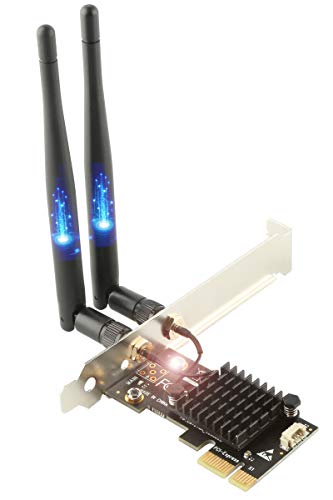
Ubit AC1200 PCIe Dual-Band WiFi + BT 4.2 Card
If you want a straightforward desktop upgrade for smooth 4K streaming and low-latency gaming, the Ubit AC1200 PCIe card delivers: Intel Dual Band Wireless‑AC 7265 chipset, combined 1200 Mbps throughput (900 Mbps on 5 GHz, 300 Mbps on 2.4 GHz), and Bluetooth 4.2 for peripherals, all in a PCIe x1‑compatible card that fits both low‑profile and standard cases. You’ll install it into any PCIe x1/x4/x8/x16 slot, add the appropriate bracket, and expect WPA/WPA2 security. It’s compatible with modern Windows versions (not Vista), offers quick setup with bundled utilities, and includes short‑circuit protection for safer operation.
- Dual Band:Yes (2.4 GHz & 5 GHz)
- Wi‑Fi Standard(s):802.11ac (Dual Band Wireless‑AC)
- Bluetooth Support:Bluetooth 4.2
- Form Factor / Interface:PCIe (PCI Express x1 card; full/low-profile)
- Compatible OS / Drivers:Windows 7/8/8.1/10 (32/64‑bit); Windows Server supported (not Vista)
- Use Case / Intended Benefit:Upgrade desktop for gaming, streaming, browsing (4K/gaming)
- Additional Feature:Intel 7265 chipset
- Additional Feature:Short-circuit prevention design
- Additional Feature:Low-profile bracket included
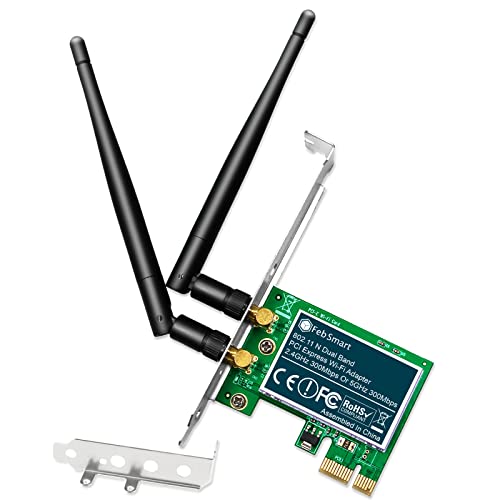
Wireless N Dual-Band 600Mbps PCIe WiFi Adapter (FS-N600)
The Wireless N Dual-Band 600Mbps PCIe WiFi Adapter (FS-N600) is ideal for home and small-office users who need reliable, low-latency wireless for HD streaming, VoIP, and casual gaming without upgrading their router; it delivers a combined 600 Mbps (300 Mbps on 2.4 GHz + 300 Mbps on 5 GHz) using a 2×2 MIMO Qualcomm Atheros AR946X chipset and two detachable 3 dBi dual‑band antennas. You’ll get IEEE 802.11n compatibility with older and newer routers, robust WPA3-to-WEP security options, and ATH9K Linux support. It’s a PCIe x1 Gen2 card with full- and low-profile brackets; make sure an empty slot and install drivers where required.
- Dual Band:Yes (2.4 GHz & 5 GHz)
- Wi‑Fi Standard(s):802.11n (Wireless N)
- Bluetooth Support:(Not listed / no BT mentioned)
- Form Factor / Interface:PCIe x1 (PCIe 2.0; full/low-profile)
- Compatible OS / Drivers:Windows 8.x/10/11 & Windows Server (various); drivers required for older OS; not Vista
- Use Case / Intended Benefit:Internet surfing, VoIP, casual gaming, HD streaming
- Additional Feature:Qualcomm Atheros AR946X
- Additional Feature:Detachable 3 dBi antennas
- Additional Feature:PCIe Gen 2.0 compatible
Intel Dual Band Wireless-AC 7260 Network Adapter (7260.HMWWB.R)
Choose the Intel Dual Band Wireless-AC 7260 when you need fast, reliable dual‑band Wi‑Fi and Bluetooth 4.0 in a compact card-it’s geared toward users with 4th‑generation Intel Core systems who want improved speed, coverage, and battery life for streaming, conferencing, or mobile work. You get 802.11ac 2×2 performance, Intel Wireless Display, Smart Connect, and Wi‑Fi HotSpot Assistant in a tiny 2.75 x 2.4-inch card weighing 0.32 ounces. It’s compatible with Windows PCs, ships as model 7260.HMWWB.R (ASIN B00N7474CS), and remains supported by Intel with positive user ratings (4.4/5 from 2,484 reviews).
- Dual Band:Yes (2.4 GHz & 5 GHz)
- Wi‑Fi Standard(s):802.11ac (Dual Band Wireless‑AC)
- Bluetooth Support:Bluetooth 4.0
- Form Factor / Interface:(Mini PCIe / laptop card form factor implied)
- Compatible OS / Drivers:PC (designed for Intel platforms; general Windows compatibility referenced)
- Use Case / Intended Benefit:Improved speed/coverage/capacity; business-class features
- Additional Feature:Intel Wi‑Fi HotSpot Assistant
- Additional Feature:Intel Smart Connect Technology
- Additional Feature:2×2 802.11ac configuration
MT7921 M.2 Dual-Band WiFi Card 1800Mbps
Looking for a compact upgrade that boosts wireless speed and responsiveness? You’ll like the MT7921 M.2 Dual-Band WiFi Card 1800Mbps (Dual Band Network Card, MT7921 NGFF M.2) from Qiilu. It plugs into an NGFF M.2 slot, supports 802.11ax on 2.4/5 GHz, and delivers up to 1800 Mbps for smoother streaming and gaming. It’s compatible with Windows 10 and 11 and offers plug-and-play ease. The PCB uses a premium circuit module to reduce corrosion and interference. Package includes card, gasket spacer, and screw. Small, lightweight, and first available July 2, 2024; check manufacturer warranty.
- Dual Band:Yes (2.4 GHz & 5 GHz)
- Wi‑Fi Standard(s):802.11ax (Wi‑Fi 6)
- Bluetooth Support:(No Bluetooth mentioned)
- Form Factor / Interface:M.2 NGFF (M.2 interface)
- Compatible OS / Drivers:Windows 10 & Windows 11 (plug‑and‑play)
- Use Case / Intended Benefit:High-throughput Wi‑Fi 6 for faster wireless (1800 Mbps)
- Additional Feature:802.11ax (Wi‑Fi 6)
- Additional Feature:NGFF M.2 interface
- Additional Feature:1800 Mbps top throughput
AC7265 Dual-Band WiFi + Bluetooth 4.0 Network Card
If you need a compact upgrade that boosts both laptop Wi‑Fi and Bluetooth, the AC7265 Dual‑Band WiFi + Bluetooth 4.0 card gives you faster 2.4/5 GHz connections, longer range, and lower power draw so your device stays connected and runs cooler between charges. You’ll enjoy dual‑band performance with improved throughput and fewer interruptions for multiple devices, plus reliable Bluetooth 4.0 pairing. Its small form factor fits laptops and compact systems, installs easily in compatible slots, and conserves battery life during regular use. It’s a straightforward, cost‑effective way to modernize wireless capability without unnecessary complexity.
- Dual Band:Yes (2.4 GHz & 5 GHz)
- Wi‑Fi Standard(s):802.11ac (AC 7265)
- Bluetooth Support:Bluetooth 4.0
- Form Factor / Interface:(Laptop/compact internal card; mini card form factor implied)
- Compatible OS / Drivers:Implied Windows laptop compatibility (standard drivers)
- Use Case / Intended Benefit:Higher reliability, lower power for portable devices
- Additional Feature:Lower power consumption
- Additional Feature:Compact laptop form factor
- Additional Feature:Improved multi-device capacity
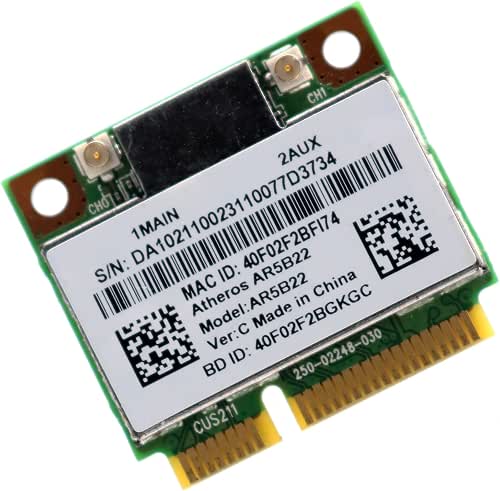
Deal4GO AR5B22 Mini PCIe Dual-Band WiFi + Bluetooth
For anyone needing a compact, dual‑band upgrade for older systems, the Deal4GO AR5B22 Mini PCIe delivers reliable 2.4/5 GHz Wi‑Fi and Bluetooth 4.0 in a half‑size card that fits many Dell, Sony, Acer, Asus, MSI, Clevo and industrial PC slots. You’ll get a Qualcomm Atheros AR9462-based 2T2R card (half Mini PCIe) with two IPEX MHF4 antenna connectors, supporting 802.11a/b/g/n (no 802.11ac) and Bluetooth 4.0. Expect up to 150/300 Mbps on 2.4 GHz and up to 300 Mbps on 5 GHz 802.11n. It supports Windows 7–10 and XP, but check laptop whitelists and note it’s not M.2 compatible.
- Dual Band:Yes (2.4 GHz & 5 GHz)
- Wi‑Fi Standard(s):802.11a/b/g/n (no 802.11ac)
- Bluetooth Support:Bluetooth 4.0
- Form Factor / Interface:Half Mini PCIe (Mini PCIe half-size)
- Compatible OS / Drivers:Windows XP/7/8/8.1/10 (32/64‑bit); cautions about vendor whitelist
- Use Case / Intended Benefit:Laptop/embedded wireless + Bluetooth replacement or upgrade
- Additional Feature:Half Mini PCIe form
- Additional Feature:IPEX MHF4 antenna connectors
- Additional Feature:Laptop whitelist caution
Factors to Consider When Choosing Dual Band Network Cards
When choosing a dual-band network card, you’ll want to compare bandwidth and throughput to make sure it meets your speed needs and supports current wireless standards like 802.11ac/ax. Check whether it includes Bluetooth compatibility or requires a separate module, and evaluate antenna design and gain for range and signal stability. Also confirm the form factor and slot (PCIe, Mini PCIe, M.2) matches your device so installation is straightforward.
Bandwidth And Throughput
Because dual-band cards handle traffic on both 2.4 GHz and 5 GHz, you should evaluate their combined and per-band throughput to match your needs. Check advertised per-band maxima (they add to an aggregate figure-e.g., 300 Mbps + 900 Mbps = 1200 Mbps) but expect 50–70% of those rates in real environments due to overhead, interference, distance, and congestion. Consider radio type and MIMO streams: 802.11ac/ax with 2×2 or higher yields far better real-world speeds than single-stream 802.11n. Note channel width trade-offs: 40/80/160 MHz boost 5 GHz peaks but increase interference risk in crowded areas. Finally, factor Bluetooth coexistence and simultaneous dual-band design-cards with good coexistence or separate antennas better sustain higher throughput under load.
Wireless Standards Support
After checking throughput and antenna design, you’ll want to inspect which wireless standards a dual‑band card actually supports, since that determines speed, latency, and how well it handles multiple clients. Pick cards with 802.11ac (Wi‑Fi 5) or 802.11ax (Wi‑Fi 6) for higher throughput and lower latency versus 802.11n. Check spatial streams (2×2, 3×3) and MU‑MIMO/OFDM support-more streams and MU‑MIMO boost simultaneous throughput and reliability in crowded networks. Confirm backward compatibility with 802.11a/b/g/n so you can reach legacy routers and hotspots. Compare maximum theoretical link rates per band to match internet and LAN needs. Finally, verify driver and OS support for chipset features like WPA3, DFS channels, and target wake time to make certain full protocol functionality.
Bluetooth Compatibility Options
Don’t overlook Bluetooth when choosing a dual‑band card: check the Bluetooth version, onboard chipset support, driver/OS compatibility, and the specific profiles you need (A2DP, HFP, HID, AVRCP, etc.) so your headsets, keyboards, and controllers work reliably. You should favor cards with native onboard Bluetooth chipsets rather than ones that force you to use USB dongles, since native integration reduces latency and setup complexity. Match the Bluetooth version (4.0/4.2/5.x) to your peripherals-newer 5.x standards give better range, throughput, and multi-device handling. Always verify driver availability for your OS to avoid pairing problems, especially on Linux. Finally, confirm supported profiles for audio, input, and control devices so everything functions as expected without unexpected feature gaps.
Antenna Design And Gain
Pay attention to antenna design and gain since they directly shape range, throughput, and real‑world reliability. You’ll prefer higher dBi when you need focused range-e.g., a 5 dBi antenna typically outperforms a 2 dBi at the same transmit power. Check the card’s Tx/Rx chain count: 2T2R versus 3T3R supports more spatial streams, boosting aggregate throughput and link resilience. Removable external antennas with RP‑SMA let you swap in higher‑gain or directional units; onboard/internal antennas favor compactness but limit upgrade options. Mind antenna placement and orientation: omnidirectional antennas are usually vertical, while directional ones concentrate signal for long links. Finally, use spatially separated antennas to reduce multipath fading and minimize obstruction or interference impacts for steadier performance.
Form Factor And Slot
While choosing a dual‑band card, make sure its physical form factor and slot type match your system so installation and performance aren’t compromised. You need to confirm whether your desktop uses PCIe x1, x4/x8/x16, or a laptop uses M.2 NGFF or Mini PCIe half/full, and that the slot provides proper electrical compatibility. Check the PCIe generation or M.2 key type so signaling and bandwidth meet the card’s requirements. Verify low‑profile versus full‑height brackets and case clearance for mounting. For laptops, confirm connector type and watch for manufacturer whitelists that can block third‑party cards. Finally, match antenna connector placement and the number of antenna ports (1×1, 2×2, etc.) to your chassis or laptop antenna cables for best RF performance.
Driver And OS Support
Because the right drivers determine whether a dual‑band card actually works as advertised, you should confirm chipset and OS support before buying. Check that the chipset has drivers for your exact OS version-Windows 10/11, specific Windows Server releases, or targeted Linux kernel versions-to enable full features. Verify whether the adapter is plug‑and‑play or needs vendor drivers for MU‑MIMO, Bluetooth, and advanced settings. Match driver packages to your OS architecture (32‑bit vs 64‑bit) and hunt down legacy installers if you run older systems. For Linux and macOS, confirm upstream kernel modules or signed drivers versus third‑party/open‑source alternatives for stability. Finally, evaluate vendor update cadence and support lifecycle so you get security patches, bug fixes, and feature updates over time.
Security Protocols Supported
If you care about keeping your network safe, confirm the card supports modern encryption and authentication standards like WPA3 and WPA2‑AES (AES‑CCMP), since they prevent easy password guessing and provide forward secrecy that legacy WPA/WEP/TKIP can’t. You should also choose adapters that offer WPA2/WPA3‑Enterprise (802.1X) support when you need RADIUS‑based, per‑user credentials for business or campus networks. Verify the card implements AES‑CCMP rather than TKIP or WEP, as AES‑CCMP is required for current Wi‑Fi security. Make certain firmware and driver updates are possible so you can apply security patches promptly. Finally, prefer cards that let you disable WPS, enable Protected Management Frames (PMF), and produce logs for auditing and incident response.
Power Consumption Impact
Often you’ll find that dual‑band network cards vary widely in how much power they draw, and that difference can matter a lot for battery‑powered devices. You should expect Wi‑Fi transmissions-especially on 5 GHz at high data rates-to consume substantially more current than idle or sleep states. Integrated Bluetooth adds extra usage; BLE helps, but running Wi‑Fi and BT together raises total draw. Multi‑stream MIMO (2×2, 3×3) and higher throughput increase power during transfers because extra RF chains and processing run. Look for cards with documented low‑power modes, dynamic transmit power control, and robust chipset sleep states, and insist on efficient drivers. If you plan continuous high‑bandwidth tasks, choose cards optimized for low active and idle consumption to preserve battery life.




