

If your eyes get tired after long laptop sessions, you’ll want a screen protector that cuts glare without killing touch or color. I’ll walk you through five top picks-from matte PET films to blue‑light filters-so you can compare clarity, responsiveness, and protection. Keep going to find the right size and features for your device and work habits.
| Supershieldz Matte Anti-Glare Screen Protectors for Surface Laptop 13 (3-Pack) |

| Best for Surface Users | Compatibility (screen size / device): Microsoft Surface Laptop 13″ (2025) | Anti-glare / Matte finish: Matte / anti-glare finish | Blue-light protection / eye-strain reduction: Reduces glare (promotes reduced eye strain) – not explicitly blue-light labeled | VIEW LATEST PRICE | Read Our Analysis |
| F FORITO 14″ Anti-Glare Matte Laptop Screen Protector (2-Pack) |

| Best for 14″ Laptops | Compatibility (screen size / device): 14″ laptops (16:9) – 12.2″ x 7.4″ usable area | Anti-glare / Matte finish: Anti-glare matte | Blue-light protection / eye-strain reduction: Reduces glare to help reduce eye strain (no blue-light claim) | VIEW LATEST PRICE | Read Our Analysis |
| 15.6″ Blue Light Laptop Screen Protectors (2-Pack) |
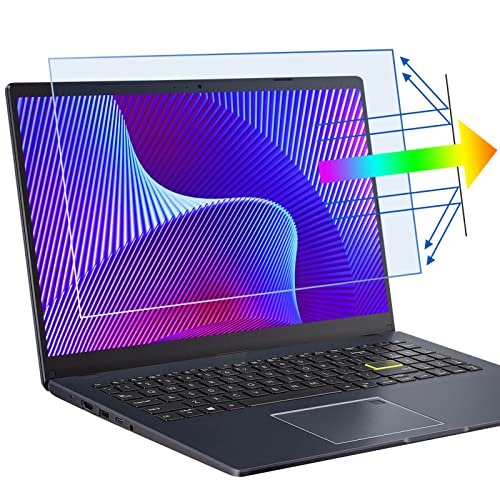
| Blue-Light Defense | Compatibility (screen size / device): 15.6″ laptops (16:9) – filter 13.6″ x 7.6″ | Anti-glare / Matte finish: Anti-glare (transparent with anti-glare properties) | Blue-light protection / eye-strain reduction: Multi-layer blue-light filtering (anti-blue light) | VIEW LATEST PRICE | Read Our Analysis |
| 17.3″ Anti-Blue Light Matte Screen Protectors (2-Pack) |

| Best for Large Screens | Compatibility (screen size / device): 17.3″ laptops (16:9) | Anti-glare / Matte finish: Matte anti-glare surface | Blue-light protection / eye-strain reduction: Layered anti-blue light filtering | VIEW LATEST PRICE | Read Our Analysis |
| 15.6″ Anti-Blue Light Laptop Screen Protector (3-Pack) |

| Best for Heavy Use | Compatibility (screen size / device): 15.6″ laptops – 13.57″ x 7.64″ (measure width & height recommended) | Anti-glare / Matte finish: Advanced anti-glare (AG) process | Blue-light protection / eye-strain reduction: Anti-blue light material – 99.3% blue-light blocking | VIEW LATEST PRICE | Read Our Analysis |
More Details on Our Top Picks
Supershieldz Matte Anti-Glare Screen Protectors for Surface Laptop 13 (3-Pack)
If you work in bright environments or spend long hours on your Surface Laptop 13, the Supershieldz Matte Anti-Glare 3-pack is a smart choice because its Japanese PET matte finish cuts glare and hides fingerprints while keeping touch responsiveness intact. You’ll install high-quality Japanese PET film that reduces reflections and maintains real touch sensitivity for natural feel and accurate input. It shields your screen from daily scratches, dust, and scrapes, and won’t leave residue when you remove it. The three-pack gives you spares or replacements, so you’ll keep consistent anti-glare performance over time without fuss.
- Compatibility (screen size / device):Microsoft Surface Laptop 13″ (2025)
- Anti-glare / Matte finish:Matte / anti-glare finish
- Blue-light protection / eye-strain reduction:Reduces glare (promotes reduced eye strain) – not explicitly blue-light labeled
- Scratch / physical protection:Protects from daily scratches, dust, scrapes
- Touchscreen compatibility / touch sensitivity:Real touch sensitivity; flawless touch accuracy
- Easy installation / bubble reduction & residue-free removal:No residue when removed (easy removal)
- Additional Feature:High-quality Japanese PET
- Additional Feature:3-pack value bundle
- Additional Feature:No-residue removal
F FORITO 14″ Anti-Glare Matte Laptop Screen Protector (2-Pack)
Designed for users who work in bright environments, the F FORITO 14″ Anti-Glare Matte Screen Protector cuts glare and reflections so you can focus longer without eye strain. You’ll fit it to 14″ 16:9 laptops (12.2″ x 7.4″)-confirm your screen width and height first. It reduces ambient reflections while preserving brightness, vibrant colors, and HD clarity. The scratch-resistant, low-profile film resists fingerprints and lets your lid close properly. Touchscreens stay responsive, and the nano-silicone layer helps minimize bubbles during installation. It includes cleaning tools; just remove dust and smudges before applying for the best result.
- Compatibility (screen size / device):14″ laptops (16:9) – 12.2″ x 7.4″ usable area
- Anti-glare / Matte finish:Anti-glare matte
- Blue-light protection / eye-strain reduction:Reduces glare to help reduce eye strain (no blue-light claim)
- Scratch / physical protection:Scratch-resistant construction
- Touchscreen compatibility / touch sensitivity:Does not interfere with touchscreen sensitivity
- Easy installation / bubble reduction & residue-free removal:Nano-silicone layer for bubble reduction; includes cleaning tools
- Additional Feature:Exact 16:9 dimensions
- Additional Feature:Includes cleaning tools
- Additional Feature:Nano-silicone bubble reduction
15.6″ Blue Light Laptop Screen Protectors (2-Pack)
For anyone who spends long hours on a small laptop or portable monitor, the 6″ Blue Light Laptop Screen Protectors (2-Pack) cut eye strain with multi-layer blue-light filtering while keeping glare and fingerprints down. You get two transparent, anti-glare, anti-scratch protectors that fit 15.6″ diagonal displays (13.6″ x 7.6″ filter area) and work with touchscreens. The bubble-proof, adhesive-on-screen design lets you press out bubbles, reposition without frame residue, and remove cleanly. Clean your screen before applying for best results. These protectors reduce blue light and glare, resist fingerprints, and preserve your display’s look while easing prolonged use.
- Compatibility (screen size / device):15.6″ laptops (16:9) – filter 13.6″ x 7.6″
- Anti-glare / Matte finish:Anti-glare (transparent with anti-glare properties)
- Blue-light protection / eye-strain reduction:Multi-layer blue-light filtering (anti-blue light)
- Scratch / physical protection:Anti-scratch protection
- Touchscreen compatibility / touch sensitivity:Works with touchscreen devices
- Easy installation / bubble reduction & residue-free removal:Bubble-proof installation design; adhesive only on screen; no residue
- Additional Feature:Multi-layer blue filtering
- Additional Feature:Adhesive-free-on-frame
- Additional Feature:Bubble-proof press removal
17.3″ Anti-Blue Light Matte Screen Protectors (2-Pack)
Wondering who benefits most from these 3″ Anti-Blue Light Matte Screen Protectors (2-Pack)? You will if you use a 17.3″ 16:9 laptop and spend long periods at the screen. The layered anti-blue light design filters harmful wavelengths, helping reduce eye strain and headaches. The matte, anti-glare finish cuts reflections while protecting against scratches. It’s ultra-thin, preserves touchscreen responsiveness, and adheres only to the display without leaving residue or bulk. Installation is simple: clean the screen, apply using the bubble-adsorption method, and press out small bubbles. Contact the seller if you’re unsure about fit before buying.
- Compatibility (screen size / device):17.3″ laptops (16:9)
- Anti-glare / Matte finish:Matte anti-glare surface
- Blue-light protection / eye-strain reduction:Layered anti-blue light filtering
- Scratch / physical protection:Protects screen from scratches
- Touchscreen compatibility / touch sensitivity:Preserves touchscreen functionality; imperceptible
- Easy installation / bubble reduction & residue-free removal:Bubble-adsorption design; adheres to screen only; leaves no residue
- Additional Feature:Ultra-thin profile
- Additional Feature:Brand-agnostic fit (many OEMs)
- Additional Feature:Contact-seller fit support
15.6″ Anti-Blue Light Laptop Screen Protector (3-Pack)
If you spend long hours on a 15.6″ laptop and want to cut eye strain and blue-light exposure, this 3-pack of anti-blue light screen protectors is a smart pick-you’ll get 99.3% blue light blocking with anti-glare clarity that keeps visuals sharp. You’ll fit screens 13.57″ x 7.64″ (15.6″ diagonal) – confirm width and height before ordering. The German AG process diffuses glare while Japanese ultra-thin material preserves definition. Nano-silicone adhesion removes bubbles for fast installs. The set includes three protectors, installation and cleaning kits, a scratch card, guide, storage clip, and lifetime warranty backed by user-driven design.
- Compatibility (screen size / device):15.6″ laptops – 13.57″ x 7.64″ (measure width & height recommended)
- Anti-glare / Matte finish:Advanced anti-glare (AG) process
- Blue-light protection / eye-strain reduction:Anti-blue light material – 99.3% blue-light blocking
- Scratch / physical protection:Comprehensive screen protection; durable construction
- Touchscreen compatibility / touch sensitivity:Maintains visual/interaction quality (implied touchscreen compatibility)
- Easy installation / bubble reduction & residue-free removal:Nano-silicone adsorption for bubble-free install; adhesive-free-on-frame; includes installation kits
- Additional Feature:99.3% blue-blocking
- Additional Feature:Includes installation kits
- Additional Feature:Die-cut 0.01 mm accuracy
Factors to Consider When Choosing Anti Glare Laptop Screen Protectors
When choosing an anti-glare screen protector, you’ll want to match the screen size and fit precisely to avoid bubbles and blind spots. Check the level of anti-glare and blue light filtering to balance reduced reflections with accurate color and eye comfort, and confirm touchscreen compatibility if you use touch gestures. Also consider how easy it is to install or remove so you don’t struggle with alignment or residue.
Screen Size & Fit
For a proper anti glare fit, measure your laptop’s viewable screen width and height-not just the diagonal-and pick a protector cut to those exact dimensions so it covers the active display without encroaching on bezels. Match the protector to your screen’s aspect ratio (16:9, 3:2, etc.) so the film aligns cleanly and avoids cropping or excess overlap. Check for curved edges, rounded corners, or bezel gaps; those require either fuller-bleed protectors or slightly smaller cuts that adhere only to the active area. If you have a convertible or clamshell laptop, choose a thin, low-profile film that lets the lid close without pressure marks or lifting. For touchscreen models, confirm the cut preserves full touch and pen access across the entire active display.
Anti-Glare Strength
Although stronger anti‑glare finishes cut reflections more effectively, they also scatter light in ways that can slightly reduce perceived contrast and sharpness. You’ll see AG strength described as matte or semi‑matte and quantified by percent reduction in specular reflection-stronger coatings can cut glare by 60–90%. Consider how particle size and coating uniformity affect sharpness: coarser textures lower contrast more. Think about where and how you use the laptop; high‑strength AG works best at wide viewing angles and under bright overhead or side lighting. Check objective specs-reflectance percentage, haze value, or surface roughness (µm RMS)-instead of vague labels. Finally, weigh durability: matte finishes resist fingerprints but can show micro‑abrasions over time that reduce AG performance.
Blue Light Filtering
Matte anti‑glare coatings reduce reflections but they don’t address high‑energy blue wavelengths that can contribute to eye strain and disrupted sleep cycles, so you should also look at blue‑light filtering when picking a protector. Choose protectors with multi‑layer coatings that state the blocked band (commonly ~400–450 nm) and give a percentage-some claim up to ~99% for targeted bands-so you can compare products objectively. Prefer filters that balance attenuation with accurate color and brightness; excessive blocking alters color temperature and dims the screen. If you work long hours, favor protectors that cite eye‑strain reductions or clinical/measurement data. Since anti‑blue layers are usually combined with matte finishes, confirm the combined treatment preserves screen clarity and works with your device’s touch sensitivity and brightness settings.
Touchscreen Compatibility
How will the protector affect how you actually use the screen? Check that the product explicitly states touchscreen compatibility or “real touch sensitivity,” because some films dull responsiveness or force harder presses. Prefer ultra-thin PET or TPU layers and adhesive-on-screen-only designs to preserve capacitive accuracy and multi-touch gestures. Nano-silicone or bubble-adsorption adhesives are best-they guarantee full contact without air gaps that can disrupt stylus accuracy or palm detection. If you swipe or write a lot, pick a matte/anti-glare coating tested for low friction so it won’t impede smooth swiping or handwriting with finger or stylus. Finally, confirm support for your device’s touch tech-active stylus, pressure sensitivity, and tilt-if you rely on those features.
Installation Ease
Getting a protector to sit right matters more than you’d think: ease of installation affects whether you end up with bubbles, misalignment, or a screen that peels at the edges. You should pick protectors with nano-silicone or adhesive layers that stick only to the glass, letting you reposition without trapping air. Confirm the kit includes cleaning wipes, dust-removal stickers and a squeegee or card so alignment and dust removal aren’t an afterthought. Measure your screen’s exact width and height – diagonal size won’t guarantee a die-cut fit and can cause overhangs or gaps. Favor bubble-adsorption designs and real-touch surfaces that let small bubbles be pressed out without harming touch sensitivity. Ultra-thin, flexible matte materials smooth flat easier and resist creasing when you close the lid.
Frequently Asked Questions
Do Anti-Glare Protectors Affect Touchscreen Sensitivity?
Yes – they can slightly reduce touchscreen sensitivity, but you’ll usually not notice with quality protectors; manufacturers design them for capacitive touch, and you can adjust touch settings or choose ultra-thin films if you need maximum responsiveness.
Can I Cut a Protector to Fit a Different Screen?
Want a custom fit? You can cut a protector to fit, but you’ll need sharp tools, patience, and careful measuring to avoid bubbles or uneven edges, and thin or adhesive-backed protectors work best for clean results.
Do Anti-Glare Protectors Prevent Fingerprint Smudges?
They mostly reduce fingerprints but don’t eliminate them entirely; you’ll notice fewer visible smudges thanks to textured coatings, though heavy oils can still show, so you’ll occasionally need to wipe the screen with a microfiber cloth.
How Long Do These Protectors Typically Last?
They usually last 1–3 years, depending on use, cleaning, and quality. You’ll replace when scratches appear, clarity fades, or anti-glare fails; you’ll extend life with gentle cleaning, minimal abrasion, and avoiding harsh chemicals or constant peeling.
Are These Protectors Compatible With Privacy Filters?
Yes – many anti-glare protectors work with privacy filters, but you’ll want to check thickness and adhesive type; choose compatible sizes and mounting methods so the privacy filter can attach properly without bubbling, misalignment, or reduced clarity.




