

You want speed, and you want stability, and you want a simple plug‑and‑play solution – and you can get all three with the right Ethernet USB adapter. Pick a 1Gbps or 2.5Gbps chipset, match it to a USB‑3.0/USB‑C port, and prioritize metal housings and solid cables for long life. I’ll walk you through top models, what specs matter, and the tradeoffs so you can choose confidently.
| TECKNET USB-C 3-Port Hub with Gigabit Ethernet |

| Versatile All-Rounder | Network Speed: Gigabit Ethernet (up to 1000 Mbps) | USB Interface Type: USB-C (also compatible with USB-A via adapter) | Compatibility / OS Support: Windows, macOS, Chrome OS, Linux, Android | VIEW LATEST PRICE | Read Our Analysis |
| UGREEN 2.5Gb USB 3.0 to Ethernet Adapter |

| High-Speed Upgrade | Network Speed: 2.5Gb Ethernet (up to 2.5 Gbps) | USB Interface Type: USB 3.0 (Type-A) | Compatibility / OS Support: Windows, macOS (note: not compatible with some consoles/TVs/NAS) | VIEW LATEST PRICE | Read Our Analysis |
| UGREEN 5-in-1 USB-C Hub with Gigabit Ethernet |
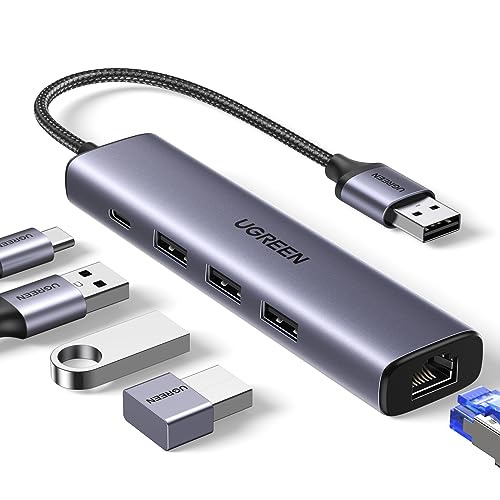
| Port-Expanding Workhorse | Network Speed: Gigabit Ethernet (up to 1000 Mbps) | USB Interface Type: USB-C | Compatibility / OS Support: Windows, macOS, Chrome OS (drivers for older OS/Linux) | VIEW LATEST PRICE | Read Our Analysis |
| UGREEN USB 3.0 to Gigabit Ethernet Adapter |

| Reliable Plug-and-Play | Network Speed: Gigabit Ethernet (up to 1000 Mbps) | USB Interface Type: USB 3.0 (Type-A) | Compatibility / OS Support: Windows, macOS, Chrome OS, Android (drivers for older OS/Linux) | VIEW LATEST PRICE | Read Our Analysis |
| uni USB-C to Gigabit Ethernet Adapter (RJ45) |

| Sleek Everyday Adapter | Network Speed: Gigabit Ethernet (up to 1000 Mbps) | USB Interface Type: USB-C | Compatibility / OS Support: macOS, Windows, Chrome OS, many USB-C devices (plug-and-play) | VIEW LATEST PRICE | Read Our Analysis |
More Details on Our Top Picks
TECKNET USB-C 3-Port Hub with Gigabit Ethernet
If you need reliable wired networking plus extra USB ports on a laptop or tablet, the TECKNET USB-C 3-Port Hub with Gigabit Ethernet is a smart choice – it turns a single USB-C or USB-A port into gigabit Ethernet (up to 1000 Mbps) and three USB 3.0 ports, so you can plug in wired internet and multiple peripherals without juggling adapters. You’ll get backward compatibility with 100/10 Mbps Ethernet and USB 2.0, plug-and-play operation across Windows, macOS, Chrome OS, Linux, and Android, plus dual-color LEDs for status. Aluminum housing, surge protection, three-year warranty, and responsive support round it out.
- Network Speed:Gigabit Ethernet (up to 1000 Mbps)
- USB Interface Type:USB-C (also compatible with USB-A via adapter)
- Compatibility / OS Support:Windows, macOS, Chrome OS, Linux, Android
- Build Material / Durability:Aluminum shell and aluminum-shielded USB ports
- LED / Status Indicators:Dual-color LED (green/yellow) for connection/activity
- Plug-and-Play / Ease of Use:Plug-and-play; no drivers required for basic connectivity
- Additional Feature:Built-in surge protection
- Additional Feature:Dual-color LED indicators
- Additional Feature:36-month warranty
UGREEN 2.5Gb USB 3.0 to Ethernet Adapter
For users who need a simple, cost-effective way to jump from 1Gb to 2.5Gb wired networking, the UGREEN 2.5Gb USB 3.0 to Ethernet Adapter delivers-its Realtek RTL8156BG chipset and USB 3.0 interface provide up to 2.5Gbps throughput with low power draw and reduced heat, making it ideal for laptops and desktops that want faster downloads, smoother streaming, and better gaming without swapping internal hardware. You plug this compact USB 3.0-to-RJ45 dongle into Windows or macOS machines, and it upgrades compatible networks when paired with 2.5Gb switches. The aluminum housing, reinforced ports, and status LEDs promote durability and clear operation, though some consoles and NAS models aren’t supported.
- Network Speed:2.5Gb Ethernet (up to 2.5 Gbps)
- USB Interface Type:USB 3.0 (Type-A)
- Compatibility / OS Support:Windows, macOS (note: not compatible with some consoles/TVs/NAS)
- Build Material / Durability:High-quality aluminum housing
- LED / Status Indicators:Indicator lights showing transmission status
- Plug-and-Play / Ease of Use:Driver-free on modern OS (implied), optimized chipset for low power
- Additional Feature:2.5Gb throughput support
- Additional Feature:Realtek RTL8156BG chipset
- Additional Feature:Low heat / low power
UGREEN 5-in-1 USB-C Hub with Gigabit Ethernet
Ideal for users who need reliable wired networking plus extra USB ports-especially laptop and MacBook owners who work with external drives or multiple peripherals, the UGREEN 5-in-1 USB-C Hub combines a gigabit RJ45 port with three USB 3.0 ports and a dedicated USB‑C power inlet so you can get stable 1,000 Mbps connections and power-hungry peripherals without charging your host device. You’ll get gigabit speeds for gaming, uploads, and HD streaming, plus USB 3.0 transfers up to 5 Gbps for drives and accessories. It’s plug-and-play on modern OSes; older Windows and Linux need drivers. Compact and practical.
- Network Speed:Gigabit Ethernet (up to 1000 Mbps)
- USB Interface Type:USB-C
- Compatibility / OS Support:Windows, macOS, Chrome OS (drivers for older OS/Linux)
- Build Material / Durability:(Not explicitly stated as aluminum) generally compact hub with durable construction (aluminum implied in others)
- LED / Status Indicators:(Implied network status indicators for Ethernet) – supports network activity display
- Plug-and-Play / Ease of Use:Plug-and-play on modern OS; drivers only for older OS/Linux
- Additional Feature:Dedicated USB-C power port
- Additional Feature:5-in-1 combo design
- Additional Feature:Supports high-power peripherals
UGREEN USB 3.0 to Gigabit Ethernet Adapter
Gamers and remote workers who need a rock-solid wired connection will appreciate the UGREEN USB 3.0 to Gigabit Ethernet Adapter, since it delivers true 1 Gbps throughput with low latency for streaming, gaming, and large transfers. You’ll get plug-and-play use on Windows 11/10/8.1/8, macOS, Chrome OS, and Android, while older Windows and Linux require drivers provided by UGREEN. The aluminum shell and reinforced cable point improve heat dissipation and durability, and a yellow-green LED shows status. It’s compatible with most USB 3.0 laptops, desktops, and the Nintendo Switch dock, offering reliable, simple wired networking without bulky docks.
- Network Speed:Gigabit Ethernet (up to 1000 Mbps)
- USB Interface Type:USB 3.0 (Type-A)
- Compatibility / OS Support:Windows, macOS, Chrome OS, Android (drivers for older OS/Linux)
- Build Material / Durability:Aluminum shell with reinforced cable connection
- LED / Status Indicators:Yellow-green LED indicator showing working status
- Plug-and-Play / Ease of Use:Plug-and-play on modern OS; drivers required for older OS/Linux
- Additional Feature:Nintendo Switch compatible
- Additional Feature:Reinforced cable connection
- Additional Feature:Yellow-green LED indicator
uni USB-C to Gigabit Ethernet Adapter (RJ45)
If you need a dependable wired connection on a USB-C device, the uni USB-C to Gigabit Ethernet Adapter gives you stable 1 Gbps performance in a compact, travel-ready package. You’ll get gigabit speeds (backward compatible with 100/10 Mbps) when using CAT6 or better, making large downloads and unreliable Wi‑Fi a nonissue. It’s plug‑and‑play with USB‑C and Thunderbolt 3/4 laptops, tablets, and phones (not Nintendo Switch). The braided cable, aluminum casing, non‑slip surface, and slim profile resist wear and avoid blocking adjacent ports. Each pack includes one adapter, backed by an 18‑month warranty and 24/7 customer support.
- Network Speed:Gigabit Ethernet (up to 1000 Mbps)
- USB Interface Type:USB-C
- Compatibility / OS Support:macOS, Windows, Chrome OS, many USB-C devices (plug-and-play)
- Build Material / Durability:Premium aluminum casing and braided nylon cable
- LED / Status Indicators:(Not explicitly listed) typical plug-and-play adapter (no LED specified)
- Plug-and-Play / Ease of Use:Plug-and-play, driver-free operation
- Additional Feature:Braided nylon cable
- Additional Feature:Slim, non-blocking design
- Additional Feature:18-month warranty
Factors to Consider When Choosing Ethernet USB Network Adapters
When picking an Ethernet USB adapter, you should focus on speed and throughput to match your network needs and check the port type and form factor for your device. Verify compatibility and driver support for your OS, and consider power delivery if you need to charge while connected. Also assess build quality and materials to guarantee durability.
Speed And Throughput
Compare the adapter’s rated speed to your internet plan and local gear so it won’t become the bottleneck: a 1 Gbps or 2.5 Gbps adapter only helps if your host port, cables, and router/switch can handle those rates, and you’re using USB 3.x/USB‑C with sufficient upstream bandwidth. Match the adapter’s maximum rated speed to your plan and LAN hardware; otherwise the adapter sits idle. Verify the adapter uses USB 3.0/3.1/3.2 or USB‑C-USB 3.0 tops around 5 Gbps, and older USB limits real throughput. Expect 10–20% less than advertised due to protocol overhead, CPU, and OS stack. For full multi‑gig performance, guarantee Cat5e/Cat6 cables, a capable chipset that avoids thermal throttling, and separate upstream bandwidth if you’re sharing hubs or controllers.
Port And Form Factor
Because your device’s ports and your workflow dictate what’s practical, pay close attention to an adapter’s connector type, size, and overall form factor. Decide if you want a simple USB-to-RJ45 dongle or a multiport hub-hubs add versatility with extra USB ports but are bulkier. Match USB-C, USB-A, or a detachable cable to your host and port spacing so you don’t block neighbors. Inspect cable and connector durability, strain relief, and enclosure build for frequent plugging and travel. Consider footprint and weight: compact, low-profile units pocket easily but may lack features. For long-term or desk use, choose a short fixed cable, right-angle connector, or braided cable to improve ergonomics and cable management.
Compatibility And Drivers
Although a USB Ethernet adapter might look universal, you need to confirm physical ports, OS support, and chipset drivers before buying. First, check connector type-USB‑C vs USB‑A/USB 3.0-so you don’t need dongles that could cut speeds. Next, verify OS compatibility: many adapters are plug‑and‑play on modern Windows, macOS, and Chrome OS, but older Windows, some Linux distros, and niche systems often require drivers. Confirm the adapter’s chipset and that drivers exist and are maintained for your platform; manufacturers sometimes use chipsets with limited support. If you use gaming consoles, tablets, or legacy PCs, look for explicit compatibility notes. Finally, if you need advanced features like VLANs or jumbo frames, make sure the driver actually supports and receives updates.
Power Delivery Support
When you pick an Ethernet USB adapter, check its Power Delivery (PD) capabilities so your laptop and peripherals actually stay powered while you’re online. Look for PD passthrough ratings-common ones are 60W or 100W-and match the wattage to your laptop’s needs. Don’t assume a USB‑C port charges the host: some ports only power downstream devices, so verify host charging (input) versus output capability. Add the wattages of your laptop and any bus‑powered drives to make sure you don’t exceed the adapter’s maximum PD rating, since passthrough divides available power. High‑wattage adapters often run hotter; if you need sustained delivery, pick a model with better cooling or higher PD spec. Finally, confirm supported PD profiles and current for external high‑power devices.
Build Quality Materials
Pick an adapter with solid materials and smart mechanical design, because the shell, cable, and connectors determine how reliably it handles heat, repeated use, and interference. Choose housings of aluminum or reinforced metal alloys for better heat dissipation and structural durability versus plastic. Prefer internal shielding and grounded shells to cut electromagnetic interference and keep throughput stable. Check braided or reinforced cables plus strain‑relief at connector joints to prevent wear and internal breakage from frequent plugging. Inspect port shields and connector plating-gold or nickel-for corrosion resistance and long‑term signal integrity. If you travel or plug often, favor ruggedized models that state tested insertion cycles (thousands) so the adapter survives real‑world use without degrading performance or causing intermittent network issues.
Indicator Lights Status
Because the LEDs are your quickest way to diagnose connection health, check how an adapter displays link, speed, and activity so you can read problems at a glance. Look for dual-color LEDs or separate lights for link, speed, and activity so colors and patterns aren’t ambiguous. A steady green or yellow generally means an established link; dual-color indicators often map different hues to speeds (for example, 100 Mbps versus 1 Gbps). Blinking indicates data transmission, with faster or irregular blinking signaling heavy traffic or large transfers. Separate power, link, and activity LEDs let you quickly tell whether the adapter has power, a physical connection, or is transmitting. Prefer clear labels and documentation that explicitly maps LED states to meanings to avoid guesswork.
Warranty And Support
Those LEDs give you a quick read on hardware health, but you’ll want solid warranty and support behind the adapter if something fails. Check warranty length and terms – 12–36 months is common – and confirm it covers manufacturing defects and early failures. See if registration is required to activate extended coverage and note deadlines or proof-of-purchase needs. Verify support channels (email, phone, live chat) and expected response times for technical help and RMA processing. Know whether the warranty provides replacement units, repairs, or only refunds, and whether you’ll pay return shipping. Finally, make certain the vendor supplies long-term firmware and driver updates with clear instructions or downloads so you can troubleshoot compatibility issues without guesswork.




