

You’ll want a few reliable female‑to‑male modem cables in your tech drawer so you can hit consoles, legacy gear, and hardware‑flow devices without hunting adapters. Keep a short DB9 null‑modem for quick console work, a full‑handshake 1–2m cable for flow‑controlled connections, and a longer shielded run for flexible routing-plus a slim adapter and DB25→DB9 converter-and you’ll avoid the usual last‑minute scramble.
| DTECH 15ft DB9 RS232 Male-to-Female Null Modem Cable |
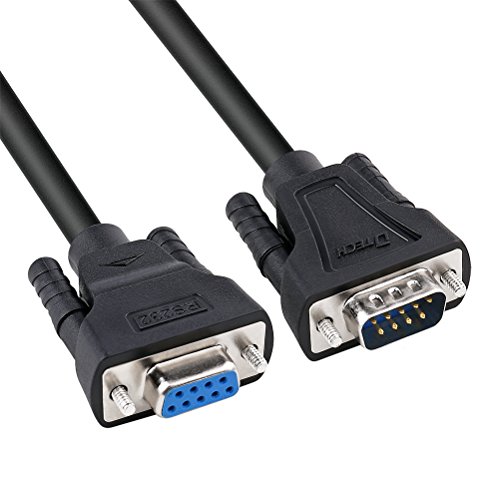
| Best for Extensions | Connector Type: DB9 male ↔ DB9 female | Purpose/Function: RS-232 serial null modem / direct DTE-to-DTE link | Shielding: Aluminum foil shielded | VIEW LATEST PRICE | Read Our Analysis |
| C2G DB25 Male to DB9 Female Null Modem Cable |

| Legacy System Ready | Connector Type: DB25 male ↔ DB9 female | Purpose/Function: RS-232 null modem / serial connection between devices | Shielding: Foil shielded | VIEW LATEST PRICE | Read Our Analysis |
| StarTech.com 1m DB9 RS232 Serial Null Modem Cable |

| Reliable Compact Pick | Connector Type: DB9 male ↔ DB9 female | Purpose/Function: RS-232 null modem / serial device connection | Shielding: Shielded (specified for RS232; typical foil) | VIEW LATEST PRICE | Read Our Analysis |
| DTECH DB9 RS232 Null Modem Cable 1.5ft |

| Full-Handshaking Pro | Connector Type: DB9 male ↔ DB9 female | Purpose/Function: RS-232 null modem / DTE-to-DTE serial link (full handshaking) | Shielding: Aluminum foil shielded | VIEW LATEST PRICE | Read Our Analysis |
| DB9 Null Modem Adapter Male-to-Female (5 Pack) |

| Handy Adapter Pack | Connector Type: DB9 male ↔ DB9 female (adapter) | Purpose/Function: Converts straight cables to null-modem wiring (enable DTE-to-DTE) | Shielding: Not explicitly stated (adapter with plated contacts; typically unshielded adapter body) | VIEW LATEST PRICE | Read Our Analysis |
More Details on Our Top Picks
DTECH 15ft DB9 RS232 Male-to-Female Null Modem Cable
If you need a simple, reliable way to link two RS-232 devices without handshaking-like connecting a laptop to a router console or a microcontroller for debugging, the DTECH 15ft DB9 null modem cable is a smart pick: it swaps TX/RX and ground for direct data transfer, uses 30 AWG conductors with gold-plated DB9 connectors and thumbscrews for a secure fit, and comes shielded for typical indoor use. You’ll get a 15-foot male-to-female DE9 3-wire crossover that omits RTS/CTS, fits standard RS-232C pinouts, pairs with USB adapters, and suits consoles, modems, POS, and legacy gear.
- Connector Type:DB9 male ↔ DB9 female
- Purpose/Function:RS-232 serial null modem / direct DTE-to-DTE link
- Shielding:Aluminum foil shielded
- Gendered Male/Female Offering:Male-to-female cable
- Gold-Plated Contacts:Gold-plated pins
- Intended Indoor/Equipment Use:Indoor use; connects PCs, routers, modems, POS, microcontrollers
- Additional Feature:15 ft length
- Additional Feature:30 AWG conductors
- Additional Feature:AL-foil shielded
C2G DB25 Male to DB9 Female Null Modem Cable
Tech-savvy users who still rely on legacy serial gear will appreciate the C2G DB25-to-DB9 null modem cable for its straightforward compatibility and reliable construction. You get a 6-foot beige RS232 null modem cable (model 3019) that converts DB25 male to DB9 female with transmit/receive crossed for true null-modem operation. It’s round PVC-jacketed with foil shielding and overmolded strain relief, suitable for short-distance serial links under 100 feet-modems, PCs, printers. It weighs about 4 ounces, carries a limited lifetime warranty from C2G (part of Legrand), and ships as a single unit with UPC 757120030195.
- Connector Type:DB25 male ↔ DB9 female
- Purpose/Function:RS-232 null modem / serial connection between devices
- Shielding:Foil shielded
- Gendered Male/Female Offering:Male-to-female cable
- Gold-Plated Contacts:Not explicitly stated (standard plated contacts; product images/specs often show plated)
- Intended Indoor/Equipment Use:Indoor/outdoor listed, typical short-distance serial device use (modem, PC, printer)
- Additional Feature:DB25-to-DB9 connectors
- Additional Feature:6 ft length
- Additional Feature:Limited lifetime warranty
StarTech.com 1m DB9 RS232 Serial Null Modem Cable
Choose the StarTech.com 1m DB9 RS232 Serial Null Modem Cable when you need a simple, reliable way to link two serial devices or transfer data PC‑to‑PC-its null modem wiring and male-to-female DB9 connectors make it plug-and-play for any 9‑pin serial port. You’ll get a 1 m, black, round cable (model SCNM9FM1MBK) with standard RS232 pinout for direct serial connections and file transfers. It’s RoHS compliant, meant for indoor use, and ships in a rigid box. The lightweight, durable jacket houses nine pins and supports PCs and serial gear; StarTech.com backs it with a lifetime warranty.
- Connector Type:DB9 male ↔ DB9 female
- Purpose/Function:RS-232 null modem / serial device connection
- Shielding:Shielded (specified for RS232; typical foil)
- Gendered Male/Female Offering:Male-to-female cable
- Gold-Plated Contacts:Not explicitly stated in summary (StarTech commonly uses plated contacts)
- Intended Indoor/Equipment Use:Indoor use; connects PCs and serial devices
- Additional Feature:1 m length
- Additional Feature:RoHS compliant
- Additional Feature:Lifetime warranty
DTECH DB9 RS232 Null Modem Cable 1.5ft
Plug this compact DTECH DB9 RS232 null modem cable into two DTE devices when you need a short, reliable serial link for console access or quick device-to-device debugging. You’ll get a 1.5 ft black male-to-female DB9 with full handshaking: 7-wire crossover for TX/RX, RTS/CTS, DTR/DSR. Gold-plated pins and thumbscrews secure the connection; 30 AWG wires follow standard DB9 color codes and sit inside a 6 mm round cord with AL-foil shielding. It’s compatible with PCs, routers, USB-serial adapters, microcontrollers and legacy gear. For heavy-interference sites consider double-shielded cable instead. Model DT-9007B-0.5M includes one unit.
- Connector Type:DB9 male ↔ DB9 female
- Purpose/Function:RS-232 null modem / DTE-to-DTE serial link (full handshaking)
- Shielding:Aluminum foil shielded
- Gendered Male/Female Offering:Male-to-female cable
- Gold-Plated Contacts:Gold-plated pins
- Intended Indoor/Equipment Use:Indoor use; connects PCs, network equipment, USB-to-serial adapters, legacy hardware
- Additional Feature:Full 7-wire handshaking
- Additional Feature:1.5 ft (0.5 m) length
- Additional Feature:Thumbscrew connectors
DB9 Null Modem Adapter Male-to-Female (5 Pack)
If you need a simple, reliable way to convert straight-wired DB9 cables for direct device-to-device serial communication, this 5-pack of slimline male-to-female null modem adapters is ideal. You’ll convert standard straight-through DB9 cables to null-modem wiring quickly, letting two devices talk over RS-232 without swapping cables. The slimline form reduces leverage on computer ports, and the removable, reversible screws give flexible mounting options. Gold-plated contacts guarantee durable, low-resistance mating cycles, while the connector insulator meets UL 94V-0 flammability standards. Keep a pack in your tech drawer for quick, dependable serial hookups and reduced port strain.
- Connector Type:DB9 male ↔ DB9 female (adapter)
- Purpose/Function:Converts straight cables to null-modem wiring (enable DTE-to-DTE)
- Shielding:Not explicitly stated (adapter with plated contacts; typically unshielded adapter body)
- Gendered Male/Female Offering:Male-to-female adapter (pack of 5)
- Gold-Plated Contacts:Gold contact plating
- Intended Indoor/Equipment Use:Indoor use as adapter for serial equipment
- Additional Feature:Pack of five
- Additional Feature:Slimline form factor
- Additional Feature:Removable/reversible screws
Factors to Consider When Choosing Female-Male Modem Cables
When choosing female-male modem cables, you’ll want to confirm the connector type and gender match your devices. Check the wiring and pinout, pick a cable length that avoids strain, and consider shielding to reduce interference. Also weigh conductor gauge for signal quality against flexibility for routing.
Connector Type And Gender
Because connector type and gender determine whether a cable will physically mate and carry the signals you need, you should first confirm whether your device uses DB9 or DB25 and whether it requires a male (pins) or female (sockets) end. DB9 and DB25 aren’t compatible without an adapter, so matching type avoids dead ends. Check gender to make certain the cable plugs directly into your device or into any adapter you plan to use. Look for thumb screws or captive screws if you need a vibration‑resistant connection that won’t loosen. Remember gender alone doesn’t tell you if signals are crossed or which handshaking lines are present-many male‑to‑female assemblies only carry minimal TX/RX/ground, so verify pin compatibility for required signals.
Wiring And Pinout
After you’ve confirmed connector type and gender, check the cable’s wiring and pinout so signals actually match your devices. Null‑modem wiring swaps TX and RX (TX↔RX) and uses signal ground so two DTEs talk without a modem. You’ll find simple 3‑wire crossovers (TX, RX, ground) and full 7‑ or 9‑wire null‑modems that also swap handshaking lines (RTS↔CTS, DTR↔DSR) for hardware flow control. Verify DB‑9 and DB‑25 pinouts: common DB‑9 null‑modems cross pins 2 and 3 and tie pin 5 as ground; full handshaking swaps pins 4↔6 and 7↔8 as needed. If pinouts don’t match (straight‑through vs null), communication fails or you’ll need software XON/XOFF. With USB‑to‑serial adapters, confirm the virtual COM maps those DB‑9 signals or emulates the required handshaking.
Cable Length Needs
How far apart will your devices sit, and can the cable reach with a little slack? Measure the direct distance, then add at least 1–2 feet (0.3–0.6 m) for routing so connectors aren’t under tension. For typical RS‑232 serial setups, keep runs under 15 meters (≈49 feet) to avoid signal degradation and repeaters. Very short cables or adapters cut latency and loss but can force awkward placement and stress ports if there’s no slack. Longer runs make EMI issues more likely, so if you must exceed short distances plan for higher‑quality or shielded cable and route away from power lines. Finally, factor in possible equipment moves: choose a length that supports modest reconfiguration to prevent replacement soon.
Shielding And Interference
Consider shielding and interference early, because the cable’s construction directly affects serial reliability as distances and electrical noise rise. You’ll want foil, braid, or both: foil reflects high-frequency EMI/RFI, while braided copper gives better low-frequency rejection and mechanical strength. Double-shielded (foil+braid) cables are best near motors, fluorescent lights, or radio transmitters. For RS-232 links, inadequate shielding can cause bit errors, dropped characters, or outright failures as runs exceed a few meters. If you choose shielded cable, maintain shield continuity by terminating the shield to chassis or signal ground per your system’s grounding practice. Do this thoughtfully-ground at one or both ends as appropriate-to suppress interference without creating ground loops.
Conductor Gauge And Flexibility
Pick a conductor gauge that balances durability and routing needs, because thicker wires (lower AWG, like 24–26) give you lower resistance and better long-run signal integrity while thinner wires (28–32 AWG) make the cable much easier to bend into tight spaces. You’ll choose lower AWG if you need sturdiness and longer runs; expect less attenuation and voltage drop. Choose higher AWG when flexibility and tight routing matter, but watch for higher attenuation and breakage risk with repeated flexing. Prefer stranded conductors for cables that move often – stranded 30–32 AWG stays flexible and resists fatigue better than solid of the same gauge. Remember jacket thickness, insulation, strand count and overall construction also affect how the cable handles and routes.
Handshaking And Signals
Don’t assume every modem cable will handle flow control the same way – handshaking lines determine whether you get reliable high-speed transfers or only basic TX/RX. Check whether the cable supports RTS/CTS (hardware) or XON/XOFF (software). A minimal 3-wire null modem crosses only TX, RX and signal ground (pins 2↔3 and 5 on DB9), so it won’t provide RTS/CTS or DTR/DSR. If your device needs hardware flow control, choose a full handshaking cable that links RTS↔CTS and DTR↔DSR as well as TX/RX to enable carrier-detect and robust multi-device comms. Verify the control-pin crosslinks (RTS pin 7, CTS pin 8, DTR pin 4, DSR pin 6 on DB9). Mismatched wiring can cause data loss or stalled transfers at higher baud rates.
Compatibility With Devices
After confirming handshaking and signal wiring, check that the cable will physically and electrically match the devices you’re connecting. Verify connector types and genders on both ends so plugs mate without adapters-DB9 male vs DB9 female, DB25 vs DB9, etc. Confirm the serial standard (RS‑232) and pinout: choose straight‑through or null‑modem crossover depending on whether full handshaking or simple TX/RX/GND is needed. Make certain control lines like RTS/CTS or DTR/DSR are present if required. Match cable length to RS‑232’s short‑range reliability (typically under ~15 meters/50 feet). For noisy or industrial sites, pick foil or braided shielding and an adequate AWG. If using a USB‑to‑serial adapter, confirm it supports the required baud rates and control‑signal behavior.




