

You want seamless control, you want hidden gear to respond, you want reliability-and you can get it without rewiring your room. You’ll learn about compact hubs that rebroadcast IR as RF, multi‑head emitters that reach every component, and sturdy power options that avoid dropouts. Pick the right combination and your remotes will work through walls and cabinets; keep going to see which models fit your setup.
| SofaBaton R1 IR Remote Extender for X2 |

| Best for SofaBaton Owners | Purpose: Extend IR control of hidden devices via RF-to-IR retransmission (for SofaBaton X2) | Connector / Interface: USB-C power (USB-C to USB-A cable included) and built-in IR emitters; pairs via RF with SofaBaton hub | IR Emitter(s): Seven internal high‑power IR emitters + 3 m single IR blaster cable included | VIEW LATEST PRICE | Read Our Analysis |
| TNP IR Repeater Extender Kit for Home Theater |
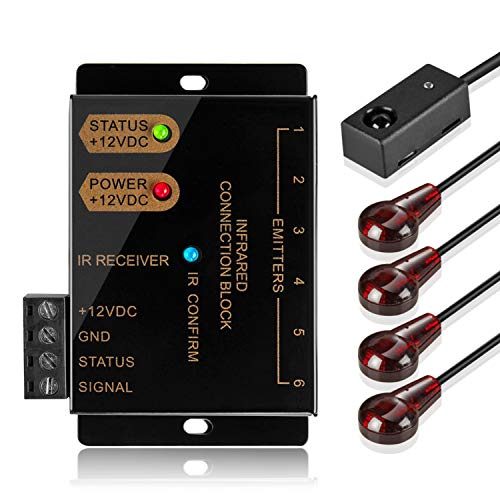
| Best for Home Theaters | Purpose: Allow remote control of A/V components hidden in cabinets/other rooms | Connector / Interface: 3.5 mm mini plug for receiver/emitter connections (distribution block) | IR Emitter(s): Supplied with 4 emitters (kit has 2 dual-head 10 ft emitters; supports up to 6 outputs, expandable) | VIEW LATEST PRICE | Read Our Analysis |
| TNP 10ft Dual-Head 3.5mm IR Extender Cable |

| Best for Flexibility | Purpose: Pass infrared remote commands to hidden devices as an IR emitter cable | Connector / Interface: 3.5 mm mono jack connector (male) | IR Emitter(s): Dual‑head IR emitter cable (two stick-on emitters), 10 ft | VIEW LATEST PRICE | Read Our Analysis |
| IR Remote Repeater Kit for Hidden A/V Devices |
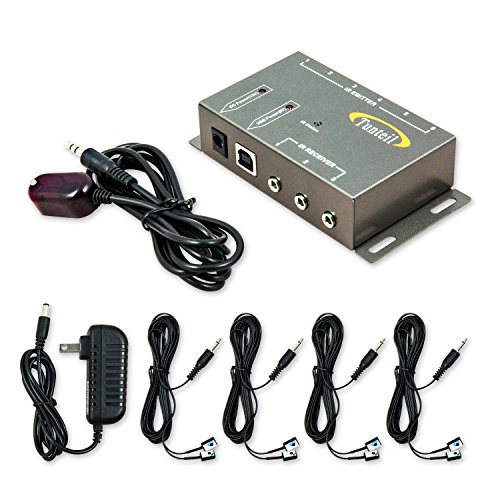
| Best for Expandability | Purpose: Enable control of hidden A/V components using existing IR remotes | Connector / Interface: 3.5 mm mini plug for emitters/receiver connections | IR Emitter(s): Four dual IR emitters (controls up to 8 devices), 10 ft emitter cords | VIEW LATEST PRICE | Read Our Analysis |
| Herfair 10FT IR Receiver Cable 3.5mm (2-Pack) |

| Best Budget Backup | Purpose: Extend remote control reach to A/V components via IR receiver/emitter cable | Connector / Interface: 3.5 mm jack plug (mini-plug) for IR connection | IR Emitter(s): Two emitter heads on a single plug (2‑pack), 10 ft receiver cable length | VIEW LATEST PRICE | Read Our Analysis |
More Details on Our Top Picks
SofaBaton R1 IR Remote Extender for X2
If you hide your gear in cabinets or run your SofaBaton X2 hub in another room, the R1 is your best choice: it receives RF from the X2 and rebroadcasts precise IR to devices via seven high‑power emitters (plus a 3 m blaster cable for exact aiming), so you’ll get reliable control through walls and complex setups. You pair the R1 to one X2 hub, sync via the SofaBaton app, then assign it as the IR emitter for devices. It offers 360° horizontal and upward coverage, strong RF penetration, on‑device IR code storage, and simple setup. Includes power adapter, cables, and manual. Model R1.
- Purpose:Extend IR control of hidden devices via RF-to-IR retransmission (for SofaBaton X2)
- Connector / Interface:USB-C power (USB-C to USB-A cable included) and built-in IR emitters; pairs via RF with SofaBaton hub
- IR Emitter(s):Seven internal high‑power IR emitters + 3 m single IR blaster cable included
- Frequency / IR Compatibility:Standard IR (requires SofaBaton app/code storage); designed for typical IR remote codes (no explicit kHz listed)
- Power / Supply:5 V DC via included 1.2 m USB‑C to USB‑A cable and 5V/1A adapter
- Intended Installation / Use Case:Pair with SofaBaton X2 hub, place near entertainment area or between rooms/cabinets to retransmit IR to hidden gear
- Additional Feature:360° internal emitters
- Additional Feature:App-required device assignment
- Additional Feature:Single-hub pairing only
TNP IR Repeater Extender Kit for Home Theater
For homeowners who hide AV gear in cabinets or another room but still want full remote control, the TNP IR Repeater Extender Kit gives you reliable, dual-frequency reach without changing your remotes. You get a self-contained system: distribution block, 10-ft dual-frequency receiver, two 10-ft dual IR emitter blasters (four emitters supplied), power adapter, screws and manual. It supports 38 kHz and 56 kHz remotes, a 1–40 ft receive range, and expandable outputs to control many components. Mount the receiver near your seating area, route the cable to hidden gear, position emitters over device IR windows, and use your existing remotes immediately.
- Purpose:Allow remote control of A/V components hidden in cabinets/other rooms
- Connector / Interface:3.5 mm mini plug for receiver/emitter connections (distribution block)
- IR Emitter(s):Supplied with 4 emitters (kit has 2 dual-head 10 ft emitters; supports up to 6 outputs, expandable)
- Frequency / IR Compatibility:Dual-frequency support: 38 kHz and 56 kHz
- Power / Supply:12 V DC, 200 mA AC power adapter included
- Intended Installation / Use Case:Mount receiver near entertainment area; distribution block inside cabinet; place emitters over device IR windows
- Additional Feature:Dual-frequency support
- Additional Feature:IR confirmation LED
- Additional Feature:Expandable to 12
TNP 10ft Dual-Head 3.5mm IR Extender Cable
Choose the TNP 10ft Dual-Head 3.5mm IR Extender Cable when you need a simple, low-profile way to send IR commands to hidden AV gear-its dual stick-on emitters and flexible 10 ft lead let you neatly route and aim signals at multiple devices inside cabinets or racks. You’ll plug the 3.5mm mono jack into an IR OUT/IN port and position the blink-eye emitters over device IR windows. It’s passive, working with 38–56 kHz systems, so range depends on your hub or repeater. Clean surfaces before sticking, reinforce with stronger tape if needed, and remember it won’t handle RF or Bluetooth remotes.
- Purpose:Pass infrared remote commands to hidden devices as an IR emitter cable
- Connector / Interface:3.5 mm mono jack connector (male)
- IR Emitter(s):Dual‑head IR emitter cable (two stick-on emitters), 10 ft
- Frequency / IR Compatibility:Passive transmitter compatible with 38–56 kHz systems
- Power / Supply:Passive (no power required); depends on drive strength of hub/repeater
- Intended Installation / Use Case:Plug into IR OUT/IN and stick emitters over device IR windows; route through cabinets/racks/walls
- Additional Feature:Stick-on blink-eyes
- Additional Feature:Passive (no power)
- Additional Feature:10 ft flexible lead
IR Remote Repeater Kit for Hidden A/V Devices
Home theater owners who hide components in cabinets or behind walls will appreciate that the IR Remote Control Repeater Extender Kit lets you operate up to eight devices with your existing remote without line‑of‑sight, and you can expand it to 12 devices with extra emitters. You plug the 5 ft receiver and four dual 10 ft emitters into the distribution block, tape emitters to each device’s IR window, and power the 12 V supply. It handles 36–58 kHz signals, suits most A/V gear (with listed exceptions), warns about plasma interference, and includes a lifetime warranty plus 24/7 support.
- Purpose:Enable control of hidden A/V components using existing IR remotes
- Connector / Interface:3.5 mm mini plug for emitters/receiver connections
- IR Emitter(s):Four dual IR emitters (controls up to 8 devices), 10 ft emitter cords
- Frequency / IR Compatibility:Receive/transmit range: ~36–58 kHz (listed 36 & 58 kHz)
- Power / Supply:12 V DC power supply (100–240 VAC input) included
- Intended Installation / Use Case:Mount receiver in room, plug emitters into distribution block, tape emitters to device IR windows; avoid receiver interference
- Additional Feature:Lifetime parts warranty
- Additional Feature:High receive sensitivity
- Additional Feature:Interference distance guideline
Herfair 10FT IR Receiver Cable 3.5mm (2-Pack)
If you need a simple, budget-friendly way to control multiple IR devices from one IR output, the Herfair 10FT IR Receiver Cable is a smart pick – it gives you two emitter heads on a single 3.5 mm plug so you can stick IR eyes to two devices and run them from one repeater. You’ll get two 10 ft cables (2-pack) with adhesive-backed emitter heads and about 4.92 ft between heads. It passes IR signals with repeater kits, connecting blocks, or home automation controllers to reach hidden A/V gear. Note it needs a device IR port and isn’t compatible with some Denon and Sony models.
- Purpose:Extend remote control reach to A/V components via IR receiver/emitter cable
- Connector / Interface:3.5 mm jack plug (mini-plug) for IR connection
- IR Emitter(s):Two emitter heads on a single plug (2‑pack), 10 ft receiver cable length
- Frequency / IR Compatibility:Compatible with standard IR remotes (typical 38/56 kHz systems implied; works with IR-controlled devices)
- Power / Supply:Passive receiver/emitter cable (uses repeater or IR port power); no separate power for the cable itself
- Intended Installation / Use Case:Plug into IR repeater/distribution block or IR port and stick emitters to device IR eyes to control A/V gear from other rooms
- Additional Feature:Dual-head two-pack
- Additional Feature:Adhesive backing included
- Additional Feature:4.92 ft between heads
Factors to Consider When Choosing IR Emitter Remote-Control Extenders
When choosing IR emitter extenders, you’ll want to check range and coverage to make sure signals reach every device in your setup. Compare emitter types, frequency compatibility, and hub/pairing limits so your system actually works together. Also consider installation flexibility-placement options and cable lengths can make or break a tidy, functional install.
Range And Coverage
Although the basic function of an IR emitter is simple, you’ll want to focus on range and coverage when choosing an extender because those factors determine whether every device responds reliably. Check emitter count and orientation: multiple emitters or a 360° array give broader coverage for several devices and different placements, while a single emitter targets one device precisely. Consider effective IR transmission distance: receivers commonly pick up signals from about 1 ft to 40 ft, and emitter effectiveness depends on proximity to device IR windows and drive strength. Verify cable length and placement flexibility-blaster leads are typically 3–10 ft to route inside cabinets or through walls. Account for directionality and mounting, and guarantee expandability to add emitters or cover extra rooms.
Emitter Types Available
Range and coverage influence which emitter type will work best for your setup, so next look at the actual emitter options and how they perform. Single-head emitters use one IR LED on a 3.5 mm connector, ideal when you need to aim precisely at one device’s IR window; they usually come in 3–10 ft lengths. Dual- or multi-head cables place two or more low-profile “blink-eye” emitters on one lead so you can control multiple devices from a single IR output. Passive emitters depend on your repeater’s drive strength, so range and reliability vary with controller power. Active distribution systems provide powered outputs (commonly 4–12) to amplify signals for longer runs. Flexible wired and specialty tape‑on or eye emitters let you route and align neatly inside cabinets.
Frequency Compatibility
Because IR systems rely on specific carrier frequencies, you should confirm your extender supports the same bands your remotes and devices use (commonly ~36–38 kHz and sometimes ~56–58 kHz). Check specifications for single- or dual-frequency support; dual-frequency units cover more remotes and set-top boxes. If the extender’s receive/transmit range is narrower than your remote’s carrier, commands can be unreliable or fail, especially with nonstandard carriers. When adding emitters, receivers, or extension cables, verify every component lists compatible bands to avoid attenuation or mismatch. Prefer extenders that advertise a span (for example, 36–58 kHz) that fully encompasses your devices’ carrier frequencies to guarantee consistent performance and minimize troubleshooting.
Hub And Pairing Limits
When pairing IR emitters, check how hubs and emitters interact-will a new hub overwrite previous pairings, can one emitter be assigned to multiple devices, and does the hub limit how many emitters it supports. Verify whether an emitter can pair with multiple hubs or if a new hub erases stored settings; that affects migration and redundancy. Confirm each emitter’s assignment rules in the app: single-device, multi-device, or hub-controlled groupings. Check the hub’s maximum emitter capacity and whether you must register or assign emitters individually after pairing. Understand if pairing is one-to-one or one-to-many, and whether re-pairing needs a reset or manual remapping. Finally, note pairing range and RF linking limits – does pairing require close proximity or can it be done remotely via the hub?
Installation Flexibility
Several practical installation factors will determine whether an IR extender fits your setup, so check cable length, blaster count, connector type, and mounting options before buying. You’ll want longer emitter leads (3–10 ft) and multiple blasters to route through cabinets and position emitters over several device IR windows. Confirm the connector type-most use a 3.5 mm mono/stereo mini‑plug-so it mates with your repeater or distribution block. Choose low‑profile, adhesive “blink‑eye” heads for neat placement inside racks and tight spaces. Check whether the system supplies both distributed emitters and a separate receiver with a long lead so the pickup can sit remote from gear. Finally, consider emitter directionality versus multi‑emitter 360° hubs based on device layout.
Power And Connectivity
Having picked emitter types, counts, and placements, you’ll next want to verify power and connectivity so the system actually performs. Check the extender’s voltage and amperage requirements and match them to your outlet or hub-common supplies run from 5 V/1 A to 12 V/200 mA-so emitters aren’t under‑driven. Favor a stable external DC adapter over USB when you’re driving multiple emitters, since USB ports often can’t supply enough current. Confirm connector types (3.5 mm mini/mono, USB‑C) and cable lengths to guarantee reliable routing through cabinets or walls. For multi‑emitter setups, verify the distribution block’s total output and whether you need a higher‑capacity supply to keep IR strength. Finally, account for wall penetration: RF‑to‑IR links need robust RF range and low‑loss runs; passive emitters benefit from shorter cable runs.


