

Big ink tanks, small headaches – you get reliable wired networking without constant cartridge swaps. If you care about low running costs, fast duplexing, and robust scanning for multitasking teams, these five Ethernet-ready inkjets deserve a look. They pair high-resolution output and generous paper capacity with centralized management and enterprise protocols, so you can cut TCO and keep workflows moving – here’s what to take into account next.
| Epson EcoTank ET-15000 Wireless Wide-Format Supertank Printer |

| Best for Wide-Format | Functions: Print, scan, copy, fax (all-in-one) | Ethernet Connectivity: Ethernet port included | Refillable Ink Tank System: Supersized refillable EcoTank tanks (cartridge-free) | VIEW LATEST PRICE | Read Our Analysis |
| HP Smart Tank 7301 Wireless All-in-One Ink Tank Printer |

| Best for Home Offices | Functions: Print, copy, scan (all-in-one, duplex) | Ethernet Connectivity: Ethernet (1 port) included | Refillable Ink Tank System: Refillable Smart Tank system (cartridge-free refill bottles) | VIEW LATEST PRICE | Read Our Analysis |
| Brother INKvestment Tank MFC-T980DW Wireless Color All-in-One |
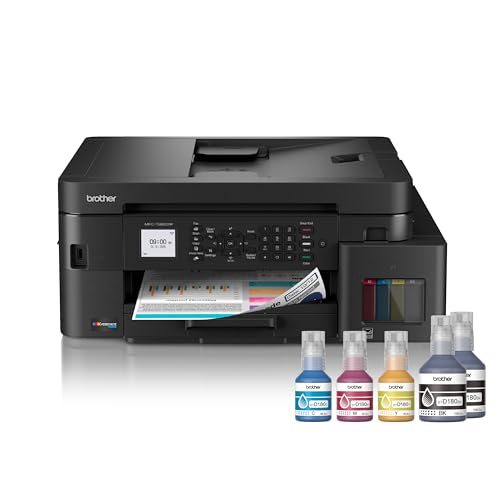
| Best for Small Business | Functions: Print, copy, scan, fax (all-in-one) | Ethernet Connectivity: Ethernet included | Refillable Ink Tank System: Refillable INKvestment tank with no‑spill bottles | VIEW LATEST PRICE | Read Our Analysis |
| HP Smart Tank 7602 Wireless All-in-One Ink Printer |
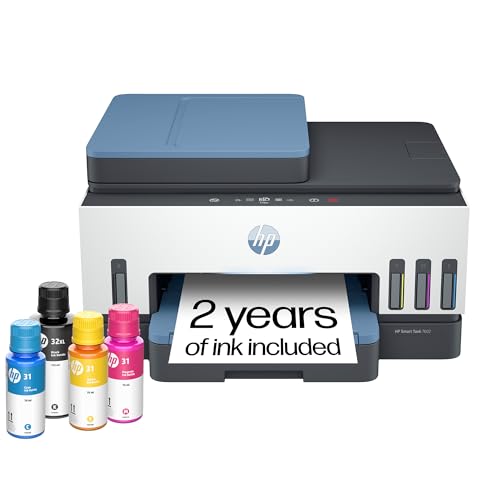
| Best for High Volume | Functions: Print, copy, scan (all-in-one) | Ethernet Connectivity: Ethernet (1 port) included | Refillable Ink Tank System: Cartridge-free Smart Tank refill system | VIEW LATEST PRICE | Read Our Analysis |
| Epson EcoTank ET-4800 Wireless All-in-One Supertank Printer |

| Best Compact Supertank | Functions: Print, scan, copy, fax (all-in-one) | Ethernet Connectivity: Ethernet included | Refillable Ink Tank System: EcoTank refillable ink tanks (cartridge-free) | VIEW LATEST PRICE | Read Our Analysis |
More Details on Our Top Picks
Epson EcoTank ET-15000 Wireless Wide-Format Supertank Printer
If you need a low‑cost, high‑volume color all‑in‑one that handles wide formats, the Epson EcoTank ET‑15000 is built for small offices, creatives, and home businesses that print lots of photos, posters, or multi‑page documents. You get printer, scanner, copier, and fax in a cartridge‑free design with supersized refillable tanks that support up to 13 x 19 inches (borderless to 11 x 17). It offers Ethernet, Wi‑Fi, Wi‑Fi Direct, a 2.7″ touchscreen, duplexing, a 250‑sheet tray, sheetfed ADF scanning to 8.5 x 14, and up to 4800 x 1200 dpi color.
- Functions:Print, scan, copy, fax (all-in-one)
- Ethernet Connectivity:Ethernet port included
- Refillable Ink Tank System:Supersized refillable EcoTank tanks (cartridge-free)
- Automatic Duplex Printing:Duplex automatic double-sided printing
- Wireless/Wi‑Fi Support:Wireless 802.11b/g/n; Wi‑Fi CERTIFIED; Wi‑Fi Direct (may require software)
- Target Use / Audience:Wide-format/home office or small business (supertank, up to 13×19)
- Additional Feature:13 x 19″ wide-format
- Additional Feature:2.7″ color touchscreen
- Additional Feature:High 4800 x 1200 dpi
HP Smart Tank 7301 Wireless All-in-One Ink Tank Printer
Choose the HP Smart Tank 7301 when you need low-cost, high-volume color printing with Ethernet reliability-it’s built for home offices that want cartridge-free refillable ink, automatic duplexing, and wired network access for multiple users. You’ll get print, copy, scan, ADF plus flatbed, and borderless photos up to Legal size, all in a compact 16.98 lb chassis. The refillable tanks include bottles giving up to 6,000 black or 8,000 color pages, and prints reach 4800 x 1200 dpi color. Connect via Ethernet, Wi‑Fi, USB, or the HP Smart app; enjoy AI formatting, firmware updates, and a 250-sheet input.
- Functions:Print, copy, scan (all-in-one, duplex)
- Ethernet Connectivity:Ethernet (1 port) included
- Refillable Ink Tank System:Refillable Smart Tank system (cartridge-free refill bottles)
- Automatic Duplex Printing:Automatic duplex (double-sided) printing
- Wireless/Wi‑Fi Support:Wireless + mobile printing (Wi‑Fi)
- Target Use / Audience:Home office / high-volume printing
- Additional Feature:Up to 2 years ink
- Additional Feature:AI web/email formatting
- Additional Feature:8.5 x 14″ legal max
Brother INKvestment Tank MFC-T980DW Wireless Color All-in-One
For small offices that need reliable, low-running-cost color printing over Ethernet, the Brother INKvestment Tank MFC-T980DW delivers-its refillable ink-tank system and wired networking make it ideal when you want sustained high-volume output with minimal cartridge waste. You’ll get print, copy, scan and fax in a 21.1 x 19.13 x 10.1-inch chassis with a 150-sheet main tray, 80-sheet multipurpose tray and 20-page ADF. Refillable Brother bottles cut waste and include up to three years of ink; keyed bottles avoid color swaps. Expect duplex printing, up to 17 ppm black/16.5 ppm color, mobile/cloud support and a three-year limited warranty.
- Functions:Print, copy, scan, fax (all-in-one)
- Ethernet Connectivity:Ethernet included
- Refillable Ink Tank System:Refillable INKvestment tank with no‑spill bottles
- Automatic Duplex Printing:Automatic duplex (two-sided) printing
- Wireless/Wi‑Fi Support:Wireless printing supported (mobile apps)
- Target Use / Audience:Small office / small business
- Additional Feature:150 + 80-sheet trays
- Additional Feature:20-page ADF (single-sided)
- Additional Feature:Quick no-spill refills
HP Smart Tank 7602 Wireless All-in-One Ink Printer
Looking for a reliable, low-cost workhorse for home or small-business printing? You’ll like the HP Smart Tank 7602: a cartridge-free, refillable ink tank all-in-one that prints, scans, and copies with duplex and borderless options. It includes high-yield inks that can last up to two years (≈6,000 black / ≈8,000 color pages) and a spill-resistant refill system. You’ll get mobile and Ethernet connectivity, Alexa support, ADF plus flatbed scanning, and AI-assisted formatting for cleaner web and email prints. With up to 4800 x 1200 dpi color and a 250-sheet capacity, it’s optimized for high-volume, low-cost office use.
- Functions:Print, copy, scan (all-in-one)
- Ethernet Connectivity:Ethernet (1 port) included
- Refillable Ink Tank System:Cartridge-free Smart Tank refill system
- Automatic Duplex Printing:Automatic duplex (dual-sided) printing
- Wireless/Wi‑Fi Support:Wireless + mobile printing (Wi‑Fi)
- Target Use / Audience:Home and small business / high-volume low-cost printing
- Additional Feature:Included printheads (dual)
- Additional Feature:256 MB memory
- Additional Feature:Up to 11 x 14″ media
Epson EcoTank ET-4800 Wireless All-in-One Supertank Printer
If you need a low-cost, low-waste printer that handles home or small-office tasks and offers Ethernet connectivity, the Epson EcoTank ET-4800 is a strong choice-its high-capacity refillable ink tanks and built-in ADF make it ideal for frequent duplex printing, scanning, copying and faxing without constant cartridge replacements. You’ll get cartridge-free printing with EcoFit bottles, a 100-sheet input, duplex auto, and legal-size support. The color display, voice and smart-home compatibility, plus Ethernet and USB ports, make setup flexible. Expect up to 5760 x 1440 dpi output, conservative power use, and notable savings over cartridges.
- Functions:Print, scan, copy, fax (all-in-one)
- Ethernet Connectivity:Ethernet included
- Refillable Ink Tank System:EcoTank refillable ink tanks (cartridge-free)
- Automatic Duplex Printing:Duplex auto (automatic two-sided printing)
- Wireless/Wi‑Fi Support:Wireless printing supported (voice/app features)
- Target Use / Audience:Home / office use
- Additional Feature:5760 x 1440 dpi
- Additional Feature:Compact 11 lb footprint
- Additional Feature:100-sheet input capacity
Factors to Consider When Choosing Ethernet Inkjet Printers
When you pick an Ethernet inkjet, start by checking network connectivity options and whether the printer supports your LAN setup and remote management. Compare print speed and throughput, paper handling capacity, and the ink system and yield to match your volume and media needs. Also verify security features and firmware update policies to keep your device protected and up to date.
Network Connectivity Options
Because your network determines how reliably and securely print jobs move between users and the device, choose an Ethernet inkjet that supports wired Gigabit (or at least 10/100 Mbps) for heavy or multi‑user loads, offers optional wireless for flexibility, and includes enterprise protocols (DHCP/static IP, IPv6, SNMP, LDAP/AD) plus strong network security and remote management features. You’ll want both Ethernet and wireless so you can prioritize wired speed and security while keeping wireless as fallback. Confirm support for DHCP, static addressing, IPv6, SNMP monitoring, and LDAP/Active Directory integration for authentication and seamless deployment. Check built‑in protections-WPA2/3, IP filtering, SSL/TLS, secure firmware updates, and user access controls-and guarantee robust remote management (web admin, SNMP, or cloud agents) for centralized monitoring and updates.
Print Speed And Throughput
Assess print speed and throughput carefully, since those metrics determine how quickly your office moves from job submission to finished pages. Compare ppm for black and color-inkjet ranges vary, so use stated text speeds (e.g., 10–17 ppm) and color ratings to estimate throughput. Factor in time-to-first-page; short warm-up and initial page-out times boost responsiveness for intermittent jobs. Check automatic duplex support and the speed penalty for two-sided printing, since duplex can roughly double sheet time depending on the mechanism. Don’t ignore tray capacities: input/output limits interact with speed, reducing intervention during sustained runs. For heavy workflows, prefer printers with ISO/IEC test speeds or clear manufacturer throughput notes, and treat marketing figures as optimistic rather than guaranteed.
Paper Handling Capacity
Several key paper-handling features determine how well an Ethernet inkjet fits your workflow, so check tray capacities, supported sizes, and specialty feeds before you buy. You’ll want to verify the maximum input tray capacity – single-tray models force frequent refills, while multi-tray designs support high-volume runs. Confirm supported paper sizes and maximum media size so the printer handles your routine sheets, from small photos to legal or ledger. Look for specialty or rear-feed trays and their capacity for heavy stock, envelopes, or wide media to reduce jams and preserve print quality. Check output tray capacity and automatic duplexing to cut manual handling and speed throughput. Finally, match ADF capacity and single- or double-sided scanning to expected scan/copy volumes.
Ink System And Yield
How will the printer’s ink system affect your running costs and reliability? You should compare refillable tank, cartridge, and integrated printhead tank designs: tank systems normally give much higher page yields and lower per‑page costs than single‑use cartridges. Check stated yield metrics (often ISO/IEC tests) and whether manufacturers quote per bottle/set or per cartridge so you can calculate realistic cost‑per‑page and replacement frequency. Note starter ink volumes versus replacement volumes-starters are usually smaller and can understate long‑term yield. Decide between dye and pigment inks: pigment black resists water and fading better for archival needs. Finally, evaluate maintenance ink use and waste from head cleaning or priming, since upkeep can measurably reduce effective printable pages.
Security And Firmware Updates
After you’ve compared ink systems and running costs, don’t overlook network security and firmware management-printers on Ethernet can be an attack vector if left unprotected. You should require secure wired features (WPA2/WPA3 for management interfaces, SNMPv3 or TLS for network traffic) and insist on digitally signed firmware with secure boot so tampered images can’t load. Verify the vendor issues regular firmware updates with clear release notes and set an update cadence (monthly or quarterly) to patch vulnerabilities. Configure admin access controls: change defaults, enforce strong passwords or centralized auth (LDAP/AD), and restrict management to trusted subnets or VPNs. Finally, enable syslog or SIEM integration and review logs for unusual activity like repeated logins or unexpected outbound connections.
Compatibility And Drivers
Wondering whether a printer will actually work in your environment? Verify the Ethernet interface supports standard TCP/IP printing protocols (LPR/LPD, IPP, SMB) so it joins wired networks and print servers without fuss. Confirm drivers exist for every OS and version you use-Windows, macOS, Linux, iOS/Android-and that manufacturers offer both full-featured drivers and basic PCL/PS or Gutenprint options. Check vendor policies for ongoing driver and firmware updates, including security patches and new OS compatibility. If you need scanning or multifunction features, make certain TWAIN, WIA, ICA, or SANE support plus ADF/duplex controls. For multiple devices, look for centralized deployment (MSI, MDM, print-server drivers) and remote management via SNMP or a Web UI to simplify administration.
Total Cost Of Ownership
Because sticker price only tells part of the story, you should evaluate total cost of ownership for Ethernet inkjet printers by combining upfront hardware costs with recurring expenses-ink (calculated as cost per ISO test page from yields and refill prices), paper and specialty media, electricity, maintenance and service, and the labor impact of speed and features-then project those costs over your expected ownership period (2–5 years) to get realistic cost-per-month and cost-per-page figures. Include hardware purchase, warranty extensions, replacement parts, and periodic servicing; maintenance can eclipse ink savings at high volumes. Calculate ink cost using pages-per-refill and refill price. Add paper, specialty media, and standby/active power use. Value productivity differences (speed, duplex, ADF) as labor time saved or lost for your monthly volume. Depreciate equipment and schedule refill/maintenance intervals to model true operating costs.




