

If you’re tired of tangled cords, overflowing bins, and mystery boxes, you’ll want a label maker that actually makes organizing painless. You’ll find compact, battery-ready options, pocketable Bluetooth thermal models, versatile multi-line machines, budget renewals, and tactile, inkless printers with rich icon sets. Pick the right one and labeling becomes surprisingly satisfying-keep going to see which fits your space and workflow best.
| DYMO LabelManager 160 Portable Label Maker Bundle |

| Compact & Reliable | Connectivity: Battery-powered standalone (no USB stated) | Portable Form Factor: Compact, handheld portable | Tape/Label Compatibility: DYMO D1 tapes (1/4″, 3/8″, 1/2″) | VIEW LATEST PRICE | Read Our Analysis |
| NIIMBOT D110 Mini Bluetooth Thermal Label Maker |
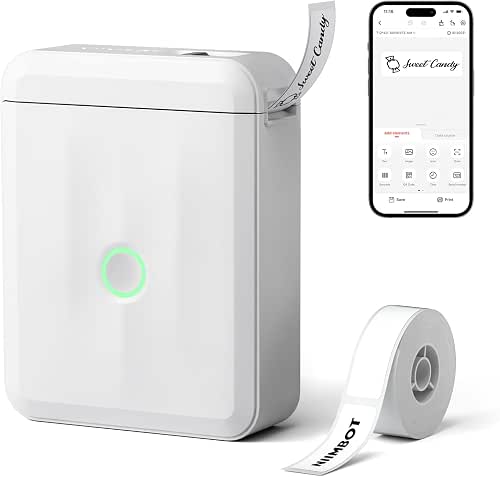
| App-Driven Portable | Connectivity: Bluetooth + USB-C | Portable Form Factor: Pocket-size, lightweight (149 g) | Tape/Label Compatibility: Roll label tapes (max ~15 mm; 12×40 mm, 14×30 mm, 15×30 mm) | VIEW LATEST PRICE | Read Our Analysis |
| Brother P-Touch PT-D410VP Home & Office Label Maker |
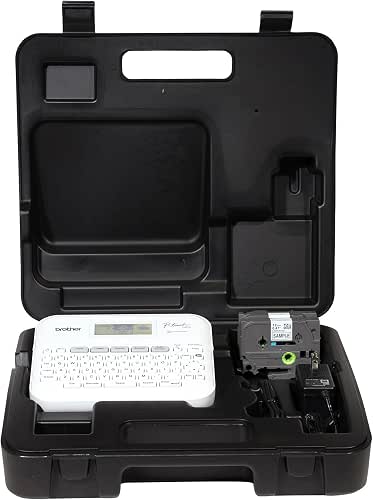
| Feature-Rich Workhorse | Connectivity: USB to PC/Mac | Portable Form Factor: Handheld with carrying case (home/office portable) | Tape/Label Compatibility: Brother TZe tapes (up to ~18 mm / 3/4″) | VIEW LATEST PRICE | Read Our Analysis |
| Brother P-Touch PT-D410 Label Maker (Renewed Premium) |

| Affordable Professional | Connectivity: USB to PC/Mac (renewed PT‑D410) | Portable Form Factor: Handheld (renewed unit) | Tape/Label Compatibility: Brother TZe tapes (up to ~18 mm / 3/4″) | VIEW LATEST PRICE | Read Our Analysis |
| SUPVAN E11 Bluetooth Rechargeable Inkless Label Maker |
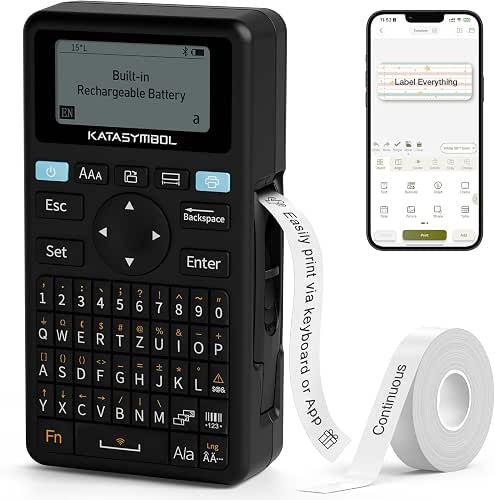
| Long-Lasting Wireless | Connectivity: Bluetooth + USB-C | Portable Form Factor: Handheld, pocket/desktop portable | Tape/Label Compatibility: Continuous and fixed labels (max 15 mm × 6 m; cable labels supported) | VIEW LATEST PRICE | Read Our Analysis |
More Details on Our Top Picks
DYMO LabelManager 160 Portable Label Maker Bundle
If you need a compact, easy-to-use label maker for on-the-go tasks, the DYMO LabelManager 160 bundle is a smart choice – it’s portable, has a QWERTY keyboard and large display for quick typing and reviewing, and includes three D1 cassettes (1/2″ black-on-white) so you can start labeling right away. You’ll appreciate one-touch smart keys, over 20 text formats and 200+ symbols for clear, professional labels. It supports 1/4″, 3/8″ and 1/2″ tapes in various colors, runs long on batteries with auto shutoff, and works best with authentic DYMO Label Tapes for consistent quality.
- Connectivity:Battery-powered standalone (no USB stated)
- Portable Form Factor:Compact, handheld portable
- Tape/Label Compatibility:DYMO D1 tapes (1/4″, 3/8″, 1/2″)
- Print Technology / Output:Thermal printing on adhesive tape (D1 labels)
- On-device Input or App Control:QWERTY keyboard on device (one-touch smart keys)
- Use Cases / Typical Applications:Home, office organization, file labeling
- Additional Feature:Large backlit display
- Additional Feature:One-touch smart keys
- Additional Feature:Extended battery life
NIIMBOT D110 Mini Bluetooth Thermal Label Maker
Choose the NIIMBOT D110 when you want a pocketable, app-driven label maker that prints clear 203 DPI thermal labels without ink or toner. You get the D110M, a lightweight 149 g device with a 1500 mAh battery, USB‑C charging, and one preinstalled 12×40 mm tape roll. Pair it via Bluetooth to the NIIMBOT app (iOS/Android) to access templates, fonts, icons, and automatic label recognition. It auto-calibrates first-label positioning and rewinds paper to save tape. With 64 MB memory and BPA‑free direct thermal printing, it’s ideal for home, office, small business, and on-the-go organization.
- Connectivity:Bluetooth + USB-C
- Portable Form Factor:Pocket-size, lightweight (149 g)
- Tape/Label Compatibility:Roll label tapes (max ~15 mm; 12×40 mm, 14×30 mm, 15×30 mm)
- Print Technology / Output:Direct thermal (inkless) 203 DPI, black-and-white
- On-device Input or App Control:App-driven via Bluetooth (smartphone control); no full on-device keyboard
- Use Cases / Typical Applications:Home storage, kitchen, office, cable/name tags, small business labels
- Additional Feature:First-label auto-calibration
- Additional Feature:Built-in 1500 mAh battery
- Additional Feature:Automatic label recognition
Brother P-Touch PT-D410VP Home & Office Label Maker
For home users and small-business owners who need fast, professional-looking labels, the Brother P-Touch PT-D410VP delivers: you’ll organize files, workspaces, supplies, and inventory quickly with a QWERTY keyboard and built-in design tools. Connect via USB to PC or Mac, choose from 30 preloaded templates, or craft custom labels using 15 fonts, 13 styles, seven sizes, 120 frames, and 700 symbols. It prints up to five text lines on Brother TZe tapes (18 mm) including security, cable, and premium designer options in many colors and finishes. The kit includes a carrying case so you can create and print on the go.
- Connectivity:USB to PC/Mac
- Portable Form Factor:Handheld with carrying case (home/office portable)
- Tape/Label Compatibility:Brother TZe tapes (up to ~18 mm / 3/4″)
- Print Technology / Output:Thermal transfer/label tape printing (Brother TZe)
- On-device Input or App Control:On-device QWERTY keyboard + PC software via USB
- Use Cases / Typical Applications:Home and small business organization (files, inventory, supplies)
- Additional Feature:30 preloaded templates
- Additional Feature:Includes carrying case
- Additional Feature:Fits five text lines
Brother P-Touch PT-D410 Label Maker (Renewed Premium)
Small businesses and busy households will appreciate the PT-D410’s easy USB connection and built-in design tools, which let you create polished labels from a PC or Mac in seconds. You’ll type on a QWERTY keyboard, use 30 templates, and tweak labels with 15 fonts, 13 styles, seven sizes, 120 frames, and 700 symbols. The PT-D410 prints up to five lines on Brother TZe tapes (18 mm), including security, cable, and premium designer varieties in multiple colors and finishes. Renewed Premium condition gives you reliable performance for files, workspaces, supplies, and inventory without paying full retail.
- Connectivity:USB to PC/Mac (renewed PT‑D410)
- Portable Form Factor:Handheld (renewed unit)
- Tape/Label Compatibility:Brother TZe tapes (up to ~18 mm / 3/4″)
- Print Technology / Output:Thermal transfer/label tape printing (Brother TZe)
- On-device Input or App Control:On-device QWERTY keyboard + PC software via USB
- Use Cases / Typical Applications:Home and small business organization (files, inventory, supplies)
- Additional Feature:Renewed premium condition
- Additional Feature:30 preloaded templates
- Additional Feature:Fits five text lines
SUPVAN E11 Bluetooth Rechargeable Inkless Label Maker
If you need fast, portable labeling with flexible design options, the SUPVAN E11 fits the bill – it pairs a tactile keyboard with a Bluetooth app that gives you 30+ fonts, 660+ icons, and local templates for on-the-go customization. You’ll switch between hand control and app design, then print inkless, black-and-white labels at 203 dpi up to 45 ppm. It supports continuous, fixed-size, and cable labels (max 15 mm x 6 m), uses USB-C charging and a rechargeable 1200 mAh battery plus one AA included, and ships with four white tapes. Compact (5.7 x 2.9 x 1.3 in), E11 is practical.
- Connectivity:Bluetooth + USB-C
- Portable Form Factor:Handheld, pocket/desktop portable
- Tape/Label Compatibility:Continuous and fixed labels (max 15 mm × 6 m; cable labels supported)
- Print Technology / Output:Direct thermal / inkless 203 DPI, black-and-white
- On-device Input or App Control:On-device keyboard + Bluetooth app control
- Use Cases / Typical Applications:Home organization, kitchen, pantry, garage, office, cable identification
- Additional Feature:Four continuous tapes included
- Additional Feature:1200 mAh rechargeable battery
- Additional Feature:660+ built-in icons
Factors to Consider When Choosing USB Label Makers
When choosing a USB label maker, consider how it connects and whether it’s compatible with your devices. Check print resolution and speed, tape types and sizes it accepts, and the features of its software or app. Also think about power options and portability so it fits how and where you’ll use it.
Connectivity And Compatibility
Because a label maker’s usefulness hinges on how it connects and communicates with your devices, check compatibility and interface options before you buy. Confirm the label maker supports your OS and device type-Windows, macOS, iOS, Android-since some units need USB drivers or companion apps. Check the physical interface (USB‑A, USB‑C, or Bluetooth via a USB hub) and make certain your computer has the matching port or that you have an adapter. Verify whether it accepts direct USB printing (mass‑storage or HID keyboard emulation) or requires proprietary software to design and send labels. Look for stated memory and file‑format support for templates, images, and fonts so your layouts and logos transfer correctly. Also confirm USB firmware update capability for future fixes and patches.
Print Resolution And Speed
After you confirm a label maker will talk to your computer via USB, turn your attention to print resolution and speed, since they directly shape output quality and job throughput. Print resolution (DPI) controls sharpness-203 DPI works for simple address or file labels; 300 DPI or higher suits tiny fonts, logos, and barcodes that must scan reliably. Higher DPI gives crisper output but can slow printing and use more tape for dense images. Print speed, listed in mm/sec, affects throughput: faster rates help batch jobs but may slightly soften detail at the same DPI. Prefer low-resolution/faster settings for bulk, everyday labels and high-resolution/slower modes for serialized barcodes or multi-line small text. Look for printers that let you tweak DPI, density, and speed per job.
Tape Type And Sizes
Tape cartridge choices and tape widths determine what labels you can make and how durable they’ll be, so check both before you buy. You’ll want tapes in common widths-about 6 mm (1/4″), 12 mm (1/2″), 15 mm (≈5/8″), up to 18 mm (3/4″)-so label height fits slots, shelves, and cables. Choose continuous roll tapes for custom lengths or pre-cut sizes for uniform tags; rolls cut waste when lengths vary. Match tape material and finish (paper, laminated plastic, heat-shrink, fabric, specialty adhesive) to water, UV, chemical, or industrial needs. Review available color combos and finishes (transparent, metallic, designer) for legibility and color-coding. Finally, confirm cartridge format and market availability to avoid costly proprietary-only supplies.
Software And App Features
Once you’ve picked the right tape types and sizes, check the label maker’s software and apps – they’ll largely determine how efficiently you design and print. Look for companion desktop or mobile apps with templates, fonts, symbols, border tools and logo import so you can maintain consistent branding. Prefer apps that connect via Bluetooth or USB and offer automatic label-size detection and first-label calibration to avoid misalignment and wasted tape. Make sure you can save custom templates, build local libraries, or import CSVs for batch printing of names, barcodes, and dates. Verify font families, sizes, multi-line support and icon libraries to match your style needs. Finally, prioritize stability, frequent updates, cross-platform support and a clean, user-friendly layout.
Power And Portability
Think about where and how you’ll use the label maker, because power and portability determine whether it fits your workflow. Check power source options: built-in rechargeable vs. removable AA/AAA, battery capacity (mAh) and whether you can recharge via USB-C or need spare cells. Match continuous printing time or standby runtime to your tasks-hours for mobile jobs, weeks for occasional home use. Evaluate size and total weight to guarantee pocketable or bag-friendly portability. Confirm charging compatibility (USB-C/USB-A) and portable power bank support, plus charging speed. Look for energy-saving features like auto power-off or sleep modes to extend runtime during intermittent use. These factors keep labeling efficient without unexpected downtime.
Durability And Build Quality
A rugged build keeps a label maker working through drops, field use, and long service cycles, so prioritize reinforced housings, impact‑resistant plastics, and rubber bumpers that absorb shocks. Inspect the USB connector and cable strain relief-metal‑reinforced ports and molded relief cut failures from repeated plugging. Look inside: heat‑dissipating designs and sturdy feed mechanisms, such as metal gears or reinforced rollers, reduce jams and wear. Check manufacturer duty cycles or rated lifespans for print heads and batteries to gauge real longevity (prints per day or hours of operation). Finally, prefer models with serviceable parts and available spares-replaceable print heads, modular batteries, and repair documentation extend usable life. Choosing these features keeps your label maker reliable and economical over time.


