

You need a laptop that actually keeps pace with your day, and these Intel Core i7 8th Gen machines do just that-fast quad‑core performance, roomy 16 GB options, and NVMe storage that cuts load times. They’re built for long battery life, crisp displays, and ports that won’t leave you hunting for adapters, so you’ll get more done with fewer interruptions. Keep going to see which model fits the way you work.
| Dell Latitude 7490 Business Laptop i7 16GB 512GB |

| Professional Workhorse | Processor: Intel Core i7-8650U | Display size: 14″ | Memory (RAM): 16 GB DDR4 | VIEW LATEST PRICE | Read Our Analysis |
| Dell Latitude 5400 14″ Laptop i7-8665U (Renewed) |

| Solid Everyday Performer | Processor: Intel Core i7-8665U | Display size: 14″ | Memory (RAM): 8 GB | VIEW LATEST PRICE | Read Our Analysis |
| Dell Latitude 7400 14″ Touchscreen Laptop i7 16GB |

| Productivity Touchscreen | Processor: Intel Core i7-8665U | Display size: 14.0″ | Memory (RAM): 16 GB DDR4 (2666 MHz) | VIEW LATEST PRICE | Read Our Analysis |
| Dell Latitude 7390 Touchscreen Laptop i7-8650U 16GB |
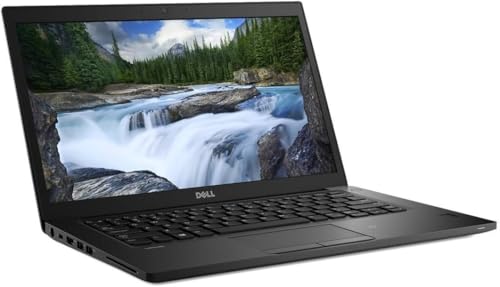
| Ultra-Portable Power | Processor: Intel Core i7-8650U | Display size: 13.3″ (compact but laptop class) | Memory (RAM): 16 GB DDR4 | VIEW LATEST PRICE | Read Our Analysis |
| Lenovo ThinkPad T490 14″ Touchscreen Laptop (Renewed) |

| Security-Focused Power | Processor: Intel Core i7-8665U | Display size: 14″ | Memory (RAM): 16 GB DDR4 | VIEW LATEST PRICE | Read Our Analysis |
More Details on Our Top Picks
Dell Latitude 7490 Business Laptop i7 16GB 512GB
If you need a durable, business-ready laptop for demanding multitasking and secure productivity on the go, the Dell Latitude 7490 with an Intel Core i7-8650U, 16 GB RAM, and 512 GB SSD is a smart choice – it packs quad-core performance and fast storage into a compact 14″ chassis so you can run heavy Office workloads, virtual meetings, and browser tabs without bottlenecks. You’ll get Windows 11 Pro preinstalled, solid 802.11ac wireless, HDMI and three USB 3.0 ports, and a built-in webcam. This Grade A renewed unit includes a power adapter, functional battery, and a 90-day refurbisher warranty.
- Processor:Intel Core i7-8650U
- Display size:14″
- Memory (RAM):16 GB DDR4
- Storage type & capacity:512 GB SSD
- Operating system:Windows 11 Pro
- Condition / Category:Renewed / Grade A refurbished
- Additional Feature:HDMI plus 3 USB 3.0
- Additional Feature:Functional battery included
- Additional Feature:90-day refurbisher warranty
Dell Latitude 5400 14″ Laptop i7-8665U (Renewed)
For professionals who need steady performance without the premium price, the renewed Dell Latitude 5400 with an Intel Core i7-8665U delivers responsive multitasking and long battery life in a compact 14-inch chassis. You get an 8th Gen dual-core i7 that boosts from 1.9 GHz to 4.8 GHz for snappy single-threaded tasks, paired with 8 GB of RAM and a 256 GB SSD for quick boot and app loads. The 1920×1080 non-touch display is crisp for spreadsheets and docs, while integrated graphics handle light media. Windows 10 Pro, webcam, Wi‑Fi, and Bluetooth round out this practical business laptop.
- Processor:Intel Core i7-8665U
- Display size:14″
- Memory (RAM):8 GB
- Storage type & capacity:256 GB SSD
- Operating system:Windows 10 Pro
- Condition / Category:Renewed
- Additional Feature:1920×1080 FHD display
- Additional Feature:Bluetooth and Wi‑Fi
- Additional Feature:Windows 10 Pro installed
Dell Latitude 7400 14″ Touchscreen Laptop i7 16GB
Business travelers who need a compact, responsive workhorse will appreciate the Dell Latitude 7400 with its 8th Gen Core i7 and 16 GB of RAM, which deliver snappy multitasking and long battery-friendly performance. You’ll get an i7-8665U quad-core CPU boosting to 4.80 GHz and an 8 MB cache, tuned for efficient 15 W operation. The 14-inch FHD touchscreen uses a Super Low Power LCD to extend unplugged time while keeping clarity. Storage is a 256 GB PCIe M.2 NVMe drive for fast boot and file access. Windows 11 and expandability via M.2 round out a polished business laptop.
- Processor:Intel Core i7-8665U
- Display size:14.0″
- Memory (RAM):16 GB DDR4 (2666 MHz)
- Storage type & capacity:256 GB PCIe NVMe M.2 SSD
- Operating system:Windows 11
- Condition / Category:(Listed as new model) Dell Latitude 7400 (implied renewed/business) – included in roundup
- Additional Feature:FHD AG touchscreen
- Additional Feature:PCIe M.2 NVMe SSD
- Additional Feature:Super Low Power LCD
Dell Latitude 7390 Touchscreen Laptop i7-8650U 16GB
The Dell Latitude 7390 Touchscreen pairs a compact 13.3-inch FHD touchscreen with an Intel Core i7-8650U and 16 GB of RAM, making it a great pick if you need a responsive, portable workhorse for frequent travel and client-facing tasks. You’ll get snappy multitasking and fast NVMe storage with the 512 GB SSD, while Intel UHD 620 handles everyday graphics. Windows 11 Pro and business-focused features suit professional workflows. Connectivity includes Wi‑Fi 6 (AX), Bluetooth 4.1, three USB 3.0 ports, USB‑C and HDMI. It’s lightweight at 3.2 pounds, gray, and offers roughly 6–10 hours of battery life.
- Processor:Intel Core i7-8650U
- Display size:13.3″ (compact but laptop class)
- Memory (RAM):16 GB DDR4
- Storage type & capacity:512 GB PCIe NVMe SSD
- Operating system:Windows 11 Pro
- Condition / Category:Renewed
- Additional Feature:13.3″ FHD touchscreen
- Additional Feature:USB-C plus HDMI
- Additional Feature:~6–10 hour battery life
Lenovo ThinkPad T490 14″ Touchscreen Laptop (Renewed)
If you need a durable, productivity-focused laptop that still handles demanding multitasking, the renewed Lenovo ThinkPad T490 with an Intel Core i7-8665U is a solid pick. You get a quad-core, eight-thread CPU with Turbo up to 4.8 GHz and 8 MB L3 cache, paired with 16 GB DDR4 and a 256 GB SSD for snappy performance. The 14″ FHD IPS touchscreen is crisp and anti-glare, while the backlit keyboard and fingerprint reader boost daily efficiency. Ports cover USB-A, dual USB-C (one Thunderbolt 3), HDMI, Ethernet, and microSD, and it ships with Windows 11 Pro.
- Processor:Intel Core i7-8665U
- Display size:14″
- Memory (RAM):16 GB DDR4
- Storage type & capacity:256 GB SSD
- Operating system:Windows 11 Pro (64-bit)
- Condition / Category:Renewed
- Additional Feature:Fingerprint reader built‑in
- Additional Feature:Thunderbolt 3 (USB‑C)
- Additional Feature:microSD card reader
Factors to Consider When Choosing Intel Core i7 8th Gen Laptops
When choosing an Intel Core i7 8th Gen laptop, you’ll want to balance raw performance and clock speeds with plenty of RAM and the fastest memory type you can afford. Check for SSD storage and NVMe options, a sharp high-resolution display, and battery life that matches your typical use. Those factors together determine real-world speed, responsiveness, and portability.
Performance And Clock Speeds
Consider clock speeds and sustained boost as two sides of the same coin: advertised base and Turbo frequencies (often ~1.9–2.2 GHz base with Turbo up to ~4.2–4.8 GHz on 8th Gen i7 mobile chips) tell you peak potential, but real-world performance depends on how long the CPU can hold those boosts under load. You should check sustained boost behavior on realistic workloads, since a short-lived Turbo offers little benefit for prolonged tasks. Remember core count matters: quad-core 8th Gen i7s excel in multithreaded jobs, while higher Turbo helps single-threaded apps. Compare benchmarked clock traces and thermal throttling results, and factor in laptop power profiles and cooling design-two laptops with the same i7 can run at very different effective clocks and consequently deliver different day-to-day performance.
Memory Capacity And Type
Memory capacity and RAM type are one of the quickest ways to affect daily responsiveness on an 8th‑Gen i7 laptop, so aim for 16 GB DDR4 (commonly 2400–2666 MHz) as a practical baseline; 8 GB will work for light use but you’ll hit swapping and sluggishness under heavier multitasking. Opt for dual‑channel configurations and the higher supported speeds you can get-2666 MHz over 2133 MHz gives noticeable gains in integrated‑GPU tasks and memory‑sensitive workloads. If you can’t upgrade storage, prioritize increasing RAM to reduce paging and perceived lag. Before buying, confirm whether the motherboard exposes SODIMM slots and supports up to 32 GB so you can add memory later without replacing the whole system.
Storage Type And Speed
Pick an NVMe PCIe M.2 drive if you want the fastest boot, app load, and file-transfer times-these drives typically deliver 1,500–3,500+ MB/s versus SATA SSDs’ ~500–600 MB/s and far outpace HDDs’ 80–160 MB/s. You’ll notice NVMe’s low latency and high random IOPS when multitasking or using small files. Choose larger capacities (512 GB or 1 TB) for heavy projects: they sustain better write performance and often last longer. Check the NVMe class and controller-PCIe Gen3 vs Gen4 affects peak throughput-and compare advertised random IOPS, not just sequential MB/s. Finally, confirm the laptop’s form-factor and interface: M.2 NVMe requires an M.2 slot and PCIe lanes, while 2.5″ SATA needs a bay and SATA connector for upgrades.
Display Quality And Resolution
Usually you’ll want at least a 1920×1080 (FHD) panel on 13–14″ Intel Core i7 8th Gen laptops to keep text sharp and give enough workspace. Avoid 1366×768 on these sizes – text and UI elements look noticeably softer. Pick IPS or another wide-viewing-angle panel so colors and contrast stay consistent when you tilt the screen; TN displays often suffer poor color and narrow angles. Aim for 300+ nits and an anti-glare or low-reflectivity coating if you work near windows or bright indoor light. If you do photo or video work, prioritize high sRGB coverage (ideally ≥95%) and low Delta E for accurate reproduction. Only choose a touchscreen if the interaction benefit outweighs added glare and slight color/brightness tradeoffs.
Battery Life And Efficiency
While the 8th‑Gen Core i7 U‑series gives you strong performance in thin-and-light designs, its 15 W TDP and Turbo Boost bursts mean battery life hinges on more than the CPU alone. You’ll get efficient baseline runtimes, but Turbo Boost spikes (sometimes near 4.8 GHz) cut autonomy if sustained. Check the display: higher resolution, touch layers, and brightness drain batteries fastest. Prefer modern low‑power panels and NVMe SSDs with efficient controllers; they extend real-world runtime compared with older HDDs or inefficient flash. RAM capacity and speed also affect draw under load. With smart firmware and OS power profiles, expect several to 10+ hours for light use; heavy CPU/GPU tasks can reduce that to a few hours, so match configuration to your workflow.
Port Selection And Expandability
When you size up an 8th‑Gen Core i7 laptop, check the port mix and upgrade paths to make sure it fits your workflow: a blend of USB‑A and USB‑C (ideally USB 3.x), a video output (HDMI/DisplayPort or USB‑C with Alt Mode/Thunderbolt), and card/Ethernet options cover most needs, while M.2 slots and accessible RAM determine how long the machine will stay useful. You’ll want at least three USB‑A ports plus one USB‑C for flexibility, plus HDMI or native DisplayPort to avoid adapters. An SD/microSD reader and an RJ‑45 jack help media transfers and reliable networking. Confirm at least one M.2 slot and whether RAM is soldered or removable. Thunderbolt or docking support simplifies multi‑display, charging, and desk setups.
Build Quality And Durability
Because you’ll be carrying and opening your laptop daily, pay close attention to chassis materials and structural details that affect real-world longevity. Check for magnesium alloy, aluminum, or reinforced polycarbonate and look for MIL‑STD‑810G or similar ratings to gauge drop, vibration, and temperature resistance. Test hinge design and stiffness-metal‑reinforced or dual‑hinge mechanisms cut screen wobble and failure risk. Inspect port reinforcement and bezel seams; metal‑reinforced USB/HDMI ports and tight seams mean fewer connector issues and less flex. Balance weight and thickness against listed rigid‑frame or stiffness specs, since thinness alone doesn’t guarantee fragility. Finally, verify battery accessibility and internal serviceability-user‑replaceable batteries, accessible screws, and modular components extend usable life and simplify repairs.




