

When you swap between a conference-room projector, a home office, and a client site and still finish a full data‑model before lunch, you need a laptop that keeps pace. You’ll want cores and battery life that don’t force compromises, port options that suit every setup, and security that protects sensitive work. Below are five Latitude models that strike that balance-keep going to find which one fits your workload and travel needs.
| Dell Latitude 5550 Business Laptop – 15.6″ FHD 32GB |
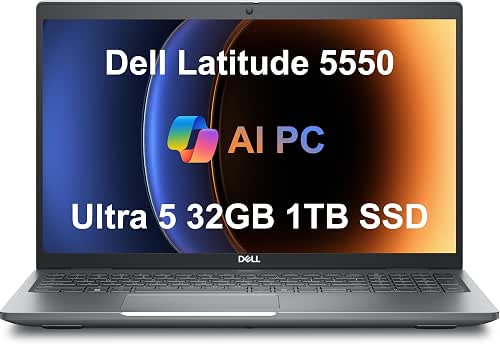
| Power Professional | Processor: Intel Core Ultra 5 125U (12 cores) | RAM: 32 GB DDR5 4800 MHz | Display size & type: 15.6″ FHD IPS anti-glare | VIEW LATEST PRICE | Read Our Analysis |
| Dell Latitude 5540 Business Laptop i5-1345U 32GB |

| Lightweight Performer | Processor: Intel Core i5-1345U (10 cores, vPro) | RAM: 32 GB DDR4 | Display size & type: 15.6″ FHD IPS anti-glare (250 nits) | VIEW LATEST PRICE | Read Our Analysis |
| Dell Latitude 7430 14″ Laptop i7-1265U 32GB |

| Compact Powerhouse | Processor: Intel Core i7-1265U (12th Gen, 10 cores) | RAM: 32 GB | Display size & type: 14″ FHD (1920×1080) multi-touch, 300 nits | VIEW LATEST PRICE | Read Our Analysis |
| Dell Latitude 5520 15.6″ Touch i7 Business Laptop |

| Touchscreen Workhorse | Processor: Intel Core i7-1185G7 (11th Gen, quad-core) | RAM: 32 GB DDR4 | Display size & type: 15.6″ FHD (1920×1080) IPS touchscreen | VIEW LATEST PRICE | Read Our Analysis |
| Dell Latitude 5450 Business Laptop – 14″ FHD 32GB |
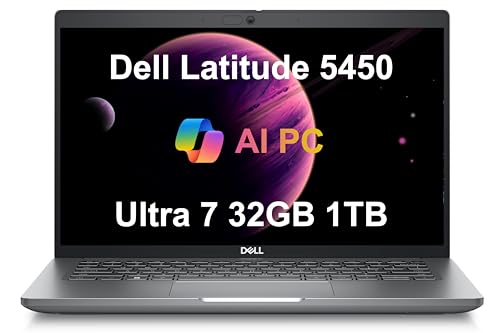
| Mobile Multitasker | Processor: Intel Core Ultra 7 155U (12 cores) | RAM: 32 GB DDR5 4800 MHz | Display size & type: 14″ FHD IPS anti-glare | VIEW LATEST PRICE | Read Our Analysis |
More Details on Our Top Picks
Dell Latitude 5550 Business Laptop – 15.6″ FHD 32GB
If you need a powerful, portable workhorse for multitasking and travel, the Latitude 5550 is a smart pick – its Intel Core Ultra 5 with 12 cores and 32 GB of DDR5 RAM keeps heavy spreadsheets, virtual meetings, and multiple apps responsive, while the slim 15.6″ FHD chassis and up to 11-hour battery life let you stay productive on the go. You get dual 512 GB NVMe SSDs for speed and separation of system and storage, Thunderbolt 4 and HDMI 2.1 for dual 4K displays, Wi‑Fi 6E, backlit keyboard, FHD HDR webcam with shutter, and a resealed unit warranty.
- Processor:Intel Core Ultra 5 125U (12 cores)
- RAM:32 GB DDR5 4800 MHz
- Display size & type:15.6″ FHD IPS anti-glare
- Storage configuration:Dual M.2 PCIe NVMe SSDs – 2 × 512 GB
- Connectivity (Thunderbolt / USB‑C):2 × Thunderbolt 4
- Operating System:Windows 11 Professional 64-bit (with AI Copilot)
- Additional Feature:FHD HDR webcam shutter
- Additional Feature:Dual M.2 NVMe drives
- Additional Feature:11‑hour battery life
Dell Latitude 5540 Business Laptop i5-1345U 32GB
Choose the Dell Latitude 5540 if you need a durable, portable workhorse that balances professional-grade performance with long battery life. You’ll get a premium, minimalist 15.6″ FHD IPS laptop weighing 3.56 lbs that meets MIL-STD 810H and runs up to 11 hours with Express Charge. The 10-core i5-1345U vPro, 32GB DDR4, and dual 512GB NVMe drives keep multitasking and file management fluid. Thunderbolt 4, HDMI 2.0, Ethernet, Wi‑Fi 6E, and 1080p webcam cover connectivity and conferencing. Windows 11 Pro with Copilot and a multi-year warranty make it ideal for professionals and students.
- Processor:Intel Core i5-1345U (10 cores, vPro)
- RAM:32 GB DDR4
- Display size & type:15.6″ FHD IPS anti-glare (250 nits)
- Storage configuration:Dual M.2 PCIe NVMe SSDs – 2 × 512 GB
- Connectivity (Thunderbolt / USB‑C):2 × Thunderbolt 4 (PD & DisplayPort)
- Operating System:Windows 11 Pro 64-bit (with AI Copilot)
- Additional Feature:MIL‑STD 810H durability
- Additional Feature:Lighter 3.56 lb weight
- Additional Feature:One USB PowerShare port
Dell Latitude 7430 14″ Laptop i7-1265U 32GB
Work fast and stay secure with the Latitude 7430 – it’s ideal for business users who need a compact, powerful laptop with enterprise-grade features. You’ll get a certified refurbished 2023 model running Windows 11 Pro, powered by an Intel 12th Gen i7-1265U (10 cores, up to 4.8 GHz) and 32 GB RAM, so multitasking feels effortless. Storage is a 512 GB PCIe M.2 SSD and the 14″ FHD touch display (300 nits) stays clear with anti-glare and a carbon fiber lid. Security includes FHD IR camera with shutter, ExpressSign-In, and Intelligent Privacy. Thunderbolt 4, Wi‑Fi 6E, HDMI, backlit keyboard complete the package.
- Processor:Intel Core i7-1265U (12th Gen, 10 cores)
- RAM:32 GB
- Display size & type:14″ FHD (1920×1080) multi-touch, 300 nits
- Storage configuration:512 GB PCIe M.2 SSD
- Connectivity (Thunderbolt / USB‑C):2 × USB-C Thunderbolt 4.0 (PD, DisplayPort 1.4)
- Operating System:Windows 11 Pro
- Additional Feature:14″ multi‑touch display
- Additional Feature:FHD IR camera with shutter
- Additional Feature:Carbon fiber lid
Dell Latitude 5520 15.6″ Touch i7 Business Laptop
For professionals who need powerful performance and a responsive touchscreen in a durable business body, the Dell Latitude 5520 delivers with an 11th Gen Intel Core i7, 32GB RAM, and a 15.6″ FHD touch display so you can run demanding apps and navigate workflows smoothly. Refurbished Grade A, it runs Windows 11 Pro and includes an AC adapter. The i7-1185G7 (3.0–4.8GHz) handles complex tasks while 1TB NVMe storage boots fast and keeps files accessible. HD+IR camera with mic offers secure Windows Hello sign-in. Thunderbolt 4, USB 3.2, HDMI, card reader, and Ethernet give versatile connectivity for any office setup.
- Processor:Intel Core i7-1185G7 (11th Gen, quad-core)
- RAM:32 GB DDR4
- Display size & type:15.6″ FHD (1920×1080) IPS touchscreen
- Storage configuration:1 TB NVMe M.2 SSD
- Connectivity (Thunderbolt / USB‑C):2 × USB Type-C / Thunderbolt 4 (PD & DisplayPort)
- Operating System:Windows 11 Pro
- Additional Feature:15.6″ touchscreen display
- Additional Feature:1TB NVMe storage
- Additional Feature:HD + IR camera bezel
Dell Latitude 5450 Business Laptop – 14″ FHD 32GB
If you need a durable, productivity-focused laptop that handles heavy multitasking, the Dell Latitude 5450 – with an Intel Core Ultra 7 155U and 32GB of DDR5 RAM – delivers the performance and responsiveness professionals and students expect. You get a 14″ FHD IPS anti-glare display, integrated Intel graphics, and an FHD webcam with privacy shutter for crisp video calls. A 1TB PCIe NVMe SSD and Thunderbolt 4 ports speed workflows and support up to three external 4K monitors. Wi‑Fi 6E, Ethernet, backlit keyboard, Windows 11 Pro with Copilot, and dual warranties make it a reliable, versatile choice.
- Processor:Intel Core Ultra 7 155U (12 cores)
- RAM:32 GB DDR5 4800 MHz
- Display size & type:14″ FHD IPS anti-glare
- Storage configuration:1 TB PCIe NVMe SSD
- Connectivity (Thunderbolt / USB‑C):2 × Thunderbolt 4 (PD & DisplayPort)
- Operating System:Windows 11 Professional 64-bit (with AI Copilot)
- Additional Feature:Intel Ultra 7 155U
- Additional Feature:1TB PCIe NVMe SSD
- Additional Feature:Supports three external monitors
Factors to Consider When Choosing Latitude Laptops
When choosing a Latitude, you’ll want to match performance and processor options to the work you’ll do. Consider memory and storage, display size versus portability, available ports and connectivity, and how battery life and durability fit your travel or office needs. I’ll walk through each of these points so you can pick the right configuration.
Performance And Processors
Pick a processor that matches how you actually work: heavier multitasking, virtualization, and content creation benefit from modern 8–12‑core chips, while basic office and web tasks run fine on 4–6 cores. Choose recent‑generation CPUs for better single‑thread performance, power efficiency, and stronger integrated graphics. Match TDP and performance modes to your needs-high‑TDP parts sustain workloads, low‑power variants extend battery life. Check for hardware features you’ll use: AI accelerators speed inference, vPro supports enterprise manageability, and integrated Thunderbolt/PCIe enables fast peripherals. Finally, avoid imbalanced configurations: a modern multi‑core processor performs poorly if paired with insufficient RAM or slow storage. Aim for CPUs that complement your workflow and peripherals to get predictable, sustained performance.
Memory And Storage
Balance memory and storage to match how you work: aim for 16GB for standard office use and 32GB+ if you run heavy multitasking, VMs, large datasets, or media editing. Choose DDR5 when available for higher bandwidth, but confirm your Latitude’s CPU/motherboard support and supported speeds (for example, 4800 MHz). For storage, pick NVMe PCIe M.2 SSDs for much faster boot and app load times than SATA; plan at least 512GB for OS and apps, 1TB+ for large media or datasets. Prefer a dual-drive setup-separate system and data NVMe drives-or a single large NVMe, and make certain there are enough M.2 slots for expansion. Finally, check warranty and serviceability: confirm whether RAM/SSDs are soldered or user-replaceable to allow future upgrades and easier backups.
Display And Portability
Consider how screen size, weight, and battery life will shape your daily use: 14″ and 15.6″ displays hit a good compromise between readability and portability, with 14″ models usually lighter for frequent travel; prefer FHD IPS panels for sharp text and wide viewing angles, and decide between anti‑glare or touchscreen based on lighting and input needs (touch adds a bit of weight and can cut battery time). Balance chassis thickness and battery capacity-slimmer, lighter models may sacrifice cells, though efficient components can still reach roughly 10–11 hours. Prioritize panel type and resolution for long work sessions, and choose anti‑glare in bright environments. If you dock to multiple external monitors, plan for adapters but don’t let docking needs dictate your everyday carry.
Connectivity And Ports
Don’t underestimate how ports shape your workflow: the right mix of USB-C/Thunderbolt, USB-A, and video outputs means you can plug into docks, fast storage, and multiple external displays without juggling adapters. You should prioritize at least one Thunderbolt (40 Gbps) USB‑C port for high-bandwidth displays, fast external SSDs, and power delivery. Seek a dedicated HDMI (preferably 2.0/2.1) or multiple video outputs to run 4K@60Hz monitors natively. Make sure the machine also offers USB‑A (USB 3.2 Gen 1 or higher) so legacy peripherals stay connected alongside modern devices. Check for RJ‑45 Ethernet and Wi‑Fi 6E for reliable networking, plus handy I/O like a headphone/mic jack, SD card slot, and docking/power delivery support for seamless workstation use.
Battery Life And Durability
When you pick a Latitude, battery life and durability determine whether it keeps up with travel, meetings, and daily wear – so prioritize advertised runtimes and fast‑charge features (about 11 hours and Express Charge where available) and look for higher capacity batteries (roughly 50–60 WHr or more). You should also favor low‑TDP CPUs and efficient RAM generations to reduce drain; processor architecture and memory type noticeably affect real‑world endurance. Check chassis certifications and MIL‑STD testing for drops, vibration, and temperature to judge long‑term resilience, and inspect reinforced materials around hinges and ports. Evaluate cooling and port layout too: efficient vents and heat pipes prevent thermal throttling and stress that shorten component and battery life. These choices keep a Latitude reliable on the road.




