

Remember the laptop that handled a week of video edits, light gaming, and marathon spreadsheets without breaking a sweat? You’ll find that kind of steady power across Dell’s top XPS models, from ultraportable AI‑enabled 13‑inch machines to 14.5‑inch OLED creatives and a 15‑inch pro workhorse. If you want a system that balances battery life, on‑device AI, and real GPU muscle, keep going – the right XPS might be closer to your workflow than you think.
| Dell XPS 13 9350 AI Business Laptop (16GB 512GB) |
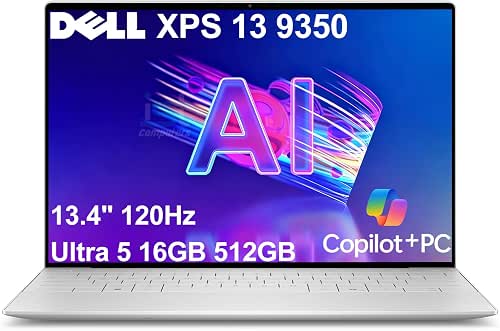
| Commuter Powerhouse | Display Size: 13.4″ | Resolution / Panel Type: WUXGA (1920 × 1200) IPS, 120 Hz | RAM: 16 GB DDR5 | VIEW LATEST PRICE | Read Our Analysis |
| Dell XPS 15 9530 Business Laptop (i7 32GB 1TB) |

| Performance Workhorse | Display Size: 15.6″ | Resolution / Panel Type: FHD+ (1920 × 1200) IPS, 60 Hz | RAM: 32 GB DDR5 | VIEW LATEST PRICE | Read Our Analysis |
| Dell XPS 14.5 Touch OLED Professional Laptop (32GB,1TB) |

| Creative Powerhouse | Display Size: 14.5″ | Resolution / Panel Type: OLED 3.2K (3200 × 2000) Touch, 120 Hz | RAM: 32 GB LPDDR5X (onboard) | VIEW LATEST PRICE | Read Our Analysis |
| Dell XPS 13 9345 Copilot+ AI Laptop (13.4″) |

| Long‑Battery Ultraportable | Display Size: 13.4″ | Resolution / Panel Type: FHD+ (1920 × 1200) Non-touch, 30–120 Hz | RAM: 16 GB LPDDR5x | VIEW LATEST PRICE | Read Our Analysis |
| Dell XPS 14.5″ OLED Laptop (Intel RTX 4050) |

| Gaming & Creator | Display Size: 14.5″ | Resolution / Panel Type: OLED 3.2K (3200 × 2000) Touch, 120 Hz | RAM: 16 GB LPDDR5X (onboard) | VIEW LATEST PRICE | Read Our Analysis |
More Details on Our Top Picks
Dell XPS 13 9350 AI Business Laptop (16GB 512GB)
If you travel for work or juggle meetings across time zones, the Dell XPS 13 9350 delivers the portability and on-device AI you need: at just 2.7 lbs with a thin, durable chassis, it pairs an Intel Core Ultra 5 CPU and a 40-TOPS NPU for fast local AI tasks, 16GB DDR5 memory, and a resealed 512GB SSD-so you can run Copilot+ features, real-time captions, and multitask without relying on cloud services. You’ll get a 13.4″ WUXGA 120Hz display, 1080p webcam, Thunderbolt 4, Wi‑Fi 7, and Windows 11 Pro. It’s tuned for productivity, commuting, and secure business use.
- Display Size:13.4″
- Resolution / Panel Type:WUXGA (1920 × 1200) IPS, 120 Hz
- RAM:16 GB DDR5
- Storage Capacity:512 GB SSD
- Operating System:Windows 11 Pro (64-bit)
- Security / Biometric Login:Fingerprint reader
- Additional Feature:Dedicated 40 TOPS NPU
- Additional Feature:120 Hz variable refresh
- Additional Feature:Wi‑Fi 7 support
Dell XPS 15 9530 Business Laptop (i7 32GB 1TB)
Choose the Dell XPS 15 9530 if you need a powerful, portable workhorse that balances a 13th Gen Intel Core i7, 32 GB DDR5, and a 1 TB NVMe SSD for demanding business tasks and multitasking. You’ll get 10 cores and 16 threads with up to 4.9 GHz turbo, plus Intel Iris Xe for light graphics work. The 15.6″ FHD+ 16:10 InfinityEdge panel hits 500 nits and 100% sRGB for accurate, bright visuals. Connectivity includes dual Thunderbolt 4, USB-C, SD reader, Wi‑Fi 6, and Bluetooth 5.3. Extras: backlit keyboard, fingerprint reader, Windows 11 Pro, and solid warranties.
- Display Size:15.6″
- Resolution / Panel Type:FHD+ (1920 × 1200) IPS, 60 Hz
- RAM:32 GB DDR5
- Storage Capacity:1 TB SSD
- Operating System:Windows 11 Pro (64-bit)
- Security / Biometric Login:Fingerprint reader
- Additional Feature:32 GB DDR5 4800 MHz
- Additional Feature:500 nits brightness
- Additional Feature:SD card reader
Dell XPS 14.5 Touch OLED Professional Laptop (32GB,1TB)
The XPS 14.5 Touch OLED is the right pick for professionals who need a powerhouse ultraportable-its 15th Gen Intel Core Ultra 7 CPU, Intel Arc graphics, 32 GB LPDDR5X memory and 1 TB NVMe SSD deliver sustained performance for creative work, multitasking, and AI-accelerated productivity. You’ll appreciate the 14.5″ 3.2K OLED touchscreen at 120 Hz for vivid color and smooth responsiveness, plus Intel Arc for GPU-accelerated tasks. The sleek Platinum chassis runs quietly with optimized power management; connectivity includes Wi‑Fi 7, Bluetooth 5.4, and two Thunderbolt 4 ports. Upgraded RAM/SSD enjoy a 3-year warranty from Great Price Tech.
- Display Size:14.5″
- Resolution / Panel Type:OLED 3.2K (3200 × 2000) Touch, 120 Hz
- RAM:32 GB LPDDR5X (onboard)
- Storage Capacity:1 TB SSD
- Operating System:Windows 11 Pro (64-bit)
- Security / Biometric Login:Fingerprint reader
- Additional Feature:3.2K OLED touchscreen
- Additional Feature:60 WHr battery
- Additional Feature:2 × Thunderbolt 4
Dell XPS 13 9345 Copilot+ AI Laptop (13.4″)
Want a portable Windows laptop that handles AI tasks on-device? You’ll like the Dell XPS 13 9345 Copilot+ AI: Snapdragon X Elite SoC with a 12-core CPU, NPU up to 45 TOPS, and Windows 11 Pro with Copilot for responsive, secure on-device AI. It has 16 GB LPDDR5x, a 1 TB upgraded PCIe NVMe SSD, and an Adreno integrated GPU, plus two USB4 Type-C ports driving up to two 4K external displays. The 13.4″ FHD+ 120 Hz InfinityEdge screen, 1080p IR webcam, fingerprint reader, Wi‑Fi 7, and up to 27-hour battery life make it ideal for professionals.
- Display Size:13.4″
- Resolution / Panel Type:FHD+ (1920 × 1200) Non-touch, 30–120 Hz
- RAM:16 GB LPDDR5x
- Storage Capacity:1 TB SSD
- Operating System:Windows 11 Pro (64-bit)
- Security / Biometric Login:Fingerprint reader (and IR webcam for face)
- Additional Feature:Snapdragon X Elite SoC
- Additional Feature:Up to 45 TOPS NPU
- Additional Feature:27‑hour battery claim
Dell XPS 14.5″ OLED Laptop (Intel RTX 4050)
If you need a compact creator’s powerhouse, the XPS 14.5″ OLED delivers-with a vivid 3.2K 120 Hz touchscreen, Intel Ultra 7-165H and RTX 4050 graphics that handle photo, video and light 3D work without breaking a sweat. You get 16GB LPDDR5X and a 1TB PCIe NVMe SSD for speedy multitasking and storage. Three Thunderbolt 4 ports, Wi‑Fi 6E, Bluetooth 5.3 and an SD reader keep your workflow flexible. The backlit keyboard, fingerprint reader and webcam cover daily needs, while a 70WHr battery and 100W charger balance mobility and power. Windows 11 Pro rounds it out.
- Display Size:14.5″
- Resolution / Panel Type:OLED 3.2K (3200 × 2000) Touch, 120 Hz
- RAM:16 GB LPDDR5X (onboard)
- Storage Capacity:1 TB SSD
- Operating System:Windows 11 Pro (64-bit)
- Security / Biometric Login:Fingerprint reader
- Additional Feature:NVIDIA RTX 4050 GPU
- Additional Feature:3 × Thunderbolt 4
- Additional Feature:100 W power supply
Factors to Consider When Choosing XPS Laptops
When choosing an XPS, think about performance and AI features first so your workflow and apps run smoothly. Check display quality and touch responsiveness, then weigh portability, build, battery life and charging to match how you’ll use it. Finally, confirm the ports and connectivity you’ll need for peripherals and fast transfers.
Performance And AI Capabilities
Prioritize raw compute and efficient hardware that match the AI and performance tasks you plan to run: check CPU cores and boost clocks (up to ~16 cores and 4.5–5.1 GHz for heavy multithreaded and single‑thread work), look for dedicated NPUs rated in tens of TOPS for fast on‑device inference, and choose 16–32+ GB of high‑speed LPDDR5/5X RAM with a PCIe NVMe SSD (512 GB–1 TB) to avoid memory and storage bottlenecks. Evaluate GPU options-integrated GPUs handle productivity and light AI, while discrete GPUs or stronger integrated accelerators speed up training, creative work, and GPU‑accelerated inference. Confirm platform AI support (frameworks, hardware acceleration, OS assistant integration). Finally, check thermal design and power delivery to sustain peak performance without throttling during prolonged AI workloads.
Display Quality And Touch
How will you use your XPS display-for color‑critical photo and video editing, smooth motion in creative apps, or long stretches of web and document work? Choose OLED or a high‑resolution 3.2K (3200×2000) panel for deep blacks and wide gamut when color fidelity matters; pick FHD+ (1920×1200) to save battery for general productivity. Consider refresh rate: 120 Hz smooths scrolling and motion, 60 Hz conserves power. Check brightness and HDR (400–500+nits) for outdoor use and better HDR rendering, plus low‑blue‑light options to reduce eye strain. Decide on touch and stylus support for annotation and direct input, knowing touch increases reflectivity and power draw. Verify color coverage (sRGB 100% or wider) and factory calibration if you need accurate color out of the box.
Portability And Build
Mobility needs should drive your choice of XPS chassis: pick an ultralight 2.5–3.0 lb model if you commute daily, or accept a bit more weight for larger batteries and extra ports. Match weight and thickness to how often you travel; ultralight designs still use durable metal or composite builds so you won’t compromise rigidity. Favor aluminum, magnesium alloy, or carbon fiber for drop resistance without bulk. Pay attention to screen size and bezel design-thin bezels let you get a bigger display in a smaller footprint, which helps when you’re on the move. Finally, inspect port selection and placement (USB-C/Thunderbolt, SD card reader, headset jack) so you don’t end up carrying adapters that defeat portability.
Battery Life And Charging
Along with build and weight, battery life and charging behavior shape how useful an XPS will be on the move, so you should weigh cell capacity, display and processor efficiency, and charging speed when choosing a model. Check reported capacity (Wh) and real-world claims-larger cells (60–70 Wh) typically give longer runtime for browsing and office work. Match the display and CPU to your needs: high‑refresh OLEDs and powerful CPUs/GPUs drain faster than lower‑res, efficient SoCs. Evaluate charging: higher‑watt USB‑C/PD support (60–100 W) tops up much quicker between meetings or flights. Prefer features that stretch runtime-adaptive refresh, low‑power display modes, and power profiles that throttle performance. Compare claimed hours to your workload; conferencing, heavy multitasking, and local AI cut battery life markedly.
Ports And Connectivity
Thinking about ports and connectivity lets you avoid dongles and bottlenecks when you plug in displays, storage, or docking stations. Check high-bandwidth ports-Thunderbolt/USB4 40 Gbps vs USB‑C 10–20 Gbps-to drive multiple high‑res displays and fast external SSDs. Verify each port’s display output: DisplayPort alt‑mode, HDMI version, or explicit support for two or more external 4K@60Hz monitors to match your multi‑monitor setup. Confirm onboard conveniences like USB‑A, an SD card reader, and a 3.5mm jack to reduce adapters. Evaluate wireless tech-Wi‑Fi 6/6E/7, Bluetooth version, and antenna configuration (2×2 vs 1×1)-for stable throughput in busy networks. Finally, consider USB‑C power delivery: wattage and whether a port handles charging, data, and video simultaneously for single‑cable docking.




