

Is it really true that a wider screen can replace a multi-monitor rig and actually speed up your workflow? You’ll find that modern 21:9 and larger displays do more than just give you extra pixels – they streamline multitasking with split-screen modes, high refresh rates, and cleaner cable layouts. Stick around to see which models strike the best balance between productivity, comfort, and immersive visuals.
| CRUA 34″ Ultrawide 120Hz WFHD Gaming Monitor |

| Best for Productivity | Screen Size: 34-inch | Aspect Ratio: 21:9 | Curvature / Form Factor: Flat ultrawide | VIEW LATEST PRICE | Read Our Analysis |
| LG 34″ UltraWide Curved WQHD Monitor (34WR55QK-B) |

| Best for Multitaskers | Screen Size: 34-inch | Aspect Ratio: 21:9 | Curvature / Form Factor: Curved | VIEW LATEST PRICE | Read Our Analysis |
| LG UltraGear 34″ Curved WQHD Gaming Monitor (240Hz) |
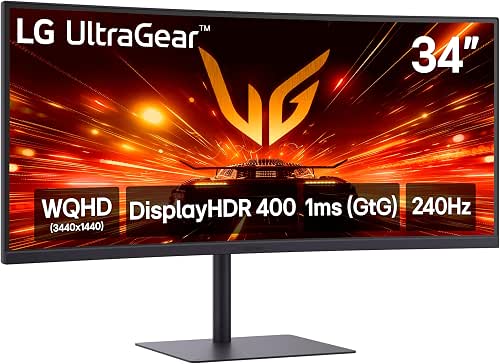
| Best for Competitive Gaming | Screen Size: 34-inch | Aspect Ratio: 21:9 | Curvature / Form Factor: Curved | VIEW LATEST PRICE | Read Our Analysis |
| Samsung 34″ Odyssey G5 Ultra-Wide Gaming Monitor |

| Best Immersive Value | Screen Size: 34-inch | Aspect Ratio: 21:9 | Curvature / Form Factor: Curved (1000R) | VIEW LATEST PRICE | Read Our Analysis |
| Samsung 49″ Odyssey G93SC Curved QD-OLED Gaming Monitor |

| Ultimate Powerhouse | Screen Size: 49-inch | Aspect Ratio: Ultrawide (approx. 32:9 for 49″) | Curvature / Form Factor: Curved (1800R) | VIEW LATEST PRICE | Read Our Analysis |
More Details on Our Top Picks
CRUA 34″ Ultrawide 120Hz WFHD Gaming Monitor
Who benefits most from the CRUA 34″ Ultrawide? You will, if you juggle gaming, content creation, and productivity. Its 34″ 21:9 IPS panel gives wide, true-to-life color with 120% sRGB and 8-bit depth, while 178° viewing angles keep hues consistent. You’ll enjoy 120Hz motion and AMD FreeSync for tear-free, smooth gameplay and racing sims. The 2560×1080 WFHD resolution expands horizontal workspace so you can run side-by-side windows without a second monitor. HDMI and DisplayPort inputs, built-in speakers, tilt stand, VESA mount, and a blue light filter round out a versatile setup that reduces eye strain.
- Screen Size:34-inch
- Aspect Ratio:21:9
- Curvature / Form Factor:Flat ultrawide
- High Refresh Capability:120Hz
- Adaptive Sync Support:AMD FreeSync
- Multiple Inputs / Connectivity:HDMI 1.4 and DisplayPort 1.4 (built-in speakers)
- Additional Feature:120% sRGB gamut
- Additional Feature:Built-in speakers
- Additional Feature:Blue light filter
LG 34″ UltraWide Curved WQHD Monitor (34WR55QK-B)
If you juggle spreadsheets, creative apps, and video playback at once, the LG 34″ UltraWide Curved WQHD (34WR55QK‑B) is built for your multitasking needs. Its 34-inch 21:9 curved WQHD display (3440 x 1440) gives roomy horizontal space, HDR10 and up to 99% sRGB for accurate, vivid color, and a 100Hz refresh rate with 5ms response for smooth motion. OnScreen Control and Picture-by-Picture let you split tasks or view two inputs side-by-side. USB-C with 65W power delivery charges your laptop while HDMI, DisplayPort and USB expand connectivity. Adjustable tilt/height, three-side borderless design, and Reader Mode improve comfort.
- Screen Size:34-inch
- Aspect Ratio:21:9
- Curvature / Form Factor:Curved
- High Refresh Capability:100Hz
- Adaptive Sync Support:(implicit) adaptive sync / compatible (supports smooth gaming) – typically FreeSync
- Multiple Inputs / Connectivity:USB-C (65W), 2× HDMI, DisplayPort, 2× USB, headphone jack
- Additional Feature:USB-C with 65W PD
- Additional Feature:Picture-by-Picture support
- Additional Feature:OnScreen Control software
LG UltraGear 34″ Curved WQHD Gaming Monitor (240Hz)
Gamers who want ultra-wide immersion and blistering responsiveness will appreciate the LG UltraGear 34″ curved WQHD display, which pairs a 3440×1440, 21:9 panel with a 240Hz refresh rate and 1ms response for smooth, tear-free action and extra horizontal space for overlays and multitasking. You’ll get vivid HDR400 highlights and up to 95% DCI-P3 color for lifelike visuals, plus AMD FreeSync Premium, Dynamic Action Sync, Black Stabilizer, FPS counter, and crosshair for competitive play. A slim, virtually borderless design, ergonomic stand, USB-C with 15W power delivery, HDMI/DisplayPort, and built-in speakers keep your desk tidy and efficient.
- Screen Size:34-inch
- Aspect Ratio:21:9
- Curvature / Form Factor:Curved
- High Refresh Capability:240Hz
- Adaptive Sync Support:AMD FreeSync Premium
- Multiple Inputs / Connectivity:USB-C (15W), HDMI, DisplayPort, USB
- Additional Feature:1ms (GtG) response
- Additional Feature:Crosshair & FPS counter
- Additional Feature:DisplayHDR 400 support
Samsung 34″ Odyssey G5 Ultra-Wide Gaming Monitor
Serious competitive players and immersive sim fans will appreciate the Samsung 34″ Odyssey G5’s 1000R curved, ultra-wide 34-inch screen, which fills your peripheral vision for a true wraparound experience. You get WQHD clarity and HDR10 that sharpen details and boost color accuracy, while the VA panel delivers faithful tones for content creation. A 165Hz refresh rate, 1ms MPRT, AMD FreeSync Premium, and low-framerate compensation keep motion fluid and input lag low. The curve and resolution reduce eye strain during long sessions, and multiple ports plus ergonomic design make connectivity and comfort straightforward for both gaming and productivity.
- Screen Size:34-inch
- Aspect Ratio:21:9
- Curvature / Form Factor:Curved (1000R)
- High Refresh Capability:165Hz
- Adaptive Sync Support:AMD FreeSync Premium
- Multiple Inputs / Connectivity:Multiple ports (HDMI/DisplayPort variants) for versatile connectivity
- Additional Feature:1000R curvature
- Additional Feature:Low framerate compensation
- Additional Feature:VA panel richness
Samsung 49″ Odyssey G93SC Curved QD-OLED Gaming Monitor
The Samsung 49″ Odyssey G93SC is ideal for competitive players and content creators who need a massive, ultra-fast display that still delivers pixel-perfect color. You get a 49″ curved QD-OLED with DQHD clarity, 1800R wraparound immersion, and DisplayHDR True Black 400 for deep blacks without bleed. Its 240Hz refresh and 0.03ms GTG response keep motion ultra-smooth, while G-Sync and FreeSync Premium Pro prevent tearing and stutter. Connect via HDMI 2.1, DisplayPort, or USB hub; Auto Source Switch Plus and Picture-by-Picture boost multitasking. The premium metal finish, ultra-thin profile, and adjustable stand complete a pro-grade setup.
- Screen Size:49-inch
- Aspect Ratio:Ultrawide (approx. 32:9 for 49″)
- Curvature / Form Factor:Curved (1800R)
- High Refresh Capability:240Hz
- Adaptive Sync Support:FreeSync Premium Pro / G-Sync compatible
- Multiple Inputs / Connectivity:HDMI 2.1, DisplayPort, USB hub, Auto Source Switch Plus
- Additional Feature:QD-OLED tech
- Additional Feature:HDMI 2.1 inputs
- Additional Feature:Auto Source Switch Plus
Factors to Consider When Choosing Widescreen Monitors
When choosing a widescreen monitor, you’ll want to weigh screen size and aspect ratio against how you’ll use the display. Consider resolution and panel type for sharpness and color accuracy, plus refresh rate and response time if you game or edit video. Don’t forget ergonomics and adjustability to guarantee comfortable, long-term use.
Screen Size And Aspect
Want more horizontal space for work or play? Pick an ultrawide-21:9 gives far more horizontal real estate than 16:9-so you can arrange documents, chat, and browsers side-by-side without bezel gaps. Sizes usually span 34 to 49 inches; 34–38″ suit tighter desks and shorter viewing distances, while 40–49″ deliver truly expansive, immersive workspaces if you have room. Consider curvature on larger panels: 1000R or 1800R bends match your field of view, boosting immersion and easing eye strain on very wide displays. Before you buy, measure desk depth and seating distance, then match size and aspect to your primary tasks-productivity, content creation, or immersive media-to maximize comfort and usable screen area.
Resolution And Sharpness
Curious how resolution affects what you actually see on an ultrawide? You’ll notice WQHD (3440×1440) gives much sharper, more detailed images than 2560×1080, making text and fine UI elements easier to read. Because ultrawide 21:9 panels give extra horizontal space, you can fit more windows side-by-side without losing clarity. Don’t forget pixel density: a larger screen with the same resolution reduces sharpness, while higher pixel density makes text and images crisper. HDR support enhances perceived detail by boosting contrast and brightness in highlights and shadows, which helps fine textures pop. Finally, panel technology still matters-IPS, VA, and OLED affect how vivid and consistent that sharpness appears across viewing angles and brightness levels.
Panel Type And Color
Because panel choice shapes color, contrast, and viewing behavior, pick the right technology to match how you use the screen. If you need accurate colors and consistent clarity from wide angles-say for design or collaborative work-an IPS panel with roughly 178° viewing typically serves you best. If deep blacks and stronger contrast matter more-for media consumption or darker scenes-a VA panel can deliver richer blacks, though viewing angles may be narrower. Check color gamut figures like sRGB or DCI-P3 percentages to judge vibrancy and accuracy for your tasks. Prefer higher bit depth (8-bit or greater) to smooth gradients and reduce banding. Finally, consider HDR support when you want enhanced color depth and expanded contrast for more lifelike visuals.
Refresh Rate And Response
When you’re choosing a widescreen monitor, refresh rate and response time dictate how smooth motion looks and how quickly on-screen actions register; higher refresh rates (120Hz+) reduce motion blur and make fast-paced gaming and action scenes feel fluid. Response time, in milliseconds, shows how fast pixels change color-1ms to 5ms minimizes ghosting and artifacts during rapid movement. Technologies like FreeSync and G-Sync sync the monitor to your GPU to eliminate tearing and stutter for a seamless image. Low response time combined with high refresh rate also cuts input lag, giving you more precise control in competitive play. For everyday productivity and media, 60Hz–100Hz with moderate response times is often sufficient without the extra expense.
Ergonomics And Adjustability
Although you might focus on resolution and refresh rate, ergonomics and adjustability are just as important for comfort and long-term health; you should prioritize monitors with adjustable tilt, height, and swivel so you can set the screen to your eye level and seating posture, reducing neck and eye strain during long sessions. Curved widescreens match your natural field of vision, cutting eye fatigue and improving viewing comfort when you’re juggling windows. Look for customizable stands and smooth adjustment mechanisms so you can reposition quickly for different tasks or gaming. VESA mount compatibility gives you flexible placement options-like wall or arm mounts-to free desk space and fine-tune ergonomics. Proper adjustability helps prevent musculoskeletal issues and keeps multi-tasking comfortable.
Connectivity And Ports
Good connectivity lets you hook up PCs, laptops, consoles, and peripherals without juggling adapters, so check a monitor’s mix of HDMI, DisplayPort, and USB‑C ports first. You’ll want multiple inputs to support different devices simultaneously and reduce cable swaps. Prefer USB‑C with power delivery so your laptop charges while sending video and data over a single cable. Look for built‑in USB hubs and headphone jacks to cut desktop clutter and keep accessories plugged in. Automatic source switching saves you from manually changing inputs when an active device wakes. If you need side‑by‑side feeds, choose Picture‑by‑Picture or Picture‑in‑Picture modes to view two input sources at once. These features keep your setup flexible and efficient.
Productivity And Multitasking
If you need to run multiple apps side by side, an ultrawide monitor (21:9) gives you the horizontal real estate to keep documents, browsers, and tools visible at once without constant window juggling. Choose higher resolutions so those side-by-side apps stay sharp and legible, letting you scan spreadsheets and reference material without zooming. Look for built-in screen-splitting modes and Picture-by-Picture support to arrange inputs and workflows quickly, especially if you monitor multiple devices. Prioritize adjustable stands with tilt, height, and swivel so you can set comfortable viewing angles for long sessions and reduce neck strain. Finally, pick a display with blue light filters or a reader mode to cut eye fatigue during extended multitasking, helping you stay productive longer.




