

You want more screen space, more clarity, and more seamless multitasking-and you want it without a lot of fuss. In this roundup you’ll find reliable dual-monitor pairs that balance size, color accuracy, and connectivity so you can set up quickly and work longer with less strain. Keep going to see which models fit your desk, budget, and workflow-and which features really matter for boosting productivity.
| Kado 27″ Dual Monitor 1080p 75Hz (2-Pack) |
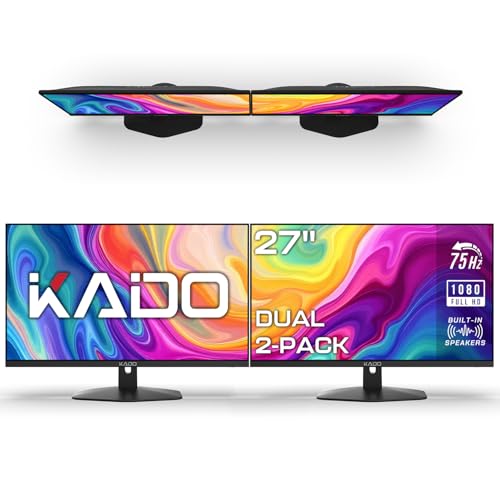
| Versatile Performer | Screen Size: 27″ (dual) | Resolution: 1920×1080 (Full HD) | Color Gamut / Panel Accuracy: 100% sRGB | VIEW LATEST PRICE | Read Our Analysis |
| 2-Pack 24″ Curved FHD 100Hz Gaming Monitors | Immersive Gamer | Screen Size: 24″ (dual) | Resolution: 1920×1080 (Full HD) | Color Gamut / Panel Accuracy: 99% sRGB | VIEW LATEST PRICE | Read Our Analysis | |
| Kado Dual 22″ 1080p 75Hz Dual Monitor Pack |

| Compact Productivity | Screen Size: 22″ (dual) | Resolution: 1920×1080 (Full HD) | Color Gamut / Panel Accuracy: 100% sRGB | VIEW LATEST PRICE | Read Our Analysis |
| Kado 27″ Curved Dual Monitor Setup (C27 Series) |

| Eye-Comfort Curved | Screen Size: 27″ (dual) | Resolution: 1920×1080 (Full HD) | Color Gamut / Panel Accuracy: 100% sRGB | VIEW LATEST PRICE | Read Our Analysis |
| ViewSonic VA2456A-MHD Dual 24″ 1080p IPS Monitors |

| Pro-Grade Display | Screen Size: 24″ (dual) | Resolution: 1920×1080 (Full HD) | Color Gamut / Panel Accuracy: IPS / accurate colors (SuperClear IPS) | VIEW LATEST PRICE | Read Our Analysis |
More Details on Our Top Picks
Kado 27″ Dual Monitor 1080p 75Hz (2-Pack)
If you need a reliable, budget-friendly dual-monitor setup for both work and casual gaming, the Kado 27″ 1080p 75Hz (2-pack) is a smart choice – it gives you two flat 27″ screens with 100% sRGB for accurate colors, a 75Hz refresh for smoother motion, and VESA compatibility so you can mount them for an ergonomic, clutter-free workspace. You’ll get Full HD clarity and fast response times that cut ghosting, making detailed spreadsheets and fast-paced games clearer. Built-in speakers save desk space, while custom gaming modes and seamless dual viewing boost productivity and immersion without breaking the bank.
- Screen Size:27″ (dual)
- Resolution:1920×1080 (Full HD)
- Color Gamut / Panel Accuracy:100% sRGB
- Refresh Rate:75Hz
- Built-in Audio:Built-in speakers
- Mount Compatibility:VESA mount compatible
- Additional Feature:Flat 27″ dual setup
- Additional Feature:Custom gaming modes
- Additional Feature:Fast built-in speakers
2-Pack 24″ Curved FHD 100Hz Gaming Monitors
Immersive Gamer
View Latest PriceDual 24″ curved FHD monitors are a great pick for creators and multitaskers who want immersive screens without sacrificing desk space. You get 1500R curvature and Full HD clarity so images feel enveloping yet crisp. With 99% sRGB, colors stay accurate for photo, video, and design work. A 100Hz refresh rate, 1ms blur reduction, and fast response times cut motion blur and keep fast scenes smooth. Custom gaming modes tailor visuals to FPS or RTS needs. Built-in speakers, dual HDMI plus VGA, tilt adjustment, wall-mount compatibility, and a machine-black finish round out a practical, polished setup.
- Screen Size:24″ (dual)
- Resolution:1920×1080 (Full HD)
- Color Gamut / Panel Accuracy:99% sRGB
- Refresh Rate:100Hz
- Built-in Audio:Built-in speakers
- Mount Compatibility:Wall mount compatible (tilt-adjustable)
- Additional Feature:1500R curvature
- Additional Feature:1ms blur reduction
- Additional Feature:HDMI x2 + VGA
Kado Dual 22″ 1080p 75Hz Dual Monitor Pack
The Kado Dual 22″ 1080p 75Hz pack is ideal for budget-conscious creators and multitaskers who need accurate color and smooth motion-its 100% sRGB coverage delivers true-to-life hues for photo and video work, while the 75Hz refresh and fast response time keep gameplay and scrolling fluid. You get two flat 22″ 1920×1080 panels that reduce peripheral distortion and create a continuous workspace for detailed tasks. Custom gaming modes optimize settings for FPS and RTS titles, and built-in speakers save desk space. VESA compatibility lets you mount or arm the pair for ergonomic setups that suit both productivity and play.
- Screen Size:22″ (dual)
- Resolution:1920×1080 (Full HD)
- Color Gamut / Panel Accuracy:100% sRGB
- Refresh Rate:75Hz
- Built-in Audio:Built-in speakers
- Mount Compatibility:VESA mount compatible
- Additional Feature:Compact 22″ pair
- Additional Feature:Fast response time
- Additional Feature:Dual flat seamless design
Kado 27″ Curved Dual Monitor Setup (C27 Series)
Professionals who need immersive, color-accurate screens will appreciate the Kado C27 Series, which pairs two 27″ 1500R curved panels to minimize peripheral distortion and keep you focused across wide workspaces. You’ll get 1920×1080 clarity with 100% sRGB for vibrant, true-to-life colors-great for creative tasks-plus a 75Hz refresh rate and fast response times for smooth visuals. Custom gaming modes for FPS and RTS tuning add versatility if you game after work. Built-in speakers save desk space and provide solid audio. VESA compatibility and HDMI connectivity make mounting and connecting devices straightforward and flexible.
- Screen Size:27″ (dual)
- Resolution:1920×1080 (Full HD)
- Color Gamut / Panel Accuracy:100% sRGB
- Refresh Rate:75Hz
- Built-in Audio:Built-in speakers
- Mount Compatibility:VESA mount compatible
- Additional Feature:1500R curved pair
- Additional Feature:Reduced eye/neck strain
- Additional Feature:Includes HDMI connectivity
ViewSonic VA2456A-MHD Dual 24″ 1080p IPS Monitors
If you need a compact, color-accurate setup for multitasking or content review, the ViewSonic VA2456A-MHD dual pack delivers two 24″ IPS 1080p panels with thin bezels and a 120Hz refresh rate. You’ll get SuperClear IPS for consistent color and wide viewing angles, plus preset modes like Game, Movie, Web, Text, and Mono to match tasks instantly. The head-only configuration ships without stands, so plan for VESA mounts or a dual-arm rig for a clean setup. Connectivity includes HDMI, DisplayPort, and VGA, and eye-care features-Flicker-Free and Blue Light Filter-reduce fatigue during long work sessions.
- Screen Size:24″ (dual)
- Resolution:1920×1080 (Full HD)
- Color Gamut / Panel Accuracy:IPS / accurate colors (SuperClear IPS)
- Refresh Rate:120Hz
- Built-in Audio:(Noted as) Head-only pack but includes standard monitor audio features / supports audio (has HDMI/DisplayPort connectivity; designed with typical monitor audio capability)
- Mount Compatibility:VESA mountable
- Additional Feature:SuperClear IPS panels
- Additional Feature:Thin bezel frameless design
- Additional Feature:120Hz refresh rate
Factors to Consider When Choosing Dual Monitors
When you pick dual monitors, think about screen size and layout so your workflow fits across both displays. Check resolution, refresh rate, response time, and color accuracy to make sure text is sharp, motion is smooth, and colors are true. Also consider ergonomics and mounting options so you can position the screens comfortably and save desk space.
Screen Size & Layout
Because screen size and layout shape how you work and how much you see at once, pick monitors that balance visibility with desk space-most people find 22–27 inches a sweet spot-while matching sizes and resolutions to keep content aligned and reduce distracting bezel breaks; choose identical panels when possible so windows span cleanly across both screens. Decide between flat and curved: flat side-by-side setups minimize boundary distractions but can introduce slight viewing-angle compromises, whereas matched curved screens (e.g., 1500R) wrap your field of view, easing eye strain and improving comfort for long sessions. Also consider orientation and positioning-landscape for spreadsheets and design, portrait for coding or reading-adjust tilt, height, and distance to maintain ergonomic posture and efficient multitasking.
Resolution & Clarity
After you’ve picked sizes and layout that suit your desk and workflow, resolution and clarity determine how crisp and usable those screens feel. Choose at least Full HD (1920×1080) for clear text and detailed images; if you go larger, step up the resolution so pixels don’t betray you. Match resolutions across both monitors to keep content seamless when you drag windows between screens and to minimize eye strain. Also check color gamut: panels covering 100% sRGB deliver truer, more vibrant colors for design, photo work, and accurate previews. While refresh rate affects motion, focus here on static sharpness and color accuracy-those are what matter most for productivity tasks, document work, and any detailed visual projects.
Refresh Rate & Response
If you want smoother motion and crisper changes across two screens, prioritize refresh rate and response time together: higher refresh rates (75Hz and above) make movement feel more fluid, while faster response times (closer to 1ms) cut ghosting and blur during rapid on-screen changes. When you pair monitors, choose models that both support elevated refresh rates – anything above 60Hz reduces visual lag and eases eye strain during extended work or multimedia sessions. Equally, aim for low response times to keep fast shifts sharp, particularly if you switch between spreadsheets, video playback, and occasional gaming. Matching these specs across both displays prevents mismatched motion and artifacts, delivering a cohesive, comfortable dual-monitor experience that’s responsive and clear during fast on-screen activity.
Color Accuracy & Gamut
Smooth motion matters, but color fidelity will determine how accurate and consistent your work looks across both screens. You should prioritize monitors that match standardized references and reproduce colors precisely, so what you edit or design onscreen reflects real life. Look for wide color gamuts-100% sRGB is a practical baseline-for vibrant, true-to-life hues needed in photo and multimedia work. IPS panels typically give you the best color accuracy and wider viewing angles compared with TN or VA, which helps maintain consistency between displays. Use calibration tools and built-in color presets to align both monitors to the same profile and task requirements. Consistent calibration prevents distracting mismatches, preserves visual continuity, and keeps your workflow reliable.
Ergonomics & Mounting
Because you’ll be spending hours in front of your screens, prioritize ergonomics and flexible mounting so you can keep a neutral posture and avoid strain. Choose monitors with adjustable tilt and swivel to fine-tune viewing angles and reduce neck and eye fatigue during long sessions. Look for VESA mount compatibility so you can use arms, wall mounts, or stands to reclaim desk space and set ideal heights. Consider curved panels (for example, 1500R) to minimize peripheral distortion and lessen eye strain. Align your two displays-flat or gently curved-to maintain consistent viewing angles and avoid twisting your torso. Finally, pick monitors or mounts that allow easy height and spacing adjustments so you can position screens at prime distances for comfort and productivity.
Connectivity & Ports
When you set up dual monitors, prioritize versatile ports so you can plug in laptops, desktops, and media players without constantly swapping cables; look for multiple HDMI and DisplayPort inputs (and older VGA if you need legacy support) so each screen can handle more than one source at once. You’ll want at least two HDMI ports or a mix of HDMI and DisplayPort to switch sources quickly. USB-C or Thunderbolt with power delivery simplifies things further by carrying video, audio, and charging over one cable. Built-in speakers or audio jacks cut the need for extra devices. Also confirm VESA mount compatibility so you can place monitors ideally while keeping cables tidy. Choose connectivity that matches your current gear and future upgrades.




