

Like carrying a Swiss Army knife for your workstation, you’ll find portable monitors turn any table into a productive dual-screen setup. You’ll appreciate lightweight builds, crisp IPS panels, and simple USB-C or HDMI connections that let you work almost anywhere. I’ll walk you through five standout models and what matters most when choosing one – so you can pick the right companion for travel, home, or the office.
| 15.6″ Portable 1080p USB-C HDMI Monitor |
| Sleek Portable Pro | Screen Size: 15.6-inch | Resolution: 1920 x 1080 (Full HD) | Panel Type: IPS | VIEW LATEST PRICE | Read Our Analysis |
| cocopar 15.6″ Portable 1080p Monitor with Speakers |

| Travel Productivity | Screen Size: 15.6-inch | Resolution: 1920 x 1080 (Full HD) | Panel Type: IPS A-grade | VIEW LATEST PRICE | Read Our Analysis |
| ViewSonic VA1653 16″ FHD Portable Monitor |
| Reliable Business Pick | Screen Size: 15.6-inch | Resolution: 1920 x 1080 (Full HD) | Panel Type: IPS | VIEW LATEST PRICE | Read Our Analysis |
| 21.5″ Portable FHD 120Hz IPS Monitor with Speakers |

| Smooth Gaming Display | Screen Size: 21.5-inch | Resolution: 1920 x 1080 (Full HD) | Panel Type: IPS LCD | VIEW LATEST PRICE | Read Our Analysis |
| VisionOwl 18.5″ 1080p 100Hz Portable Monitor |

| High-Refresh Workhorse | Screen Size: 18.5-inch | Resolution: 1920 x 1080 (Full HD) | Panel Type: IPS | VIEW LATEST PRICE | Read Our Analysis |
More Details on Our Top Picks
15.6″ Portable 1080p USB-C HDMI Monitor
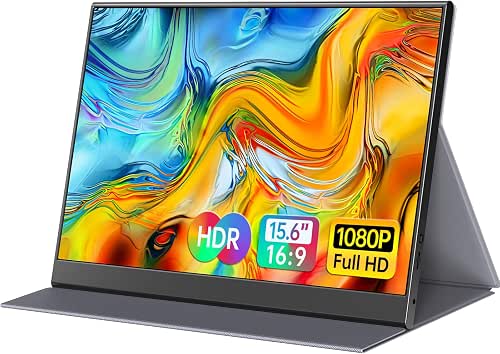
If you need a lightweight, travel-ready secondary screen for work or gaming, the 15.6″ 1080p USB-C/HDMI portable monitor delivers-its slim 0.3-inch aluminum body and 1.52 lb weight slip into your bag while full-featured USB-C and mini-HDMI ports let you connect laptops, consoles, and phones quickly. You’ll get a 15.6″ 1920×1080 IPS matte display with 178° viewing, accurate colors, and eye-care tech that cuts blue light and flicker. Dual full-featured Type-C ports plus mini-HDMI support Thunderbolt 3/4 and DP Alt Mode, so you can mirror, extend, or use HDR. A PU leather smart cover protects and props the screen.
- Screen Size:15.6-inch
- Resolution:1920 x 1080 (Full HD)
- Panel Type:IPS
- Connectivity Ports:2 × USB-C (full-featured) + mini HDMI
- Built-in Audio:Two built-in speakers
- Portability/Travel Focus:Ultra-slim (0.3″) and lightweight (1.52 lb) with magnetic smart holster
- Additional Feature:HDR mode boost
- Additional Feature:Magnetic smart holster
- Additional Feature:Aluminum alloy body
cocopar 15.6″ Portable 1080p Monitor with Speakers
For travelers and multitaskers who need a true plug‑and‑play second screen, the cocopar 15.6″ Portable 1080p Monitor delivers crisp Full HD visuals, dual USB‑C ports, and a slim 0.2‑inch profile that slips into a bag with ease. You’ll get a 15.6″ 1920×1080 IPS display with 178° viewing, 60Hz, 85% sRGB and HDR support, plus Low Blue Light for comfort. Two full‑featured USB‑C ports, mini HDMI, power pass‑through and reverse charging keep connections simple; a single USB‑C can handle power and video when your device supports DP Alt‑Mode. It’s lightweight, VESA‑mountable, includes a Smart Stand Case, and supports extend/mirror modes.
- Screen Size:15.6-inch
- Resolution:1920 x 1080 (Full HD)
- Panel Type:IPS A-grade
- Connectivity Ports:2 × USB-C (full-featured) + mini HDMI
- Built-in Audio:Built-in speakers
- Portability/Travel Focus:Slim (0.2″/4mm), lightweight (1.5 lb), Smart Stand Case included
- Additional Feature:Power pass-through
- Additional Feature:VESA mountable holes
- Additional Feature:85% sRGB gamut
ViewSonic VA1653 16″ FHD Portable Monitor
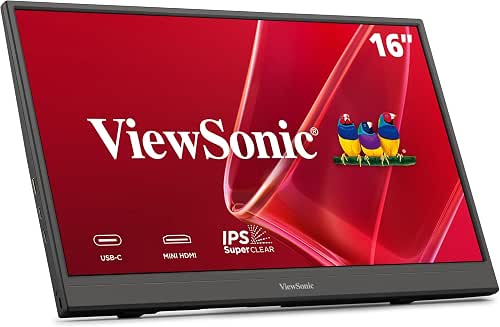
Business travelers and remote professionals will appreciate the ViewSonic VA1653’s lightweight 15.6-inch IPS panel and compact 0.7-inch profile, which lets you add a Full HD second screen without lugging extra bulk. You’ll get 1920×1080 clarity, wide viewing angles, and an anti-glare finish for comfortable use in bright settings. At 1.5 pounds it slips into backpacks or briefcases; the included sleeve and stand make setup quick. USB-C carries video, audio, data, and passthrough power, while mini HDMI broadens compatibility with laptops, Macs, tablets, and consoles. A three-year warranty and US support round out reliability.
- Screen Size:15.6-inch
- Resolution:1920 x 1080 (Full HD)
- Panel Type:IPS
- Connectivity Ports:USB-C + mini HDMI
- Built-in Audio:(Speaker included) protective sleeve & built-in stand noted – speaker presence implied by compatibility (listed as includes audio via USB-C)
- Portability/Travel Focus:Slim, lightweight (1.5 lb), protective sleeve and built-in stand included
- Additional Feature:3-year warranty
- Additional Feature:Anti-glare coating
- Additional Feature:Portrait orientation support
21.5″ Portable FHD 120Hz IPS Monitor with Speakers
Gamers and mobile professionals who need smooth motion and accurate color will appreciate this 21.5″ FHD IPS portable monitor, which combines a 120Hz refresh rate and 110% sRGB coverage for blur-free gameplay and faithful visuals on the go. You’ll get 1920×1080 clarity, 8-bit color, 300 nits brightness and a 1300:1 contrast ratio in a slim 0.55″ chassis. Connect via USB-C (Thunderbolt/Full-featured) or HDMI; plug-and-play works for MacBooks, Surfaces, PCs and consoles. It includes HDR, anti-glare, flicker-free tech, built-in speakers, a 90° adjustable kickstand, VESA 75×75 support and portrait mode.
- Screen Size:21.5-inch
- Resolution:1920 x 1080 (Full HD)
- Panel Type:IPS LCD
- Connectivity Ports:USB-C + HDMI
- Built-in Audio:Built-in speakers
- Portability/Travel Focus:Ultra-slim, lightweight (3.72 lb), built-in adjustable kickstand
- Additional Feature:120Hz refresh rate
- Additional Feature:110% sRGB gamut
- Additional Feature:75x75mm VESA
VisionOwl 18.5″ 1080p 100Hz Portable Monitor
Looking for a lightweight, high-refresh portable screen that keeps motion smooth on the go? You’ll appreciate the VisionOwl 18.5″ 1080p IPS panel with 100Hz refresh, 125% sRGB (88% NTSC) coverage, and 8-bit color for vibrant, accurate visuals. At 2.7 lbs and just 0.24–0.55 inches thick, it slips into your bag and survives travel thanks to a metal back and integrated stand. Hook up via two USB-C ports or HDMI-single-cable Thunderbolt/USB-C setups work-then mount with 75x75mm VESA or use the kickstand. Each unit undergoes strict quality control for reliable, long-term performance.
- Screen Size:18.5-inch
- Resolution:1920 x 1080 (Full HD)
- Panel Type:IPS
- Connectivity Ports:2 × USB-C + standard HDMI
- Built-in Audio:(Integrated audio implied via HDMI/USB-C; metal-backed design with integrated stand – typical speaker support)
- Portability/Travel Focus:Slim (0.24–0.55″), lightweight (2.7 lb), integrated stand and metal back
- Additional Feature:100Hz refresh rate
- Additional Feature:Metal back panel
- Additional Feature:Integrated metal stand
Factors to Consider When Choosing Portable Monitors
When choosing a portable monitor, you’ll want to weigh display resolution and size against how you plan to use it. Check connectivity and ports, refresh rate and performance, and color accuracy and gamut to make sure it meets your needs. Also consider portability and build so it’s durable and easy to carry.
Display Resolution And Size
How big and sharp should your portable monitor be? Decide between roughly 15.6 inches and 21.5 inches: smaller sizes boost portability, while 18.5–21.5-inch models give more workspace and immersion. Aim for Full HD (1920×1080) as a baseline – it’s common and delivers crisp text and media on those sizes. If you do gaming or motion-heavy work, consider higher refresh rates like 100Hz or 120Hz for smoother movement. Check the panel type too; IPS panels offer wide viewing angles (often up to 178°) and better color accuracy, useful if you share the screen or change positions. Balance size, resolution, and refresh rate against how often you’ll carry the monitor.
Connectivity And Ports
Because your portable monitor needs to connect to different devices, port choices matter a lot: prioritize USB-C with DP Alt Mode and power delivery for single-cable video/audio/power, keep an HDMI or mini‑HDMI port for consoles and older laptops, and consider dual USB‑C ports or Thunderbolt 3/4 for power pass‑through and extra peripherals. You’ll want Thunderbolt 3/4 when you need higher bandwidth, daisy‑chaining, or faster charging. Dual USB‑C ports let you accept power from one end while feeding video from the other, or charge a phone via reverse charging. HDMI keeps setup simple for game consoles and legacy gear. Also check for VESA mounting holes so you can secure the monitor while keeping all your inputs accessible. Choose ports that match your devices and workflow.
Refresh Rate And Performance
Looking for buttery-smooth motion? You’ll want to focus on refresh rate and overall performance. Standard portable monitors run at 60Hz, which handles productivity and casual viewing fine. If you game, edit video, or track fast-moving content, aim for 100Hz or 120Hz to reduce lag, motion blur, and flicker-giving you clearer visuals and smoother cursor movement. Higher rates make fast scenes feel more responsive, but they also draw more power. That means battery life can drop, so weigh performance against efficiency based on how you’ll use the monitor. If mobility and long unplugged sessions matter, a 60Hz model may be preferable; if responsiveness is priority, choose a higher-refresh option and plan for increased power use.
Color Accuracy And Gamut
When you need true-to-life images, prioritize a monitor’s color accuracy and gamut so what you see matches the source. Look for high sRGB coverage-closer to 100% or above (110% sRGB or more) means richer, more accurate colors, especially for photo and video work. Favor IPS panels: they deliver better color fidelity and wide viewing angles so colors stay consistent when you move. Check color depth too; 8-bit panels render about 16.7 million colors, smoothing gradients and reducing banding. If you work with HDR content, choose a portable monitor with HDR support to boost brightness, contrast, and perceived color range, making highlights and shadows more detailed. Together, these specs guarantee reliable, lifelike color reproduction on the go.
Portability And Build
A portable monitor’s convenience often comes down to weight, thickness, and build quality, so pick a model that’s light enough to carry daily-some weigh around 1.5 pounds and measure as thin as 0.2 inches-without skimping on durability. You’ll want slim profiles (often below 0.3 inches) that slip into bags and don’t add bulk. Look for metal back panels or aluminum-alloy construction to resist dings from frequent travel. Protective cases or smart covers that double as stands give transport protection and adjustable viewing angles without extra gear. Integrated kickstands or VESA compatibility expand setup options when you’re stationary, but avoid assuming every lightweight model sacrifices sturdiness; balance thinness with robust materials for long-term use.
Mounting And Accessories
Although portability matters most for travel, mounting options and included accessories determine how useful a portable monitor will be in different setups, so check for VESA-compatible holes (usually 75x75mm) if you plan to use arms or wall mounts. You’ll want a slim, lightweight design so the display won’t stress mounts or add bulk to your bag. Look for smart covers or cases that double as adjustable stands to get stable, customizable viewing angles without extra gear. Magnetic or detachable stands and holsters protect the screen and speed setup when you’re on the move. Also verify landscape and portrait support so you can rotate the display for coding, reading, or vertical content. Choose accessories that match how you’ll actually work.




