

You might think higher refresh rates or wider color gamuts are the only things that make a monitor truly pop, but is that the whole story? You’ll want to weigh clarity, color accuracy, and ergonomic features together to see which screen actually fits your workflow or gaming setup. Keep going to compare solid options from Dell, Samsung, Pixio, ViewSonic, and AOC that balance performance and practicality.
| Dell P2425H 24″ FHD IPS Monitor with USB-C |

| Professional Workstation | Panel Type: IPS | Screen Size: 24-inch | Resolution: 1920 x 1080 (FHD) | VIEW LATEST PRICE | Read Our Analysis |
| Samsung 27″ S3 IPS FHD 100Hz Monitor (LS27D300G) |
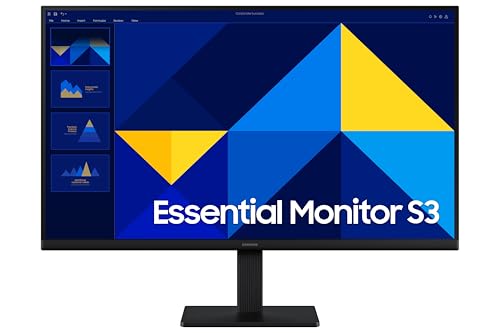
| Sleek Everyday Value | Panel Type: IPS | Screen Size: 27-inch | Resolution: 1920 x 1080 (FHD) | VIEW LATEST PRICE | Read Our Analysis |
| Pixio PX248 Prime V2 24″ 180Hz Gaming Monitor |

| Competitive Gamer | Panel Type: Fast-IPS | Screen Size: 24-inch | Resolution: 1920 x 1080 (FHD) | VIEW LATEST PRICE | Read Our Analysis |
| ViewSonic VS2747-H 27″ 1080p IPS Monitor |

| Comfortable All-Rounder | Panel Type: SuperClear IPS | Screen Size: 27-inch | Resolution: 1920 x 1080 (FHD) | VIEW LATEST PRICE | Read Our Analysis |
| AOC 27″ QHD Mini-LED Gaming Monitor (Q27G4ZMN) |

| Ultimate Visual Power | Panel Type: IPS (Mini-LED backlit) | Screen Size: 27-inch | Resolution: 2560 x 1440 (QHD) | VIEW LATEST PRICE | Read Our Analysis |
More Details on Our Top Picks
Dell P2425H 24″ FHD IPS Monitor with USB-C
If you need a reliable, color-accurate workhorse for long office days, the Dell P2425H delivers: its 24″ IPS panel covers 99% sRGB for true colors, a 100 Hz refresh rate and 5 ms response time keep motion smooth, and USB-C plus multiple inputs simplify docking so you can connect a laptop and peripherals with a single cable. You’ll get Full HD clarity, 250 nits brightness, 1500:1 contrast, and 16.7 million colors for consistent images. The height-adjustable, tilt/swivel/pivot stand and anti-glare ComfortView Plus reduce eye strain. Included cables streamline setup, making it ideal for productivity-focused professionals.
- Panel Type:IPS
- Screen Size:24-inch
- Resolution:1920 x 1080 (FHD)
- Refresh Rate:100 Hz
- Eye Comfort / Flicker Reduction:ComfortView Plus (reduced blue light)
- Connectivity Options:HDMI, DisplayPort, USB-C, VGA, USB-A/B
- Additional Feature:USB-C single-cable docking
- Additional Feature:Height/tilt/swivel/pivot
- Additional Feature:Includes cleaning kit
Samsung 27″ S3 IPS FHD 100Hz Monitor (LS27D300G)
The Samsung 27″ S3 IPS FHD 100Hz is a great pick for gamers and multitaskers who want smooth motion and accurate colors on a budget. You get a 27-inch IPS panel with 1920×1080 resolution and a 100Hz refresh rate, so motion looks fluid and viewing angles stay reliable. Inputs include HDMI and D-sub, plus three USB ports for peripherals. It’s lightweight at 6.39 pounds and fits typical desks with its compact footprint. Released January 27, 2025, it’s backed by Samsung’s warranty and has user feedback from 81 reviews, making it an affordable, dependable choice.
- Panel Type:IPS
- Screen Size:27-inch
- Resolution:1920 x 1080 (FHD)
- Refresh Rate:100 Hz
- Eye Comfort / Flicker Reduction:(Not explicitly named) – includes standard eye-friendly specs (listed features include IPS panel)
- Connectivity Options:HDMI, D-sub (VGA), USB ports (3)
- Additional Feature:Three USB ports
- Additional Feature:Lightweight design
- Additional Feature:VGA (D-sub) input
Pixio PX248 Prime V2 24″ 180Hz Gaming Monitor
Competitive gamers who prioritize fluid motion and quick input will appreciate the Pixio PX248 Prime V2’s 180Hz Fast-IPS panel, which pairs a 1ms GTG response with adaptive sync to cut motion blur and screen tearing. You’ll get a 24″ 1080p canvas with wide viewing angles and vivid colors that keeps gameplay smooth and responsive. At 300 cd/m² brightness and a compact footprint, it fits battlestations without dominating them. Built-in 2W speakers and a tilting stand add convenience for casual use. Lightweight and energy-efficient, the PX248P targets fast-paced play while offering warranty-backed support from Pixio.
- Panel Type:Fast-IPS
- Screen Size:24-inch
- Resolution:1920 x 1080 (FHD)
- Refresh Rate:180 Hz
- Eye Comfort / Flicker Reduction:(Not explicitly named) – Fast-IPS + standard ergonomic tilt; manufacturer notes general comfort
- Connectivity Options:(Adaptive Sync via display inputs; typical PC/console connections implied) – includes standard monitor inputs for gaming (model details)
- Additional Feature:180Hz ultra-fast refresh
- Additional Feature:Built-in 2W speakers
- Additional Feature:1ms GTG response
ViewSonic VS2747-H 27″ 1080p IPS Monitor
You’ll appreciate the ViewSonic VS2747-H if you want a 27″ Full HD IPS display that balances smooth motion and accurate colors for everyday gaming, work, and media. You get a 1920×1080 panel with SuperClear IPS for vivid, consistent colors from wide angles and thin bezels that keep your desk tidy. A 100Hz refresh rate smooths motion, and multiple presets – Game, Movie, Web, Text, Mono – help you quickly optimize visuals. Flicker-Free tech and a Blue Light Filter reduce eye strain. HDMI and VGA inputs guarantee easy compatibility with laptops, PCs, Macs, and other devices.
- Panel Type:SuperClear IPS
- Screen Size:27-inch
- Resolution:1920 x 1080 (FHD)
- Refresh Rate:100 Hz
- Eye Comfort / Flicker Reduction:Flicker-Free and Blue Light Filter
- Connectivity Options:HDMI, VGA
- Additional Feature:Multiple viewing presets
- Additional Feature:Thin bezel design
- Additional Feature:Flicker-Free + Blue Light
AOC 27″ QHD Mini-LED Gaming Monitor (Q27G4ZMN)
If you want blister-fast competitive performance with stunning contrast, the AOC 27″ QHD Mini-LED (Q27G4ZMN) is built for you. You get a 27-inch 2560×1440 panel with Mini-LED backlighting and 1,152 dimming zones that deliver deep blacks and precise highlights. DisplayHDR 1000 guarantees high peak brightness and accurate color. A 240Hz refresh (DisplayPort) and 1ms GtG response keep motion crisp, while Adaptive-Sync works with AMD and NVIDIA GPUs to eliminate tearing. The frameless design immerses you, and ergonomic adjustments plus Flicker-Free and Low Blue Light support comfort during long sessions. A 3-year zero-bright-dot warranty rounds it out.
- Panel Type:IPS (Mini-LED backlit)
- Screen Size:27-inch
- Resolution:2560 x 1440 (QHD)
- Refresh Rate:240 Hz
- Eye Comfort / Flicker Reduction:Low Blue Light and Flicker-Free
- Connectivity Options:Multiple inputs incl. DisplayPort (supports consoles and PC; DisplayPort required for 240Hz)
- Additional Feature:Mini-LED 1152 zones
- Additional Feature:DisplayHDR 1000 certified
- Additional Feature:3-year zero bright-dot warranty
Factors to Consider When Choosing IPS LED Monitors
When picking an IPS LED monitor, you’ll want to weigh resolution and pixel density against how sharp text and images need to be for your work or play. Check color accuracy and gamut, panel uniformity and brightness to guarantee consistent, true-to-life visuals. Also consider refresh rate, response time, and the available connectivity and ports so your monitor matches your system and usage.
Resolution And Pixel Density
Although resolution and pixel density sound similar, they affect your viewing experience in different ways: resolution is the total number of pixels (like 1920×1080), while pixel density (PPI) tells you how tightly those pixels are packed on a given screen size. You’ll get sharper images and finer detail when resolution increases for the same panel size because PPI rises. That means text looks crisper and individual pixels become less noticeable. Conversely, low resolution on a large monitor yields visible, blocky pixels and potential eye strain. Pick a resolution that matches your screen size and typical viewing distance: Full HD suits smaller displays, while 1440p or 4K deliver clearer results on 27-inch and larger IPS panels.
Color Accuracy And Gamut
Because accurate color reproduction makes or breaks work like photo editing and design, you should prioritize an IPS monitor with strong color accuracy and wide gamut coverage. IPS panels give you consistent colors and wide viewing angles, so hues stay true across the screen. Look for monitors that advertise near or above 99% sRGB coverage if you need professional-level fidelity; that guarantees vibrant, diverse colors are rendered correctly. Also check for calibration features and support for deeper color depths (such as 16.7 million colors) so you can fine-tune output and avoid banding. Together, high sRGB coverage, reliable IPS consistency, and calibration capability secure the monitor represents colors faithfully for demanding creative tasks.
Refresh Rate And Response
Beyond color fidelity, how a display handles motion matters just as much for many users. You’ll want a higher refresh rate-100Hz or above-for smoother, more fluid motion during fast gameplay or high-frame-rate video. Pair that with a low response time (1–5ms) to cut motion blur and ghosting, keeping moving objects crisp.
Also look for Adaptive Sync or similar tech to match the monitor’s refresh rate to your GPU, preventing tearing and stutter. The combination of high refresh rate and low response time minimizes input lag and yields sharper visuals in dynamic scenes, which improves both experience and performance. If you mainly browse or edit stills, 60Hz is usually fine, but competitive or professional gaming benefits from faster displays.
Panel Uniformity And Brightness
When you’re evaluating IPS LED monitors, check panel uniformity and brightness first because they determine how consistently colors and luminance appear across the screen. Panel uniformity means brightness and color stay even from corner to corner; without it you’ll notice distracting patches that hurt accuracy and long-term comfort. Brightness, measured in nits (cd/m²), affects clarity in bright rooms-aim for 300 nits or more if you need punchy visuals, but remember higher levels can raise power use and heat. IPS panels can struggle with uniformity, so prioritize models with strong quality control and advanced backlight designs that minimize variation. Inspect reviews and uniformity tests, and prefer monitors whose measured luminance stays stable across the panel for reliable, consistent imagery.
Connectivity And Ports
If you want a hassle-free setup and flexible use, check a monitor’s ports and included cables first: IPS LEDs commonly offer HDMI, DisplayPort, USB-C, USB-A, and sometimes VGA so you can connect laptops, desktops, consoles, and peripherals without adapters. Pick models with USB-C when you want video, data, and power over one cable to cut clutter and simplify docking. Make certain USB-A ports are available for keyboards, mice, and external drives if you rely on wired peripherals. Multiple input types let you switch sources-work laptop, gaming console, or media player-without swapping adapters. Finally, prefer monitors that include device-specific cables (USB-C, DisplayPort, or HDMI) so you’re ready to plug in right away.
Ergonomics And Adjustability
After you’ve confirmed the ports and cables match your devices, check the monitor’s ergonomics and adjustability so you can work comfortably for hours. Look for stands with height adjustment, tilt, swivel, and pivot so you can personalize viewing angle and distance. Position the screen at eye level to reduce neck and back strain, and use pivot to switch between landscape and portrait for document- or code-heavy tasks. Anti-glare coatings plus flexible adjustment minimize reflections and help reduce eye fatigue in varying light. Choose monitors with ergonomic bases and flicker-free technology to prevent visual discomfort and maintain productivity during long sessions. If the included stand won’t suffice, pick a VESA-compatible model so you can mount it to a better arm.
Eye Comfort Technologies
Because you’ll be looking at your monitor for hours, prioritize built-in eye comfort features like blue-light filters and flicker-free backlights that reduce strain and headaches. Choose monitors with certified standards (for example, ComfortView Plus) when possible, since they combine blue light reduction and anti-glare coatings for broader protection. Use adjustable brightness and contrast to match your ambient light; that simple step cuts glare and keeps text readable without overdriving your eyes. Look for viewing presets-text, reading, or low-blue modes-that automatically tweak color temperature and luminance for specific tasks. Ultimately, pick a model that lets you fine-tune these settings easily so you can maintain comfort during long sessions and minimize visual fatigue and headaches.
Price Versus Features
How much you’re willing to spend will shape which IPS LED features you can actually get: higher refresh rates, Mini‑LED or HDR support, USB‑C, full ergonomic stands, and larger or higher‑resolution panels all push prices up, while basic HDMI models with limited adjustments stay budget‑friendly. Decide whether smooth motion matters-100Hz+ panels cost more but suit gaming and fast video. Expect Mini‑LED and HDR-certified displays to command premiums for better contrast, brightness, and color accuracy. USB‑C and multiple inputs add convenience at a price, whereas HDMI-only models save money. Ergonomic bases and eye‑comfort tech like Blue Light filters or Flicker‑Free screens improve usability but increase cost. Finally, balance screen size against pixel density to avoid paying for a bigger display with insufficient resolution.




