

Like finding a dependable compass in fog, choosing the right HP toner can steer your prints away from smudges and wasted pages. You’ll want cartridges that balance yield, cost, and eco-smarts while fitting your Color LaserJet model without fuss. I’ll point out top genuine and certified-recycled options, show where high-yield pays off, and explain what to watch for so you can make a confident pick.
| HP 206A Magenta Toner Cartridge (W2113A) |
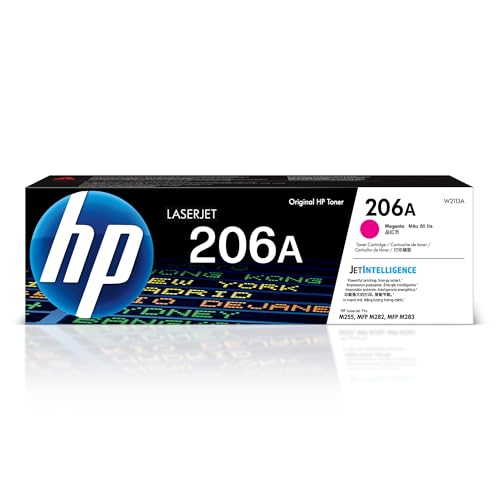
| Reliable Color | Compatibility: HP Color LaserJet Pro M255dw, MFP M282, M283 series (M255dw, M283fdw) | Yield (pages): ~1,250 pages | OEM or Compatible Status: OEM (HP) | VIEW LATEST PRICE | Read Our Analysis |
| HP 206X Black Toner Cartridge (W2110X) |

| High-Yield Black | Compatibility: HP Color LaserJet Pro M255dw, M283fdw, MFP M282, M283 series | Yield (pages): ~3,150 pages | OEM or Compatible Status: OEM (HP) | VIEW LATEST PRICE | Read Our Analysis |
| 206A High Yield Toner Cartridges 4-Pack (Compatible) |

| Best for Offices | Compatibility: HP Color LaserJet Pro MFP/series (M283fdw, M283cdw, M283fdn, M282nw, M255dw, M255nw, etc.) | Yield (pages): Black up to 1,350; each color up to 1,250 pages | OEM or Compatible Status: Compatible / third‑party replacements for HP 206A/206X | VIEW LATEST PRICE | Read Our Analysis |
| HP 48A Black Toner Cartridge (CF248A) |

| Eco-Friendly Pick | Compatibility: HP LaserJet Pro M15a, M15w, M16a, M28a, M28w, M29a, M29w series | Yield (pages): ~1,000 pages | OEM or Compatible Status: OEM (HP) | VIEW LATEST PRICE | Read Our Analysis |
| HP 134A Black Toner Cartridge (W1340A) |

| Compact Performance | Compatibility: HP LaserJet M209 Series and LaserJet MFP M234 Series (M234sdw, M234dw, M234dwe, etc.) | Yield (pages): ~1,100 pages | OEM or Compatible Status: OEM (HP) | VIEW LATEST PRICE | Read Our Analysis |
More Details on Our Top Picks
HP 206A Magenta Toner Cartridge (W2113A)
If you need crisp magenta prints for small offices or home workgroups, the HP 206A Magenta (W2113A) is a solid pick: you’ll get about 1,250 pages per cartridge, engineered to prevent toner leaks and premature failures. It’s compatible with HP Color LaserJet Pro M255dw and MFP M282/M283 series, especially M255dw and M283fdw. HP designs it for consistent color and reliable performance, with tamper-resistant chips, firmware, and packaging that help maintain printer integrity. Built-in security features protect printers from malicious code and preserve printed data integrity, so you can replace cartridges confidently and keep workflows secure.
- Compatibility:HP Color LaserJet Pro M255dw, MFP M282, M283 series (M255dw, M283fdw)
- Yield (pages):~1,250 pages
- OEM or Compatible Status:OEM (HP)
- Security / Chip Features:Tamper‑resistant chip; firmware/security to protect printer and data
- Print Quality / Reliability:Engineered for consistent print quality and reliable performance
- Intended Use Environment:Office / small business color laser printing (Color LaserJet Pro)
- Additional Feature:Model number W2113A
- Additional Feature:Tamper-resistant packaging
- Additional Feature:Prevents toner leaks
HP 206X Black Toner Cartridge (W2110X)
The HP 206X Black (W2110X) is a smart choice for small offices and busy home users who need a high-yield cartridge that keeps laser-quality black text consistent across long print runs. You’ll get about 3,150 pages per cartridge, so you won’t swap supplies often. It fits HP Color LaserJet Pro M255dw, M283fdw, and MFP M282/M283 series printers, and it’s engineered for consistent quality and value. HP designed it to prevent toner leaks and premature failures, and it uses tamper-resistant chips. Firmware and packaging help maintain data integrity and safeguard printer operations against malicious interference. Model: HP 206X (W2110X).
- Compatibility:HP Color LaserJet Pro M255dw, M283fdw, MFP M282, M283 series
- Yield (pages):~3,150 pages
- OEM or Compatible Status:OEM (HP)
- Security / Chip Features:Tamper‑resistant chip; firmware/security to protect printer and data
- Print Quality / Reliability:Engineered for consistent print quality and reliable performance
- Intended Use Environment:Office / small business color laser printing (Color LaserJet Pro)
- Additional Feature:High-capacity 206X model
- Additional Feature:Tamper-resistant chips included
- Additional Feature:Prevents toner leaks
206A High Yield Toner Cartridges 4-Pack (Compatible)
For offices that need consistent, high-volume color output without vendor-priced cartridges, this 206A high-yield 4-pack gives you a cost-effective swap that’s compatible with many HP Color LaserJet Pro MFPs. You get four cartridges-black (W2110A) and cyan, magenta, yellow (W2111A–W2113A)-with built-in chips for plug-and-play installation, no chip transfers required. Black yields up to 1,350 pages; each color yields up to 1,250 pages at 5% coverage. Prints deliver sharp text and vibrant color suitable for professional documents. Use it in M283, M282, and M255 series printers when you need reliable, high-yield output for busy offices.
- Compatibility:HP Color LaserJet Pro MFP/series (M283fdw, M283cdw, M283fdn, M282nw, M255dw, M255nw, etc.)
- Yield (pages):Black up to 1,350; each color up to 1,250 pages
- OEM or Compatible Status:Compatible / third‑party replacements for HP 206A/206X
- Security / Chip Features:Built‑in chip for seamless installation (no chip transfer)
- Print Quality / Reliability:Provides sharp text and vibrant colors; designed for reliable results
- Intended Use Environment:Office / business color laser multifunction printing (high‑yield set)
- Additional Feature:Four-cartridge bundle
- Additional Feature:Built-in installation chips
- Additional Feature:Packaging version varies
HP 48A Black Toner Cartridge (CF248A)
Office users who need reliable, no-fuss black prints will appreciate the HP 48A (CF248A), a genuine HP cartridge that’s engineered for consistent quality and about 1,000 pages of yield. You’ll get dependable output for LaserJet Pro M15 and M28/M29 series, avoiding common issues like leaks or premature failures. The OEM design boosts productivity with steady page yield and minimal downtime. It’s made with 100% recycled content, so you don’t sacrifice sustainability for performance. Weighing about a pound with compact dimensions, it’s supported by HP’s quality standards and typically includes a voluntary 30-day return option via Amazon.
- Compatibility:HP LaserJet Pro M15a, M15w, M16a, M28a, M28w, M29a, M29w series
- Yield (pages):~1,000 pages
- OEM or Compatible Status:OEM (HP)
- Security / Chip Features:Genuine HP design (implied security/authenticity); standard OEM safeguards
- Print Quality / Reliability:Genuine HP toner engineered for consistent quality and reliability
- Intended Use Environment:Home/office monochrome printing (small LaserJet Pro series)
- Additional Feature:100% recycled content
- Additional Feature:Compact 1 lb weight
- Additional Feature:Specific M15/M28/M29 series
HP 134A Black Toner Cartridge (W1340A)
If you need reliable, high-quality black prints for small-to-medium HP LaserJet setups, the HP 134A (W1340A) is a solid choice because it’s engineered specifically for M209 and M234 series machines. You’ll get about 1,100 pages per cartridge with consistent print quality and fewer interruptions. The design prevents toner leaks and premature failures, so installations stay clean and dependable. Tamper-resistant chips and firmware help protect your printer from malicious code and preserve data integrity. Packaging and authentication features further guarantee you’re installing an original HP cartridge, giving you predictable performance and solid value for everyday black-and-white printing.
- Compatibility:HP LaserJet M209 Series and LaserJet MFP M234 Series (M234sdw, M234dw, M234dwe, etc.)
- Yield (pages):~1,100 pages
- OEM or Compatible Status:OEM (HP)
- Security / Chip Features:Tamper‑resistant chip and firmware to protect printer and data
- Print Quality / Reliability:Engineered for consistent print quality and reliability
- Intended Use Environment:Home/office monochrome printing (M209/M234 series)
- Additional Feature:Specific M209/M234 series
- Additional Feature:First-availability date noted
- Additional Feature:Tamper-resistant chip included
Factors to Consider When Choosing Printer Toner Cartridges for HP
When choosing HP toner cartridges, you’ll want to check printer compatibility and expected yield so you know how many pages a cartridge will actually print. Decide between genuine and compatible options while keeping an eye on firmware/security issues that can affect performance. Also factor in sustainability and total cost to balance environmental impact with long-term value.
Printer Compatibility Guide
Because printer models and firmware vary, you should always confirm a toner cartridge’s exact model number and compatibility list before buying to guarantee it fits your HP series, supports MFP or single-function variants, and matches the color or black printing requirements of your device. Verify the cartridge model against your printer’s series and exact model to confirm fit and function. Check the compatibility list for variations like multifunction or single-function units. Use only cartridges specified for your printer line because print engines and firmware differ. Confirm color versus black specifications to avoid errors or damage. Finally, account for regional and firmware variations by making certain the cartridge is certified for your printer’s firmware version and region before purchase.
Yield And Page Coverage
Since toner yield is quoted at 5% page coverage, you’ll want to translate that figure into your real-world usage to pick the right cartridge. Check the quoted page count against the type of documents you print: text-only pages use close to 5% coverage, but graphics or dense reports will eat toner faster and reduce total pages per cartridge. Pick higher-yield cartridges if you print frequently to lower replacement frequency and per-page cost. Remember that color cartridges usually have lower yields than black, so factor separate replacement schedules and costs for CMY versus K. Align cartridge yield with your monthly print volume to avoid downtime and surprise expenses, and re-evaluate if your printing patterns change over time.
Genuine Versus Compatible
Matching cartridge yield to your print habits will save money and hassle, but you’ll also need to decide between genuine and compatible cartridges. Genuine toner cartridges are engineered and tested by HP for reliable compatibility and consistent print quality, and they help prevent premature failures, leaks, and warranty issues. They also typically include tamper-resistant chips and firmware that maintain printer integrity. Compatible or third-party cartridges cost less and can be fine for casual use, but their reliability, yield, and color accuracy often vary. Many compatibles lack built-in security features, which may affect performance and data protection. Weigh your priorities: if you need predictability, protection, and long-term maintenance, choose genuine; if upfront cost matters most, compatibles are an option.
Security And Firmware
When you pick toner cartridges, pay close attention to their firmware and security features because those chips do more than just count pages-they protect your printer and the data it handles. You’ll want cartridges with tamper-resistant chips and embedded firmware that maintain authenticity and prevent data tampering. Those security measures detect and block malware or unauthorized modifications, safeguarding overall printer operations. Advanced firmware and packaging also restrict use to genuine or approved cartridges, cutting off counterfeit and incompatible options that can introduce vulnerabilities. Finally, prioritize vendors that provide regular firmware security updates so protection evolves with threats; without updates, even secure cartridges can become attack vectors. Security-conscious choices reduce risk and keep printing reliable.
Sustainability And Cost
If you print a lot, prioritize cartridges with higher page yields and durable construction so you cut your cost per page and avoid frequent replacements; choose cartridges that balance price, yield, and build to optimize long-term savings. Look for sustainable options that use recycled materials to reduce environmental impact without sacrificing print quality. Pick designs that prevent leaks and premature failures so you avoid wasted toner and unexpected replacements. Verify tamper-resistant chips and secure packaging to guarantee authenticity and steer clear of counterfeits that can undermine both sustainability and cost-effectiveness. In short, weigh upfront cost against durability and yield, favor certified recycled or remanufactured cartridges when they meet specs, and prioritize reliability to lower total ownership costs and environmental footprint.
Frequently Asked Questions
Are These Cartridges Compatible With HP Instant Ink Subscriptions?
No – think of Instant Ink as a locked garden: you’ll need genuine HP cartridges enrolled in that subscription, and third-party or remanufactured cartridges won’t qualify. You’ll avoid service enrollment and replenishment if you use non-HP supplies.
Can I Recycle These Cartridges Through Hp’s Program?
Yes – you can recycle those cartridges through HP’s program. You’ll get prepaid labels or envelopes for return, and HP processes cartridges for reuse or recycling. Check specific instructions on HP’s recycling page before sending.
Do Any Cartridges Support Automatic Firmware Updates?
Yes – some HP original cartridges support automatic firmware updates when installed in compatible printers; you’ll get updates pushed via the printer’s network connection. Third-party cartridges typically won’t receive automatic firmware updates from HP.
Are There Warranty Differences Between OEM and Compatible Cartridges?
Like choosing a passport, yes – you’ll find OEM cartridges usually include stronger warranties and manufacturer support, while compatible ones often carry limited or seller-backed guarantees; you’ll want to read fine print to avoid surprises.
Will Using Compatible Cartridges Void My Printer Warranty?
Generally, using compatible cartridges won’t automatically void your printer warranty; you’re protected unless the manufacturer proves the compatible part caused damage, so keep evidence, follow maintenance, and check your warranty terms and local consumer protection laws.




