

If you’re upgrading your workflow for 2026, you’ll want a 4K monitor that balances color accuracy, connectivity and ergonomics without overspending. You’ll find compact 24″ panels that pack high pixel density, larger 27″–32″ IPS or Fast‑IPS options with HDR and ΔE<2 calibration, plus portable director displays for on‑set work. Keep going to compare key models and the tradeoffs that matter for your projects.
| Z-Edge U27P4K 27″ 4K IPS Monitor |

| Minimalist 4K Workhorse | Resolution: 4K UHD (3840 × 2160) | Panel Type: IPS | Size: 27-inch | VIEW LATEST PRICE | Read Our Analysis |
| 32″ 4K UHD Fast IPS Computer Monitor |
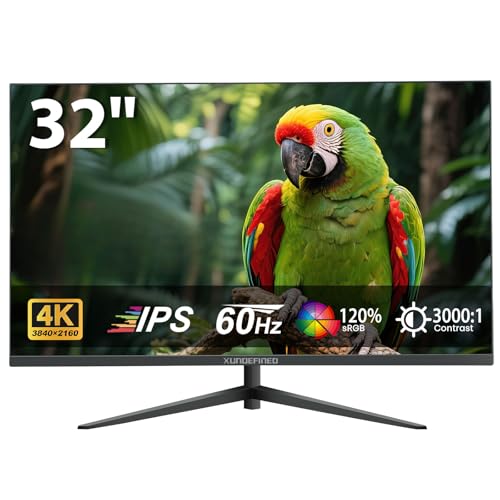
| Immersive Color Performer | Resolution: 4K UHD (3840 × 2160) | Panel Type: Fast IPS | Size: 32-inch | VIEW LATEST PRICE | Read Our Analysis |
| 24″ 4K UHD IPS Monitor for Photo & Video Editing |

| Creator’s Precision Tool | Resolution: 4K UHD (3840 × 2160) | Panel Type: IPS | Size: 23.8-inch (marketed as 24-inch) | VIEW LATEST PRICE | Read Our Analysis |
| ViewSonic VA2756-4K 27″ IPS 4K Monitor |

| Eye‑Comfort Everyday | Resolution: 4K UHD (3840 × 2160) | Panel Type: SuperClear IPS | Size: 27-inch | VIEW LATEST PRICE | Read Our Analysis |
| FEELWORLD 15.6″ 4K Broadcast Director Monitor (4K156-9HSD) |
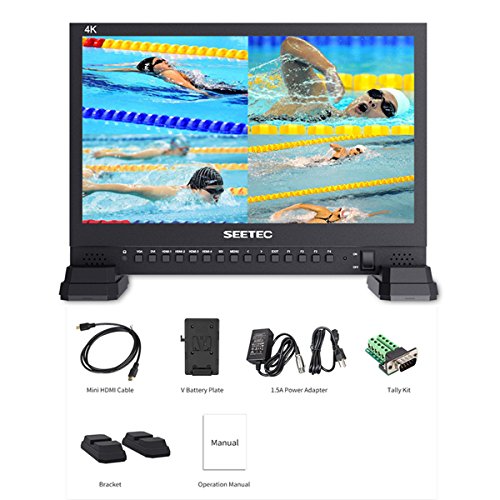
| Pro Broadcast Monitor | Resolution: 4K UHD (3840 × 2160) | Panel Type: IPS | Size: 15.6-inch | VIEW LATEST PRICE | Read Our Analysis |
More Details on Our Top Picks
Z-Edge U27P4K 27″ 4K IPS Monitor
If you need a sharp, color-accurate 27-inch 4K display for photo or video work (or crisp multitasking), the Z-Edge U27P4K delivers: a 3840×2160 IPS panel with 100% sRGB and wide 178° viewing angles that keeps colors consistent across the screen. You’ll get vivid, realistic visuals with enhanced contrast and a low-blue-light mode to reduce eye strain during long sessions. Connectivity’s robust: two HDMI and two DisplayPort inputs, all supporting 4K@60Hz, plus FreeSync to cut tearing and latency. The three-sided edge-to-edge screen, ultra-slim stand, and VESA mount keep your setup clean and flexible.
- Resolution:4K UHD (3840 × 2160)
- Panel Type:IPS
- Size:27-inch
- Refresh Rate:60 Hz
- Color Coverage / Accuracy:100% sRGB
- Inputs / Connectivity:2 × HDMI, 2 × DisplayPort
- Additional Feature:Three-sided edge-to-edge
- Additional Feature:Ultra-slim stand
- Additional Feature:VESA 100 × 100
32″ 4K UHD Fast IPS Computer Monitor
Gamers and creative pros who need crisp detail and quick response will appreciate this 32″ 4K UHD Fast IPS monitor, which pairs a 3840 × 2160 panel with low motion stutter and Adaptive-Sync for smooth, tear-free visuals. You’ll get 120% sRGB and 16.7 million colors for vivid accuracy, plus a 3000:1 contrast ratio that deepens blacks and refines highlights. The ultra-slim bezel suits multi-monitor setups, while tilt and VESA 100 × 100 compatibility save desk space. Connectivity includes two HDMI 2.0 ports, DisplayPort 1.4 and a 3.5 mm audio out. A two-year warranty and 90-day replacement back it.
- Resolution:4K UHD (3840 × 2160)
- Panel Type:Fast IPS
- Size:32-inch
- Refresh Rate:60 Hz
- Color Coverage / Accuracy:120% sRGB
- Inputs / Connectivity:2 × HDMI 2.0, 1 × DisplayPort 1.4, 3.5 mm audio out
- Additional Feature:120% sRGB coverage
- Additional Feature:3000:1 contrast ratio
- Additional Feature:Tilt -5° to +15°
24″ 4K UHD IPS Monitor for Photo & Video Editing
Creative professionals who need pixel-perfect color and detail will find this 23.8-inch 4K UHD IPS monitor ideal for photo and video editing. You get 3840 x 2160 at 185 PPI, yielding sharper images with minimal edge roughness. The IPS panel renders over 1.07 billion colors, covers 135% sRGB and 100% DCI-P3, and delivers ΔE < 2 accuracy with 178° viewing. HDR10 boosts dynamic range for footage previews. The height- and angle-adjustable stand supports vertical orientation and VESA mounts. HDMI and DisplayPort guarantee broad compatibility with PCs, Macs, consoles, and laptops; built-in 2W speakers round out basic audio needs.
- Resolution:4K UHD (3840 × 2160)
- Panel Type:IPS
- Size:23.8-inch (marketed as 24-inch)
- Refresh Rate:(implied standard) 60 Hz
- Color Coverage / Accuracy:135% sRGB / 100% DCI-P3 (ΔE < 2)
- Inputs / Connectivity:HDMI, DisplayPort (built-in speakers)
- Additional Feature:135% sRGB / 100% DCI-P3
- Additional Feature:ΔE < 2 accuracy
- Additional Feature:Height & rotate stand
ViewSonic VA2756-4K 27″ IPS 4K Monitor
The ViewSonic VA2756-4K is a smart pick for professionals and multitaskers who need crisp 4K detail on a 27-inch IPS panel, because its SuperClear technology keeps colors accurate and consistent across wide viewing angles. You get 3840 x 2160 clarity, ultra-thin bezels, and a 60 Hz refresh rate that suits editing, reviewing, and general productivity. Preset modes-Game, Movie, Web, Text, Mono-let you switch to optimized settings fast. Eye comfort features include Flicker-Free tech and a Blue Light Filter to reduce fatigue during long sessions. Connectivity is broad: USB, HDMI, DisplayPort, and VGA for laptops, PCs, and Macs.
- Resolution:4K UHD (3840 × 2160)
- Panel Type:SuperClear IPS
- Size:27-inch
- Refresh Rate:60 Hz
- Color Coverage / Accuracy:Accurate/vivid color (SuperClear IPS) – eye-comfort presets
- Inputs / Connectivity:USB, HDMI, DisplayPort, VGA
- Additional Feature:SuperClear IPS tech
- Additional Feature:Multiple preset modes
- Additional Feature:USB + VGA inputs
FEELWORLD 15.6″ 4K Broadcast Director Monitor (4K156-9HSD)
If you need a compact director monitor that handles four native 4K HDMI sources simultaneously, the FEELWORLD 15.6″ 4K156-9HSD is built for multi-camera live productions and field directing. You get a 15.6″ IPS panel with native 3840×2160 at up to 2160p60 for pixel-to-pixel clarity. Four 4K HDMI inputs plus 3G-SDI (with loop), DVI and VGA let you switch cameras, computers, and other devices. Quad, dual, single and PIP layouts support live programs, sports and interviews. Built-in tools-peaking, check field, image freeze, zoom, markers and color/brightness controls-keep you precise on set.
- Resolution:4K UHD (3840 × 2160)
- Panel Type:IPS
- Size:15.6-inch
- Refresh Rate:Supports up to 2160p60 (60 Hz)
- Color Coverage / Accuracy:Professional broadcast color controls (pixel-to-pixel clarity; adjustable color temperature)
- Inputs / Connectivity:4 × 4K HDMI, 1 × 3G-SDI (loop/loop-out), DVI, VGA
- Additional Feature:Four 4K HDMI inputs
- Additional Feature:Quad-view / PIP
- Additional Feature:3G-SDI loop-out
Factors to Consider When Choosing 4K Resolution Video Monitors
When choosing a 4K monitor, you’ll want to weigh resolution and pixel density against how close you’ll sit and what detail you need. Check color accuracy and coverage, pick the panel type that suits your viewing angles, and confirm refresh rate and response times for motion clarity. Also verify the connectivity and ports to guarantee compatibility with your camera, GPU, and peripherals.
Resolution And Pixel Density
Choosing a 4K monitor isn’t just about grabbing the highest resolution-it’s about matching screen size, pixel density (PPI), and your typical viewing distance so images and text stay sharp without awkward scaling. You should pick a screen size that preserves useful PPI: for example, 27″ at 4K gives ~163 PPI while 24″ at 4K is ~185 PPI. Higher PPI yields finer detail and crisper text, which matters for photo and video editing or close work where 170–200+ PPI is often preferred. Remember that very high PPI may require UI scaling in your OS and apps to keep interface elements readable. Always run the monitor at its native 3840×2160; non‑native modes or upscaling will soften images and introduce artifacts.
Color Accuracy Coverage
Why does color coverage matter for a 4K video monitor? You need accurate color to guarantee what you see matches final delivery. Look for wide gamut percentages-100% sRGB, 100% DCI-P3, or higher like 135% sRGB-so the panel can reproduce your target color space. Check ΔE values: aim for <2 for near-imperceptible error in color-critical photo and video work. Confirm bit depth: 10-bit panels render over a billion colors and smoother gradients with less banding than 8-bit. Make sure the monitor ships with factory calibration or a calibration report and supports hardware calibration with a colorimeter to maintain consistency. Finally, match standards to your workflow-sRGB for web, Adobe RGB for print, DCI-P3 for digital cinema.
Panel Type And Viewing
Color coverage sets the palette, but the panel technology determines how that palette looks across the screen and to different viewers. Choose IPS if you need wide 178° angles and consistent color/contrast for collaborative work or color-critical tasks. Pick VA when deep native contrast and richer blacks matter, but know off-axis viewers may see color shift. OLED gives true blacks and excellent off-axis color thanks to per-pixel emissive contrast, though you should weigh burn-in risk for static UI elements. Also match screen size to pixel density: 24–27″ 4K models yield higher PPI and crisper detail at desktop distances, while 32″+ displays need more viewing distance to hide pixel structure. Consider your seating and room layout to guarantee uniform viewing for everyone.
Refresh Rate And Response
While refresh rate and pixel response are often grouped together, they address different parts of motion fidelity: refresh rate (Hz) controls how frequently the screen updates, and response time (ms) measures how quickly pixels change between frames, so you need both adequate Hz to match your target frame rates and low response times to prevent visible ghosting. For 4K, 60 Hz is the practical baseline-balancing smooth motion with the bandwidth 3840×2160 demands. If you want 120–144 Hz at native 4K, be ready for much higher GPU and interface requirements (DisplayPort 1.4/2.0 or HDMI 2.1). Aim for 1–5 ms pixel response to avoid ghosting, and use adaptive sync (FreeSync/G‑Sync) to eliminate tearing and stutter. For pro video, match refresh to your target 24/30/60 fps for frame‑accurate playback.
Connectivity And Ports
Because ports determine what your monitor can actually do, check connectivity first when shopping for a 4K display. Make sure it offers HDMI 2.0+ and DisplayPort 1.2/1.4 so you get true 4K at 60 Hz without chroma subsampling or reduced color depth. Prefer multiple inputs – for example two HDMI plus a DisplayPort – so you can keep a PC, console, and media player connected.
If you need audio routing, confirm 3.5 mm or optical outputs or built-in speakers. For pro workflows or live switching, look for SDI or multi‑HDMI inputs with loop/loop‑out to daisy‑chain recorders and monitors. Finally, verify the ports and cables support Adaptive‑Sync/FreeSync and HDR at 4K60 so advanced features actually work.
Ergonomics And Mounting
Once you’ve confirmed the ports you need, check how the monitor will sit and move in your workspace-ergonomics and mounting affect comfort and long‑term productivity as much as image quality. Make sure VESA compatibility (typically 75×75 or 100×100 mm) if you’ll use wall mounts or adjustable arms. Prefer height-adjustable stands with tilt ranges (for example −5° to +15°) to keep your eyes aligned and reduce neck strain during long sessions. Swivel and pivot functions let you rotate between landscape and portrait or align multiple displays precisely. Match monitor size and desk depth-27–32″ 4K panels usually need 24–40 inches viewing distance to avoid excessive head movement. Finally, confirm the stand footprint, panel weight, and VESA specs so your desk or arm safely supports the monitor.
Specialized Monitoring Features
When you need beyond-basic image quality, specialized monitoring features become the difference between guesswork and reliable results: support for HDR formats and wide color gamuts preserves highlight detail and expanded color, built-in waveform/vectorscope/histogram/false-color tools give real-time exposure and color feedback, and focus-assist (peaking and 1:1 pixel modes) guarantees critical sharpness at 4K density. You should pick monitors that handle HDR10/HLG and cover DCI‑P3 or Rec.2020 to trust highlight and color fidelity. Look for onboard waveform, vectorscope, histogram, and false-color for instant corrective action. Peaking and pixel‑to‑pixel modes make fine focus checks easy. Multi‑input routing with multi‑view/PIP/quad‑split simplifies multi‑camera monitoring. Finally, 3D LUT support and built‑in calibration keep color consistent across devices and workflows.
Final Thoughts
You’ll get sharper detail and more usable screen real estate with any of these 4K choices, whether you’re color‑grading, editing, or directing on set. Pick a panel that matches your workflow-high PPI for smaller screens, fast‑IPS for motion, and hardware LUTs for consistency. Remember: professional 4K monitors often cover 100% DCI‑P3 and can reduce color error to ΔE<2; for perspective, that level of accuracy is used by most studios.




