

You’ll want a mount that fits your TV, handles a bit more weight than the manufacturer lists, and lets you tilt and swivel without tools. I’ll walk you through five solid full‑motion options for 2026 and point out the key specs-VESA range, extension, leveling, and anchors-so you can pick one that won’t make installation a headache. Keep going to find the mount that actually matches how you watch.
| Mounting Dream Full-Motion TV Wall Mount (32–65″) |

| Best for Durability | Supported TV Size: 32–65″ | VESA Compatibility: Up to 400×400 mm (16×16 in) | Weight Capacity: 99 lbs | VIEW LATEST PRICE | Read Our Analysis |
| USX Full Motion TV Wall Mount 42–90 |

| Best for Large Screens | Supported TV Size: 42–90″ | VESA Compatibility: 200×100 mm to 600×400 mm | Weight Capacity: 132 lbs | VIEW LATEST PRICE | Read Our Analysis |
| Pipishell Full-Motion TV Wall Mount (24–55″) |

| Best All-Purpose Pick | Supported TV Size: 24–55″ | VESA Compatibility: 75×75 mm to 400×400 mm (extenders included) | Weight Capacity: 66 lbs | VIEW LATEST PRICE | Read Our Analysis |
| MOUNTUP Adjustable Full-Motion TV Wall Mount (26–55″) |

| Best for Height Adjustment | Supported TV Size: 26–55″ | VESA Compatibility: 100×100 mm to 400×400 mm | Weight Capacity: 11–66 lbs (supported range) | VIEW LATEST PRICE | Read Our Analysis |
| Cmple Full Motion TV Wall Mount 32–55 Inch |
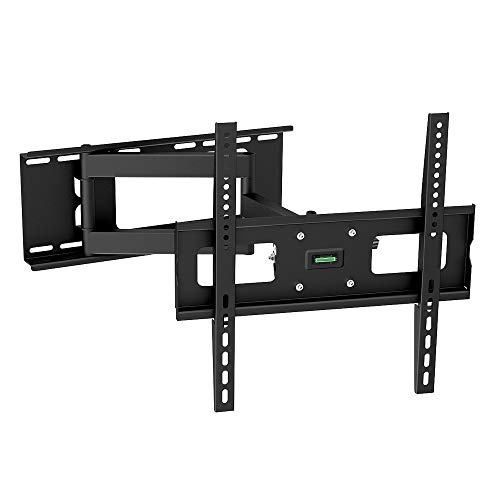
| Best Budget Performer | Supported TV Size: 32–55″ | VESA Compatibility: 200×200, 300×300, 400×200, 400×400, 600×400 | Weight Capacity: 88 lbs | VIEW LATEST PRICE | Read Our Analysis |
More Details on Our Top Picks
Mounting Dream Full-Motion TV Wall Mount (32–65″)
If you want a heavy-duty, fully articulating mount that fits most 32–65″ TVs and handles up to 99 lbs, the Mounting Dream MD2380 is a smart pick- you’ll get six articulating arms for wide swivel and a 17.5‑inch extension while still retracting to 3.4 inches, plus ±3° post-install leveling to fine-tune your picture. You’ll mount screens up to VESA 400×400 on 16-inch studs (alternate MD2380-24K covers 16/18/24-inch). Tilt (+5°/−15°) cuts glare, robot-welded steel adds strength, and labeled hardware, a template, and Allen-key storage simplify installation. Concrete anchors are available on request.
- Supported TV Size:32–65″
- VESA Compatibility:Up to 400×400 mm (16×16 in)
- Weight Capacity:99 lbs
- Motion Type:Full-motion articulating dual-arm (6 arms)
- Tilt Range:+5° / −15°
- Installation Hardware / Support:Pre-labeled hardware bags, paper template; US-based support; concrete anchors on request
- Additional Feature:6 articulating arms
- Additional Feature:Allen key storage
- Additional Feature:Paper template included
USX Full Motion TV Wall Mount 42–90
Choose the USX Full Motion TV Wall Mount 42–90 when you want maximum flexibility for large screens – it supports most 42–90″ TVs up to 132 lbs with full-articulating arms for tilt, swivel, and post-installation leveling. You’ll get VESA support from 200×100mm to 600×400mm and a maximum 16″ stud spacing requirement. The mount extends 16.49″ and retracts to 2.40″ for a clean look. Tilt range is +5°/‑15°, swivel ±45° (TV-dependent), and leveling ±3°. Installation includes labeled hardware, instructions, a bubble level and cable ties; concrete anchors aren’t included but are available on request.
- Supported TV Size:42–90″
- VESA Compatibility:200×100 mm to 600×400 mm
- Weight Capacity:132 lbs
- Motion Type:Full-motion dual articulating arms
- Tilt Range:+5° / −15°
- Installation Hardware / Support:Pre-labeled hardware bags, bubble level, cable ties; US-based support; anchors available on request
- Additional Feature:Bubble level included
- Additional Feature:Cable ties included
- Additional Feature:Slim 2.40″ retracted depth
Pipishell Full-Motion TV Wall Mount (24–55″)
Mounting a mid-size TV with full flexibility, the Pipishell Full-Motion TV Wall Mount (24–55″) lets you swivel, tilt, and extend for prime viewing whether you’re seating across the room or off to the side. You’ll fit most 24–55″ LED/LCD/flat/curved TVs with VESA 75×75–400×400 using included extenders, supporting up to 66 lbs. Tilt 5° up/15° down and swivel up to 90° (TV size dependent); extend 17″ or retract to 2.2″. Built from premium steel with ultra-strong articulating arms and UL stress testing, it mounts to a stud, concrete, or brick. Hardware, a simple 1-2-3 guide, and customer support are included.
- Supported TV Size:24–55″
- VESA Compatibility:75×75 mm to 400×400 mm (extenders included)
- Weight Capacity:66 lbs
- Motion Type:Full-motion articulating arms
- Tilt Range:+5° / −15°
- Installation Hardware / Support:Complete hardware kit, graphical guide; customer support for fit/questions
- Additional Feature:Includes 4 extenders
- Additional Feature:UL stress-tested rating
- Additional Feature:Fits single stud mounting
MOUNTUP Adjustable Full-Motion TV Wall Mount (26–55″)
For anyone who wants effortless height and angle adjustments, the MOUNTUP MU0037 makes daily TV viewing simple with its gas-spring, height‑adjustable arm that self‑balances TVs between 26″ and 55″. You’ll get a textured-black, cold‑formed steel bracket supporting 11–66 lbs with VESA 100×100–400×400 compatibility. It offers 8.6″ pneumatic height travel, tool‑free +5°/‑15° tilt, 180° swivel, 23″ extension and +/-3° leveling after installation. Install on a single wood stud or concrete in about 15 minutes using included hardware and graphics; drywall alone isn’t advised. The mount’s strength testing, daily support, warranty, and 30‑day return provide added confidence.
- Supported TV Size:26–55″
- VESA Compatibility:100×100 mm to 400×400 mm
- Weight Capacity:11–66 lbs (supported range)
- Motion Type:Gas-spring full-motion articulating bracket
- Tilt Range:+5° / −15° (tool-free)
- Installation Hardware / Support:All necessary hardware, step-by-step graphic instructions; support available; concrete anchors on request
- Additional Feature:Gas-spring height adjustment
- Additional Feature:23″ smooth extension
- Additional Feature:Tool-free height adjustment
Cmple Full Motion TV Wall Mount 32–55 Inch
If you need a sturdy, flexible wall mount for a 32″–55″ TV, the Cmple Full Motion model delivers full swivel and tilt so you can easily aim the screen from across the room. You’ll fit most 32″–55″ LED/LCD or curved TVs with VESA patterns from 200×200 up to 600×400, including Samsung, LG, Sony, Vizio, TCL and more. Built from reinforced cold steel and rated for 88 lbs (40 kg), it offers full-motion swivel arms, tilt adjustments, and a built-in level for precise positioning. Installation is straightforward with included hardware, snap-in brackets with security screws, and a lifetime warranty.
- Supported TV Size:32–55″
- VESA Compatibility:200×200, 300×300, 400×200, 400×400, 600×400
- Weight Capacity:88 lbs
- Motion Type:Full-motion swivel arms
- Tilt Range:Free-tilting (typical +5° / −15° stated)
- Installation Hardware / Support:Complete hardware kit and instruction manual; lifetime warranty/support
- Additional Feature:Snap-in brackets
- Additional Feature:Lifetime warranty
- Additional Feature:Built-in level adjustment
Factors to Consider When Choosing Adjustable TV Mounts
When choosing an adjustable TV mount, you’ll want to match the mount to your TV’s size, weight, and VESA pattern so it fits securely. Check the mounting surface-drywall, concrete, or studs-to make certain proper anchors and support. Also consider the range of motion you need, from fixed tilt to full motion, to get the viewing angles you want.
TV Size Compatibility
Choosing the right mount starts with matching your TV’s physical specs to the mount’s limits: check the supported screen-size range, confirm the maximum weight capacity leaves a safety margin, and verify the VESA hole pattern fits your TV. Next, match your TV’s diagonal to the mount’s listed size range (e.g., 32–65″) so mounting points align and the display looks proportionate. Confirm the mount supports flat or curved panels and that extender brackets or adapters are available for unusual VESA patterns. For full-motion or articulating mounts, check extension depth and swivel/tilt limits so a larger screen can move freely without striking walls or furniture. These checks prevent poor fit, stress on the TV, and restricted movement.
Weight Capacity Limits
After matching size and VESA pattern, you’ll want to confirm the mount’s weight limits so the bracket can safely carry your TV plus any accessories. Choose a mount rated at least 20–30% above your TV’s actual weight to create a safety margin for soundbars, mounting plates, and future upgrades. Add the combined weight of everything attached and never exceed the mount’s maximum load. Remember articulating, full-motion arms introduce greater leverage, so pick higher-rated mounts than you’d use for a fixed bracket. Check that studs, concrete, or brick and the fasteners are rated for the combined load with the same safety factor. For wall plates spanning studs or using extensions, verify the weight capacity for each installation configuration (single vs. dual stud, extended vs. retracted).
VESA Pattern Support
If your TV’s mounting holes don’t line up with the bracket, the whole installation can fail, so always match the VESA pattern (measured in millimeters) on your TV to the mount’s supported dimensions. Check the horizontal and vertical spacing-examples include 100×100, 200×200, 400×400, and 600×400-and make sure the mount lists that exact pattern. Look at the mount’s maximum supported VESA; many include extender brackets to cover multiple ranges. For larger or nonstandard TVs, confirm adapters or choose a heavy-duty mount rated for wider spacings. Never assume small-pattern compatibility for bigger screens. Before buying, cross-reference the TV’s VESA spec with the mount’s compatibility to avoid last-minute adapters or extra drilling.
Mounting Surface Type
Matching the VESA pattern gets you the right bracket, but the wall itself determines whether that bracket will hold – and how you fasten it. You’ll almost always prefer wood studs (usually 16 in on-center); lag bolts into the stud center give the strongest, most common support for heavy mounts. Concrete or brick need rated expansion or sleeve anchors (think ~10×50 mm range); don’t trust drywall anchors alone. Plain drywall can’t safely support full-motion or heavy TVs unless you hit studs or install a structural backing plate. Mounting to a single stud can work for some models, but verify the mount’s capacity, hardware, and orientation first. For hollow, plaster, or irregular stud spacing, confirm materials and spacing – you may need toggles, plywood backing, or to move the mount.
Range Of Motion
Think through how you’ll watch the TV and pick a mount whose articulation matches those needs: tilt, swivel, and extension ranges determine what viewing angles you can get, while retracted depth and maximum extension dictate whether the set clears furniture or fits in a tight space. Check tilt specs (commonly +5° to −15°) so you can reduce glare and aim the screen. Confirm swivel limits-many mounts offer ±45° or more-which matters for corner setups and broad seating. Verify post-installation leveling (often ±3°) to fine-tune alignment without re-drilling. If you want powered or gas-spring height adjustment, compare total vertical travel and self-balance for smooth, tool-free repositioning. Match articulation to your room and viewing habits.
Extension And Depth
When choosing a mount, check both maximum extension and retracted depth so the TV reaches your viewing positions without crowding the room. Measure typical extensions-about 2–23 inches-to confirm the mount pulls far enough for off-angle or side seating. Also verify the retracted depth; low-profile options can sit as shallow as 2–3 inches to save space. Make sure the arm length and articulation let you swivel laterally and clear nearby shelves or cabinets. Remember longer extensions increase torque on studs and fasteners, so match extension needs to wall strength. Finally, check clearance for cables and ventilation at both full extension and fully retracted depths so cords won’t pinch and the TV gets adequate airflow.
Installation Complexity
Now that you’ve checked extension and retracted depth, consider how installation difficulty will affect your choice of mount. Verify wall type-wood studs, concrete, or brick-and use anchors or fasteners rated for the mount’s weight and stud spacing. Measure stud spacing and confirm VESA compatibility before drilling; many full-motion mounts must bolt into studs and aren’t safe on drywall alone. Check the mount’s weight capacity against your TV and include a safety margin; heavy dual-arm articulating brackets need sturdier hardware and more effort to install. Account for clearance and extension so the arm can articulate without hitting walls or furniture. Prepare proper tools, follow the template and level guidelines, and plan for a two-person install for large or heavy displays.
Build Quality And Safety
Start by confirming the mount’s load capacity exceeds your TV’s weight by at least 20–30% and that the VESA pattern and weight rating stamped on the bracket match your display. Then inspect construction: prefer heavy-gauge cold-formed or welded steel, reinforced arms, and quality fasteners to minimize flex and wear. Verify safety features like locking security screws, anti-drop mechanisms, and post-installation leveling adjustments (±2–3°) to prevent accidental shifts or tipping. Make sure supplied mounting hardware and anchors are rated for your wall type-wood studs, concrete, or brick-with specified anchor diameters and embedment depths to meet static load requirements. Finally, check for industry stress-test compliance, clear installation instructions, and ratings that exceed working load for added safety.
Final Thoughts
You’ve just seen the best adjustable TV mounts for 2026-pick one and your viewing life will change like you’ve upgraded from a potato to a cinema screen overnight. Don’t skimp: choose the right VESA, weight rating, and arm reach, and you’ll get perfect angles, zero wobble, and installation that feels almost magical. Treat mounting like investing in happiness-get a sturdy, adjustable mount and enjoy flawless views every time you sit down.


