

Most quad‑port NICs don’t just differ by speed – their chipsets dictate driver quality, offloads, and virtualization features you’ll actually use. You’ll want cards that play nicely with Windows, Linux, and ESXi, but also offer the right PCIe lanes, jumbo frame support, and SR‑IOV if you’re virtualizing. I’ve picked five options that balance compatibility, performance, and value so you can narrow your choice quickly.
| H!Fiber 4-Port Gigabit NIC (Intel I350) |

| Reliable Performer | Port Count: 4 RJ45 ports | Interface: PCI Express (PCIe 2.1 x4 compatible) | Auto‑Negotiation Speeds: 10/100/1000 Mbps auto‑negotiation | VIEW LATEST PRICE | Read Our Analysis |
| StarTech 4-Port PCIe RJ45 Network Card (ST1000SPEX43) |

| Practical Workhorse | Port Count: 4 RJ45 ports | Interface: PCI Express (PCIe) | Auto‑Negotiation Speeds: 10/100/1000 Mbps (Gigabit) auto‑negotiation | VIEW LATEST PRICE | Read Our Analysis |
| IO Crest 4-Port Gigabit PCIe Network Card |

| Budget-Friendly Pick | Port Count: 4 RJ45 ports | Interface: PCI Express 2.1 x4 | Auto‑Negotiation Speeds: 10/100/1000 Mbps auto‑negotiation | VIEW LATEST PRICE | Read Our Analysis |
| GLOTRENDS 4-Port 10G RJ45 Ethernet PCIe Network Card |

| High-Speed Professional | Port Count: 4 RJ45 ports | Interface: PCIe 3.0 x8 | Auto‑Negotiation Speeds: 10Gb/1Gb/100Mb auto‑negotiation | VIEW LATEST PRICE | Read Our Analysis |
| StarTech 4-Port PCIe Gigabit Ethernet Network Adapter |
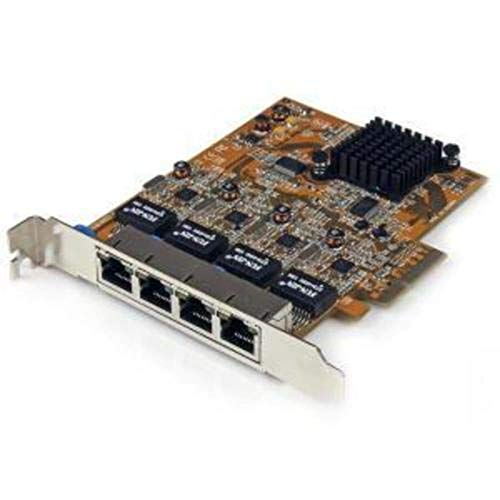
| Server-Ready Choice | Port Count: 4 RJ45 ports | Interface: PCI Express x4 | Auto‑Negotiation Speeds: 10/100/1000 Mbps auto‑negotiation | VIEW LATEST PRICE | Read Our Analysis |
More Details on Our Top Picks
H!Fiber 4-Port Gigabit NIC (Intel I350)
If you need reliable multiport gigabit connectivity for a small server or workstation, the H!Fiber 4‑Port Gigabit NIC with the Intel I350 chip is a strong choice-its true Intel controller delivers proven performance and driver support across Windows, Linux, and ESXi, and the PCIe x4 form factor with included low‑profile bracket makes it easy to install in both standard and slim systems. You get four RJ45 10/100/1000 ports, Cat5e support to 100 m, and compatibility with PCIe x4/x8/x16 slots. Intel drivers are available via QR code or website, and H!Fiber offers 24/7 support, a 3‑year warranty, and 30‑day returns.
- Port Count:4 RJ45 ports
- Interface:PCI Express (PCIe 2.1 x4 compatible)
- Auto‑Negotiation Speeds:10/100/1000 Mbps auto‑negotiation
- Wake‑on‑LAN (WoL):Supported (Intel I350 supports WoL)
- Low‑Profile Bracket Included:Includes low‑profile + full‑height brackets
- OS / Driver Support (Broad OS Support):Windows, Windows Server, major Linux distros, VMware ESXi, FreeBSD, SLES
- Additional Feature:Intel I350 controller
- Additional Feature:PCIe 2.1 x4 bus
- Additional Feature:3-year warranty
StarTech 4-Port PCIe RJ45 Network Card (ST1000SPEX43)
Choose the StarTech ST1000SPEX43 when you need four independent Gigabit RJ45 ports from a single PCIe slot-ideal for clients, workstations, or servers that require reliable, out-of-the-box Ethernet expansion. You get a Realtek RTL8111H-based card that’s TAA compliant and broadly compatible with desktop and server OSes. It supports IEEE 802.3/802.3u/802.3x/802.3ab standards, auto MDIX, full and half duplex, Wake-on-LAN, and 9K jumbo frames. The standard-profile PCIe form factor with four RJ45 ports makes installation straightforward. Choose this card when you want affordable, dependable Gigabit connectivity without complex setup or driver hassles.
- Port Count:4 RJ45 ports
- Interface:PCI Express (PCIe)
- Auto‑Negotiation Speeds:10/100/1000 Mbps (Gigabit) auto‑negotiation
- Wake‑on‑LAN (WoL):Supported (WoL listed)
- Low‑Profile Bracket Included:Standard‑profile bracket (low‑profile not specified)
- OS / Driver Support (Broad OS Support):Out‑of‑box compatibility with most desktop/server OSes (drivers available), TAA compliant
- Additional Feature:Realtek RTL8111H chipset
- Additional Feature:TAA compliant
- Additional Feature:9K jumbo frame support
IO Crest 4-Port Gigabit PCIe Network Card
For builders who need reliable, budget-friendly multiport Ethernet expansion, the IO Crest 4-Port Gigabit PCIe card delivers four full 10/100/1000 Mbps ports on a single PCIe 2.1 x4 card. You’ll get a Realtek-based SI-PEX24085 that fits x4, x8, or x16 slots and includes a low-profile 8 cm bracket for compact HTPCs. It supports auto-negotiation, full-duplex operation, and complies with IEEE 802.3/802.3u/802.3ab standards. Wake-on-LAN is supported for remote wake tasks. If you need straightforward, affordable quad-port Gigabit expansion without advanced offload features, this IO Crest card is a pragmatic choice.
- Port Count:4 RJ45 ports
- Interface:PCI Express 2.1 x4
- Auto‑Negotiation Speeds:10/100/1000 Mbps auto‑negotiation
- Wake‑on‑LAN (WoL):Supported (WOL listed)
- Low‑Profile Bracket Included:Includes additional low‑profile 8 cm bracket
- OS / Driver Support (Broad OS Support):Windows/Linux (standard driver support implied), PCIe compatibility
- Additional Feature:Includes low-profile bracket
- Additional Feature:PCIe 2.1 x4 electrical
- Additional Feature:Fits x4/x8/x16 slots
GLOTRENDS 4-Port 10G RJ45 Ethernet PCIe Network Card
Professionals who need reliable multi‑10GbE connectivity will appreciate the GLOTRENDS ST7223’s four auto‑negotiating 10Gb RJ45 ports driven by the Intel X710 controller-this card gives you high throughput, SR‑IOV and VMDq for virtualized workloads, and MACsec/PTP support for secure, time‑sensitive networking. You’ll install it in a PCIe 3.0 x8 slot, choose regular or low‑profile brackets, and rely on Intel drivers (or vendor links) for Windows, Linux, FreeBSD, and ESXi. Flexible Port Partitioning and Wake on LAN add utility, the package is compact and lightweight, and manufacturer warranty details are available from glotrends.
- Port Count:4 RJ45 ports
- Interface:PCIe 3.0 x8
- Auto‑Negotiation Speeds:10Gb/1Gb/100Mb auto‑negotiation
- Wake‑on‑LAN (WoL):Supported (Wake on LAN listed)
- Low‑Profile Bracket Included:Includes low‑profile + regular profile brackets
- OS / Driver Support (Broad OS Support):Windows, Windows Server, recent RHEL/Ubuntu, Debian, FreeBSD, ESXi (drivers available)
- Additional Feature:Four 10Gb RJ45 ports
- Additional Feature:SR-IOV and VMDq support
- Additional Feature:MACsec & IEEE 1588 PTP
StarTech 4-Port PCIe Gigabit Ethernet Network Adapter
If you need to add four Gigabit Ethernet ports to a desktop or server without swapping motherboards, the StarTech ST1000SPEX42 delivers a compact PCIe x4 solution that’s ideal for small businesses and power users. You’ll get four 10/100/1000 Mbps RJ45 ports in a single card that fits a PCIe x4 slot, expanding wired connectivity for desktops and servers. It supports Windows (64-bit modern versions and Server editions), Linux LTS kernels, and VMware ESXi, making it versatile for mixed environments. The card is compact, well-supported by StarTech, and remains a practical, reliable NIC choice for 2026.
- Port Count:4 RJ45 ports
- Interface:PCI Express x4
- Auto‑Negotiation Speeds:10/100/1000 Mbps auto‑negotiation
- Wake‑on‑LAN (WoL):Supported (typical NIC WoL support / driver listed)
- Low‑Profile Bracket Included:Standard‑profile bracket (low‑profile not specified)
- OS / Driver Support (Broad OS Support):Windows, Windows Server, Linux, VMware ESXi (driver support noted)
- Additional Feature:Single PCIe x4 slot
- Additional Feature:VMware ESXi supported
- Additional Feature:Compact lightweight design
Factors to Consider When Choosing 4 Port Network Cards
When picking a 4‑port network card, you’ll want to check port speeds and connector types to match your switches and cabling. Look at the card’s chipset and driver maturity, plus explicit OS support and PCIe slot requirements to guarantee compatibility. Also consider advanced offload features like TOE, SR‑IOV, and checksum offload for better CPU and network performance.
Port Speed And Types
Although port speed and connector type might seem like basic specs, they directly determine whether a 4‑port NIC will handle your workloads: choose 1GbE for typical office traffic or 10GbE for virtualization, large backups, and media editing; confirm ports can auto‑negotiate across supported speeds (e.g., 10/100/1000 or 1/10 Gbps); and pick RJ45 or SFP/SFP+ based on your cabling, distance, and desire for DAC or fiber. You should match throughput to tasks, ensuring ports provide the aggregate bandwidth you need. Check jumbo frame and QoS support if you transfer large packets or need prioritization. Verify physical port counts versus logical partitioning like SR‑IOV so you don’t assume dedicated bandwidth per VM. Finally, confirm RJ45 reach (≈100 m) or choose SFP/SFP+ for longer fiber or DAC links.
Chipset And Drivers
Port speed and connectors set the stage, but the chipset and drivers determine whether a 4‑port NIC actually performs and stays reliable over time. You should pick NICs with well‑supported chipsets (Intel, mature Realtek families) because they get frequent, stable driver updates across major OSes and hypervisors. Verify explicit driver availability for your exact Windows Server builds, Linux distributions and kernel versions, and VMware ESXi releases before buying. Prefer chipsets with upstream mainline Linux drivers or vendor‑signed drivers to avoid recompiling after kernel updates. If you need SR‑IOV, VMDq, MACsec, jumbo frames, or offloads, confirm drivers implement those features – hardware alone won’t help. Finally, check the vendor’s firmware and driver update policy to make certain long‑term security and performance fixes.
Operating System Support
Because your server’s OS and hypervisor determine whether a 4‑port NIC will actually work, confirm driver and kernel compatibility before you buy. Check that the NIC supports your exact OS and kernel version-Linux distros and Windows Server builds often need matching drivers or in-kernel chipset support. Verify virtualization compatibility (VMware ESXi, Hyper‑V) if you’ll use passthrough or advanced VM features, since some firmware/driver combos are required. Confirm 32‑bit vs 64‑bit and specific build support; many vendors only ship 64‑bit installers. Prefer vendor‑provided kernel modules or native, in‑tree Linux drivers and signed Windows drivers to avoid manual compilation or unsigned-install hurdles. Finally, make certain vendors maintain drivers and firmware with security updates for long‑term server deployments.
PCIe Slot Requirements
When selecting a 4‑port NIC, make sure your motherboard has a free PCIe slot that matches the card’s electrical lane width and generation (many quad‑port cards use PCIe 2.1 or 3.0 x4), since a mismatch can bottleneck throughput or prevent the card from working at full speed; also check physical clearance and bracket type in your chassis, available power and lane allocation on systems with multiple add‑in devices, and whether the platform firmware exposes PCIe features (ACS, VT‑d/IOMMU) required for SR‑IOV and other virtualization offloads. Beyond that, verify the slot’s generation-PCIe 3.0 gives roughly double per‑lane bandwidth versus 2.0-and make certain you have at least x4 electrical connectivity. Confirm chassis bracket height, mounting points, and that shared CPU/motherboard lanes won’t throttle aggregate NIC traffic.
Advanced Offload Features
Beyond physical and electrical fit, you should evaluate the card’s offload capabilities, since they directly affect CPU load, latency, and VM performance. Check TCP/UDP checksum offload and Large Send/Generic Segmentation Offload (LSO/GSO) to shift segmentation and checksums to the NIC, which frees CPU cycles and boosts throughput. For receive-heavy workloads, GRO/LRO reduce interrupts and kernel overhead by aggregating packets. Ensure hardware RSS or Transmit Packet Steering is present to spread traffic across cores via queue hashing, vital for multi-core servers. If you run VMs, SR-IOV or VMDq deliver near-native I/O and better isolation by exposing virtual functions or partitioning queues. Also consider IEEE 1588 PTP timestamping and MACsec support for time-sensitive or encrypted links.
Physical Fit And Brackets
If you’re installing a 4‑port NIC, make sure it physically and electrically fits your system: match the card’s PCIe version and lane requirement to the available slot (x4/x8/x16), choose the correct full‑height or low‑profile bracket, and confirm there’s enough clearance for adjacent cards, cables, and the bracket depth so the RJ45s can be plugged in without obstruction. Check whether your case needs a low‑profile bracket and whether the card includes a swap option for small‑form‑factor builds. Measure clearance around the slot to allow for cable routing and neighbouring cards. Verify the external bracket aligns with chassis retention points and that screw or tool‑less mounts are compatible. For rack or server installs, confirm front/rear airflow, bracket cutouts, and whether single‑ or dual‑slot brackets will block nearby I/O.
Final Thoughts
You’re choosing the backbone of your network – think of these 4‑port cards as bridges. Pick the Intel I350 if you want a stone‑solid arch, StarTech or IO Crest for affordable timber spans, and GLOTRENDS’ X710 when you need a steel viaduct for heavy traffic. Match chipset, PCIe lanes, brackets and offloads to your load, and you’ll build a reliable crossing that keeps data flowing where it needs to go.




