

Like a good movie, choosing a 50‑inch TV should pull you in and keep you watching. You’ll want a set that balances picture quality, smart features and price without unnecessary fluff. I’ll walk you through five top models for 2026-each with clear strengths-so you can quickly spot which matches your needs and budget.
| Insignia 50″ F50 Series 4K UHD Smart Fire TV |

| Best Smart Ecosystem | Screen Size: 50″ | Resolution: 4K Ultra HD (2160p) | HDR Support: HDR10 | VIEW LATEST PRICE | Read Our Analysis |
| Roku 50″ Select Series 4K HDR Smart TV |
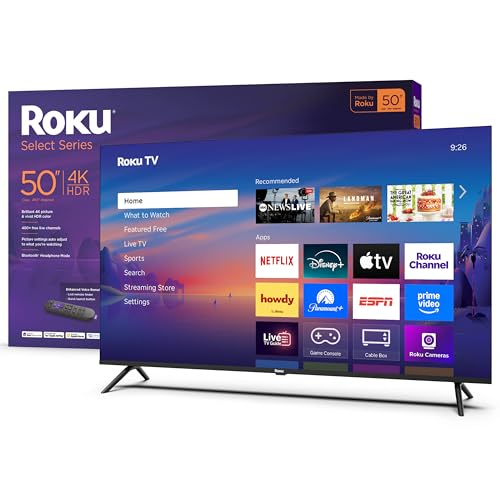
| Easiest to Use | Screen Size: 50″ | Resolution: 4K Ultra HD | HDR Support: HDR10 | VIEW LATEST PRICE | Read Our Analysis |
| RCA 50″ UHD Smart Google TV with HDR10 |

| Budget Streaming Power | Screen Size: 50″ | Resolution: 4K Ultra HD (3840 x 2160) | HDR Support: HDR10 | VIEW LATEST PRICE | Read Our Analysis |
| VIZIO 50″ V-Series 4K Smart TV with AirPlay |

| Best for Gamers | Screen Size: 50″ | Resolution: 4K UHD | HDR Support: HDR (HDR processing; HDR formats not specified) | VIEW LATEST PRICE | Read Our Analysis |
| Sony 50″ 4K BRAVIA Smart TV (K-50S30) |

| Premium Picture & Features | Screen Size: 50″ | Resolution: 4K Ultra HD | HDR Support: Dolby Vision + 4K HDR | VIEW LATEST PRICE | Read Our Analysis |
More Details on Our Top Picks
Insignia 50″ F50 Series 4K UHD Smart Fire TV
If you want an affordable 50-inch 4K TV that’s easy to use and packed with streaming options, the Insignia F50 Series delivers – its Fire TV platform gives you quick access to Prime Video, Netflix, Disney+, Hulu and a ton of free, ad-supported content, while 4K HDR10 and upscaling sharpen everyday shows and movies. You’ll get 2160p resolution, HDR10’s wider color and contrast, and upscaling for lower-res sources. DTS Virtual‑X and HDMI eARC improve audio, and Fire TV’s smart-home, AirPlay, and app catalog expand functionality. It includes three HDMI ports, USB, optical, Ethernet, voice remote, parental controls, and VESA mounting.
- Screen Size:50″
- Resolution:4K Ultra HD (2160p)
- HDR Support:HDR10
- Smart Platform / Streaming:Fire TV platform (apps: Prime Video, Netflix, Disney+, etc.)
- Voice / Assistant Support:Alexa voice remote / smart home integration
- HDMI Inputs:3 HDMI ports
- Additional Feature:DTS Virtual‑X audio
- Additional Feature:HDMI eARC support
- Additional Feature:VESA 200×200 mount
Roku 50″ Select Series 4K HDR Smart TV
For viewers who want a streamlined streaming experience and crisp HDR picture without extra fuss, the Roku 50″ Select Series 4K HDR Smart TV delivers sharp 4K visuals, HDR10 color, and a Roku platform that makes finding shows fast and simple. You’ll appreciate the frameless 50-inch LED design and Roku Smart Picture that cleans signals and picks the right mode. Access 500+ channels, free live shows, movies and Roku Originals, and customize your home screen. Built-in Wi‑Fi, AirPlay, and voice-assistant support keep devices connected. The enhanced voice remote, lost-remote finder, clear speech tuning, and Bluetooth Headphone Mode round out a practical package.
- Screen Size:50″
- Resolution:4K Ultra HD
- HDR Support:HDR10
- Smart Platform / Streaming:Roku TV platform (500+ channels, Roku Originals)
- Voice / Assistant Support:Roku Voice; compatible with Siri, Alexa, Google Assistant
- HDMI Inputs:(Not explicitly numbered) Multiple HDMI ports (standard 50″ Roku TVs typically include HDMI inputs)
- Additional Feature:Frameless sleek design
- Additional Feature:Lost remote finder
- Additional Feature:Roku Smart Picture
RCA 50″ UHD Smart Google TV with HDR10
Looking for a budget-friendly 50-inch 4K TV that still handles movies and games well? The RCA 50″ UHD Smart Google TV with HDR10 gives you a frameless 3840×2160 LED panel, HDR10, 3D Noise Reduction and a 5000:1 dynamic contrast ratio with a 178° viewing angle. Google TV organizes apps and recommendations; built-in Google Assistant and Alexa compatibility let you control it hands-free. You get three HDMI ports, two USBs, optical and RCA outputs, Wi‑Fi, Bluetooth and USB media playback. It runs under 110 W, includes a two-year warranty, and offers weekday customer support.
- Screen Size:50″
- Resolution:4K Ultra HD (3840 x 2160)
- HDR Support:HDR10
- Smart Platform / Streaming:Google TV (Google Play apps, personalized recommendations)
- Voice / Assistant Support:Built‑in Google Assistant; compatible with Alexa
- HDMI Inputs:3 HDMI ports
- Additional Feature:3D Noise Reduction
- Additional Feature:2‑year warranty
- Additional Feature:Wide 178° viewing
VIZIO 50″ V-Series 4K Smart TV with AirPlay
Gamers and budget-conscious viewers who want crisp 4K performance will appreciate the VIZIO 50″ V-Series, which packs IQ Active 4K HDR processing and Active Pixel Tuning to deliver sharper upscaling and better contrast. You’ll get a 4K UHD LED HDR panel with intelligent upscaling from HD and pixel-level brightness control for improved accuracy. The V-Gaming Engine offers Auto Game Mode and the lowest input lag in the V-Series for responsive Xbox and PlayStation play. SmartCast gives fast access to Netflix, Disney+, Prime Video and free channels with no fees. Included: power cable, remote, and stand.
- Screen Size:50″
- Resolution:4K UHD
- HDR Support:HDR (HDR processing; HDR formats not specified)
- Smart Platform / Streaming:VIZIO SmartCast (major streaming apps, SmartCast mobile)
- Voice / Assistant Support:SmartCast voice features (and smart remote via app)
- HDMI Inputs:(Not explicitly numbered) HDMI inputs (supports gaming consoles; V‑Gaming Engine)
- Additional Feature:IQ Active 4K Processor
- Additional Feature:V‑Gaming Engine
- Additional Feature:SmartCast Mobile app
Sony 50″ 4K BRAVIA Smart TV (K-50S30)
If you want a 50-inch TV that balances cinematic picture quality with smart-home convenience, the Sony 50-Inch 4K BRAVIA (K-50S30) is a strong pick. You’ll get 4K HDR with Dolby Vision, TRILUMINOS Pro color, and the 4K HDR Processor X1 for sharper, more accurate images. Motionflow XR reduces blur for sports and action, while 4K X-Reality PRO upscales lower-res content. Google TV with Google Assistant, Chromecast, and AirPlay 2 make streaming and voice control simple. X-Balanced speakers and Dolby Atmos enhance sound; PS5-friendly features and Sony Pictures Core extras round out a versatile 50-inch option.
- Screen Size:50″
- Resolution:4K Ultra HD
- HDR Support:Dolby Vision + 4K HDR
- Smart Platform / Streaming:Google TV (Google Assistant, Chromecast built‑in, AirPlay 2)
- Voice / Assistant Support:Google Assistant built‑in; voice control (and AirPlay 2)
- HDMI Inputs:(Not explicitly numbered) HDMI support with PS5 features (standard HDMI inputs)
- Additional Feature:TRILUMINOS Pro color
- Additional Feature:Dolby Atmos support
- Additional Feature:Sony Pictures Core access
Factors to Consider When Choosing 50 Inch TVs
When choosing a 50‑inch TV, you’ll want to balance screen resolution and HDR performance with the smart platform’s app support and ease of use. Don’t forget to check audio features, available input ports and connectivity, and how the set handles gaming performance and latency. These factors together determine how well the TV fits your viewing habits and devices.
Screen Resolution And HDR
Because a 50-inch screen puts pixels and HDR performance front and center, you’ll want a 4K (3840×2160) panel with solid HDR support to get sharp detail, vivid highlights, and deep shadows without artifacts. Choose 4K to maintain readable text and crisp textures at typical living-room distances. At minimum, look for HDR10 support; better models add Dolby Vision or wider color gamut coverage for more accurate hues and scene-by-scene contrast mapping. Check peak brightness and local dimming: HDR needs several hundred nits plus per-zone control to deliver bright speculars and deep blacks without blooming. Finally, verify the TV’s tone mapping and upscaling quality so both HDR and lower-resolution SDR sources map naturally to the panel’s capabilities.
Smart Platform Compatibility
Although a TV’s picture and sound matter most, its smart platform determines how easily you’ll access the shows, apps, and devices you rely on, so confirm the OS supports your preferred streaming services and casting protocols, offers voice-assistant and smart-home integrations, gets regular updates, and provides intuitive navigation with good universal search and input handling. Beyond basics, check that the platform natively runs the subscription apps and free ad-supported channels you use so nothing disappears later. Verify built-in voice assistants and AirPlay/Chromecast compatibility for seamless control and casting from phones or tablets. Prefer platforms with frequent software and security updates to keep apps working over time. Test home-screen customization, universal search, and input handling so you can find content fast and connect peripherals like consoles or cameras via supported protocols and HDMI features.
Audio And Sound Features
Usually, you’ll want to treat a TV’s built-in speakers as convenience rather than destination audio. Check speaker configuration and total output power-more watts and multiple drivers (tweeters, woofers) give clearer dialogue and fuller bass. Look for support of advanced codecs like Dolby Atmos or DTS and HDMI eARC so you can pass full-resolution multichannel audio to a soundbar or AV receiver. Consider virtual surround or simulated height for better immersion when you’re not using external speakers, but plan on a dedicated soundbar/system for true surround. Verify audio outputs (HDMI ARC/eARC, optical, headphone, subwoofer/RCA) and Bluetooth for private listening or wireless speakers. Prefer TVs with dialogue enhancement, EQ presets, or manual equalizer controls for speech clarity.
Input Ports And Connectivity
Good audio matters, but how you connect your gear determines whether that sound and the rest of your setup will perform. Make sure the TV has at least three HDMI ports, including one with eARC, so you can hook up a console, Blu‑ray/player and soundbar while preserving high‑quality audio pass‑through. Prefer HDMI 2.1 or at least one port that supports 4K@120Hz and VRR if you’ll use next‑gen consoles. Check for two USB ports-one must support the media formats you use-for playback and firmware updates. Verify Ethernet and dual‑band Wi‑Fi for reliable streaming, plus Bluetooth for headphones or wireless speakers. Finally, confirm extra outputs like optical audio, a headphone jack or composite input for legacy devices and external systems.
Gaming Performance And Latency
When you’re picking a 50‑inch TV for gaming, prioritize low input lag, high refresh rates, and features that cut screen tearing and motion blur. Aim for input lag under 20 ms at 60 Hz and below 10 ms at 120 Hz so controls feel instant in fast-paced titles. Choose panels with 120 Hz support and VRR to smooth frame pacing and eliminate tearing. HDMI 2.1 matters: look for 4K@120Hz, Auto Low Latency Mode (ALLM), and VRR to get full next‑gen console and PC benefits. Use a dedicated game mode or auto game mode to disable extra processing and lower lag. Also check gray‑to‑gray response times-around 5 ms or less reduces ghosting and keeps motion crisp for competitive play.
Size Fit And Viewing Distance
For a 50‑inch TV, getting the distance and fit right makes or breaks your viewing experience: sit about 1.2–1.5 times the diagonal (roughly 5–6.5 feet) for 4K content and a bit farther-1.5–2.5 times (6.5–10.5 feet)-for 1080p so you don’t see pixels, confirm the screen’s ~44‑inch width plus 3–6 inches clearance on each side for cabinets or wall mounts, and mount the center at about 30–40 inches from the floor while allowing ±15–30° off‑center seating to preserve contrast and color. Measure your room before buying, placing seating within those ranges. Leave clearance for ventilation and cables. If wall‑mounting, check stud placement and viewing height. For flexible rooms, consider a tilting mount to fine‑tune angle and minimize glare.
Build Quality And Warranty
Although you might focus on picture specs first, pay close attention to build quality and warranty since they determine how long your 50‑inch TV stays reliable. Check chassis materials and stand stability – metal or reinforced plastic frames and a low center of gravity cut wobble and panel stress whether on a stand or wall-mounted. Verify the VESA mounting pattern and whether mounting hardware or a reinforced backplate is included to guarantee secure installation and reduce housing strain. Look for clear warranty terms detailing parts and labor duration (commonly 1–2 years) and whether panel or backlight coverage is full or prorated. Confirm customer support channels, turnaround times, authorized service centers, and documented operating/standby power and temperature limits for realistic durability expectations.
Price And Value Options
Among the most important choices you’ll make is how much to spend versus what you get: compare the base price to the actual feature set-native 4K and advanced HDR, stronger image processors, and premium audio support cost more, while budget models can still deliver 4K and HDR10 at lower prices. You should weigh value-added features like Dolby Vision, Dolby Atmos, built-in streaming, voice assistants, and low-latency gaming; they raise long-term worth. Check connectivity and expandability-HDMI count, HDMI 2.1/eARC, USB, and audio outputs-to avoid future adapters. Factor warranty length, included accessories, wall-mount compatibility, and estimated power use when calculating total cost of ownership. Balance panel resolution, HDR type, upscaling, and audio tech against price to find the best overall value.
Final Thoughts
You’ve seen the lineup-each 50‑inch brings its own flavor-so picture your living room as a stage: the Sony fills it with cinematic color and thunderous sound, the VIZIO sharpens game nights, the RCA anchors streaming with Google smarts, Roku keeps navigation effortless, and Insignia delivers solid value. Trust what fits your habits and budget; pick the set that lights up your space and makes every seat feel like the best one in the house.


