

Nearly 78% of viewers say screen size is their top priority when upgrading a TV, and a 65-inch set often hits the sweet spot for most living rooms. You’ll want a model that balances picture fidelity, smart features, and gaming responsiveness without dominating your space. I’ll walk you through standout 65-inch options from Samsung, Sony, and Insignia – plus what matters most when you’re choosing – so you can pick confidently.
| Samsung 65″ QLED Q8F 4K UHD Smart TV |

| Best for Color Precision | Resolution: 4K UHD | Display Type / Tech: QLED (Quantum Dot) | Smart Platform / Voice: Smart TV with built-in Alexa / Samsung platform | VIEW LATEST PRICE | Read Our Analysis |
| Sony BRAVIA 65″ 4K UHD Smart TV (K-65S20M2) |
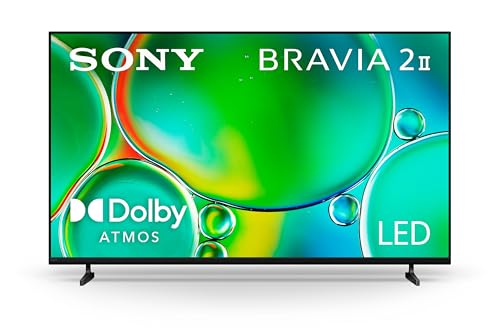
| Best for Gamers | Resolution: 4K UHD | Display Type / Tech: LED (Sony BRAVIA, wide color array) | Smart Platform / Voice: Google TV (supports Google Cast and AirPlay 2) | VIEW LATEST PRICE | Read Our Analysis |
| Insignia 65″ QLED 4K UHD Smart Fire TV |

| Best Streaming Value | Resolution: 4K UHD | Display Type / Tech: QLED (Quantum Dot) | Smart Platform / Voice: Fire TV OS with Alexa voice remote | VIEW LATEST PRICE | Read Our Analysis |
| Samsung 65″ Neo QLED 4K Mini LED Smart TV |

| Best for Contrast & Brightness | Resolution: 4K (upscaled to 4K) | Display Type / Tech: Neo QLED (Mini LED + Quantum Dot) | Smart Platform / Voice: Smart TV with built-in Alexa / Samsung platform | VIEW LATEST PRICE | Read Our Analysis |
More Details on Our Top Picks
Samsung 65″ QLED Q8F 4K UHD Smart TV
If you want a large TV that balances vivid, true-to-life color with gaming and sports performance, the Samsung 65″ QLED Q8F is a top pick-its Quantum Dots deliver over a billion precise colors while the Q4 AI Processor and VRR support up to 4K 144Hz for smooth, tear-free motion. You’ll get AI-optimized picture and Advanced HDR that boost brightness and contrast per scene, plus AI-enhanced audio tailored to content. The AirSlim design keeps a low profile on your wall, while Samsung Vision AI and built-in Alexa simplify streaming across 2,700+ free channels and apps.
- Resolution:4K UHD
- Display Type / Tech:QLED (Quantum Dot)
- Smart Platform / Voice:Smart TV with built-in Alexa / Samsung platform
- HDR / Dynamic Contrast:Advanced HDR (scene-by-scene dynamic enhancement)
- Gaming / Motion Support:VRR up to 4K 144Hz; smooth motion for sports/gaming
- Voice & Assistant Integration:Built-in Alexa (voice assistant integration)
- Additional Feature:Nano-sized Quantum Dots
- Additional Feature:Q4 AI Processor
- Additional Feature:2,700+ free channels
Sony BRAVIA 65″ 4K UHD Smart TV (K-65S20M2)
Gamers and cinephiles will appreciate the Sony BRAVIA K-65S20M2 for its PlayStation 5-friendly features and lifelike 4K processing-Auto HDR Tone Mapping and Auto Genre Picture Mode optimize visuals on the fly, while the 4K Processor X1 and XR-Reality PRO restore textures and color for sharper, more cinematic images. You’ll get vivid colors from a wide color array, dynamic contrast, and Motionflow XR for smooth action. Google TV, Apple AirPlay 2, and Google Cast make streaming effortless, and Sony Pictures Core adds complimentary movies. Use the Game Menu to tweak settings, and the Eco Dashboard to manage energy.
- Resolution:4K UHD
- Display Type / Tech:LED (Sony BRAVIA, wide color array)
- Smart Platform / Voice:Google TV (supports Google Cast and AirPlay 2)
- HDR / Dynamic Contrast:Dynamic contrast with HDR support (XR-Reality PRO upscaling)
- Gaming / Motion Support:Motionflow XR; Auto HDR Tone Mapping and gaming features (PS5-focused)
- Voice & Assistant Integration:Supports Google Assistant features (Google TV) and AirPlay/works with voice ecosystems
- Additional Feature:4K Processor X1
- Additional Feature:Google TV platform
- Additional Feature:PlayStation 5 optimizations
Insignia 65″ QLED 4K UHD Smart Fire TV
For viewers who want punchy colors and bright HDR performance on a budget, the Insignia 65″ QLED 4K Smart Fire TV delivers-with Quantum Dot QLED tech and Dolby Vision that make movies and shows pop. You get a 65-inch 4K UHD panel with Direct LED backlight for uniform brightness and strong contrast, plus Dolby Vision support for finer highlights and shadow detail. Dolby Atmos brings immersive spatial audio, great for films and games. Fire TV OS gives fast access to Netflix, Prime Video, Disney+, Apple TV+ and more, with Alexa hands-free control via the included voice remote and three HDMI ports including eARC.
- Resolution:4K UHD
- Display Type / Tech:QLED (Quantum Dot)
- Smart Platform / Voice:Fire TV OS with Alexa voice remote
- HDR / Dynamic Contrast:HDR with Dolby Vision support
- Gaming / Motion Support:(Implicit) low-lag/modern gaming support with Dolby Atmos audio; Direct LED and likely HDMI inputs (three HDMI including eARC)
- Voice & Assistant Integration:Amazon Alexa built into remote (Alexa voice control)
- Additional Feature:Dolby Vision support
- Additional Feature:Dolby Atmos audio
- Additional Feature:Edge-to-edge glass
Samsung 65″ Neo QLED 4K Mini LED Smart TV
You’ll appreciate the Samsung 65″ Neo QLED if you want pinpoint contrast and AI-driven upscaling that turns lower-res shows into near-4K quality; you get a 20-neural-network NQ4 AI Gen2 processor that sharpens, boosts brightness, and converts SDR to HDR-like imagery. Mini LED zones deliver bold brights and deep blacks for striking clarity. Motion Xcelerator and VRR up to 4K 144Hz keep sports and gaming smooth and tear-free. Samsung Vision AI refines scenes, Alexa’s built-in voice control adds convenience, and the smart platform gives access to 2,700+ free channels plus your favorite apps and games.
- Resolution:4K (upscaled to 4K)
- Display Type / Tech:Neo QLED (Mini LED + Quantum Dot)
- Smart Platform / Voice:Smart TV with built-in Alexa / Samsung platform
- HDR / Dynamic Contrast:SDR-to-HDR transformation and enhanced dynamic highlights (Mini LED contrast)
- Gaming / Motion Support:VRR up to 4K 144Hz; Motion Xcelerator for smooth motion
- Voice & Assistant Integration:Built-in Alexa (voice assistant integration)
- Additional Feature:Mini LED precision backlight
- Additional Feature:NQ4 AI Gen2 processor
- Additional Feature:20 neural networks
Factors to Consider When Choosing 65 Inch TVs
When picking a 65-inch TV you’ll want to prioritize picture and color accuracy, plus HDR and brightness performance to get the most lifelike images. Check the smart platform and apps for the services you use, and evaluate gaming features and input latency if you play competitively. Finally, consider room-appropriate size, mounting options, and design so the set fits both your space and style.
Picture And Color Accuracy
Curious how a 65-inch TV makes colors pop and skin tones look natural? You’ll want models with Quantum Dots or Mini LEDs – they deliver precise, vibrant, true-to-life colors and better color consistency across the screen. Look for a wide color gamut and high color volume so that reds, greens, and subtle skin tones remain accurate in both bright and dark scenes. AI-driven processors matter too; they analyze content scene-by-scene and adjust color tones for more faithful reproduction. Don’t overlook upscaling tech, which restores detail and improves color accuracy when you watch lower-resolution sources. Together, these features give you sharper, more natural images that stay true to the creator’s intent without relying on extreme picture tweaks.
HDR And Brightness Performance
Because HDR depends on both deep blacks and bright highlights, pay close attention to a TV’s peak brightness, contrast control, and HDR format support when choosing a 65-inch set. You’ll want high peak-nit performance so highlights pop without clipping, and robust contrast so shadow detail stays intact. Look for sets with Mini LED or quantum dot technologies; they give finer local dimming and stronger color volume, improving both blacks and bright scenes. Prefer models that support dynamic HDR formats like Dolby Vision or HDR10+ since scene-by-scene metadata optimizes brightness and color. Finally, verify real-world color accuracy at high brightness levels-effective HDR means faithful hues in highlights and preserved shadow detail, not just impressive spec sheets.
Smart Platform And Apps
Good HDR and brightness make content look stunning, but you’ll get the most out of your 65-inch TV if the smart platform delivers the apps and controls you actually use. Choose a platform that gives access to a wide range of streaming apps-national and local news, sports, movies, and exclusive channels-often without extra subscription fees. Look for curated libraries with thousands of channels and personalized recommendations so you find content faster. Make sure the TV supports Apple AirPlay and Google Cast for easy streaming from phones and tablets. Voice-assistant integration, like Alexa, lets you control apps and settings hands-free. Finally, prioritize platforms that receive regular updates and have intuitive interfaces so your TV stays relevant and simple to navigate over time.
Gaming Features And Latency
When you game on a 65-inch TV, low input latency and the right feature set make the difference between feeling in control and fighting lag; look for TVs with low measured input lag, support for Variable Refresh Rate (VRR), and 120Hz (or higher) panels to keep action smooth and tear-free. You’ll want gaming modes that cut image processing to prioritize responsiveness, and HDMI ports with Auto Low Latency Mode (ALLM) so your console or PC triggers low-latency settings automatically. VRR prevents tearing and stutter by matching the panel’s refresh rate to the game’s frame output, while higher refresh rates reduce motion blur in fast scenes. Check independent lag measurements, confirm VRR and 120Hz capability, and verify ALLM over HDMI to guarantee the best competitive and immersive experience.
Size, Mounting And Design
After checking gaming features and latency, you’ll want to think about how a 65-inch set fits your room and style. A 65-inch TV gives a large viewing area ideal for medium to large rooms, delivering immersive visuals without overwhelming space. Decide whether you’ll wall-mount or use a stand: slim, low-profile designs sit close to the wall for a sleek look, while thicker sets need more clearance and may protrude. Pay attention to bezels-bezel-less or edge-to-edge glass enhances immersion and modern aesthetics. Check the rear panel and overall thickness to guarantee the TV sits flush if mounted. Finally, plan placement for viewing angles and decor: choose a free-standing or mounted design that complements the room and preserves flexibility.
Frequently Asked Questions
Do These TVS Support Hdr10+ Gaming Features Like Variable Refresh Rate?
Absolutely – most models support HDR10+ and VRR, and you’ll get gaming visuals so smooth they’ll feel like liquid silk. You’ll want to check each TV’s specs for confirmed HDR10+ Adaptive, FreeSync, or HDMI 2.1 VRR.
Can I Wall-Mount These TVS on a Sloped/Uneven Wall Safely?
Yes – you can wall-mount them on a sloped or uneven wall safely if you use an adjustable, tilt-capable mount, anchor into studs or use proper anchors, and shim or level the mount during installation for secure, even support.
What Are the Energy Consumption Differences During Standby Versus Active Use?
Example: a 65″ OLED used 150W active, 0.5W standby. You’ll see active use consume tens to hundreds of watts while standby drops to under 1–3W. You’ll save most energy by using full sleep.
Do These Models Receive Software Updates and Security Patches Long-Term?
Yes – many manufacturers provide firmware updates and security patches for several years, but it varies by brand and model; you’ll want to check each TV’s support policy and update frequency before buying to guarantee long-term coverage.
Are Replacement Parts (Remotes, Stands, Panels) Easily Available Locally?
Yes – you’ll usually find remotes, stands, and panels locally through brand service centers, electronics retailers, or certified repair shops; availability varies by brand and region, so you should check manufacturer networks and local suppliers first.


