

You want a TV mount that moves easily, holds your set securely, and hides cables so your living room looks tidy. Start with heavy-duty USX articulating mounts for wide tilt, long reach, and easy leveling, then consider monTEK models for steel arms, clean cable management, and lifetime support. Add MOUNTUP if you need gas-spring height adjust and long extension. Keep VESA fit, weight capacity, and wall type in mind as you pick.
| USX MOUNT Full Motion TV Wall Mount (26–65″) |

| Best All-Purpose | Compatible TV Size: 26–65″ | VESA Compatibility: 75×75 mm to 400×400 mm | Motion Type: Full-motion articulating arms | CHECK LATEST PRICE | Read Our Analysis |
| monTEK Full Motion TV Wall Mount (23–65″) |
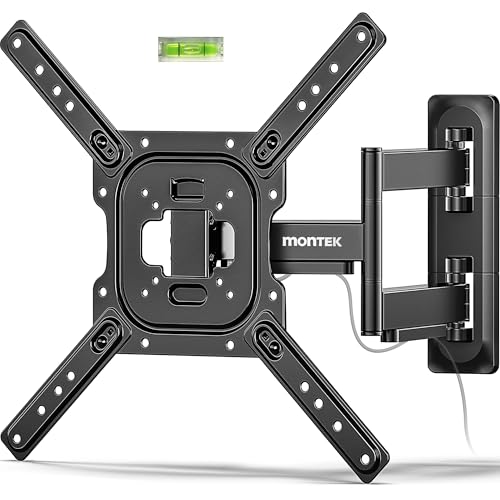
| Premium Reliability | Compatible TV Size: 23–65″ | VESA Compatibility: 75×75 mm to 400×400 mm | Motion Type: Full-motion articulating bracket | CHECK LATEST PRICE | Read Our Analysis |
| USX MOUNT Full-Motion TV Wall Mount 37″-84 |

| Heavy-Duty Large Screens | Compatible TV Size: 37–84″ | VESA Compatibility: 200×100 mm to 600×400 mm | Motion Type: Full-motion, dual articulating arms | CHECK LATEST PRICE | Read Our Analysis |
| MOUNTUP Adjustable Full-Motion TV Wall Mount (26–55″) |

| Motion & Height Adjust | Compatible TV Size: 26–55″ | VESA Compatibility: 100×100 mm to 400×400 mm | Motion Type: Full-motion articulating design (gas spring) | CHECK LATEST PRICE | Read Our Analysis |
| monTEK Full Motion TV Wall Mount for 13–43″ TVs |

| Compact & Versatile | Compatible TV Size: 13–43″ | VESA Compatibility: 75×75 mm to 200×200 mm | Motion Type: Full-motion articulating arms | CHECK LATEST PRICE | Read Our Analysis |
More Details on Our Top Picks
USX MOUNT Full Motion TV Wall Mount (26–65″)
If you want a sturdy, adjustable mount that makes wall-mounting a bigger TV feel simple and secure, the USX MOUNT Full Motion TV Wall Mount is built for you. You’ll fit most 26 to 65 inch TVs and match VESA from 75×75 to 400×400 mm. You can tilt five degrees up or 15 down, swivel up to 90 degrees, and level after install by five degrees. The arm extends 16.7 inches and retracts to 2.81 inches. Heavy duty steel and automated manufacturing give strength. Installation targets wood studs or concrete, with labeled hardware, a bubble level, and cable ties included.
- Compatible TV Size:26–65″
- VESA Compatibility:75×75 mm to 400×400 mm
- Motion Type:Full-motion articulating arms
- Tilt Adjustment:+5° / −15°
- Mounting Surface Compatibility / Studs:Wood studs and solid concrete (no drywall alone); corner mounting capable
- Included Installation Hardware / Tools:Detailed instructions, pre-labeled hardware bags, bubble level, cable ties, assorted TV screws/spacers/washers (concrete anchors removed)
- Additional Feature:Perfect center design
- Additional Feature:Corner-mounting capable
- Additional Feature:Pre-labeled hardware bags
monTEK Full Motion TV Wall Mount (23–65″)
You’ll love the monTEK Full Motion TV Wall Mount if you want strong, flexible support that keeps your TV safe and easy to view from anywhere in the room. It fits 23 to 65 inch flat and curved screens, holds 77 pounds, and accepts VESA 75×75 to 400×400. The articulating arm tilts +5° and -10°, swivels up to 90° depending on screen size, and extends 17 inches while retracting to 2.08 inches. Steel arms are thicker for stability, with cable management and safety screws. It mounts to wood, concrete, or brick, offers leveling, hardware, and lifetime support.
- Compatible TV Size:23–65″
- VESA Compatibility:75×75 mm to 400×400 mm
- Motion Type:Full-motion articulating bracket
- Tilt Adjustment:+5° / −10°
- Mounting Surface Compatibility / Studs:Wood stud, concrete, brick (no drywall alone); single-stud capable; corner mounting supported
- Included Installation Hardware / Tools:Detailed instructions, mounting hardware, product dimensions/specs; after-sale support and limited-lifetime replacement pledge
- Additional Feature:Built-in cable management
- Additional Feature:Single-stud capable
- Additional Feature:Limited-lifetime replacement
USX MOUNT Full-Motion TV Wall Mount 37″-84
The USX MOUNT Full-Motion TV Wall Mount 37″-84″ is a great choice for anyone who wants a flexible, heavy-duty setup that handles large TVs with confidence. You’ll fit most 37″-84″ screens and VESA from 200×100 to 600x400mm, and it supports major brands like Samsung and LG. The dual articulating arms give you tilt and swivel, and you can level after install. It extends to 15.02″ and retracts to 2.62″, built from heavy steel. Installation is a clear three-step process with labeled hardware and a bubble level. Customer support includes a 10-year service promise.
- Compatible TV Size:37–84″
- VESA Compatibility:200×100 mm to 600×400 mm
- Motion Type:Full-motion, dual articulating arms
- Tilt Adjustment:+5° / −15°
- Mounting Surface Compatibility / Studs:Recommended for 12″–16″ wood studs; concrete anchors available on request (no drywall alone)
- Included Installation Hardware / Tools:Pre-labeled hardware bags, bubble level, 3 cable ties, standard mounting hardware (concrete anchors removed; M8*55 available on request)
- Additional Feature:Supports 600×400 VESA
- Additional Feature:M8*55mm available on request
- Additional Feature:10-year customer service
MOUNTUP Adjustable Full-Motion TV Wall Mount (26–55″)
Looking for a mount that makes daily TV use feel effortless? You’ll love the MOUNTUP Adjustable Full-Motion TV Wall Mount. It fits 26 to 55 inch TVs and supports VESA 100×100 to 400×400, holding 11 to 66 pounds. The pneumatic gas spring gives 8.6 inches of height adjustment that adapts to your TV weight, while the articulating arm swivels 180 degrees and extends 23 inches. You can tilt tool-free for flat or curved screens. Heavy-duty cold-formed steel keeps things steady even when extended. Installation often takes 15 minutes with included hardware and clear graphics, and support is available daily.
- Compatible TV Size:26–55″
- VESA Compatibility:100×100 mm to 400×400 mm
- Motion Type:Full-motion articulating design (gas spring)
- Tilt Adjustment:Tool-free tilt ±5° / −15°
- Mounting Surface Compatibility / Studs:Single wood stud or concrete/brick walls (no drywall alone); safe corner installation guidance
- Included Installation Hardware / Tools:Step-by-step graphic instructions, necessary hardware, concrete anchors available on request
- Additional Feature:Pneumatic gas spring
- Additional Feature:23″ extension reach
- Additional Feature:Tool-free tilt
monTEK Full Motion TV Wall Mount for 13–43″ TVs
If you want a compact, flexible mount that fits smaller living spaces and a wide range of TV sizes, this monTEK full motion wall mount is a smart choice. You’ll get full-motion arms that tilt +5° and -15° to cut glare, rotate up to ±90°, and shift between landscape and portrait. It fits 13 to 43 inch TVs with VESA 75×75 to 200×200 and supports up to 44 lbs, so your set stays secure on a single wood stud, concrete, or brick wall. It tucks to 2.6 inches, extends to 14.6 inches, hides cables, and includes hardware plus support.
- Compatible TV Size:13–43″
- VESA Compatibility:75×75 mm to 200×200 mm
- Motion Type:Full-motion articulating arms
- Tilt Adjustment:+5° / −15°
- Mounting Surface Compatibility / Studs:Single wood stud, concrete, brick (no drywall alone); corner/various rooms supported
- Included Installation Hardware / Tools:Detailed instructions, mounting hardware, after-sale support and free technical support
- Additional Feature:Portrait rotation capable
- Additional Feature:Passed 4x load test
- Additional Feature:Fold-to-wall design
Factors to Consider When Choosing Adjustable TV Mounts
When you’re picking an adjustable TV mount, start by matching the mount to your TV size and weight and checking the VESA compatibility range so the brackets fit securely. Think about the motion and adjustability you want, and make sure the mount works with your wall type and the tools you’ll need for installation. I’ll walk you through each factor step by step so you can feel confident, avoid mistakes, and get the best fit for your space.
TV Size And Weight
Pick the right mount by matching it to your TV’s size and weight so you won’t worry about safety or wobble. Start by checking the mount’s supported screen size range and measure your TV diagonally to be sure it falls inside the limits. Then check the mount’s maximum weight capacity and compare it to your TV’s weight, including a soundbar if you keep one attached. Aim for a 20 to 30 percent safety margin so the mount won’t strain. For bigger, heavier TVs choose mounts rated for higher loads and wider hole patterns, and avoid small mounts meant for 13 to 43 inch or 26 to 55 inch sets. If you plan to tilt, swivel, or extend, confirm the mount keeps its weight rating at every position.
VESA Compatibility Range
VESA compatibility tells you the exact hole pattern on the back of your TV and the mount, and getting it right keeps your screen safe and steady. You’ll see patterns like 75×75, 100×100, 200×100, 200×200, 400×200, and 400×400. First, check your TV’s VESA numbers and match them to the mount’s supported range. If a mount lists 75×75 to 400×400, make sure your TV’s exact pattern falls inside that span. Bigger screens use larger patterns, sometimes up to 600×400, so verify when you upgrade. If numbers don’t match, you can use adapters or universal plates, but you must confirm the mount’s weight capacity and secure attachment before relying on them.
Motion And Adjustability
You’ve already checked VESA fit and weight, so now think about how the mount will move and how you’ll use those motions every day. Start by checking tilt range, commonly +5° to −15°, so you can cut glare and fine-tune the vertical angle. Next, ask about swivel, often up to ±90°, to share the screen across a room. Also look at extension and retraction; articulating arms typically extend 14 to 17 inches and retract to 2 to 3 inches, giving you both low-profile looks and reach. Make sure you can level after installation, usually ±3° to ±5°, to correct small shifts. Finally, consider rotation for portrait use, which some mounts let you adjust from −5° to 90°.
Wall Type Compatibility
Mounting your TV to the right wall matters more than most people expect, because the wall type decides what hardware will keep your screen safe and steady. You should first verify the wall material: wood stud, concrete, brick, or drywall. Mounts need secure anchoring into studs or masonry, so never rely on drywall alone. Next check anchor type and stud spacing. Most stud mounts use 16″ or 24″ centers and lag bolts, while masonry needs concrete or sleeve anchors. Also confirm the mount’s weight rating and that the substrate plus fasteners support the TV and motion loads. For single-stud or corner installs, make sure the mount is rated for that use and the stud depth meets the maker’s minimums. For plaster, veneer, or hollow block, consult a structural expert or use backing plates and specialized anchors.
Installation Ease And Tools
Now that you’ve checked wall type and anchor needs, think about how much hassle you want during the actual install. You’ll first verify VESA pattern and TV weight against the mount’s limits so nothing feels risky later. Next, check the kit for pre-labeled hardware, a paper template, and a bubble level. Those make placement faster and cut guesswork. Confirm the tools you’ll need like a drill, stud finder, socket or wrench, screwdriver, and tape measure. See if your wall needs special anchors or longer screws for thicker TVs. For big screens, plan for two people to lift and secure the TV. Finally, leave room to level and adjust the mount after hanging so you can fine-tune the view.
Cable Management Options
Cable clutter can ruin a great TV setup, so pick a mount that keeps cords tidy and safe as the screen moves. Look for mounts with built in cable channels or clips on the arms and backplate so you can route HDMI, power, and speaker wires neatly. Make sure the mount gives enough slack and bend radius for its full extension, for example a 14 to 17 inch pull out, so cables never strain when you swivel or tilt. Check that the hardware includes ties, spacers, or extra clips and that there is room behind the TV for power bricks without crushing cables against the wall. If you plan in wall runs, confirm the wall plate lets you reach chase points and meet code. Choose mounts with grouped routing and removable panels for easier changes later.


