

Like calling in reinforcements when a project hits crunch time, you want a laptop that refuses to slow down. You’ll find machines that balance battery life, thermals, and raw multi‑core power without being bulky. Whether you need ultraportable AI acceleration or a desktop‑class 17″ workhorse with a discrete GPU, the options here will help you choose – and one of them is likely the exact fit you’ve been waiting for.
| Acer Swift 14 AI Laptop – Ryzen AI 9 32GB |
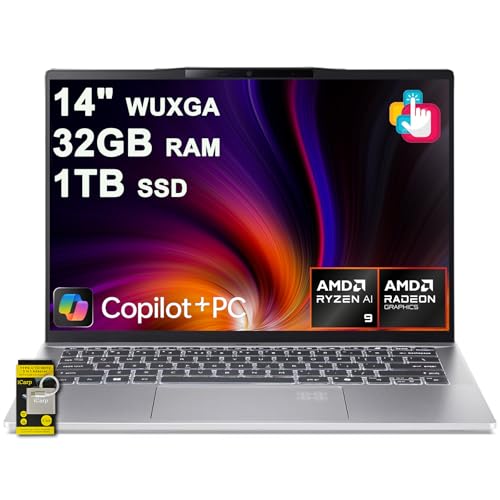
| Best for Portability | CPU: AMD Ryzen AI 9 365 (10-core) | RAM: 32 GB (DDR5) | Storage: 1 TB SSD | VIEW LATEST PRICE | Read Our Analysis |
| NIMO 17.3 Gaming Laptop Ryzen 9 8945HS |

| Best for Budget Gaming | CPU: AMD Ryzen 9 8945HS (8-core) | RAM: 16 GB (DDR5, 4800 MHz) | Storage: 512 GB SSD | VIEW LATEST PRICE | Read Our Analysis |
| NIMO 17.3″ Gaming Laptop Ryzen 9 8945HS |

| Best for Upgradeable Power | CPU: AMD Ryzen 9 8945HS (8-core / 16-thread) | RAM: 16 GB (DDR5) | Storage: 1 TB PCIe 4.0 SSD | VIEW LATEST PRICE | Read Our Analysis |
| HP OMEN 16″ Gaming Laptop – Ryzen 9 RTX 5060 |

| Best for Gaming Performance | CPU: AMD Ryzen 9 8940HX (Zen 4, up to 5.3 GHz) | RAM: 32 GB (DDR5) | Storage: 1 TB PCIe x4 SSD | VIEW LATEST PRICE | Read Our Analysis |
| ASUS Vivobook S 14 OLED Laptop Ryzen 9 24GB 1TB |
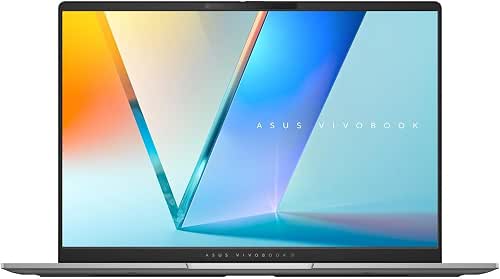
| Best for Creators | CPU: AMD Ryzen AI 9 365 (10-core, up to 5 GHz) | RAM: 24 GB (LPDDR5X) | Storage: 1 TB NVMe SSD | VIEW LATEST PRICE | Read Our Analysis |
More Details on Our Top Picks
Acer Swift 14 AI Laptop – Ryzen AI 9 32GB
If you need a slim, light laptop that packs serious on-device AI and multitasking power, the Acer Swift 14 AI is a strong pick. You’ll get a 14″ WUXGA IPS ComfyView touchscreen in a 0.7-inch gray chassis that weighs 2.95 lbs, ideal for creators and mobile professionals. Inside sits an AMD 10-core Ryzen AI 9 365 with up to 50 NPU TOPS and 73 GPU TOPS, paired with Radeon 880M, 32GB DDR5 RAM, and a 1TB SSD. You’ll enjoy Wi‑Fi 7, Bluetooth 5.4, USB4 ports, HDMI, fingerprint reader, privacy webcam, and a 75Wh battery.
- CPU:AMD Ryzen AI 9 365 (10-core)
- RAM:32 GB (DDR5)
- Storage:1 TB SSD
- Display Size:14 inches
- Operating System:Windows 11 Home
- Integrated/Onboard Graphics:AMD Radeon 880M (integrated)
- Additional Feature:Wi‑Fi 7 support
- Additional Feature:75Wh long battery
- Additional Feature:Fingerprint + privacy webcam
NIMO 17.3 Gaming Laptop Ryzen 9 8945HS
Choose the NIMO 17.3 if you need a powerful, portable workstation for gaming and creative work-its Ryzen 9 8945HS and 16GB DDR5 let you juggle AAA titles, video editing, and multitasking without breaking a sweat. You get a 17.3″ FHD panel, 512GB SSD, and Radeon 780M integrated graphics for smooth everyday play and content tasks. The slim 3.84 lb blue chassis includes soft backlit keys, fingerprint login, webcam privacy switch, and a 2MP rear cam for streaming or classes. Ports are generous: USB-C 4.0, three USB 3.0, USB 2.0; 100W PD charging and ~12.8-hour battery round out a versatile package.
- CPU:AMD Ryzen 9 8945HS (8-core)
- RAM:16 GB (DDR5, 4800 MHz)
- Storage:512 GB SSD
- Display Size:17.3 inches
- Operating System:Windows 11
- Integrated/Onboard Graphics:AMD Radeon 780M (integrated)
- Additional Feature:17.3″ large display
- Additional Feature:100W USB‑C PD charging
- Additional Feature:Rear 2MP webcam
NIMO 17.3″ Gaming Laptop Ryzen 9 8945HS
For power users who need desktop-class performance in a portable package, the NIMO 17.3″ with AMD Ryzen 9 8945HS delivers-8 cores and 16 threads with up to 5.2 GHz turbo let you game, stream, and edit without bottlenecks. You get 16GB DDR5 and a 1TB PCIe 4.0 SSD, both easily upgradeable to future-proof your setup. The 17.3″ IPS FHD panel has an 85% screen-to-body ratio and anti-glare coating, while a backlit keyboard and fingerprint precision touchpad speed inputs. A 100W USB-C PD fast charger provides rapid top-ups; NIMO backs it with a two-year warranty and dedicated U.S. support.
- CPU:AMD Ryzen 9 8945HS (8-core / 16-thread)
- RAM:16 GB (DDR5)
- Storage:1 TB PCIe 4.0 SSD
- Display Size:17.3 inches
- Operating System:Windows 11 (implied / PC platform)
- Integrated/Onboard Graphics:(Integrated AMD Radeon; paired with Ryzen 9 8945HS)
- Additional Feature:2‑year warranty
- Additional Feature:Easily upgradeable storage
- Additional Feature:85% screen-to-body ratio
HP OMEN 16″ Gaming Laptop – Ryzen 9 RTX 5060
Packed with a Ryzen 9 8940HX and an RTX 5060, the HP OMEN 16″ is aimed at gamers and creators who need top-tier performance in a portable chassis. You get 16 Zen 4 threads, 32 GB DDR5, and a 1 TB PCIe x4 SSD to handle heavy multitasking and large projects. The 16″ 2K IPS, 144 Hz panel with FreeSync shows crisp color and smooth motion while DLSS 4 and ray tracing boost visuals. Ports include USB-C with DisplayPort, HDMI 2.1, Ethernet, and Wi‑Fi 6E. At 5.42 lbs in Shadow Black, it balances power and mobility.
- CPU:AMD Ryzen 9 8940HX (Zen 4, up to 5.3 GHz)
- RAM:32 GB (DDR5)
- Storage:1 TB PCIe x4 SSD
- Display Size:16 inches
- Operating System:Windows 11 Pro
- Integrated/Onboard Graphics:NVIDIA GeForce RTX 5060 (discrete) – also system includes integrated AMD graphics on Ryzen CPU
- Additional Feature:NVIDIA RTX 5060 GPU
- Additional Feature:144Hz 2K display
- Additional Feature:Wi‑Fi 6E + Ethernet
ASUS Vivobook S 14 OLED Laptop Ryzen 9 24GB 1TB
If you need a thin, AI‑boosted workhorse that handles creative apps and multitasking, the ASUS Vivobook S 14 OLED with Ryzen AI 9 is a strong pick. You get a Ryzen AI 9 365 (10 cores, up to 5 GHz) plus a 45+ TOPS NPU, 24 GB LPDDR5X, and a 1 TB NVMe SSD for speedy workflows. The 14″ Lumina OLED (up to 3K, 120 Hz, 0.2 ms, 100% DCI‑P3, 600 nits) makes color work effortless. It’s slim (0.63″), light, and offers USB‑C with PD/Display, HDMI 2.1, AiSense camera, Copilot key, and a 75 Wh battery.
- CPU:AMD Ryzen AI 9 365 (10-core, up to 5 GHz)
- RAM:24 GB (LPDDR5X)
- Storage:1 TB NVMe SSD
- Display Size:14 inches
- Operating System:Windows 11 Home
- Integrated/Onboard Graphics:Integrated AMD Radeon graphics
- Additional Feature:3K Lumina OLED
- Additional Feature:120Hz, 0.2ms response
- Additional Feature:Dedicated Copilot key
Factors to Consider When Choosing AMD Ryzen 9 Laptops
When choosing an AMD Ryzen 9 laptop, you’ll want to weigh raw performance and core count against how well the chassis handles cooling and thermals. Also consider realistic battery life, display quality, and the memory and storage configurations you need for your workflows. These factors will help you pick a system that balances speed, longevity, and usability.
Performance And Cores
Compare core counts, clock speeds, and architecture when evaluating Ryzen 9 laptops, since 8–10+ cores with 16+ threads drive the multi-threaded workloads (video encoding, 3D rendering, heavy multitasking) while higher base and boost clocks improve single-threaded responsiveness for gaming and interactive apps. You should weigh core/thread totals against clock figures-check both base and max boost-to match your primary tasks. Inspect Zen generation and L2/L3 cache sizes because newer architectures raise IPC and throughput per core. Note TDP/configurable power ranges since they determine how long those cores can sustain peak clocks under load. If you run AI or specialized workloads, confirm CPU pairs with an integrated NPU or offers ample PCIe/CPU I/O bandwidth to accelerate inference and offload parallel tasks.
Cooling And Thermals
Because Ryzen 9 chips run hot under sustained loads, you should prioritize laptops with robust cooling that can keep peak clocks without throttling. Look for multiple heat pipes, large vapor chambers, and high‑airflow fan designs that dissipate tens of watts continuously. Check the laptop’s sustained TDP/PL limits-models that hold 45–65+ W deliver far better multi‑threaded performance than those that downclock quickly. Verify thermal interface quality; metal vapor chambers or high‑grade paste/pads reduce junction-to-ambient delta and lower throttling risk. Consider intake and exhaust placement so hot air isn’t recirculated inside the chassis. Finally, balance noise versus cooling: aggressive fan curves preserve boost clocks but raise dBA, so review real-world cooling acoustics for long workloads.
Battery Life Expectations
Although Ryzen 9 laptops deliver desktop‑class performance, they’ll usually give you shorter battery life-expect about 4–8 hours in mixed use rather than the 10+ hours common on ultralight models. You should weigh battery capacity first: 70–80 Wh packs routinely outlast 40–50 Wh units. Use power management aggressively-dynamic boost, chiplet power gating, and GPU switch‑off can cut drain dramatically; switching from high‑performance to power‑saver settings can improve runtimes by 20–50%. Remember display choices and settings matter a lot: higher refresh rates and brighter panels reduce endurance substantially. Also manage connectivity and background workloads-turn off radios and avoid sustained AI/NPU or GPU tasks to gain hours back. Balance performance needs against these variables to match a Ryzen 9 laptop to your usage.
Display Quality Standards
Battery considerations will shape how long your Ryzen 9 laptop runs, but display choices often have an even bigger impact on daily experience-so give them equal attention when deciding. Prioritize resolution and pixel density: for 14″ aim for at least 1920×1200, while creatives may want 2880×1800 or higher on smaller screens for sharper text and detail. Pick the panel by use case: IPS for wide angles and accurate color, OLED for deep blacks and contrast (watch HDR brightness), and high-refresh IPS (≥120 Hz) for smooth motion. Check color accuracy-100% sRGB or DCI‑P3 and Delta‑E <2 for editing. Make sure ~300 nits minimum, 500+ for outdoor/HDR, prefer matte coatings, and consider aspect ratio, touch, response time, and certifications.
Memory And Storage Options
When you’re juggling large projects, multiple apps, or AI tasks, prioritize RAM and fast NVMe storage so your Ryzen 9 laptop won’t bottleneck your workflow. For heavy multitasking or content creation, choose 32GB or more of DDR5 RAM and favor higher MHz modules-capacity and speed both matter for responsiveness and bandwidth-heavy tasks. Pick NVMe PCIe SSDs (PCIe 4.0 or higher) to cut boot, load, and transfer times; aim for at least a 512GB NVMe drive as a baseline. If you handle large media or datasets, go for 1TB+ SSDs or make certain easy internal expansion with M.2 bays. Verify SO‑DIMM slots and standard M.2 sockets so you can upgrade RAM or swap drives later without replacing the whole system.
Portability And Build
Because you’ll be carrying it, start with weight and size: 14″ ultraportables with Ryzen 9 can be as light as ~2.8–3.5 lbs and slip into airplane trays, while 16–17″ gaming or workstation models often top 5 lbs and add shoulder fatigue. Prioritize chassis thickness and dimensions-slimmer profiles under ~0.8 inches fit backpacks better, whereas thicker bodies usually mean beefier cooling and more internal space. Balance battery capacity against weight: around 70–75 Wh extends runtime but increases bulk. Choose durable materials: aluminum or metal alloys resist travel wear better than lightweight plastics, though they may cost a few ounces. Finally, consider port layout for on‑the‑go convenience-placements that reduce dongle needs make a heavier machine feel more portable in practice.
Connectivity And Ports
Portability affects more than weight and size-you’ll also want ports that keep you productive on the move. Make sure at least one USB-C supports Power Delivery and DisplayPort (or USB4/Thunderbolt) so you can charge and connect an external monitor with a single cable. Add multiple high-bandwidth USB-A/C ports (USB 3.2 Gen 1/2 or better) if you use external drives, audio interfaces, or several peripherals at once. Check for HDMI 2.1-or at minimum HDMI 2.0-to drive high-refresh or high-resolution displays without adapters. If you need rock-solid networking for large transfers or gaming, choose a model with Gigabit Ethernet or an RJ-45 jack. Finally, confirm Wi‑Fi 6/6E/7 and modern Bluetooth for future-proofed wireless performance.




