

You want a living room that feels like a private cinema without fuss, and Android TVs make that easy with vivid HDR, fast processors, and built‑in voice assistants. From compact streaming boxes to 50‑inch sets and pico projectors, each option balances picture quality, low‑latency gaming, and smart‑home control. I’ll walk you through five top picks and the key factors to weigh so you can pick the right setup for your space.
| NVIDIA Shield TV Pro 4K HDR Streaming Media Player |

| Best for Streaming & Gaming | Smart OS / Platform: Android TV (NVIDIA SHIELD Android TV) | 4K Support / UHD Capability: 4K HDR playback with Dolby Vision | Voice Control / Assistant: Google Assistant built-in; Alexa compatible | VIEW LATEST PRICE | Read Our Analysis |
| Amazon Fire TV 50″ 4-Series 4K Smart TV |

| Best Smart TV Ecosystem | Smart OS / Platform: Fire TV OS (Amazon Fire TV) | 4K Support / UHD Capability: 4K Ultra HD panel | Voice Control / Assistant: Alexa on Fire TV (voice remote) | VIEW LATEST PRICE | Read Our Analysis |
| Mini Smart Projector WiFi6 Bluetooth5.4 4K/8K Support |
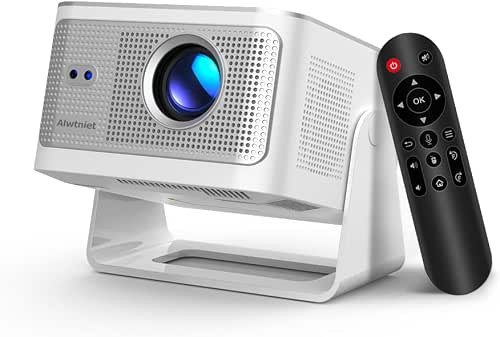
| Best Portable Projector | Smart OS / Platform: Android 14 (pure Android OS) | 4K Support / UHD Capability: Native 1080p but supports 4K/8K input | Voice Control / Assistant: Advanced Air Mouse remote (pointer) – Bluetooth remote; supports voice via Android (implied) | VIEW LATEST PRICE | Read Our Analysis |
| FPD 32″ Smart Android TV P-Series (2025) |

| Best Small-Space TV | Smart OS / Platform: Android 11 (FPD P-Series) | 4K Support / UHD Capability: (720p native) HDR10 supported – compatible with HDR/modern streaming | Voice Control / Assistant: Google Assistant via remote | VIEW LATEST PRICE | Read Our Analysis |
| ONN 4K Android TV Streaming Device with Voice Remote |
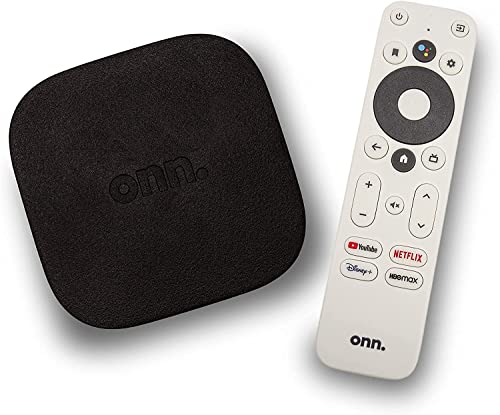
| Best Budget Streaming Stick | Smart OS / Platform: Android TV OS (ONN 4K streaming device) | 4K Support / UHD Capability: 4K Ultra HD output | Voice Control / Assistant: Voice remote with Google Assistant | VIEW LATEST PRICE | Read Our Analysis |
More Details on Our Top Picks
NVIDIA Shield TV Pro 4K HDR Streaming Media Player
If you want a compact home-theater hub that doubles as a serious media streamer and gaming device, the NVIDIA SHIELD TV Pro delivers – powered by the Tegra X1+ for faster performance, built-in Plex and Chromecast 4K, Dolby Vision/Atmos support, and USB 3.0 expandability so you can add storage, tuners, or peripherals. You’ll get 4K HDR playback, AI upscaling to 4K, Dolby Atmos and Digital Plus audio, plus GeForce NOW cloud gaming and AAA Android titles. Android TV gives you thousands of apps, Google Assistant and Alexa compatibility, gigabit Ethernet and dual-band Wi‑Fi, and two USB 3.0 ports for peripherals.
- Smart OS / Platform:Android TV (NVIDIA SHIELD Android TV)
- 4K Support / UHD Capability:4K HDR playback with Dolby Vision
- Voice Control / Assistant:Google Assistant built-in; Alexa compatible
- Casting / Screen Mirroring:Chromecast built-in (Chromecast 4K)
- Connectivity (Wi‑Fi + External Ports/Inputs):Gigabit Ethernet, dual-band AC Wi‑Fi, 2 × USB 3.0, Bluetooth 5.0
- Streaming App Access:Access to thousands of Android TV apps (Netflix, YouTube, Prime Video, Disney+, Hulu)
- Additional Feature:Real-time AI upscaling
- Additional Feature:Built-in Plex server
- Additional Feature:USB 3.0 peripheral support
Amazon Fire TV 50″ 4-Series 4K Smart TV
Choose the Amazon Fire TV 50″ 4-Series 4K if you want a bright, responsive entry-level home theater set that pairs 4K HDR10+ imaging with a quad‑core processor and Wi‑Fi 6 for smooth streaming and quick app launches. You’ll get enhanced brightness and clearer detail in dark scenes, four HDMI inputs for soundbars and consoles, and AirPlay for easy casting. New Alexa on Fire TV handles natural voice search, smart home control, and topic queries, while the Alexa Voice Remote Enhanced simplifies navigation. Omnisense wakes the panel to show artwork, Instantly On reduces wait time, and Luna plus Game Pass streams games without a console.
- Smart OS / Platform:Fire TV OS (Amazon Fire TV)
- 4K Support / UHD Capability:4K Ultra HD panel
- Voice Control / Assistant:Alexa on Fire TV (voice remote)
- Casting / Screen Mirroring:AirPlay support and Amazon casting features
- Connectivity (Wi‑Fi + External Ports/Inputs):Wi‑Fi 6, four HDMI inputs, Bluetooth (remote), other standard TV ports
- Streaming App Access:Access to Amazon content library and apps; supports streaming services and game services (Luna, Game Pass)
- Additional Feature:Omnisense ambient display
- Additional Feature:Wi‑Fi 6 connectivity
- Additional Feature:Four HDMI inputs
Mini Smart Projector WiFi6 Bluetooth5.4 4K/8K Support
For anyone who wants a compact, all-in-one projector that drops straight into a bedroom, small living room, or backyard setup, this mini smart projector delivers native 1080p clarity with 4K/8K input support and fast WiFi 6/Bluetooth 5.4 connectivity. You’ll get smooth performance from the Allwinner H726 on Pure Android 14, so you can plug in and stream without extra sticks. The 600 ANSI lumens, 10000:1 contrast and 40″–150″ image range suit varied spaces; ultra-short-throw 1.0:1 and 4-in-1 auto calibration simplify setup. A 15W SoundBase, 3 lb portability, 180° rotating lens and Air Mouse remote round it out.
- Smart OS / Platform:Android 14 (pure Android OS)
- 4K Support / UHD Capability:Native 1080p but supports 4K/8K input
- Voice Control / Assistant:Advanced Air Mouse remote (pointer) – Bluetooth remote; supports voice via Android (implied)
- Casting / Screen Mirroring:Pure Android with Wi‑Fi6 – supports casting from device (Android ecosystem)
- Connectivity (Wi‑Fi + External Ports/Inputs):Wi‑Fi 6, Bluetooth 5.4, HDMI/input support for external sources
- Streaming App Access:On-device access to streaming apps via Android 14 (no extra stick needed)
- Additional Feature:4-in-1 auto-calibration
- Additional Feature:Ultra-short-throw lens
- Additional Feature:Integrated 15W SoundBase
FPD 32″ Smart Android TV P-Series (2025)
Looking for a compact TV that handles streaming, gaming, and video calls with ease? The FPD 32″ Smart Android TV P-Series (2025) runs Android 11, giving you Google Play access to millions of apps, built-in Google Cast, and Google Assistant via the remote. Its 32-inch LED delivers 720p HD with HDR10 for better contrast and color, and Dolby audio fills the room. You get multiple HDMI ports for consoles and soundbars, Wi‑Fi for smooth streaming, and an intuitive voice remote for navigation and calls. It’s designed for home office, streaming, and casual gaming without unnecessary complexity.
- Smart OS / Platform:Android 11 (FPD P-Series)
- 4K Support / UHD Capability:(720p native) HDR10 supported – compatible with HDR/modern streaming
- Voice Control / Assistant:Google Assistant via remote
- Casting / Screen Mirroring:Built-in Google Cast
- Connectivity (Wi‑Fi + External Ports/Inputs):Wi‑Fi, multiple HDMI inputs, Bluetooth (remote support implied)
- Streaming App Access:Google Play apps access (millions of apps)
- Additional Feature:720p compact form
- Additional Feature:HDR10 on small screen
- Additional Feature:Dolby audio enhancement
ONN 4K Android TV Streaming Device with Voice Remote
If you want a budget-friendly way to turn any HDMI TV into a 4K-capable smart theater, the ONN 4K Android TV streaming device delivers crisp Ultra HD picture and built-in Chromecast so you can cast from phones and tablets with no fuss. You plug the stick into your TV’s HDMI port (high-speed cable included), sign in with your Google account, and access apps via Android TV and Google Play. The voice remote with Google Assistant helps you find and control content hands-free. Expect enhanced, clear audio and broad compatibility with brands like Samsung, TCL, Hisense, Vizio, and more.
- Smart OS / Platform:Android TV OS (ONN 4K streaming device)
- 4K Support / UHD Capability:4K Ultra HD output
- Voice Control / Assistant:Voice remote with Google Assistant
- Casting / Screen Mirroring:Chromecast built-in
- Connectivity (Wi‑Fi + External Ports/Inputs):Wi‑Fi, HDMI output (plugs into TV), Bluetooth (remote)
- Streaming App Access:Android TV access to apps via Google Play Store
- Additional Feature:High-speed HDMI included
- Additional Feature:Plug‑into‑HDMI dongle
- Additional Feature:Wide TV compatibility
Factors to Consider When Choosing Android TVs
When picking an Android TV for your home theater, you’ll want to prioritize display resolution and HDR for picture quality and check the processor and storage so apps run smoothly. Make sure the TV’s Android platform supports the apps and services you use, and verify the available ports and wireless options for your devices. Don’t forget to evaluate built-in audio, sound formats, and any support for external speakers or AVR setups.
Display Resolution And HDR
Because resolution and HDR define how much detail and dynamic range you’ll actually see, pick a native resolution that fits your screen size and seating distance-4K is the sweet spot for TVs 50″ and up-and prioritize robust HDR support (HDR10, HDR10+, Dolby Vision) to get deeper contrast and richer colors. Also check peak brightness (nits) and local dimming; higher nits and effective dimming boost HDR highlights and shadow detail, especially in bright rooms. Verify color gamut coverage (DCI-P3 percentage) and 10-bit panels to reduce banding and render smoother, more accurate color. Finally, note panel type and HDR tone-mapping: OLED, VA, and IPS differ in contrast, viewing angles, and how well they handle static versus dynamic HDR metadata.
Performance And Storage
Resolution, HDR, and panel technology set the visual baseline, but you also need a TV whose hardware can actually deliver that picture and run the smart features smoothly. Pick models with multi-core CPUs and capable GPUs so 4K HDR decoding and apps don’t stutter. Check for hardware-accelerated codec support (HEVC/H.265, VP9, AV1) to offload work from the processor and guarantee efficient playback. Aim for at least 2–3 GB of RAM to keep apps resident and enable snappy multitasking between streaming, casting, and smart-home controls. Prefer 16 GB or more of internal storage-or the ability to expand it-for apps, updates, and caching. Finally, favor Gigabit Ethernet or Wi‑Fi 5/6 and modern Bluetooth to reduce latency and free CPU resources.
Smart Platform Compatibility
If you want a TV that fits smoothly into your home tech, prioritize the smart platform as much as the panel and audio-its ecosystem determines voice control, app availability, casting, updates, and peripheral compatibility. Check which voice assistant the TV uses and whether it integrates with your existing smart-home gear; built-in assistants differ from TVs that simply work with external platforms. Verify app store access and the selection of streaming and game apps so platform limits won’t block your favorites. Confirm casting and multi-device features like Chromecast or AirPlay equivalents for easy mirroring. Look for clear OS and security update policies to warrant long-term support. Finally, make sure the platform interoperates with Bluetooth controllers, USB accessories, cameras, and media-server protocols you plan to use.
Connectivity And Ports
Covering the ports and connections early will save you frustration later: make sure the TV has multiple HDMI inputs (ideally three or more) and at least one HDMI 2.1 port for 4K@120Hz, VRR, and low-latency gaming, plus a dedicated eARC-enabled HDMI for passing high-bitrate Dolby Atmos or lossless audio to a soundbar or AV receiver. Beyond HDMI, check for gigabit Ethernet for stable streaming and compare Wi‑Fi 5 vs Wi‑Fi 6 support if you rely on wireless. Confirm USB types and counts-USB 3.0 handles external drives and webcams faster than USB 2.0-and verify the OS can read media from them. Look for optical audio, composite/component inputs, and a TF/microSD slot if you need legacy device compatibility or extra local storage.
Audio And Sound Support
Pay close attention to a TV’s audio capabilities-you’ll want more than basic stereo if you’re building a home theater. Look for support for modern surround formats like Dolby Atmos or DTS:X so you get overhead and object-based audio instead of just virtualized sound. Check for HDMI eARC to pass full-resolution multi-channel audio and Atmos bitstreams to soundbars or AV receivers. Evaluate built-in speaker configuration and total wattage, and whether the set offers a dedicated center or subwoofer channel for clearer dialogue and deeper bass. Confirm passthrough of lossless codecs (Dolby TrueHD, DTS-HD MA) if you use external sources. Also consider processing features-dialog enhancement, night mode/dynamic range control, and customizable EQ presets-to suit room acoustics and listening conditions.
Remote And Voice Control
Good audio makes movies immersive, but you also need a remote and voice control that let you access those features quickly and comfortably. Check whether the remote uses Bluetooth or RF for two-way control and no line-of-sight, rather than infrared which needs pointing. Prefer remotes with a built-in microphone and voice-assistant button so you can speak natural-language commands for search, playback, and smart-home tasks without extra devices. Verify whether the TV supports voice control natively or only via paired gadgets-native integration lets you change volume, launch apps, and tweak settings system-wide. Look for backlit or motion-activated buttons, a remote-locator, and ergonomic design. Programmable buttons, universal AV control, and pointer or gesture features speed navigation and gaming.


