

You want a backlit laptop that feels good to type on, lasts through long days, and gives you simple lighting control, and these five 2026 models fit different needs without fuss. From budget compact Renewed ASUS options to vivid OLED and Ryzen power, each choice blends build quality, battery life, and useful backlight settings so you can work in low light, travel easily, or handle business tasks with confidence-keep this list close as you narrow your pick.
| ASUS 15.5″ Full HD Renewed Laptop 4GB/128GB |

| Budget-Friendly Pick | Operating System: Windows 11 Home | Display Resolution (Full HD): 1920 x 1080 (15.5″ Full HD) | RAM (Memory): 4 GB LPDDR4 | CHECK LATEST PRICE | Read Our Analysis |
| Acer Aspire 3 Business Laptop – Ryzen 7 8GB 256GB |

| Best for Professionals | Operating System: Windows 11 Pro | Display Resolution (Full HD): 1920 x 1080 (15.6″ Full HD) | RAM (Memory): 8 GB (supports up to 64 GB DDR4) | CHECK LATEST PRICE | Read Our Analysis |
| Dell 16 Laptop Ryzen 7 16GB 1TB SSD |
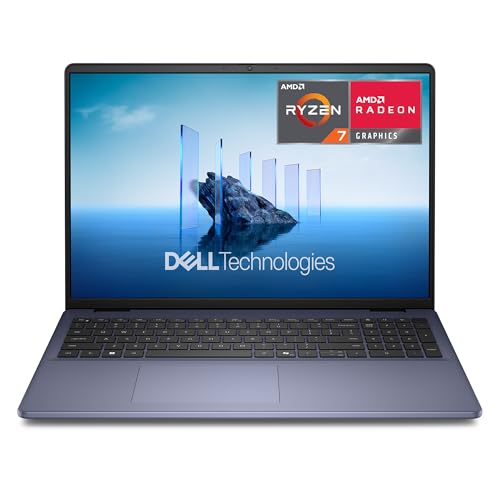
| Performance Powerhouse | Operating System: Windows 11 Home | Display Resolution (Full HD): 1920 x 1200 (16.0″ FHD+; 16:10) | RAM (Memory): 16 GB DDR5 (5600 MHz) | CHECK LATEST PRICE | Read Our Analysis |
| ASUS 15″ OLED Laptop i3-N305 (Renewed) |
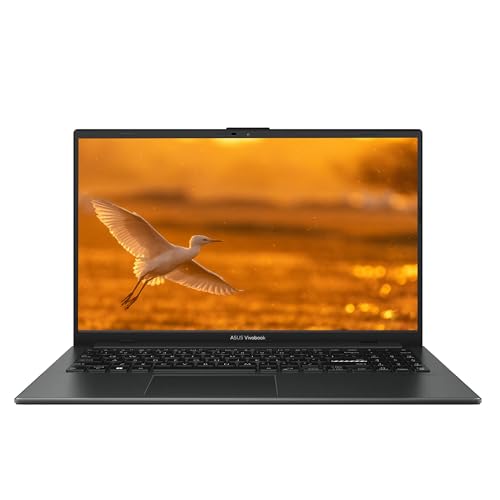
| Best Display Experience | Operating System: Windows 11 | Display Resolution (Full HD): 1920 x 1080 (15″ FHD OLED) | RAM (Memory): 8 GB DDR4 SDRAM | CHECK LATEST PRICE | Read Our Analysis |
| HP EliteBook 840 G8 14″ Laptop i5 16GB 512GB |

| Premium Business Pick | Operating System: Windows 11 Pro 64-bit | Display Resolution (Full HD): 1920 x 1080 (14″ FHD) – also lists 1366 x 768 in one place | RAM (Memory): 16 GB DDR4 SDRAM | CHECK LATEST PRICE | Read Our Analysis |
More Details on Our Top Picks
ASUS 15.5″ Full HD Renewed Laptop 4GB/128GB
If you want a simple, budget-friendly laptop that still looks and feels modern, this ASUS 15.5 inch Full HD renewed model is a solid pick. You’ll appreciate its large 15.5 inch 1920 by 1080 screen for streaming and schoolwork. It runs Windows 11 Home and boots fast from a 128 GB SSD. The Intel Celeron chip and 4 GB RAM handle browsing and videos with ease. You get useful ports like USB-C, two USB-A, and a headset jack plus WiFi and Bluetooth. A built-in HD webcam helps with calls. It comes renewed with an ASUS charger included.
- Operating System:Windows 11 Home
- Display Resolution (Full HD):1920 x 1080 (15.5″ Full HD)
- RAM (Memory):4 GB LPDDR4
- Solid-State Storage:128 GB SSD
- Wireless Connectivity:WiFi (unspecified generation) + Bluetooth
- USB Type-C Port:1 x USB Type-C
- Additional Feature:Star Black / Dark Gray
- Additional Feature:HD webcam included
- Additional Feature:USB Type-A ×2
Acer Aspire 3 Business Laptop – Ryzen 7 8GB 256GB
You’ll appreciate the Acer Aspire 3 when you need a reliable, no-nonsense workhorse that feels built for long nights and fast workflows. You get an AMD Ryzen 7 7730U that keeps apps snappy, and the system can grow up to 64GB DDR4 if you need more headroom. The 15.6-inch Full HD ComfyView display cuts glare so your eyes stay calm during late sessions. A full-size backlit keyboard helps when lighting is low. Storage is a 256GB SSD with Windows 11 Pro and access to Office for the web. Wi‑Fi 6, Bluetooth 5.2, USB-C, HDMI and microSD keep you connected.
- Operating System:Windows 11 Pro
- Display Resolution (Full HD):1920 x 1080 (15.6″ Full HD)
- RAM (Memory):8 GB (supports up to 64 GB DDR4)
- Solid-State Storage:256 GB SSD
- Wireless Connectivity:Wi‑Fi 6 + Bluetooth 5.2
- USB Type-C Port:USB-C (present)
- Additional Feature:Full-size backlit keyboard
- Additional Feature:Wi‑Fi 6 support
- Additional Feature:MicroSD card reader
Dell 16 Laptop Ryzen 7 16GB 1TB SSD
Whether you need a solid workhorse for long study sessions or a reliable machine for light content creation, the Dell 16 Laptop DC16256 fits the bill with a roomy 16-inch FHD+ display and a backlit full-size keyboard that keeps you productive even in dim light. You’ll like the roomy screen with ComfortView, which eases eye strain during late nights. The Ryzen 7 250 and 16GB DDR5 handle multitasking smoothly, while a 1TB SSD gives you plenty of fast storage. The aluminum chassis feels sturdy yet light, and adaptive thermals help keep it cool. You also get Wi‑Fi 6, a fingerprint reader, and an FHD camera that works well in varied lighting.
- Operating System:Windows 11 Home
- Display Resolution (Full HD):1920 x 1200 (16.0″ FHD+; 16:10)
- RAM (Memory):16 GB DDR5 (5600 MHz)
- Solid-State Storage:1 TB SSD
- Wireless Connectivity:Wi‑Fi 6 (802.11ax) + Bluetooth
- USB Type-C Port:USB 3.0 ports listed (Type unspecified) – laptop lists modern ports; USB-C presence not explicitly listed
- Additional Feature:16:10 FHD+ display
- Additional Feature:16 GB DDR5 RAM
- Additional Feature:Fingerprint reader
ASUS 15″ OLED Laptop i3-N305 (Renewed)
Lightweight and bright, the ASUS 15″ OLED Laptop with the Intel i3-N305 fits students and casual creators who want vivid color and long battery life without a heavy price tag. You’ll enjoy a 15-inch FHD OLED display that makes photos and videos pop, while integrated Intel UHD Graphics handles everyday tasks smoothly. It ships renewed, pastel black, and runs Windows 11 with 8GB DDR4 and a 256GB SSD for fast boot times. Ports include USB-C, two USB-A, HDMI, and a combo jack, plus WiFi 6 and Bluetooth. At 4.71 pounds it stays easy to carry.
- Operating System:Windows 11
- Display Resolution (Full HD):1920 x 1080 (15″ FHD OLED)
- RAM (Memory):8 GB DDR4 SDRAM
- Solid-State Storage:256 GB SSD
- Wireless Connectivity:WiFi 6 (802.11ax) + Bluetooth
- USB Type-C Port:1 x USB Type-C
- Additional Feature:15″ FHD OLED
- Additional Feature:WiFi 6 & Bluetooth
- Additional Feature:HDMI port included
HP EliteBook 840 G8 14″ Laptop i5 16GB 512GB
If you want a professional-grade, backlit laptop that balances power and portability for work and travel, the HP EliteBook 840 G8 is a smart pick. You’ll get a 14-inch FHD display and a refreshed chassis that feels sturdy and light at just over three pounds. It runs an Intel Core i5-1145G7 with 16 GB DDR4 and a fast 512 GB SSD, though one listing notes 128 GB so double-check storage. You’ll use Wi-Fi 6, Thunderbolt 4, HDMI and multiple USB ports. Windows 11 Pro, fingerprint access and a backlit keyboard make security and typing easy.
- Operating System:Windows 11 Pro 64-bit
- Display Resolution (Full HD):1920 x 1080 (14″ FHD) – also lists 1366 x 768 in one place
- RAM (Memory):16 GB DDR4 SDRAM
- Solid-State Storage:512 GB SSD (note: listing also shows 128 GB flash conflict)
- Wireless Connectivity:802.11ax (Wi‑Fi 6)
- USB Type-C Port:2 x Thunderbolt 4 (USB-C compatible)
- Additional Feature:Thunderbolt 4 ports
- Additional Feature:Backlit keyboard + fingerprint
- Additional Feature:Lightweight 3.24 lb design
Factors to Consider When Choosing Backlit Laptops
When you pick a backlit laptop, think about how bright the keyboard gets and whether you can change the color temperature to suit your eyes. Also check how backlight use affects battery life, and pay attention to key layout, travel, and the overall build quality for long term comfort and durability. These factors link together because brighter lights or extra features can drain power faster, so you’ll want a sturdy design and sensible keys that feel right for your work or play.
Keyboard Brightness Levels
A good keyboard brightness system can make late-night typing feel effortless, so you’ll want one that adapts to different rooms and tasks. Look for adjustable steps, often 3 to 5, so you can switch from off to low, medium, or high fast. Per-key RGB gives you fine control and zones, letting you brighten only the keys you use. Single-color backlights change uniformly, which is simpler and still useful. Check measured luminance in lux at the key surface; differences around 50 to 200 lux are noticeable in dark rooms. Auto-brightness with an ambient sensor helps by dimming or brightening as lighting shifts, and customizable timeout or wake settings turn lights off when idle. These features work together to keep typing easy and comfortable.
Battery Impact Considerations
You’ve just learned how brightness steps and per-key control make typing comfortable, and now it helps to think about how those lights affect your battery. Backlit keyboards draw extra power, usually 0.2 to 1.0 watts depending on brightness and key count, so leaving lights on continuously will shorten runtime. Pick a laptop with power-efficient LED backlighting and solid light-control firmware, because those systems often add only a few percent to overall draw. Choose adjustable intensity and prefer single-color modes when possible, since high brightness and RGB effects use more energy. Use automatic timeout settings of 5 to 15 seconds to save battery. Remember to factor keyboard lighting into your real-world power budget, especially alongside high screen brightness.
Key Layout And Travel
If you type a lot, the feel and layout of the keyboard will shape how fast and comfortably you work, so give it serious attention before you buy. You want a full-size keyboard with a dedicated number pad if you enter numbers often, because compact layouts can force you into awkward combos. Check key travel distance next. Aim for 1.2 to 1.6 mm on thin machines or 1.6 to 2.0 mm if you like more tactile feedback. Also confirm key spacing around 19 mm so your fingers land naturally and you mistype less. Look for a clear arrow cluster and full-size Shift Enter plus Home End and PgUp PgDn so you avoid hand shifts. Finally test key stability and feedback for low wobble and a crisp or quiet action that feels right.
Color Temperature Options
Wondering how the color of your keyboard light can change your typing comfort and focus? You’ll care about color temperature because it changes glare, contrast, and how tired your eyes feel. Warm tones, around 2700 to 3500 K, feel soft and cut glare in dim rooms. Cooler tones, 5000 K and up, boost perceived contrast and make white legends pop in bright settings. Many laptops let you pick presets or mix hues, so you can match room light or mood. For long nighttime typing, pick 3000 to 4000 K to lower blue light and protect sleep. Also consider legend color: cool light sharpens light legends, warm light helps dark legends. Try settings until your eyes thank you.
Build Quality And Durability
When you’re picking a backlit laptop, build quality and durability matter as much as lighting features because a sturdy machine protects your investment and keeps the keyboard working for years. Check chassis materials like aluminum or magnesium alloy since metal unibodies resist flex, dents, and heat better than plastic. Next, inspect hinge construction and reported cycle ratings such as 20,000+ opens to avoid wobble and failures. Also evaluate keyboard and backlight mounting for sealed or spill-resistant designs and key switches rated for 10 to 50 million actuations to handle heavy typing. Look for MIL-STD-810G style certifications and reinforced ports for shock and drop resistance. Finally consider internal cooling and easy access to RAM and SSD for longer life.
Portability And Weight
Think about how often you carry your laptop and let that guide your choice of weight and size. If you tote your machine all day, aim for under 3.5 pounds so your shoulders and wrists thank you. Pick ultrabooks about 0.6 to 0.8 inches thick for a slim profile that still cools well. Also weigh battery versus mass: bigger batteries give longer unplugged time but add several hundred grams, so decide which matters more to you. Frequent travelers should favor 13 to 14 inch screens that fit backpacks and airline carry-ons without fuss. Finally, consider materials: aluminum or magnesium alloy bodies often feel lighter and stiffer than plastic at the same size. These choices work together to make daily use easier.
Backlight Customization Software
Customizing keyboard lighting can make your laptop feel like it was made just for you, so you should pick software that gives control without drama. You want brightness control from 0 to 100% so you can save battery or boost visibility. Also look for per-key or zone modes to balance style and function. Color pickers with RGB sliders or hex codes let you match themes and moods. Built-in effects like wave, ripple, and breathing should offer speed and direction tweaks so they’re subtle when you need focus. Choose tools with per-key macros and layered profiles that switch with apps or hotkeys. Finally, prefer software with hardware persistence or cloud export, signed drivers, and low CPU overhead to avoid crashes or extra power drain.
Price Versus Features
You’ve just picked the lighting effects and fine-tuned brightness, so now let’s look at how much that backlight will cost you and what you’ll get in return. You’ll find backlit keyboards usually add a modest $20 to $100 depending on build and lighting zones. If you want per-key RGB and many brightness steps, expect higher prices on premium models. Think about keyboard feel and battery capacity first, because bright RGB can drain power and may need a bigger battery or better cooling. Midrange laptops often hit the sweet spot with single-color lighting, adjustable brightness, and solid key feel at a fair price. Also weigh warranty, durability ratings, and ergonomics; paying a bit more can boost comfort and longevity.




