

Like finding the right key for a vintage lock, you want a remote that just fits. You’ll look for buttons that feel right, reliable BD controls, and contacts that won’t corrode. I’ll compare six top options from Samsung, Sony, and Sanyo so you can pick one that matches your player and habits-stay with me to see which features really matter.
| Replacement Remote for Samsung Blu-ray/DVD Players |

| Compact Replacement | Compatibility: Samsung Blu-ray/DVD players (models list including BD-J5700, BD-J5100, BD-ES5000, BD-ES5300, BD-F5100, BD-F5500, BD-FM51, BD-FM57C, BD-H5100, BD-H5900, BD-HM51, BD-HM59, BD-J5900, BD-JM51, BD-JM57, BDMF57C and variants) | No programming required: Ready to use out of package; no programming/pairing required | Battery powered: Requires 2 × AAA batteries (not included) | CHECK LATEST PRICE | Read Our Analysis |
| Universal Replacement Remote for Sanyo Blu-ray DVD Players |

| Sanyo-Compatible Pick | Compatibility: Sanyo Blu-ray/DVD players (models NC088/NC092/NC097; FWBP505F/K/506FF/507FF/807FP and variants) | No programming required: IR remote; no programming required; operates after battery insertion | Battery powered: Operates after battery insertion (battery type not explicitly listed) | CHECK LATEST PRICE | Read Our Analysis |
| Remote RMT-B119A Compatible with Sony Blu-ray Players |

| Sony Original Match | Compatibility: Sony Blu-ray Disc/DVD players (models BDP-BX59, BDP-S390, BDP-S590, BDP-BX110, BDP-S1100, BDP-S3100, BDP-BX310, BDP-BX510, BDP-S580, DP-BX510, BDP-BX39, BDPS1100/2100/3100 and variants) | No programming required: Ready-to-use out of box; no programming/pairing required | Battery powered: Requires 2 alkaline batteries (not included) | CHECK LATEST PRICE | Read Our Analysis |
| AK59-00145A Blu-ray Remote Replacement for Samsung |

| Samsung High-Compatible | Compatibility: Samsung Blu-ray players (AK59-00145A compatible list: BD-E5700, BD-E5900, BD-E6100, BD-EM57/59 variants, BD-ES6000, BDE5300/5400/5700/5900, BDEM53/57/59 variants, BDES6000, BDF5900, BDFM59C, BDH6500/6600 variants) | No programming required: No programming or pairing required; ready after battery installation | Battery powered: Power: 2 × 1.5V AAA batteries (not included) | CHECK LATEST PRICE | Read Our Analysis |
| Replacement Remote for Samsung Blu-ray Players (AK59-00149A) |
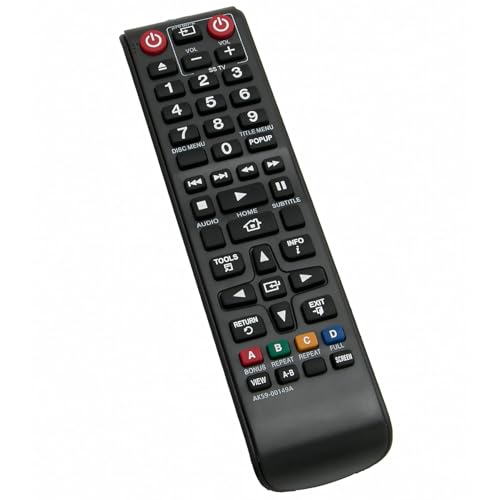
| Drop-in Replacement | Compatibility: Samsung Blu-ray players (AK59-00149A compatible list: BD-ES5000, BD-ES5300, BD-F5100 series, BD-F5500/ZF, BD-FM51 series, BD-HM57C; replaces AK59-00148A) | No programming required: IR controller; no programming/pairing required; ready after battery installation | Battery powered: Requires 2 × AAA alkaline batteries | CHECK LATEST PRICE | Read Our Analysis |
| Sony Replacement RMT-VB201U Remote for Blu-ray/DVD |

| Comfortable Grip | Compatibility: Sony Blu-ray/DVD players (models BDP-S1700, BDP-S3700, BDP-BX370, UBP-X700 and listed variants) | No programming required: No programming or setup required; ready to use out of box | Battery powered: Requires 2 × AA batteries (not included) | CHECK LATEST PRICE | Read Our Analysis |
More Details on Our Top Picks
Replacement Remote for Samsung Blu-ray/DVD Players
If you need a straight replacement for a Samsung Blu-ray or DVD player, the AK59-00149A remote is your best bet-it’s plug-and-play so you can grab it out of the box and start using it without any programming. You’ll find it compatible with a long list of Samsung models (BD-J5700, BD-F5500, BD-H5900, BD-JM57 and more, including regional variants like /ZA, /ZF, /E). It’s small, ergonomic, and resists slipping, so it fits comfortably in your hand. It runs on 2 AAA batteries (not included). If you have quality questions, contact the seller for support.
- Compatibility:Samsung Blu-ray/DVD players (models list including BD-J5700, BD-J5100, BD-ES5000, BD-ES5300, BD-F5100, BD-F5500, BD-FM51, BD-FM57C, BD-H5100, BD-H5900, BD-HM51, BD-HM59, BD-J5900, BD-JM51, BD-JM57, BDMF57C and variants)
- No programming required:Ready to use out of package; no programming/pairing required
- Battery powered:Requires 2 × AAA batteries (not included)
- Replacement/aftermarket remote:Replacement remote (AK59-00149A) for Samsung players
- Ergonomic/compact design:Small, compact size; smooth design; natural fit; comfortable grip; reduced slip risk
- Customer support / satisfaction guarantee:Contact seller for product quality questions
- Additional Feature:Replaces AK59-00148A
- Additional Feature:Compact, easy grip
- Additional Feature:Works out-of-box
Universal Replacement Remote for Sanyo Blu-ray DVD Players
For anyone who owns one of the listed Sanyo Blu-ray/DVD players and wants a plug-and-play replacement, this universal remote is the best choice – it works right out of the box with no programming required. You’ll simply insert batteries and control FWBP505F, FWBP505K, FWBP506FF, FWBP507FF, FWBP807FP, FWBP505FK, FWBP505FP, FWBP505FN, and FWBP505FQ models via IR. The remote feels solid, fits comfortably in your hand, and responds to light presses thanks to sensitive keys. It’s marketed as a direct replacement (NC088, NC092, NC097), and customer support is available if you encounter issues.
- Compatibility:Sanyo Blu-ray/DVD players (models NC088/NC092/NC097; FWBP505F/K/506FF/507FF/807FP and variants)
- No programming required:IR remote; no programming required; operates after battery insertion
- Battery powered:Operates after battery insertion (battery type not explicitly listed)
- Replacement/aftermarket remote:Universal replacement remote for Sanyo players (NC088/NC092/NC097)
- Ergonomic/compact design:Comfortable grip; high-quality construction; sensitive keys
- Customer support / satisfaction guarantee:Contact available for product or service issues
- Additional Feature:Models: NC088/NC092/NC097
- Additional Feature:Sensitive, high-quality keys
- Additional Feature:IR operation (no pairing)
Remote RMT-B119A Compatible with Sony Blu-ray Players
Choose the RMT-B119A when you want a drop-in replacement that works straight out of the box with a wide range of Sony Blu‑ray and DVD players. You’ll get a remote pre-programmed for models like BDP-BX59, BDP-S390, BDP-S590, BDP-BX110, BDP-S1100, BDP-S3100, BDP-BX310, BDP-BX510, BDP-S580, DP-BX510, BDP-BX39, BDPS3100 and others. It mirrors the original layout and functions, so you won’t relearn controls. It needs two alkaline batteries (not included) and arrives with one unit per package. A 100% satisfaction guarantee and customer support cover returns or issues, making it a simple, reliable Sony replacement.
- Compatibility:Sony Blu-ray Disc/DVD players (models BDP-BX59, BDP-S390, BDP-S590, BDP-BX110, BDP-S1100, BDP-S3100, BDP-BX310, BDP-BX510, BDP-S580, DP-BX510, BDP-BX39, BDPS1100/2100/3100 and variants)
- No programming required:Ready-to-use out of box; no programming/pairing required
- Battery powered:Requires 2 alkaline batteries (not included)
- Replacement/aftermarket remote:Replacement RMT-B119A remote for Sony players
- Ergonomic/compact design:Designed to match original layout (implies standard ergonomic remote form); ready-to-use (compact not explicitly stated)
- Customer support / satisfaction guarantee:100% satisfaction guarantee; customer support for returns/issues
- Additional Feature:Matches original layout
- Additional Feature:Includes single remote package
- Additional Feature:100% satisfaction guarantee
AK59-00145A Blu-ray Remote Replacement for Samsung
Need a drop-in replacement that just works? You’ll get the AK59-00145A, a direct replacement for many Samsung Blu-ray/DVD players (models include BD-E5700, BD-E5900, BD-E6100, BD-EM57/59 variants, BD-ES6000, BDE5300/5400/5700/5900, BDEM53/57/59 families, BDES6000, BDF5900, BDH6500/6600, and equivalents). It matches the original control layout and provides 100% functional compatibility. No programming or pairing is required-insert two AAA batteries and it’s ready. Batteries and manual aren’t included. If you want simple, reliable control identical to the factory remote, this AK5900145A is a practical, hassle-free choice.
- Compatibility:Samsung Blu-ray players (AK59-00145A compatible list: BD-E5700, BD-E5900, BD-E6100, BD-EM57/59 variants, BD-ES6000, BDE5300/5400/5700/5900, BDEM53/57/59 variants, BDES6000, BDF5900, BDFM59C, BDH6500/6600 variants)
- No programming required:No programming or pairing required; ready after battery installation
- Battery powered:Power: 2 × 1.5V AAA batteries (not included)
- Replacement/aftermarket remote:AK59-00145A Blu-ray remote replacement for Samsung players
- Ergonomic/compact design:Replacement matching original layout and function (implies familiar ergonomics)
- Customer support / satisfaction guarantee:(Support implied) Replacement remote matching original; seller support referenced in details
- Additional Feature:100% function compatible
- Additional Feature:Wide Samsung model list
- Additional Feature:Matches original AK5900145A
Replacement Remote for Samsung Blu-ray Players (AK59-00149A)
If you want a hassle-free replacement, the AK59-00149A fits Samsung BD-ES, BD-F, BD-FM and BD-HM57C series players and works right out of the box with no programming-just insert two AAA batteries and start using it. You’ll get a straightforward IR remote that replaces AK59-00148A and supports specific models like BD-ES5000, BD-ES5300, BD-F5100 variants, BD-F5500/ZF, BD-FM51 variants, and BD-HM57C. It requires two AAA alkaline batteries installed with correct polarity. The package includes one IR remote. If your Blu-ray player matches the listed models, this remote offers immediate, reliable control without setup hassle.
- Compatibility:Samsung Blu-ray players (AK59-00149A compatible list: BD-ES5000, BD-ES5300, BD-F5100 series, BD-F5500/ZF, BD-FM51 series, BD-HM57C; replaces AK59-00148A)
- No programming required:IR controller; no programming/pairing required; ready after battery installation
- Battery powered:Requires 2 × AAA alkaline batteries
- Replacement/aftermarket remote:Replacement remote (AK59-00149A) for Samsung Blu-ray players; replaces AK59-00148A
- Ergonomic/compact design:Standard IR remote form; ready to use (compact implied)
- Customer support / satisfaction guarantee:(Support implied) Replacement remote offering; seller contact implied for questions
- Additional Feature:Replaces AK59-00148A
- Additional Feature:Explicit model series variants listed
- Additional Feature:Includes IR remote only
Sony Replacement RMT-VB201U Remote for Blu-ray/DVD
For anyone who wants a simple, no-fuss replacement for a Sony Blu-ray or DVD player, the RMT-VB201U fits the bill – it’s ready to use straight from the box and works with models like the BDP-S1700, BDP-S3700, BDP-BX370, and UBP-X700. You won’t need programming; just insert two AA batteries (not included) and control playback immediately. The compact, smooth design feels natural in your hand and reduces slipping during use. It’s intended as a direct replacement to meet your needs, and Sony offers customer support if you encounter quality or compatibility questions.
- Compatibility:Sony Blu-ray/DVD players (models BDP-S1700, BDP-S3700, BDP-BX370, UBP-X700 and listed variants)
- No programming required:No programming or setup required; ready to use out of box
- Battery powered:Requires 2 × AA batteries (not included)
- Replacement/aftermarket remote:Sony replacement RMT-VB201U remote for Blu-ray/DVD players
- Ergonomic/compact design:Small, compact size; smooth design; natural fit; comfortable to hold; reduced chance of slipping
- Customer support / satisfaction guarantee:Customer support offered for product quality questions
- Additional Feature:Uses 2 × AA batteries
- Additional Feature:Fits UBP-X700 series
- Additional Feature:Smooth, non-slip design
Factors to Consider When Choosing Blu-ray Remote Controls
When picking a Blu-ray remote, you’ll want to check compatibility with your player so every function works correctly. Consider battery type and life, button layout ergonomics, IR range and reliability, and the build quality and materials to make sure the remote is comfortable, long-lasting, and responsive. Keeping these factors in mind will help you choose a remote that fits your setup and usage habits.
Compatibility With Players
Because Blu-ray remotes vary by signal type, button set, and programming, you should confirm a replacement’s protocol (IR vs. RF) matches your player, since most Blu-ray players use infrared and won’t respond to RF-only remotes. Verify the remote’s listed model or part-number compatibility or its universal code list to guarantee core functions-play, menu, BD‑Live, chapter skip-work. Make sure the control layout and BD‑specific buttons (subtitle, audio track, streaming app shortcuts) match what you need for full feature parity. Look for “no programming required” or plug-and-play notes if you want convenience; for universal remotes, confirm programming instructions and provided code lists. These checks prevent wasted purchases and guarantee seamless operation with your player.
Battery Type And Life
After confirming compatibility, you’ll want to contemplate battery type and lifespan, since power choices affect size, runtime, and long-term cost. Remotes usually take AAA or AA cells: AAA keeps remotes slim but offers lower capacity (≈600–1,200 mAh alkaline) versus AA (≈1,800–3,000 mAh alkaline). With alkalines, typical IR remotes last six months to over a year with light daily use; backlighting or heavy use reduces that. Rechargeable NiMH AAs or AAAs (AA ≈1,900–2,500 mAh; AAA ≈600–1,000 mAh) cost less long-term and hold voltage better, but need a charger and periodic recharging. Check compartment design and polarity markings-standard AAs are easiest to replace. Prefer remotes with sleep modes, backlight disable, or efficient transmitters to noticeably extend runtime.
Button Layout Ergonomics
Often you’ll rely on thumb reach for the most-used controls, so a well-designed button layout puts play/pause/stop, volume, and the D-pad in the central area to cut hand movement and speed common tasks. You should group related controls-playback, navigation, audio/subtitle, disc menu-into distinct clusters with clear spacing to avoid accidental presses and lower cognitive load. Pick remotes with larger, high-contrast primary buttons (about 12–15 mm) and tactile cues like raised rings so you can find keys by feel. Look for consistent patterns-circular D-pad with a central OK, linear volume/channel columns-to build muscle memory. Prefer dedicated, clearly labeled shortcut keys for home, source, and subtitle, and avoid models crowded with rarely used functions.
IR Range And Reliability
When you want a remote that actually works from across the room, look beyond button layout to IR range and reliability: typical remotes reach about 5–10 meters (16–33 feet) and have a roughly ±20–30° viewing cone, so aiming, line-of-sight, and battery health directly affect performance. You should position yourself where you can see the player, avoid angling the remote off-axis, and keep cabinet doors open-IR won’t penetrate solids or glass with IR-absorbing coatings. Minimize bright sunlight or strong indoor lighting near the player, since ambient IR noise can cause missed commands. Always use fresh, correctly rated batteries and replace them at the first sign of sluggish response; low voltage cuts range and makes command failures intermittent.
Build Quality Materials
IR performance matters, but the materials and construction determine whether your remote will still work well months or years from now. Choose remotes made from ABS or polycarbonate to resist impact, cracking, and yellowing. Inspect high-stress areas-power and playback keys-for reinforced frames that prevent flexing and keep buttons aligned after heavy use. Prefer rubber or silicone keypads with tactile domes and rated lifespans (over a million cycles) so buttons stay responsive and avoid stickiness. Look for corrosion-resistant metal contacts or gold-plated battery terminals to reduce failure from leaks and improve electrical reliability. A matte or textured finish and sealed seams help resist oils, scratches, and minor spills, preserving appearance and function without needing special care.
Ease Of Setup
Because you want the remote to work the moment you grab it, pick models labeled “plug-and-play” or “no programming required” so you can insert batteries and start using basic Blu-ray controls right away. Prefer IR remotes for simple, out-of-the-box operation; they rarely need pairing and work with compatible players immediately. Check battery type and quantity-AA vs AAA and whether two cells are used-so you can power the remote without hunting for uncommon batteries. If you want advanced features like smart TV apps, Bluetooth, or RF, confirm whether pairing or extra setup is required and whether instructions are clear. Look for manuals, easy pairing guides, and accessible customer support or return options in case setup problems arise.


