

Like finding an old arcade tucked behind a laundromat, you’ll appreciate how these composite RCA monitors revive classic gear with modern reliability. You get native NTSC/PAL support, clean 480i/576i display, and simple AV inputs that avoid wonky scalers. Whether you need a tiny portable screen or a larger bench monitor, the picks below make setup straightforward – and they solve the usual sync and latency headaches that slow you down.
| NEWCARE HDMI to RCA & HDMI Adapter Converter |

| Best Converter | Video Inputs/Outputs Type: HDMI input, HDMI output, CVBS (RCA composite) output | Composite (RCA) Support: CVBS composite video (RCA) output | Audio Capability: L/R stereo RCA audio output (from HDMI) | VIEW LATEST PRICE | Read Our Analysis |
| 7″ HDMI VGA RCA Portable IPS Monitor (1024×600) |
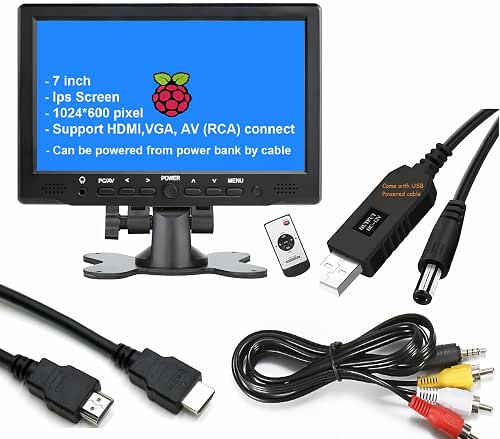
| Portable Pick | Video Inputs/Outputs Type: HDMI input, VGA input, AV RCA input | Composite (RCA) Support: AV RCA input (composite) | Audio Capability: Built-in speakers and 3.5mm headphone jack (audio from inputs) | VIEW LATEST PRICE | Read Our Analysis |
| 13.3″ Mini LED Monitor 1366×768 with HDMI/VGA |

| Best Larger Display | Video Inputs/Outputs Type: HDMI, VGA, AV, BNC, USB inputs (AV RCA supported) | Composite (RCA) Support: AV (RCA) input supported | Audio Capability: Built-in dual speakers (audio from inputs) | VIEW LATEST PRICE | Read Our Analysis |
| XMSJSIY AV RCA to VGA +3.5mm Adapter |
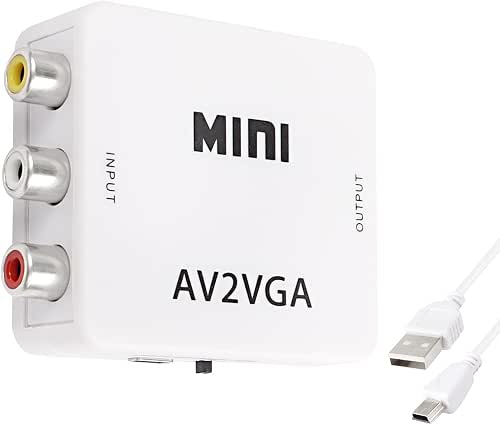
| Retro Compatibility | Video Inputs/Outputs Type: AV RCA (composite) input, VGA output | Composite (RCA) Support: Composite AV (RCA) input (red/yellow/white) | Audio Capability: Auxiliary audio connector included (3.5mm) | VIEW LATEST PRICE | Read Our Analysis |
| GINTOOYUN VGA to RCA/S-Video Converter Adapter |
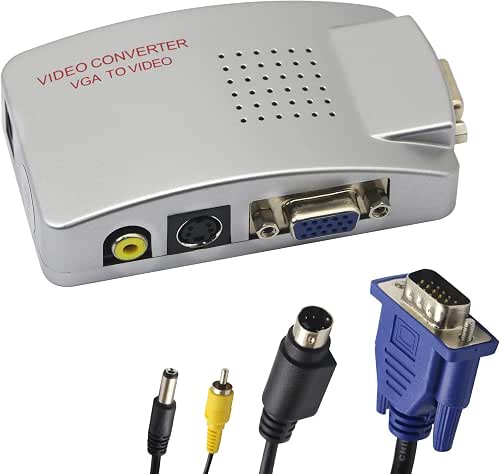
| Multi-Resolution Pro | Video Inputs/Outputs Type: VGA input, RCA composite and S‑Video outputs | Composite (RCA) Support: RCA composite video output | Audio Capability: Does not transmit audio via converter (notes audio absent) – but supports video-only conversion alongside external audio handling | VIEW LATEST PRICE | Read Our Analysis |
More Details on Our Top Picks
NEWCARE HDMI to RCA & HDMI Adapter Converter
If you need to feed modern HDMI sources into older composite-equipped gear, the NEWCARE HDMI to RCA & HDMI Adapter Converter is a practical bridge-especially for anyone restoring vintage TVs, hooking up VHS recorders, or running legacy monitors. You plug one HDMI in and get simultaneous HDMI out plus CVBS composite video and L/R stereo audio, with no lag. It supports 480P–1080p@60Hz, several DVI resolutions, and PAL/NTSC; AV output can be 480i/576i. It’s plug-and-play with a built-in IC chip, needs the included 5V1A adapter first, is portable, and can’t convert RCA to HDMI.
- Video Inputs/Outputs Type:HDMI input, HDMI output, CVBS (RCA composite) output
- Composite (RCA) Support:CVBS composite video (RCA) output
- Audio Capability:L/R stereo RCA audio output (from HDMI)
- Plug-and-Play / No Drivers:Plug and play, no driver required
- USB Power or External 5V Power:Requires 5V 1A power adapter (included)
- Compatibility with Multiple Devices:Works with HD TVs, older TVs, cameras, VHS VCRs, XBOX360, PS3, set‑top boxes, DVD recorders
- Additional Feature:Simultaneous dual outputs
- Additional Feature:HDCP & HDMI1.3 support
- Additional Feature:Includes power adapter
7″ HDMI VGA RCA Portable IPS Monitor (1024×600)
For anyone who needs a compact, versatile field monitor that handles HDMI, VGA and RCA sources, the 7″ LONCEVON IPS display delivers sharp 1024×600 clarity and wide 178° viewing so you can confidently check framing and focus on the go. You’ll get a 60 Hz panel with 500 nits brightness, 500:1 contrast, and 30 ms response in a 7 x 1.2 x 4.7 inch, 1.5-pound chassis. Full-size HDMI, VGA, and AV RCA inputs plus built-in speakers and a 3.5mm jack cover most devices. It supports 1080p input, flip options, USB 12V power, mounts, and an adjustable stand.
- Video Inputs/Outputs Type:HDMI input, VGA input, AV RCA input
- Composite (RCA) Support:AV RCA input (composite)
- Audio Capability:Built-in speakers and 3.5mm headphone jack (audio from inputs)
- Plug-and-Play / No Drivers:Portable monitor with simple HDMI/VGA/AV connection (no driver for basic use)
- USB Power or External 5V Power:Powered via 12V USB power cable
- Compatibility with Multiple Devices:Compatible with PCs, laptops, gaming consoles, Raspberry Pi, CCTV, retro gaming systems, DSLR monitors
- Additional Feature:IPS 178° wide viewing
- Additional Feature:500 nits brightness
- Additional Feature:75mm VESA mountable
13.3″ Mini LED Monitor 1366×768 with HDMI/VGA
This 13.3″ Mini LED monitor is ideal when you need a portable second screen with fuller 1366×768 detail than older 1024×600 or 1280×800 panels, so you’ll get clearer text and sharper video for casual gaming, streaming, or Raspberry Pi projects. You’ll connect via HDMI, VGA, AV, BNC, or USB, making it useful with PCs, laptops, Fire Stick, Xbox, mini PCs, HDMI cameras, and Raspberry Pi. The TFT panel gives improved realism though viewing angles are modest. It includes dual speakers, a remote, desk stand, and 75x75mm VESA wall-mount holes. Lightweight plastic housing and 24-month support round it out.
- Video Inputs/Outputs Type:HDMI, VGA, AV, BNC, USB inputs (AV RCA supported)
- Composite (RCA) Support:AV (RCA) input supported
- Audio Capability:Built-in dual speakers (audio from inputs)
- Plug-and-Play / No Drivers:Monitor with standard inputs (no driver required for display)
- USB Power or External 5V Power:USB input available (and typical monitor power via USB/adapter)
- Compatibility with Multiple Devices:Compatible with PC, laptop, Fire Stick, Xbox, Raspberry Pi, mini PC, HDMI cameras
- Additional Feature:Remote control included
- Additional Feature:Built-in dual speakers
- Additional Feature:75mm VESA mountable
XMSJSIY AV RCA to VGA +3.5mm Adapter
Gamers and vintage-tech owners who need to bridge old composite sources to modern VGA displays will appreciate the XMSJSIY AV RCA to VGA +3.5mm Adapter’s straightforward conversion and 1080P/720P output options. You plug composite (red, yellow, white) into the tiny converter, power it via USB, and feed VGA into your monitor or projector. A side button toggles 720P/1080P; supported resolutions run from 640×480 to 1920×1080 at up to 75 Hz. It’s plug-and-play, includes an 18-pin interface and round connectors, and offers denoising plus signal processing to improve color, clarity, and stability.
- Video Inputs/Outputs Type:AV RCA (composite) input, VGA output
- Composite (RCA) Support:Composite AV (RCA) input (red/yellow/white)
- Audio Capability:Auxiliary audio connector included (3.5mm)
- Plug-and-Play / No Drivers:Plug and play, no driver required
- USB Power or External 5V Power:Powered by USB cable (connect to PC or USB power)
- Compatibility with Multiple Devices:Compatible with DVD players, VCD, webcams, set‑top boxes, projectors, AV equipment
- Additional Feature:Up to 1920×1080 support
- Additional Feature:Switchable 720P/1080P output
- Additional Feature:USB-powered (included cable)
GINTOOYUN VGA to RCA/S-Video Converter Adapter
If you need an easy way to send your PC’s VGA output to an older TV or projector, the GINTOOYUN VGA to RCA/S-Video Converter Adapter is a compact, plug-and-play solution that converts VGA into composite and S-Video without drivers. You’ll connect via VGA and power it from USB (5V 1A), then output NTSC/PAL signals to most TVs, projectors, or monitors. It handles 640×480 up to 2560×1600, supports simultaneous monitor and TV display, offers independent horizontal/vertical adjustments, and up to 2x magnification. Setup takes seconds via the front control panel; note it won’t carry audio or channel signals.
- Video Inputs/Outputs Type:VGA input, RCA composite and S‑Video outputs
- Composite (RCA) Support:RCA composite video output
- Audio Capability:Does not transmit audio via converter (notes audio absent) – but supports video-only conversion alongside external audio handling
- Plug-and-Play / No Drivers:Plug and play, no driver required
- USB Power or External 5V Power:Powered via USB or keyboard port (DC 5V 1A)
- Compatibility with Multiple Devices:Compatible with Windows/Mac computers, monitors, projectors, TVs and VGA sources
- Additional Feature:Supports up to 2560×1600
- Additional Feature:Simultaneous monitor+TV output
- Additional Feature:Horizontal/vertical position adjust
Factors to Consider When Choosing Composite RCA Monitors
When choosing a composite RCA monitor, you’ll want to check signal compatibility and supported resolutions to make sure your source and display match. Look at the types and number of inputs/outputs, audio handling options, and any power requirements so installation is straightforward. These factors determine whether the monitor will work with your gear and deliver the picture and sound quality you need.
Signal Compatibility
Because composite RCA carries standard-definition analog video, you’ll want a monitor that explicitly supports composite inputs and the common NTSC and PAL formats so your source displays correctly. Check that the monitor accepts the yellow RCA composite connector and handles 480i and 576i standard-definition signals without trying to treat them as HD. If you need sound, confirm it accepts the paired red and white RCA stereo inputs or provides an accessible audio passthrough. When using converters, make sure any HDMI-to-composite or digital-to-analog adapter reliably converts formats with minimal lag and no obvious signal loss. Prioritize straightforward, native composite handling over complex scaling features to keep retro gear functioning as intended.
Resolution Support
Although composite is inherently standard-definition, choosing a monitor with a higher native resolution-like 1024×600 or 1366×768-helps reduce scaling artifacts and delivers a sharper, more detailed image from RCA sources. You should prioritize a monitor’s native resolution so the composite feed isn’t stretched or interpolated unnecessarily, preserving detail and minimizing distortion. Also check for native support of PAL and NTSC to guarantee compatibility with your devices. Remember some composite gear can output up to 720p or 1080p; pairing those with a capable monitor avoids extra conversion. In short, match the monitor’s resolution strengths to your source capabilities and regional standards to get the cleanest, most accurate picture from retro consoles and cameras.
Input And Output Types
After checking native resolution and regional formats, you’ll want to inspect a monitor’s available inputs and outputs to make sure it can actually accept the composite RCA signals you’ve got. Check for CVBS composite video input plus separate L/R stereo RCA jacks so both picture and sound are handled natively. If you plan to use converters, confirm HDMI-to-composite or VGA-to-composite boxes output distinct video and audio channels compatible with the monitor. Look for models with multiple ports (AV RCA, HDMI, VGA) for flexibility and easy device swapping. Verify PAL/NTSC support to avoid color or sync issues. Finally, confirm how the monitor manages simultaneous inputs and whether it switches or combines signals cleanly for seamless operation.
Power Requirements
When choosing a composite RCA monitor, pay close attention to its power needs so you can match it to your setup and avoid instability or extra adapters. Check whether the monitor uses USB power or a DC adapter and the required voltage-most accept 5V to 12V depending on size and features. Consider power draw: larger screens, backlighting, and built-in speakers increase consumption and affect portability. Prefer models with plug-and-play USB power if you want easy connection to computers or portable batteries. Guarantee a stable supply to prevent flicker or signal drops. Look for integrated power management or broad adapter compatibility so the monitor tolerates varied inputs and is protected against voltage issues.
Audio Handling
If you rely on composite RCA for both picture and sound, check a monitor’s audio features so you’re not surprised by silence or extra gear. You’ll want to confirm whether the monitor has built-in speakers or at least L/R stereo audio output jacks to carry the analog stereo channels that composite provides. Some models add a 3.5mm headphone jack, which lets you hook up external speakers or headphones without extra adapters. Remember composite transmits analog stereo only, not digital multi-channel formats, so match expectations to source material. Before buying, verify the monitor’s audio input and output options so you won’t need separate audio solutions or converters later. Compatibility and convenience matter for a tidy retro setup.
Latency And Conversion
Curious about delays? Latency in composite RCA monitors usually comes from conversion chips that handle digital-to-analog or analog-to-digital processing. If you convert HDMI or VGA to composite, expect real-time processing but variable delay depending on converter quality and efficiency. For live streaming, gaming, or security work, low latency matters-you’ll want video and audio synced with no noticeable lag. Look for devices that advertise minimal processing time and simultaneous video/audio support to avoid desynchronization or signal loss. Also check whether the monitor or converter efficiently handles input signals and lets you adjust input resolution; mismatched resolutions can add lag. Verify specs and user tests to guarantee the conversion meets your responsiveness needs.
Mounting And Portability
Because you’ll use composite RCA monitors in so many places, consider how and where you’ll mount or carry them: pick models with standard VESA holes (like 75 x 75 mm) so you can wall-mount or attach articulating arms for flexible placement. Portable units should be compact and lightweight so you can move them between rooms or gigs without hassle. Favor monitors with integrated adjustable stands or tilt, swivel, and pivot functions so you can stabilize them on uneven surfaces. Check for multiple mounting options-desk stands, wall mounts, and tripod-compatible fittings-to adapt to consoles, workbenches, or displays. Finally, choose models powered by USB or low-voltage adapters to avoid bulky power bricks and simplify portable setups.
Warranty And Support
When choosing a composite RCA monitor, don’t overlook warranty and support-good coverage lets you fix defects without unexpected costs and responsive support gets you back up fast when setup or firmware issues crop up. You’ll want at least a one-year warranty, with options to extend or replace defective units. Read terms carefully so you know what’s covered-hardware defects, for example-and what isn’t, like accidental damage or misuse. Check support channels: email, phone, live chat, and online help centers give flexibility when problems arise. Aim for vendors that commit to quick replies, ideally within 24 hours, and that provide firmware or software updates plus ongoing technical assistance. Strong warranty and responsive support save time and protect your investment.


