

You’ll want racks that balance security, airflow, and cable organization without wasting space or energy. Think lockable mesh doors, adjustable depths, vented shelves, and sturdy rails that handle heavy loads. I’ll compare top picks like Tecmojo, Sysracks, StarTech, and VEVOR and show which features matter most so you can pick the right fit for your 2026 server room-but first, consider how you’ll prioritize cooling versus physical security.
| Tecmojo 15U Wall Mount Rack with Mesh Door |

| Space-Saving Secure | Rack Type: Enclosed wall-mount / freestanding 15U rack cabinet | 19″ Compatibility: Compatible with standard 19-inch rack equipment | Material / Construction: Cold-rolled steel with powder-coated finish | VIEW LATEST PRICE | Read Our Analysis |
| VEVOR 1U Vented 10″ Server Rack Shelf (2-Pack) |

| Small-Parts Organizer | Rack Type: 1U vented shelf (fits 19″ 4-post rack) | 19″ Compatibility: Designed for standard 19-inch 4-post racks | Material / Construction: Q235 carbon steel (0.06″ / 1.5 mm) | VIEW LATEST PRICE | Read Our Analysis |
| Sysracks 27U 24″ Deep Wall-Mount Server Rack |
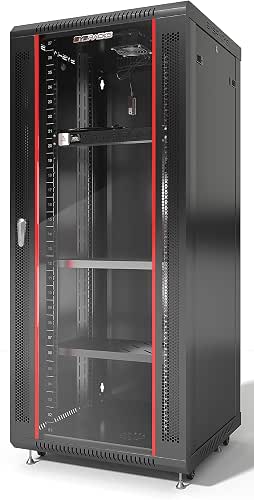
| High-Capacity Wall-Mount | Rack Type: Enclosed wall-mount 27U rack cabinet | 19″ Compatibility: Enclosed 19-inch rack cabinet | Material / Construction: Steel enclosure (cabinet construction) | VIEW LATEST PRICE | Read Our Analysis |
| StarTech 25U 4-Post 19″ Open Frame Server Rack |

| Versatile Mid-Range | Rack Type: 4-post open-frame 25U rack | 19″ Compatibility: 19-inch standard rack width | Material / Construction: Cold-rolled steel | VIEW LATEST PRICE | Read Our Analysis |
| StarTech 42U 4-Post 19″ Open Frame Server Rack |

| Enterprise-Ready | Rack Type: 4-post open-frame 42U rack | 19″ Compatibility: 19-inch standard rack width | Material / Construction: Cold-rolled steel | VIEW LATEST PRICE | Read Our Analysis |
More Details on Our Top Picks
Tecmojo 15U Wall Mount Rack with Mesh Door
If you need a compact, secure rack that handles both wall-mounted and freestanding setups, the Tecmojo 15U wall-mount rack is a solid choice-its 23.6″ depth fits standard 19″ equipment while supporting up to 176 lbs on the wall (350 lbs on the floor), and the mesh door plus dual top fans keep gear cool and visible without compromising security. You’ll get cold-rolled steel with a powder coat, removable side panels, lockable front/side access, casters, L-brackets, and a 1U cantilever shelf. Expanded side access simplifies cable management, and the 23.6 x 23.6 x 30.3″ footprint saves space.
- Rack Type:Enclosed wall-mount / freestanding 15U rack cabinet
- 19″ Compatibility:Compatible with standard 19-inch rack equipment
- Material / Construction:Cold-rolled steel with powder-coated finish
- Ventilation / Cooling:Mesh front door + dual top-mounted fans
- Mounting / Mobility Options:Wall-mountable or freestanding; includes casters and L-brackets
- Included Accessories:1U cantilever shelf, L-brackets, wheels, security locks
- Additional Feature:Removable side panels
- Additional Feature:Dual top-mounted fans
- Additional Feature:1U cantilever shelf included
VEVOR 1U Vented 10″ Server Rack Shelf (2-Pack)
Network administrators who need compact, ventilated support for small network devices will appreciate the VEVOR 1U vented 10″ server rack shelf (2-pack). You get two 1U shelves built for 19″ 4-post racks, each 10″ deep and made from 1.5mm Q235 carbon steel. They hold up to 50 lbs and stay stable to prevent wobble or tilt. Perforated bottoms boost airflow to lower device temperatures and extend equipment life. Flexible partitioning helps you separate routers, switches, and firewalls to reduce clutter. Installation’s easy: all screws and nuts are included and a Phillips screwdriver is all you’ll need.
- Rack Type:1U vented shelf (fits 19″ 4-post rack)
- 19″ Compatibility:Designed for standard 19-inch 4-post racks
- Material / Construction:Q235 carbon steel (0.06″ / 1.5 mm)
- Ventilation / Cooling:Perforated/vented bottom shelf for airflow
- Mounting / Mobility Options:Mounts into 4-post racks using included screws/nuts
- Included Accessories:Pack of 2 vented shelves; screws and nuts included
- Additional Feature:Perforated bottom design
- Additional Feature:Flexible partitioning capability
- Additional Feature:Includes screws and nuts
Sysracks 27U 24″ Deep Wall-Mount Server Rack
The Sysracks 27U 24″ deep wall-mount cabinet is ideal for IT pros and small-office managers who need to save floor space while securely housing routers, switches, patch panels and AV gear. You’ll get a 19-inch enclosed rack with 27U capacity, 24-inch overall depth and 20-inch usable mounting depth for most network devices. It holds up to 133 lbs (60 kg), so you must anchor it to solid wall structure. Tempered front glass with perforation, removable side panels, an integrated top fan, two fixed shelves, a PDU, brush cable entries and full mounting hardware deliver visibility, airflow and secure, tidy installations.
- Rack Type:Enclosed wall-mount 27U rack cabinet
- 19″ Compatibility:Enclosed 19-inch rack cabinet
- Material / Construction:Steel enclosure (cabinet construction)
- Ventilation / Cooling:Tempered glass door with perforation + integrated top fan
- Mounting / Mobility Options:Wall-mountable only (requires solid wall); includes mounting hardware
- Included Accessories:2 fixed shelves, PDU, brush cable entry panels, mounting hardware
- Additional Feature:Tempered front glass
- Additional Feature:Includes PDU and shelves
- Additional Feature:Brush cable entry panels
StarTech 25U 4-Post 19″ Open Frame Server Rack
For small datacenters or IT pros who need a sturdy, space-saving solution, the StarTech 25U 4-post open frame rack delivers adjustable depth (22–40 in) and a 1,200 lb stationary load capacity so you can mount servers, switches, and AV gear with confidence. You’ll appreciate the 19″ standard width, four vertical rails, and clear U/depth markings for precise installs. Cold-rolled steel construction supports mobility with casters, leveling feet, or a base plate for floor securing. Cable management hooks keep wiring tidy. It ships flat-pack with hardware, assembly guides, a two-year warranty, and free lifetime 24/5 multilingual tech support.
- Rack Type:4-post open-frame 25U rack
- 19″ Compatibility:19-inch standard rack width
- Material / Construction:Cold-rolled steel
- Ventilation / Cooling:Open-frame design for unrestricted airflow
- Mounting / Mobility Options:Floor-mount with casters, leveling feet, or base-plate (mobile or stationary)
- Included Accessories:Cage nuts, screws, cable management hooks, assembly tools
- Additional Feature:Adjustable mounting depth
- Additional Feature:Cable management hooks
- Additional Feature:Includes casters and feet options
StarTech 42U 4-Post 19″ Open Frame Server Rack
If you need a sturdy, open-frame rack that makes equipment access and cooling simple, the StarTech 42U 4-post 19″ model is a solid choice-its adjustable 22–40″ mounting depth and 1323 lb (600 kg) load capacity suit datacenter engineers and AV integrators who swap gear frequently and require reliable ventilation. You’ll fit servers, switches, and AV kit on EIA/ECA-310-E compliant rails made from cold-rolled steel. Choose casters, leveling feet, or a base plate for installation; total height is 80.3″ with casters or 78″ without. Assembly is straightforward, hardware and cable hooks are included, and a two-year warranty plus 24/5 support backs you.
- Rack Type:4-post open-frame 42U rack
- 19″ Compatibility:19-inch standard rack width
- Material / Construction:Cold-rolled steel
- Ventilation / Cooling:Open-frame design for unrestricted airflow
- Mounting / Mobility Options:Floor-mount with casters, leveling feet, or base-plate (mobile or stationary)
- Included Accessories:Cage nuts, screws, cable management hooks, assembly tools
- Additional Feature:1323 lb stationary capacity
- Additional Feature:Height depth markings
- Additional Feature:Ships flat-pack compact
Factors to Consider When Choosing Computer Racks & Cabinets
When choosing racks and cabinets, you’ll need to check load capacity limits to make sure your equipment and future growth are supported. Pick the right rack type and consider mounting and placement to maximize space and accessibility. Don’t forget cooling and ventilation as well as security and access controls to keep hardware running and protected.
Load Capacity Limits
Although rack size and style matter, you’ll want to focus first on load capacity limits: these specify the maximum weight a rack or cabinet can safely support and differ between wall-mounted, floor-mounted, and mobile units. You should check both static capacity for stationary loads and dynamic capacity for units on casters. Exceeding ratings can warp frames, loosen fittings, or cause catastrophic failures that damage equipment and create safety hazards. Open-frame racks often support several hundred pounds; enclosed wall-mounted cabinets typically carry less. Capacity depends on materials, construction quality, rack depth, mounting hardware, and reinforcement features, so review manufacturer specs and test reports. Plan total equipment weight with margin for future additions, then choose a rack whose rated limits exceed that calculated load.
Rack Type Selection
Because different deployments demand different trade-offs, choosing the right rack type starts with matching your space, security, and weight needs to the rack’s form and features. If floor area is tight, wall-mount racks save space-just be sure the wall can safely bear equipment weight. Open frame racks give superb ventilation and easy access for maintenance, but they won’t provide the same physical security or dust protection as enclosed cabinets. Enclosed racks lock and shield gear, and many include fans or other ventilation. Decide between 2-post and 4-post based on how you’ll mount gear and the weight it imposes. Finally, pick mobile racks with casters when you need flexibility; choose stationary racks when load capacity and stability matter most.
Mounting And Placement
If you’re planning rack placement, start by matching the mount type to your space and load so the installation stays safe and practical. Choose wall-mounted racks to save floor space or freestanding/floor-mounted models when you need higher weight capacity and mobility. Verify the mounting surface is solid and rated to support the rack’s fully loaded weight; that prevents tipping and structural failure. Opt for adjustable mounting depths to fit varied equipment sizes and simplify installation. Pick racks that accommodate stationary setups with leveling feet or mobile ones with casters depending on your workflow. When positioning racks, account for cable management access and make certain you leave clearance for airflow and service access so equipment remains organized and reachable.
Cooling And Ventilation
When you’re choosing racks, prioritize cooling and ventilation to stop heat buildup that can cause throttling or failure; mesh doors, perforated panels, and vented shelves all help airflow, while integrated or top-mounted fans actively expel hot air and draw in cool air to keep internal temperatures stable. You should select cabinets that balance passive and active airflow: perforated panels and vented shelves let heat escape from individual devices, reducing hotspots and prolonging component life. Integrated or rooftop fan modules provide directed exhaust and intake, maintaining consistent internal temps. Design the rack layout to avoid blocked vents and allow unobstructed air paths. Proper ventilation lowers overheating risk, minimizes thermal throttling, and preserves operational stability and hardware longevity.
Security And Access
While keeping access tight, you’ll still need visibility and serviceability, so choose racks with lockable front and side panels or doors that balance protection and monitoring. You’ll want mesh or perforated doors so you can inspect indicators and airflow without opening enclosures, reducing unnecessary entries. Removable side panels with security locks give you controlled, temporary access for repairs while keeping panels secured otherwise. Implement racks with clear, restricted entry points to support maintenance workflows and limit accidental or malicious interference. These physical controls protect sensitive IT, network, and AV gear from theft and tampering. When selecting cabinets, prioritize durable locks, easy key or code management, and consistent locking across units to streamline operations and uphold site security.
Cable Management Options
Because messy cabling can choke airflow and complicate maintenance, choose racks with integrated cable pathways, vertical and horizontal organizers, and brush entry panels to keep power and data runs separated, secured, and accessible. You’ll want cable management hooks or built-in pathways to organize wiring, reduce clutter, and prevent damage. Removable or expanded side panels let you access and reroute cables quickly for maintenance. Brush entry panels and dedicated vertical/horizontal managers help separate power and data, improving airflow and cutting EMI risks. Guarantee lockable panels and secure doors protect connections from accidental disruption or tampering. Finally, look for ample clearance and designated cable zones so cables don’t overcrowd, are easy to identify, and simplify troubleshooting and future upgrades.
Frequently Asked Questions
How Do I Transport a Fully Loaded Server Rack Safely?
You secure equipment, lock rails, and brace shelves, then wheel the rack on a heavy-duty dolly with straps. You’ll move slowly, avoid stairs, use two helpers, and tie down the rack in the truck to prevent tipping.
Can I Stack Multiple Wall-Mount Racks Vertically?
Yes – you can, but you shouldn’t unless racks are specifically rated for vertical stacking and permanently anchored. Check weight limits, ventilation, cable management, and manufacturer guidance; otherwise you’ll risk collapse, overheating, or voided warranties.
What Are Best Practices for Seismic or Earthquake Protection?
You’ll absolutely want to bolt racks to reinforced floors/walls, use seismic-rated rails, vibration isolators, and redundant anchoring, and secure equipment with restraints and cable management so nothing turns into flying debris during quakes-you’ll sleep better.
How Do I Recycle or Dispose of Old Rack Components?
Recycle or dispose old rack components by wiping data-bearing parts, separating metals, plastics, and electronics, then recycling through certified e-waste recyclers or scrap yards, donating usable parts, and following local hazardous waste rules to avoid fines and pollution.
Are There Universal Mounting Standards for Non-19 Equipment?
No, there aren’t universal standards for non‑19″ equipment; you’ll need to check manufacturer specs, use adapter brackets or rails, and consider custom panels or modular mounting kits to guarantee secure fit and proper airflow.




