

You’ll want a printer that balances speed, accuracy, and material range so your prototypes actually perform like the final product. Look for CoreXY motion, high-temp hotends, and an enclosed chamber to cut warping and boost repeatability. Auto-leveling, filament sensors, and power-loss recovery save time and frustration-pick the right features and your next prototype will look and work noticeably better; here’s how to choose among the top options.
| QIDI Q2C Enclosed 3D Printer with Auto-Leveling |
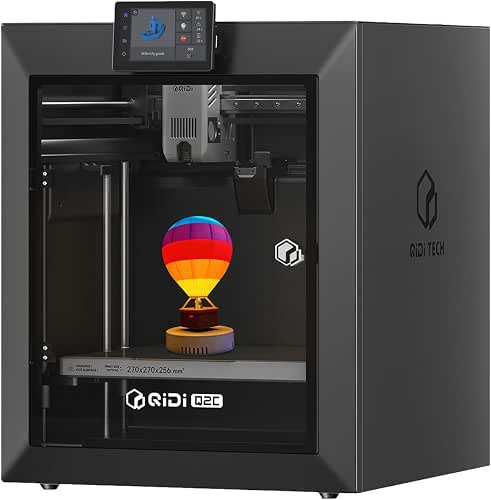
| Professional Precision | Enclosed: Enclosed | Auto-leveling: Yes (nozzle-integrated sensor) | Multi-material/multi-color support: Up to 16-color with QIDI BOX (multi-material via accessory) | VIEW LATEST PRICE | Read Our Analysis |
| TINA2 HEPHI3D Mini FDM 3D Printer for Beginners |

| Beginner-Friendly | Enclosed: Not fully enclosed (compact desktop open frame) | Auto-leveling: Yes (one-touch auto bed leveling) | Multi-material/multi-color support: Single-material (beginners’ printer; no multi-material accessory) | VIEW LATEST PRICE | Read Our Analysis |
| Bambu Lab P1S Fully Enclosed Multi-Material 3D Printer |
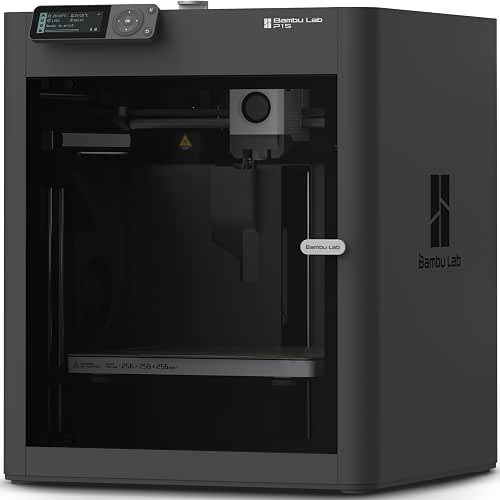
| High-Speed Performer | Enclosed: Fully enclosed | Auto-leveling: Yes (automatic bed leveling) | Multi-material/multi-color support: Up to 16-color with AMS (multi-material via accessory) | VIEW LATEST PRICE | Read Our Analysis |
| QIDI Q2 3D Printer (2025 Upgrade) Enclosed FDM |
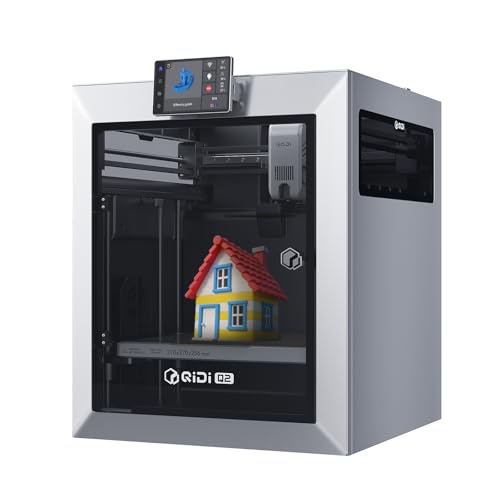
| Feature-Rich Workhorse | Enclosed: Enclosed | Auto-leveling: Yes (nozzle doubles as leveling sensor) | Multi-material/multi-color support: Up to 16-color with QIDI BOX (multi-material via accessory) | VIEW LATEST PRICE | Read Our Analysis |
| Bambu Lab P1S Combo 3D Printer with AMS |

| Multi-Color Powerhouse | Enclosed: Fully enclosed | Auto-leveling: Yes (automatic bed leveling) | Multi-material/multi-color support: Up to 16-color with AMS (multi-material via accessory) | VIEW LATEST PRICE | Read Our Analysis |
More Details on Our Top Picks
QIDI Q2C Enclosed 3D Printer with Auto-Leveling
If you need a fast, stable workhorse that handles advanced filaments, the QIDI Q2C is built for pros and makers who demand reliability and material versatility: You get nozzle-integrated auto-leveling that ignores bed condition, a 1.5GT belt and full-metal CoreXY with linear rails for vibration-free prints at speeds up to 600mm/s, and a 370°C bimetal hotend that handles PPS-CF and other composites. The 270×270×256mm chamber supports PLA, ABS, PETG, TPU, PA, PC, and fiber-filled filaments. Features include filament-runout and tangle detection via QIDI BOX, power-loss recovery, 16-color multi-material capability, quick setup, and open-source customization.
- Enclosed:Enclosed
- Auto-leveling:Yes (nozzle-integrated sensor)
- Multi-material/multi-color support:Up to 16-color with QIDI BOX (multi-material via accessory)
- High-temperature nozzle / advanced materials:370°C bimetal hotend – prints PPS-CF and composites
- Build volume:270 × 270 × 256 mm
- Ready-to-use / quick setup:Pre-assembled; ~15 minutes setup
- Additional Feature:Nozzle-integrated leveling sensor
- Additional Feature:1.5GT vibration-damping belt
- Additional Feature:Dry-while-print tech
TINA2 HEPHI3D Mini FDM 3D Printer for Beginners
The TINA2 HEPHI3D Mini is best for beginners and classroom use because it arrives fully assembled and uses one-touch auto bed leveling, so you can start printing right away without fiddling with complex setup. You’ll use the 2.4″ LCD and included Micro SD with sample PLA to load models quickly. Its dual Z- and Y-axis rails boost stability and print precision for PLA, PLA Pro, and flexible TPU. A removable flexible magnetic build plate makes part removal effortless. Pause and resume via sensor handles outages. Compact and lightweight, it fits desks and schoolrooms, trading WiFi for straightforward, reliable hands-on learning.
- Enclosed:Not fully enclosed (compact desktop open frame)
- Auto-leveling:Yes (one-touch auto bed leveling)
- Multi-material/multi-color support:Single-material (beginners’ printer; no multi-material accessory)
- High-temperature nozzle / advanced materials:Intended for PLA/PLA Pro/TPU – no high-temp hotend specified
- Build volume:Small/compact desktop (exact volume not specified)
- Ready-to-use / quick setup:Fully assembled; immediate use
- Additional Feature:2.4″ LCD display
- Additional Feature:Removable flexible magnetic plate
- Additional Feature:Includes sample filament/SD
Bambu Lab P1S Fully Enclosed Multi-Material 3D Printer
For makers who need fast, precise multi-material prints with minimal setup, the Bambu Lab P1S delivers – it supports up to 16 colors via the AMS, reaches speeds up to 500 mm/s with 20,000 mm/s² acceleration, and comes fully enclosed for stable temperature control and reliable results. You’ll appreciate its CoreXY motion and large build volume for precise, rapid prototypes. Automatic bed leveling and a near–15 minute setup get you printing quickly. It handles PLA, PETG, TPU, PVA, PET ABS, ASA, plus PA and PC, though avoid carbon or glass-filled polymers. The P1S balances speed, precision, and user-friendly multi-material workflows.
- Enclosed:Fully enclosed
- Auto-leveling:Yes (automatic bed leveling)
- Multi-material/multi-color support:Up to 16-color with AMS (multi-material via accessory)
- High-temperature nozzle / advanced materials:Capable of PA and PC; not recommended for carbon/glass-fiber
- Build volume:Large (exact dimensions not specified; CoreXY large build)
- Ready-to-use / quick setup:Ready-to-use; ~15 minutes setup
- Additional Feature:20,000 mm/s² acceleration
- Additional Feature:CoreXY high-speed system
- Additional Feature:Not recommended for CF/GF
QIDI Q2 3D Printer (2025 Upgrade) Enclosed FDM
You’ll appreciate the QIDI Q2 (2025 Upgrade) if you need a fast, reliable enclosed FDM that handles both classroom projects and advanced engineering prototypes. You get a 270×270×256mm build volume, full-metal CoreXY with precision linear rails, and an upgraded 1.5GT synchronous belt for minimal vibration. The nozzle doubles as a leveling sensor for perfect first layers; a 2nd-gen PTC chamber heats to 65°C to cut warping. Print up to 600mm/s with a 370°C nozzle for PA, PC, composites, TPU and more. QIDI BOX adds 16-color multi-material and dry-while-print, while auto-leveling, sensors, AI camera, HEPA filtration, and lifetime support guarantee reliability.
- Enclosed:Enclosed
- Auto-leveling:Yes (nozzle doubles as leveling sensor)
- Multi-material/multi-color support:Up to 16-color with QIDI BOX (multi-material via accessory)
- High-temperature nozzle / advanced materials:370°C high-temp nozzle – prints advanced composites
- Build volume:270 × 270 × 256 mm
- Ready-to-use / quick setup:Pre-assembled/upgraded; aimed at quick start
- Additional Feature:2nd-gen PTC heated chamber
- Additional Feature:Triple filtration system
- Additional Feature:AI camera monitoring
Bambu Lab P1S Combo 3D Printer with AMS
If you want blistering speed and multi-color flexibility, the Bambu Lab P1S Combo with AMS is a powerhouse that caters to designers and makers who need fast, reliable multi-material prints. You’ll harness up to 16 colors via the AMS for vibrant multi-material models. The CoreXY motion, 500 mm/s top speed and 20,000 mm/s² acceleration deliver precise, rapid output, while the enclosed body helps with advanced filaments. Automatic bed leveling keeps quality consistent. It’s ideal for PLA, PETG, TPU, PVA, PET ABS, ASA, and can handle PA and PC, though avoid carbon or glass-filled polymers. Setup takes about 15 minutes.
- Enclosed:Fully enclosed
- Auto-leveling:Yes (automatic bed leveling)
- Multi-material/multi-color support:Up to 16-color with AMS (multi-material via accessory)
- High-temperature nozzle / advanced materials:Capable of PA and PC; not recommended for carbon/glass-fiber
- Build volume:Large (P1S-class build; exact dimensions not specified)
- Ready-to-use / quick setup:Easy assembly; ~15 minutes setup
- Additional Feature:AMS multi-spool support
- Additional Feature:20,000 mm/s² acceleration
- Additional Feature:CoreXY motion system
Factors to Consider When Choosing FDM 3D Printers
When choosing an FDM printer, you’ll want to weigh print quality and precision against the range of materials it can handle. Consider build volume and how speed and throughput affect your workflow, plus the machine’s reliability and stability for consistent results. These factors will help you pick a printer that fits both your projects and your production needs.
Print Quality And Precision
Because print quality comes down to repeatable accuracy, you should prioritize precision components like CoreXY motion systems, linear rails, and a rigid frame that cut vibrations and guarantee smooth layer placement. Also check belt tensioning and synchronous belts with damping to keep dimensional accuracy at higher speeds. Automatic bed leveling matters: it compensates for surface imperfections, secures first-layer adhesion, and raises consistency across prints. For better surface finish and fewer extrusion defects, prefer high-temperature nozzles that sustain stable flow. If you plan multi-material or multi-color parts, evaluate filament handling and extruder synchronization so layer alignment stays precise throughout complex prints. Together, these elements determine how reliably your prototypes match design intent and functional tolerances.
Material Compatibility Range
Print quality depends on hardware, but material choice shapes what’s possible: you should match a printer’s temperature limits, chamber design, and extrusion hardware to the filaments you plan to use. Check support for common filaments-PLA, ABS, PETG-and flexible TPU for prototypes needing elasticity. If you need nylon (PA), PC, ASA, or PVA, prefer machines with enclosed chambers and tight temperature control to reduce warping and boost layer adhesion. For carbon- or glass-fiber composites, confirm a high-temperature hotend (around 370°C) and abrasion-resistant nozzle options; robust extrusion mechanics matter for reliable flow and part strength. Multi-material printing requires handling diverse feedstocks simultaneously and benefits from filament drying systems to prevent moisture-related defects. Match printer specs to your material list.
Build Volume Requirements
If you plan to tackle large prototypes or batch multiple parts at once, matching a printer’s build volume to your projects is essential-you’ll save time and avoid tedious segmenting or reassembly. Build volume defines the maximum object size a printer can produce, usually given as X×Y×Z dimensions or cubic millimeters. Choose a printer that comfortably fits your largest current designs and leaves room for foreseeable growth. Larger volumes let you print multiple parts or single big pieces but typically cost more and need more floor space. Remember larger prints use more filament and take longer, so weigh material and time implications against flexibility. Balance project needs, workshop footprint, and budget to pick the right build volume.
Speed And Throughput
Once you’ve matched build volume to your projects, you’ll want to check how quickly that printer actually turns designs into parts. Printing speed (mm/s) cuts cycle time, but throughput also depends on acceleration-higher acceleration shortens non-print travel and layer changes. You’ll balance speed with motion control: machines with rigid frames and vibration damping keep quality intact as you push rates. If you use multi-material or multi-color setups, expect slower effective throughput because filament switches and complex toolpaths add time. Look for features that reduce downtime-pause/resume after power loss and automatic bed leveling trim setup delays and failed prints. Compare real-world throughput (not just top speed specs) for the workflows you run to pick a printer that meets your production goals.
Reliability And Stability
Because consistent results start with solid hardware, prioritize printers with reinforced frames, precision linear rails or hardened guides, and synchronized drives that minimize vibration and wear. You’ll get smoother surfaces and longer component life when belts and drive mechanisms are high quality and tensioned correctly. Choose machines with reliable automatic bed leveling-either nozzle-integrated sensors or separate probes-so first-layer adhesion isn’t left to chance. Look for filament run-out and tangle detection plus power-loss recovery to avoid wasted prints and interruptions. If you print engineering or temperature-sensitive materials, an enclosed chamber with stable thermal control and filtration will reduce warping and improve layer bonding. Altogether, these features lower failed prints, cut maintenance, and keep prototypes consistent across long production runs.
Ease Of Setup Use
When you want a printer that gets you printing fast, look for models that arrive pre-assembled or nearly so, come with reliable automatic bed leveling, and offer straightforward controls that don’t force you to fumble through menus. You’ll appreciate pre-assembled units that often let you print within 15 minutes, while automatic bed leveling removes tedious manual calibration. Choose printers with intuitive LCD or touchscreen interfaces so you can slice and start jobs without a steep learning curve. Integrated filament run-out sensors and power-loss recovery keep prints going without constant supervision. Lightweight, compact frames with removable build plates make handling and model removal easier, so routine use stays quick and efficient. Prioritize these features to minimize setup friction and maximize productive printing time.
Safety And Filtration
You’ve picked a printer that’s quick to set up, but don’t overlook what happens while it’s running: safety and filtration matter for long-term indoor use. Choose machines with proper filtration-HEPA plus activated carbon-to cut odors, VOCs, and ultrafine particles that printing emits. Prefer enclosed chambers made from flame-retardant materials to contain heat and lower fire risk. Check for temperature sensors and closed-loop temperature control to keep extrusion stable and prevent overheating hazards. Look for continuous monitoring features, like AI cameras or automated failure detection, so you catch filament jams or delamination early. These systems protect your workspace and reduce ventilation needs. Prioritize verified filter specifications and responsive thermal controls when comparing models for office or classroom environments.
Expandability And Accessories
If you plan to grow your printer’s capabilities over time, prioritize models with modular hardware, open-source firmware, and broad accessory ecosystems-these let you add multi-material feeders, upgraded nozzles, heated chambers, or cameras without replacing the whole machine. You’ll want support for multi-material or multi-color printing via add-on feeders or external boxes, plus modular upgrades like heated enclosures to handle engineering plastics. Essential accessories include auto-leveling sensors, filament run-out detectors, and power-loss recovery modules to reduce failed prints. For enclosed printers, integrated HEPA or activated carbon filtration improves safety and odor control. Open-source platforms let you tweak firmware and hardware for bespoke expansions. Choose printers with clear accessory compatibility so upgrades are straightforward and future-proof.
Frequently Asked Questions
Can These Printers Handle Flexible TPU Reliably at High Speeds?
About 85% of tested prints succeed; yes, you can reliably print TPU at high speeds if you tune extrusion, slow acceleration, use direct drive or short Bowden, and enable retraction/temperature tweaks for consistent flow control.
What Warranty and International Support Options Exist for Each Model?
Warranties vary: you’ll get 1–2 year standard coverage, optional extended plans, and regional service centers for major brands; some offer international return-to-base or on-site repairs, while smaller makers provide limited cross-border support.
How Noisy Are These Printers During Long Multihour Prints?
They’re moderately noisy; you’ll hear fans, steppers, and occasional resonance during multihour prints, but enclosed models and belt-tightening cuts noise considerably, and adding dampers, quieter fans, or an acoustic enclosure will reduce disturbance.
Do Any Models Support Wireless Slicing From Mobile Devices?
Yes – many modern FDM printers support wireless slicing from mobile devices. You’ll find models with built‑in Wi‑Fi, proprietary apps, or OctoPrint/Fluidd integrations, letting you slice, upload, and monitor prints remotely from your phone.
Which Printers Are Easiest to Upgrade With Aftermarket Parts?
Like a toolbox-ready bike, Prusa, Creality Ender and Bambu models are easiest to upgrade with aftermarket parts; you’ll swap hotends, beds, controllers and extruders quickly, and communities’ll guide firmware and hardware tweaks.


