

Like finding the right key for an old locked chest, picking a laptop that fits your needs can feel satisfying and a bit urgent. You’ll want a machine that balances power, screen, and weight without wasting money. I’ll walk you through five Gigabyte choices that suit gaming, content work, and portability, pointing out what each model does best and why that matters for your daily use. Keep going to see which one matches how you work and play.
| GIGABYTE G6 (2024) Gaming Laptop – RTX 4050 |

| Best Balance | Operating System: Windows 11 Home | Dedicated GPU: NVIDIA GeForce RTX 4050 (8 GB) | RAM Capacity (stated): 16 GB DDR5 (8 GB × 2) | CHECK LATEST PRICE | Read Our Analysis |
| GIGABYTE G5 KC 15.6″ Gaming Laptop (RTX 3060) |
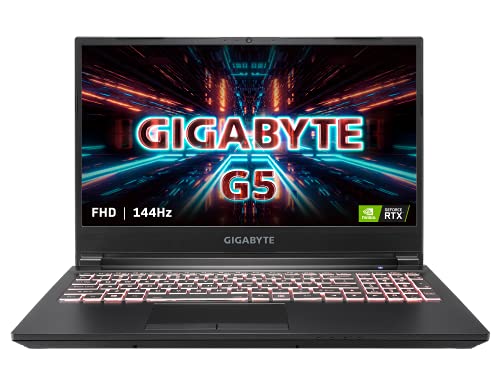
| Budget Performer | Operating System: Windows 10 Home | Dedicated GPU: NVIDIA GeForce RTX 3060 (8 GB) | RAM Capacity (stated): 16 GB (type not explicitly DDR5 in summary) | CHECK LATEST PRICE | Read Our Analysis |
| GIGABYTE A18 Gaming Laptop – Ryzen 7 RTX 5060 |

| Creator Powerhouse | Operating System: Windows 11 Home | Dedicated GPU: NVIDIA GeForce RTX 5060 (8 GB) | RAM Capacity (stated): 32 GB DDR5 | CHECK LATEST PRICE | Read Our Analysis |
| GIGABYTE Gaming A16 Laptop – i7-13620H RTX 4050 |

| Competitive Gamer | Operating System: Windows 11 Home | Dedicated GPU: NVIDIA GeForce RTX 4050 (6 GB) | RAM Capacity (stated): 16 GB DDR5 | CHECK LATEST PRICE | Read Our Analysis |
| GIGABYTE AERO X16 Copilot+ Gaming Laptop (RTX 5060) |

| Premium Creator | Operating System: Windows 11 Home | Dedicated GPU: NVIDIA GeForce RTX 5060 (8 GB) | RAM Capacity (stated): 16 GB DDR5, 5600 MHz | CHECK LATEST PRICE | Read Our Analysis |
More Details on Our Top Picks
GIGABYTE G6 (2024) Gaming Laptop – RTX 4050
If you want a solid midrange gaming laptop that usually balances power and portability, the GIGABYTE G6 (2024) is a smart pick. You’ll get an Intel Core i7-13620H that ramps up to 4.9 GHz and an NVIDIA GeForce RTX 4050 with 8 GB GDDR6 so games look great and run smoothly. The 16 GB DDR5 and 1 TB Gen4 SSD give you room for apps and fast load times. The 16.0 inch 1920×1200 165 Hz display keeps motion crisp, and Dolby Atmos plus dual speakers make sound feel alive. Ports and Wi‑Fi 6E keep you connected.
- Operating System:Windows 11 Home
- Dedicated GPU:NVIDIA GeForce RTX 4050 (8 GB)
- RAM Capacity (stated):16 GB DDR5 (8 GB × 2)
- Primary Storage:1 TB Gen4 M.2 SSD
- Display Size & Resolution:16.0″ WUXGA 1920 × 1200, 165 Hz
- Wireless Connectivity:Intel Wi‑Fi 6E, Bluetooth v5.2
- Additional Feature:Dolby Atmos audio
- Additional Feature:HDMI 2.1 port
- Additional Feature:Wi‑Fi 6E support
GIGABYTE G5 KC 15.6″ Gaming Laptop (RTX 3060)
You’ll appreciate the GIGABYTE G5 KC if you want a serious midrange gaming laptop that won’t break the bank but still plays modern titles smoothly. You get a 10th Gen Intel Core i5 that handles games and streaming well, and an RTX 3060 GPU with solid 105 W power for high settings. The 15.6″ 144 Hz FHD screen feels fluid and keeps glare down. It ships with 16 GB RAM and a 512 GB PCIe SSD, plus space for more drives. Ports and Wi‑Fi 6 let you connect multiple displays and peripherals easily. The keyboard and audio add nice polish.
- Operating System:Windows 10 Home
- Dedicated GPU:NVIDIA GeForce RTX 3060 (8 GB)
- RAM Capacity (stated):16 GB (type not explicitly DDR5 in summary)
- Primary Storage:512 GB PCIe SSD
- Display Size & Resolution:15.6″ FHD (1920×1080) IPS-level, 144 Hz
- Wireless Connectivity:Intel Wi‑Fi 6 AX200
- Additional Feature:1+3 multi-display
- Additional Feature:SD card reader
- Additional Feature:15‑zone RGB keyboard
GIGABYTE A18 Gaming Laptop – Ryzen 7 RTX 5060
The GIGABYTE A18 fits gamers and creators who want a powerful laptop that still feels light and reliable for long sessions. You get a Ryzen 7 260 CPU, 32GB DDR5, and a 1TB SSD, so streaming, recording, and multitasking feel smooth. The RTX 5060 Laptop GPU brings DLSS 4 and Studio tools, boosting creative workflows while Max-Q keeps efficiency steady. A 165Hz WQXGA display and 180-degree hinge help when you share or edit, and the 20 mm slim chassis makes it easy to carry. GiMATE gives intuitive control, so you spend more time creating and less time tweaking.
- Operating System:Windows 11 Home
- Dedicated GPU:NVIDIA GeForce RTX 5060 (8 GB)
- RAM Capacity (stated):32 GB DDR5
- Primary Storage:1 TB SSD
- Display Size & Resolution:18″ (A18) 2560 × 1600 WQXGA, 165 Hz
- Wireless Connectivity:(Not explicitly listed) – implied modern wireless (GiMATE/AI features); assume Wi‑Fi 6 or newer (not specified)
- Additional Feature:180° lay-flat hinge
- Additional Feature:GiMATE AI interface
- Additional Feature:20 mm slim chassis
GIGABYTE Gaming A16 Laptop – i7-13620H RTX 4050
For gamers who want smooth competitive performance without breaking the bank, the GIGABYTE Gaming A16 with an Intel Core i7-13620H and NVIDIA GeForce RTX 4050 delivers a strong balance of power and value. You get a 16″ WUXGA 1920×1200 display at 165 Hz, so visuals feel fluid and tearing drops. The RTX 4050 with 6 GB GDDR6 supports DLSS and ray tracing, and the Windforce cooling keeps thermals steady under load. With 16 GB DDR5 and a 1 TB PCIe SSD, apps open fast and you store lots. Warranty covers upgraded parts for one year, and the rest retains the original manufacturer coverage.
- Operating System:Windows 11 Home
- Dedicated GPU:NVIDIA GeForce RTX 4050 (6 GB)
- RAM Capacity (stated):16 GB DDR5
- Primary Storage:1 TB PCIe SSD
- Display Size & Resolution:16″ WUXGA 1920 × 1200, 165 Hz
- Wireless Connectivity:Wi‑Fi 6E
- Additional Feature:Windforce cooling system
- Additional Feature:Backlit keyboard
- Additional Feature:Seal-opened upgrade warranty
GIGABYTE AERO X16 Copilot+ Gaming Laptop (RTX 5060)
If you want a thin, lightweight laptop that handles both serious gaming and creative work, the GIGABYTE AERO X16 Copilot+ fits that need, offering a 16-inch WQXGA 165 Hz display and RTX 5060 graphics in a 4.19 pound chassis. You’ll get a bright 2560 x 1600 panel that shows detail for editing and smooth frame rates for play. The Ryzen AI 7 350 and 16 GB DDR5 keep apps responsive, while 1 TB SSD stores projects. Copilot+ features and GiMATE tune performance to your workflow. Ports are handy, battery life is long, and build feels premium.
- Operating System:Windows 11 Home
- Dedicated GPU:NVIDIA GeForce RTX 5060 (8 GB)
- RAM Capacity (stated):16 GB DDR5, 5600 MHz
- Primary Storage:1 TB SSD
- Display Size & Resolution:16″ WQXGA 2560 × 1600, 165 Hz
- Wireless Connectivity:(Not explicitly listed) – Windows 11 Copilot+/GiMATE implies modern Wi‑Fi (not specified)
- Additional Feature:Copilot+ PC features
- Additional Feature:Integrated NPU (Ryzen AI)
- Additional Feature:14‑hour battery life
Factors to Consider When Choosing Gigabyte Laptops
When you shop for a Gigabyte laptop, you’ll want to weigh performance factors like CPU speed and GPU power against how much memory and storage you really need. Pay attention to the display and refresh rate because smooth visuals can make work and play feel effortless, and check cooling and thermals so the machine stays quiet and reliable under load. I’ll guide you through how these pieces fit together so you can pick a model that matches your use and gives you lasting value.
Performance And CPU
Because your laptop’s CPU sets the pace for everything you do, choosing the right processor in a Gigabyte laptop will directly affect gaming, streaming, and creative work. You’ll want newer CPU generations and more cores and threads, like six to eight or more, to handle multitasking and heavy encoding. Also check boost clock and base clock stability since higher single-core boost speeds make games and UI feel snappier. Consider thermal design and sustained power ratings because a CPU that keeps higher power longer will stay fast during long sessions. Match cores to tasks: many cores help rendering while high single-core IPC and boost help games. Finally, evaluate platform features such as DDR5 memory, PCIe Gen5, and integrated accelerators for future-proofing.
GPU And Graphics
Start by matching the GPU to how you plan to use the laptop, since the graphics chip shapes gaming feel, creative speed, and display quality. Pick VRAM that fits your work: 6 to 8 GB is a good baseline for 1080p gaming, while 8+ GB helps with high resolution textures and heavy creative apps. Also look for hardware features like real time ray tracing and AI upscaling to boost visuals and frame rates. Check the GPU power envelope and the laptop cooling, because higher wattage GPUs need stronger thermal design to keep performance steady. Match GPU strength to your screen resolution and refresh rate, since a 144 to 165 Hz panel needs a card that can hit high frame rates. Favor newer GPU generations for efficiency and improved drivers.
Memory And Storage
A few simple choices in memory and storage will shape how your Gigabyte laptop feels every day, so pick parts that match what you do and what you want to grow into. You should choose DDR5 RAM at higher frequencies like 4800 MHz or more because faster RAM helps multitasking, steady game frames, and content work. Aim for at least 16 GB for modern gaming and productivity. Pick 32 GB if you stream, run many apps, or edit large media. For storage, prioritize NVMe PCIe Gen4 SSDs for much faster load times and responsiveness than SATA. Look for upgradeable SODIMM slots and multiple M.2 bays so you can add RAM or bigger, faster drives later. Check model, TBW, and peak throughput, not just capacity.
Display And Refresh
You’ve just sorted RAM and storage, which shape how fast your laptop feels; now you’ll want a screen that matches that speed and clarity so your work and games look as good as they run. Pick a resolution and aspect ratio that fit what you do. Higher resolutions like 2560×1600 give sharper detail for photo and video work. 1920×1200 or 1920×1080 with 16:10 or 16:9 balances clarity and battery life for gaming and daily tasks. Match refresh rate to activity. 144–165 Hz or higher smooths fast action and cuts input lag. For productivity, 60–120 Hz works fine. Check panel type and color. IPS or WVA gives wider viewing angles and truer color. Look for VRR support, 300+ nits brightness, and wide gamut coverage for accurate, vivid images.
Cooling And Thermals
When you’re buying a Gigabyte laptop, cooling and thermals matter as much as the CPU and GPU inside, because they decide whether that power stays steady or falls off during long sessions. You should look for multi-heatpipe designs and dedicated vapor chambers since they move heat faster from chip to exhaust and help sustain boost clocks. Also check reported sustained CPU and GPU power limits and fan profiles so you know if the cooling can match long gaming or rendering loads. Pay attention to intake and exhaust placement, like multiple rear or side vents and raised intake areas, because airflow layout affects internal and surface temps. Consider metal or hybrid chassis and slightly thicker builds to aid heat dissipation. Finally, review independent temp tests for real-world comfort.
Battery And Portability
Although battery life can’t be judged by a single number, you’ll want to start by checking the battery capacity in watt‑hours and the stated hours for real tasks like web browsing or video playback, because those figures tell you what to expect away from a wall outlet. Then look at weight and thickness in kg or pounds and mm or inches so you know if you can carry it all day. Keep in mind that bigger, higher resolution displays often use more power and cut runtime. Also check fast charging and charger wattage like 65W or 100W plus to get back to work faster. Finally, note wireless standards like Wi‑Fi 6 and avoid relying on heavy adapters that drain power and add bulk.
Connectivity And Ports
Picking the right ports and wireless features can make your Gigabyte laptop feel like it was built for your day, not the other way around. You should check that the laptop has the ports you actually use, like at least one HDMI 2.1 or a DisplayPort-capable USB-C for external monitors, multiple USB-A and USB-C ports for mice, drives, and hubs, plus an audio combo jack for headsets. Also look for modern wireless standards such as Wi-Fi 6E and Bluetooth 5.2 or newer so your network stays fast and pairing stays simple. Think about storage and expansion too, with PCIe Gen4 M.2 slots and extra bays if you plan upgrades. Finally, prefer full-size Ethernet or reliable USB-C power delivery options for stable wired use.




