

You want a TV box that makes watching simpler, smarter, and faster, so focus on devices with native 4K HDR, AV1/HEVC decoding, fast multicore CPUs, and Google TV with Assistant built in. Prioritize Dolby Vision/HDR10+, Dolby Atmos audio pass‑through, Wi‑Fi 6 or gigabit Ethernet, and solid update support for security and AI upscaling. Keep going to see which models hit those marks and which trade compromises.
| Xiaomi Android TV Box S 3rd Gen (4K) |
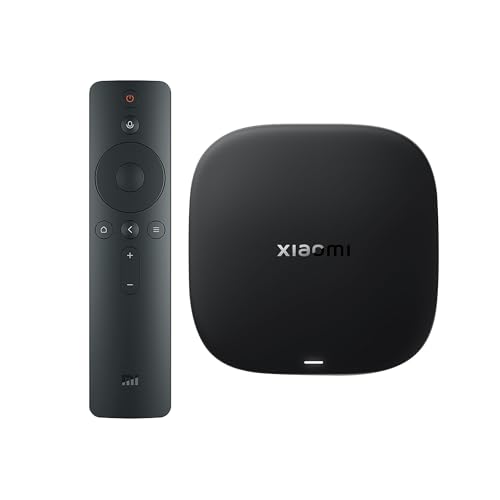
| Premium Performance | OS / Smart Platform: Google TV (built‑in) | Voice Assistant: Google Assistant (voice button on remote) | 4K HDR Video Support: 4K UHD, HDR10+ and Dolby Vision | VIEW LATEST PRICE | Read Our Analysis |
| KP1 Android 11 TV Box 4K (2GB/32GB) |

| Best Value | OS / Smart Platform: Android 11 (Google Certified) with Google apps / Chromecast built‑in | Voice Assistant: Voice remote with voice search / control (Google voice) | 4K HDR Video Support: 4K HDR and Dolby Vision HDR | VIEW LATEST PRICE | Read Our Analysis |
| RockTek GT1 4K Google TV Streaming Box |

| AI-Enhanced Streaming | OS / Smart Platform: Google TV OS (Google certified) | Voice Assistant: Hey Google voice assistance (voice remote) | 4K HDR Video Support: True 4K, 4K HDR and HDR10+ | VIEW LATEST PRICE | Read Our Analysis |
| RockTek GX1 4K UHD Google TV Streamer | Home Theater Focus | OS / Smart Platform: Google TV OS (Google certified) | Voice Assistant: Hey Google voice assistant (voice remote) | 4K HDR Video Support: 4K UHD, Dolby Vision and HDR10+ | VIEW LATEST PRICE | Read Our Analysis |
More Details on Our Top Picks
Xiaomi Android TV Box S 3rd Gen (4K)
If you want a compact 4K streamer that brings cinematic HDR and voice control together, the Xiaomi Android TV Box S 3rd Gen is a smart choice-its HDR10+/Dolby Vision and Dolby Atmos/DTS:X support deliver picture and sound that pop, while Google TV and the Assistant-equipped remote make navigation and smart‑home control effortless. You’ll get smooth playback from a 64‑bit 6nm platform with a quad‑core A55 CPU (up to 2.5 GHz), 2 GB RAM and 32 GB storage. Wi‑Fi 6, HDMI 2.1, Bluetooth remote and Google Cast simplify setup and streaming, with personalized recommendations via Google TV.
- OS / Smart Platform:Google TV (built‑in)
- Voice Assistant:Google Assistant (voice button on remote)
- 4K HDR Video Support:4K UHD, HDR10+ and Dolby Vision
- Casting / Chromecast:Google Cast (Chromecast) built‑in
- Memory / Storage:2 GB RAM + 32 GB storage
- HDMI Output:HDMI 2.1 port
- Additional Feature:Wi‑Fi 6 support
- Additional Feature:HDMI 2.1 port
- Additional Feature:360° Bluetooth remote
KP1 Android 11 TV Box 4K (2GB/32GB)
The KP1 Android 11 TV Box 4K (2GB/32GB) is ideal for budget-minded viewers who want easy access to major streaming services in 4K HDR; you’ll get Google certification for apps like Netflix and Disney+ plus Chromecast built‑in for quick casting from your phone. You’ll run Android 11 (Google Certified) with an available Android 12 update, and the box includes 2 GB RAM and 32 GB storage. It outputs 4K HDR with Dolby Vision and Dolby Audio for vivid picture and immersive sound. Bluetooth 5.0, Wi‑Fi, an HDMI output, voice remote, and plug‑and‑play setup keep things simple and compatible.
- OS / Smart Platform:Android 11 (Google Certified) with Google apps / Chromecast built‑in
- Voice Assistant:Voice remote with voice search / control (Google voice)
- 4K HDR Video Support:4K HDR and Dolby Vision HDR
- Casting / Chromecast:Google Chromecast built‑in
- Memory / Storage:2 GB RAM, 32 GB ROM
- HDMI Output:HDMI output (includes built‑in HDMI cable)
- Additional Feature:Built-in HDMI cable
- Additional Feature:Google Certified apps
- Additional Feature:Android updatable system
RockTek GT1 4K Google TV Streaming Box
For a budget-conscious streamer who still wants crisp 4K playback and built-in Google features, consider the RockTek GT1 4K: it runs Google TV with Chromecast and Hey Google. You’ll get a Google-certified experience with personalized recommendations, Free Live TV in select regions, and smart-home integration. The Realtek RTD1325 boosts stability, while AI tools (AIPQ, AISR, QMS) sharpen picture, upscale in real time, and switch refresh rates without black screens. True 4K HDR/HDR10+ delivers richer color and contrast. Dual-band Wi-Fi 5 and Bluetooth 5.2 keep connections solid; the box has 2 GB RAM, 32 GB storage, and a one-year limited warranty.
- OS / Smart Platform:Google TV OS (Google certified)
- Voice Assistant:Hey Google voice assistance (voice remote)
- 4K HDR Video Support:True 4K, 4K HDR and HDR10+
- Casting / Chromecast:Chromecast built‑in (Google Cast)
- Memory / Storage:2 GB RAM, 32 GB internal storage
- HDMI Output:HDMI output (standard for 4K streaming box)
- Additional Feature:AI-powered upscaling (AISR)
- Additional Feature:QMS seamless switching
- Additional Feature:Bluetooth 5.2
RockTek GX1 4K UHD Google TV Streamer
Home Theater Focus
View Latest PriceGamers and cinephiles who want crisp 4K playback and smart-home control will appreciate the RockTek GX1, a Google-certified streamer that combines Realtek RTD1325 performance with Dolby Vision, HDR10+ and Dolby Atmos support. You’ll get Google TV with personalized recommendations, Hey Google voice control, and a voice remote for hands-free searches. AIPQ and AISR boost color accuracy and upscaling, while QMS keeps switching instant. Google Cast, smart-home integration, and access to major international apps make streaming flexible; Free Live TV appears in select regions. Firmware updates and online support back a 12-month box warranty and three-month accessory coverage.
- OS / Smart Platform:Google TV OS (Google certified)
- Voice Assistant:Hey Google voice assistant (voice remote)
- 4K HDR Video Support:4K UHD, Dolby Vision and HDR10+
- Casting / Chromecast:Google Cast (screen casting)
- Memory / Storage:2 GB RAM, 32 GB internal storage
- HDMI Output:HDMI output (4K UHD streamer)
- Additional Feature:Dolby Atmos support
- Additional Feature:Online firmware upgrades
- Additional Feature:12-month device warranty
Factors to Consider When Choosing Google Assistant TV Boxes
When you pick a Google Assistant TV box, focus on picture and HDR support plus the audio formats it can decode so your content looks and sounds right. Check the processor, memory, and storage to make sure apps and streaming run smoothly. Also confirm the connectivity and ports you need for your TV, speakers, and network.
Picture And HDR Support
Although you might not notice every detail at first glance, picture quality and HDR support determine how faithfully a Google Assistant TV box reproduces color, contrast, and motion. You should pick a box with native 4K UHD output (3840×2160) so content isn’t merely upscaled. Check HDR compatibility-HDR10, HDR10+, Dolby Vision, and HLG-so you get wider color gamut and deeper contrast on supported streams. Confirm the device and your HDMI output handle HDR metadata passthrough and match your TV’s HDMI version (2.0/2.1) to preserve peak brightness and color. Look for 10‑bit color and 60 Hz (or higher) frame‑rate support for smooth motion and richer gradients. Finally, verify any AI upscaling or dynamic tone mapping improves low‑res and SDR-to‑HDR without artifacts.
Audio And Sound Formats
Prioritize audio capabilities as carefully as you do video-sound formats and pass-through determine whether you’ll get true surround, object-based audio, or a flattened stereo mix. Check supported surround formats like Dolby Atmos, DTS:X and Dolby Digital Plus so the box can decode or pass object-based and multi-channel tracks. Verify HDMI bitstream pass-through and eARC support to let your AV receiver or soundbar receive full-resolution Dolby/DTS without downmixing. Confirm sample rate and bit depth (24-bit/48–192 kHz) and whether lossless codecs such as Dolby TrueHD or DTS-HD Master Audio stay intact to compatible gear. Note if the box renders Atmos locally versus simply passing it through-quality differs. Make sure firmware and apps handle high-bitrate streams and receive codec updates.
Processor And Performance
Good audio needs a capable brain behind it-your streaming box’s processor determines whether apps, menus, and high‑bitrate streams run smoothly or stall while your receiver handles the sound. You should pick a multi‑core CPU with modern architecture (quad‑core ARM A55 or better) clocked around 2.0–2.5 GHz for reliable 4K playback, app switching, and background tasks. Favor SoCs built on smaller process nodes (6–12 nm) to get better power efficiency and sustained performance. Verify hardware decoding for HEVC, VP9, AV1 and HDR formats (HDR10+, Dolby Vision) so the chip offloads heavy video work. Look for extra features like AI upscaling and seamless refresh‑rate switching (QMS). Finally, judge overall platform performance (CPU+GPU+memory bandwidth) rather than clock speed alone.
Memory And Storage Needs
Think about RAM and storage like the workspace and filing cabinet for your TV box: at least 2 GB of RAM keeps the interface responsive, while 32 GB or more of internal storage prevents apps and downloads from crowding the system. You should pick more RAM if you switch apps often, use picture-upscaling, or stream games-extra memory improves multitasking and responsiveness. Prefer faster storage (eMMC or UFS) for quicker load times and sustained performance during heavy use. Look for expandable storage via microSD or USB, or strong cloud support, so you can offload media and sideloaded apps without filling ROM. Always leave 10–20% of internal storage free to allow caches and updates, avoiding slowdowns as the drive fills.
Connectivity And Ports
After you’ve settled on RAM and storage, check what connections the box offers so your setup actually performs: make sure it has HDMI 2.1 or at least HDMI 2.0a/b for solid 4K@60Hz (or higher) and HDR support, Wi‑Fi 5 or preferably Wi‑Fi 6 for faster, lower‑latency streaming on busy networks, and Bluetooth 5.0+ for stable audio and controller links. Also confirm Gigabit Ethernet for rock‑steady wired streaming, plus USB‑A or USB‑C ports for external drives and accessories. Look for optical or HDMI ARC/eARC for seamless soundbar or AVR integration. Finally, verify casting support like Chromecast built‑in and Google Cast compatibility so you can stream directly from phones, tablets, or laptops without juggling adapters or extra apps.
Software And Voice Integration
Because the software determines what your box can actually do, make sure it runs a modern, supported TV OS (like Google TV/Android TV) and is Google‑certified so Assistant, Chromecast, and app updates work reliably; also check for a built‑in voice remote or mic with low‑latency connectivity, multi‑account/language support, and clear privacy controls (mic mute, voice history options, and on‑device processing) before you buy. Beyond that, verify timely security patches and app updates, and confirm native Google Assistant support so voice commands and smart‑home control are seamless. Test voice latency and pairing reliability-Bluetooth or RF remotes matter. Guarantee voice match, multiple profiles, and language options are fully implemented to keep recommendations personal. Finally, prefer devices that expose straightforward privacy settings so you control what voice data is stored or shared.


