

You want clarity, you want reliability, and you want tools that actually help you learn-so choosing the right graphing calculator matters. You’ll find options that simplify algebra, visualize calculus, and handle stats without overwhelming you, but picking the one that fits your needs and allowed exam use takes a bit of thought. Keep going to compare screens, functionality, and portability so you make the best choice.
| Texas Instruments TI-83 Plus Graphing Calculator (Renewed) |

| Classroom Staple | Graphing capability: Graphs and tables with split-screen; 14 zoom features | Display type / resolution: Monochrome LCD, 64 x 96 pixels | Intended audience / curriculum support: High school/college-SAT, ACT, AP, IB approved | VIEW LATEST PRICE | Read Our Analysis |
| Texas Instruments TI-Nspire CX II CAS Graphing Calculator |

| Power User Choice | Graphing capability: Advanced color graphing; six graph styles; 15 colors | Display type / resolution: Color screen, 320 x 240 pixels (3.5″ diagonal) | Intended audience / curriculum support: Students (PC/Mac compatible software) – advanced classroom use | VIEW LATEST PRICE | Read Our Analysis |
| Scientific Graphing Calculator for High School & College |

| Most Versatile | Graphing capability: Graphing capability with large screen for simultaneous display | Display type / resolution: Large screen (size given 7 x 3.3″ device); unspecified pixel count | Intended audience / curriculum support: High school & college; supports Pre-Algebra through AP courses | VIEW LATEST PRICE | Read Our Analysis |
| NumWorks Graphing Calculator |
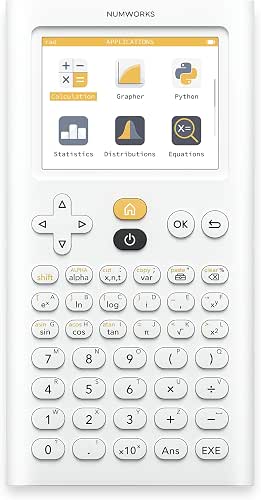
| Beginner-Friendly | Graphing capability: Full graphing functions with high-resolution color display | Display type / resolution: Color screen, 320 x 240 pixels | Intended audience / curriculum support: Middle school through college; grows with students | VIEW LATEST PRICE | Read Our Analysis |
| TI-84 Plus Graphics Calculator (Black) |

| Feature-Rich Performer | Graphing capability: Graphs up to ten functions; seven styles; 14 zoom features | Display type / resolution: Backlit color screen, 320 x 240 pixels (2.8″ diagonal) | Intended audience / curriculum support: Middle school through college; math & science applications | VIEW LATEST PRICE | Read Our Analysis |
More Details on Our Top Picks
Texas Instruments TI-83 Plus Graphing Calculator (Renewed)
If you need a reliable, exam-approved graphing calculator for high school and early college math, the renewed Texas Instruments TI-83 Plus is a smart choice-it’s handles calculus, trigonometry, engineering, and financial functions, shows graphs and tables side-by-side, and stores up to ten matrices for quick analysis. You’ll get a clear 64×96 LCD that displays split-screen graph/table views, so you can trace a curve while scrolling table values. Fourteen interactive zoom features help you inspect behavior closely. With built-in memory for matrix work and approval for SAT, ACT, AP, and IB exams, you’ll rely on it during tests and study sessions.
- Graphing capability:Graphs and tables with split-screen; 14 zoom features
- Display type / resolution:Monochrome LCD, 64 x 96 pixels
- Intended audience / curriculum support:High school/college-SAT, ACT, AP, IB approved
- Power / battery:Battery-powered (standard TI-83 Plus; renewed unit)
- Memory / software support:Built-in memory (stores up to 10 matrices); TI platform
- Portability / physical size:Handheld graphing calculator (standard pocketable TI-83 form factor; renewed)
- Additional Feature:Approved exam use
- Additional Feature:Stores up to 10 matrices
- Additional Feature:Fourteen zoom features
Texas Instruments TI-Nspire CX II CAS Graphing Calculator
Designed for students tackling advanced algebra, calculus, and STEM coursework, the TI‑Nspire CX II CAS packs a high-resolution 3.5‑inch color display and powerful CAS functionality into a thin, lightweight body so you can visualize complex graphs and manipulate symbolic expressions on the go. You’ll get a 320×240, 16-bit screen with six graph styles and 15 selectable colors, making distinctions clear. Rechargeable battery lasts up to two weeks per charge. Easy touchpad navigation and quick alpha keys speed entry, and the handheld bundle includes TI‑Nspire CX Student Software. That software runs on PC and Mac, extending classroom work to your computer.
- Graphing capability:Advanced color graphing; six graph styles; 15 colors
- Display type / resolution:Color screen, 320 x 240 pixels (3.5″ diagonal)
- Intended audience / curriculum support:Students (PC/Mac compatible software) – advanced classroom use
- Power / battery:Rechargeable battery included; up to two weeks per charge
- Memory / software support:Handheld software bundle plus TI‑Nspire CX Student Software
- Portability / physical size:Thin, lightweight handheld (3.5″ screen)
- Additional Feature:16-bit color screen
- Additional Feature:Includes student software
- Additional Feature:Rechargeable battery included
Scientific Graphing Calculator for High School & College
Students and professionals who need both detailed calculations and clear visual feedback will find this scientific graphing calculator a strong choice, thanks to its large screen that shows graphs and equations side-by-side. You’ll appreciate the 7 x 3.3 inch size and intuitive interface with three modes-angular measurement, calculation, display-so switching tasks stays simple. With over 280 functions, you can handle fractions, statistics, complex numbers, regressions, permutations, variable solving, and more across courses from Pre-Algebra to AP Calculus, science, and finance. A reset button on the back, 365-day warranty, and 24-hour customer support keep you covered.
- Graphing capability:Graphing capability with large screen for simultaneous display
- Display type / resolution:Large screen (size given 7 x 3.3″ device); unspecified pixel count
- Intended audience / curriculum support:High school & college; supports Pre-Algebra through AP courses
- Power / battery:Battery powered (reset button; warranty) – specifics not listed
- Memory / software support:Supports 280+ functions (fractions, statistics, complex numbers, etc.)
- Portability / physical size:Physical dimensions listed: 7 x 3.3 inches (handheld)
- Additional Feature:7 x 3.3 inch size
- Additional Feature:Over 280 functions
- Additional Feature:365-day limited warranty
NumWorks Graphing Calculator
The NumWorks Graphing Calculator is a great choice when you want a clean, easy-to-learn device that grows with you from middle school through college. You’ll appreciate its intuitive interface and fast handling, which cover the functions you need for all high school math courses. The high-resolution 320×240 color screen makes graphs clear, and the rechargeable lithium-ion battery plus USB-C cable keep it ready. It supports multiple languages-English, French, Dutch, Portuguese, Italian, German, and Spanish-so it’s classroom-friendly. Lightweight and compact (6.34 × 0.39 × 3.23 inches, 5.9 ounces), the N0100 model is built by NumWorks for lasting use.
- Graphing capability:Full graphing functions with high-resolution color display
- Display type / resolution:Color screen, 320 x 240 pixels
- Intended audience / curriculum support:Middle school through college; grows with students
- Power / battery:Rechargeable Lithium-Ion battery included; USB-C cable
- Memory / software support:Updatable platform with language support; feature set for curricula (software ecosystem)
- Portability / physical size:Compact dimensions 6.34 x 0.39 x 3.23 inches; 5.9 oz
- Additional Feature:USB-C charging cable
- Additional Feature:Multilingual interface support
- Additional Feature:Lightweight (5.9 oz)
TI-84 Plus Graphics Calculator (Black)
If you need a reliable, classroom-ready graphing calculator that handles everything from interactive geometry to multi-function plotting, the TI-84 Plus (Black) is a strong choice – its vibrant 2.8″ backlit color screen and ability to graph up to ten functions at once make analyzing complex algebra and calculus problems faster and clearer. You’ll get Cabri Jr. and over a dozen preloaded apps, seven graph styles, fourteen zoom options, and horizontal or vertical split screens to compare plots and data. It’s solidly built, includes a protective slide case, USB cable, and batteries, and connects with other TI devices for classroom sharing.
- Graphing capability:Graphs up to ten functions; seven styles; 14 zoom features
- Display type / resolution:Backlit color screen, 320 x 240 pixels (2.8″ diagonal)
- Intended audience / curriculum support:Middle school through college; math & science applications
- Power / battery:Uses AAA batteries included; mentions rechargeable/TI-Rechargeable options and backup battery
- Memory / software support:Preloaded apps (dozen+), connectivity/USB cable, save/analyze multiple functions
- Portability / physical size:Handheld weight 10.2 oz; dimensions 7.8 x 6.06 x 1.34 inches
- Additional Feature:Preloaded apps (Cabri Jr.)
- Additional Feature:I/O connectivity port
- Additional Feature:Protective slide case included
Factors to Consider When Choosing Graphic Graphing Calculators
When choosing a graphic graphing calculator, you should weigh screen size and resolution, battery type and life, and whether it’s approved for your exams or classroom. Also consider the device’s graphing and calculation power plus its memory and storage capacity. These factors will determine how well the calculator meets your needs and lasts through courses and tests.
Screen Size And Resolution
Choose a calculator with a screen size and resolution that match how you work: larger diagonals and higher pixel counts let you see full graphs and equations without constant scrolling, while higher pixels-per-inch deliver sharper curves and crisper text for detailed plots and small annotations. You’ll also want color when you regularly compare overlapping functions-selectable graph colors make differences obvious at a glance. Look for split-screen capability and generous vertical/horizontal pixels so you can view tables and graphs side by side, cutting context switches. Finally, check visibility: contrast, viewing angle, and backlighting determine how readable the display is in classrooms, lecture halls, or under bright lights. Prioritize the combination that best fits the types of problems you solve.
Battery Type And Life
Consider battery type and expected runtime as a top criterion: rechargeable lithium-ion packs usually give the longest, most convenient runtimes and top up via USB, while AA/AAA models let you swap cells mid-exam but require spares. You should weigh stated battery life against real-world use: color displays, backlighting, and wireless features can cut runtime from weeks to hours. If a calculator uses AA/AAA cells, plan to carry replacements because heavy graphing drains them faster. Look for a small backup coin-cell that preserves memory when the main battery is swapped or dies. Confirm the charging method-USB recharge is convenient but may be restricted during tests-and compare manufacturer claims to user reports so you pick a model that matches your workload.
Exam And Classroom Approval
Battery type and runtime matter, but you’ll also need to confirm that the calculator is allowed where you plan to use it. Check whether your device appears on the official approved list for each exam you’ll take-college entrance, AP, IB-and note any model-specific restrictions like non-CAS requirements. Review your course syllabus or instructor rules for limits on color displays, programmability, or symbolic algebra, since classrooms can be stricter than exams. Verify connectivity rules: Bluetooth, Wi‑Fi, external apps, and removable storage are often banned. Learn required test-day settings-clearing memory or enabling exam mode-and keep printed or digital proof of approval handy in case a proctor asks. For high‑stakes tests, choose a model with explicit, documented authorization.
Graphing And Calculation Power
Plunge into the calculator’s raw computational muscle and graphing features, since processor speed, math-engine capability, and supported function sets determine how smoothly it handles everything from symbolic algebra to dense numerical work. You’ll check processor speed and built-in math engines first: faster chips and CAS support make plotting complex functions and solving calculus or engineering problems much quicker. Confirm the function set-calculus, complex numbers, linear algebra, regressions-and total function count to match your curriculum. Evaluate graphing capacity: simultaneous functions, styles, colors, zoom and trace tools for multi-curve comparison and detailed exploration. Prioritize numerical precision and matrix handling for accurate system solutions, and look for parametric/polar/3D graphing plus programmability to automate repetitive symbolic or numeric tasks.
Memory And Storage Capacity
After you’ve checked processing power and graphing features, you’ll want to assess memory and storage so the calculator can actually hold the work you throw at it. Check total built-in RAM and how much storage is user-accessible so multiple matrices, apps, and programs can coexist without constant clearing. Confirm limits on saved files-some models cap matrix counts or per-file sizes, which impacts advanced calculus or stats. Look for expandable or transfer options (USB, SD, companion software) to back up or offload large datasets. Note how much memory the OS reserves versus user space; more user-allocated storage lets you install extra apps and libraries. Finally, verify documented memory needs for high-resolution plots, long sequences, regression on big data, and split-screen multitasking.
Portability And Build Quality
Think about how the calculator will live in your bag: size and weight determine whether you’ll actually carry it every day, so aim for models under about 8 ounces with a compact footprint that fits pencil cases and backpacks. Also check durable construction-impact-resistant casings, reinforced corners, and sturdy keycaps stand up to drops and daily tapping. Prefer rechargeable batteries or long battery life so you won’t haul spares or face downtime. Confirm a protective slide case or robust cover that stays attached but is easy to remove; that preserves screen and keypad integrity. Finally, inspect ports, hinges, and connectors for reinforcement-solid USB/charging ports and hinge mechanisms prevent failure from repeated plugging or opening.




