

Let’s say your current monitor isn’t doing you any favors – you deserve better without the fuss. You’ll want a screen that nails color, contrast, and connectivity so every frame matches intent. These five pro-tested HD‑SDI monitors balance fidelity, durability, and on-set practicality, and they’ll change how you judge your footage. Keep going to see which models fit your workflow and budget.
| LILLIPUT A11 10.1″ 4K Camera Monitor |

| Versatile On-Set Monitor | SDI Input/Support: 3G‑SDI input (compatible with 3G/HD/SD‑SDI) | HDMI Input/Support: HDMI 1.4b (4K@30Hz) | Field/On‑camera Mounting Options: 1/4″ screw holes, VESA 75mm, gimbal bracket support | VIEW LATEST PRICE | Read Our Analysis |
| SEETEC P133-9HSD 13.3″ Pro SDI Broadcast Monitor |

| Broadcast Workhorse | SDI Input/Support: 3G‑SDI input | HDMI Input/Support: HDMI input | Field/On‑camera Mounting Options: U bracket included, aluminum chassis for rig mounting (V‑style mounting accessories) | VIEW LATEST PRICE | Read Our Analysis |
| VILTROX DC-L2 7″ 4K SDI/HDMI Camera Field Monitor |
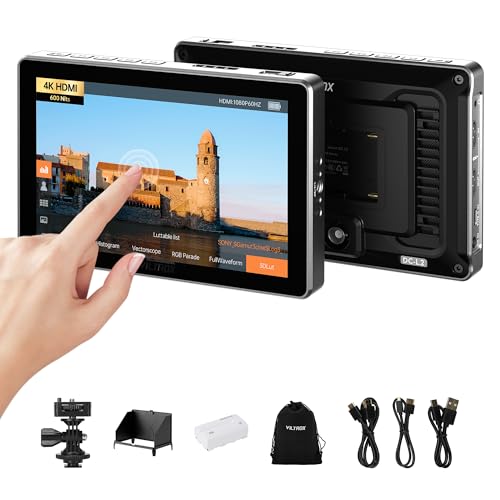
| Touchscreen Field Tool | SDI Input/Support: SDI input (dual SDI I/O) | HDMI Input/Support: HDMI input (up to 4K@60Hz) | Field/On‑camera Mounting Options: Quick‑release mount, sun hood and mount included for on‑camera use | VIEW LATEST PRICE | Read Our Analysis |
| FEELWORLD FW703 7″ 1920×1200 IPS Field Monitor |
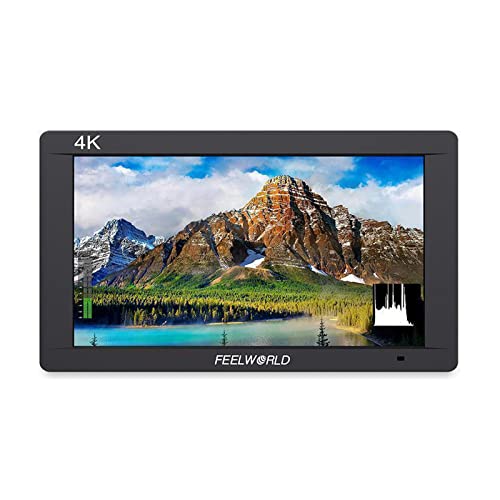
| Compact DSLR Companion | SDI Input/Support: 3G SDI input | HDMI Input/Support: 4K HDMI input and loop‑out | Field/On‑camera Mounting Options: Multi 1/4″ mounts for DSLR rigs, stabilizers, camcorders | VIEW LATEST PRICE | Read Our Analysis |
| VILTROX DC-X3 6″ 2000nits 4K SDI Field Monitor |

| High-Brightness Professional | SDI Input/Support: SDI input (supports 3G SDI) | HDMI Input/Support: HDMI input (4K up to 30Hz) | Field/On‑camera Mounting Options: Multi‑directional 1/4″ screw interfaces, cold shoe adapter, camera mounting | VIEW LATEST PRICE | Read Our Analysis |
More Details on Our Top Picks
LILLIPUT A11 10.1″ 4K Camera Monitor
If you need a compact, high‑clarity field monitor that handles both SDI and 4K HDMI signals, the LILLIPUT A11 10.1″ is built for you: you get a 10.1″ 8‑bit 1920×1200 LCD with 320 cd/m² brightness, 1000:1 contrast and 175° WVA viewing. Full lamination and Glass+Glass tech sharpen visuals. Inputs include HDMI 1.4b (4K@30Hz), 3G‑SDI and VGA, plus loop output for pass‑through. It supports VESA 75, 1/4″ screw mounting and gimbal brackets. Compatible with major 4K and Full HD cameras, it serves as a reliable on‑site, broadcast and production auxiliary monitor.
- SDI Input/Support:3G‑SDI input (compatible with 3G/HD/SD‑SDI)
- HDMI Input/Support:HDMI 1.4b (4K@30Hz)
- Field/On‑camera Mounting Options:1/4″ screw holes, VESA 75mm, gimbal bracket support
- Image Assist / Monitoring Tools:(implied) professional monitoring for precise capture (standard assist features)
- Battery / DC Power Options:(supports camera/gimbal power mounting; standard DC/battery mounting implied)
- Built‑in Audio Monitoring:(designed for broadcast/production monitoring – audio pass‑through/loop implied)
- Additional Feature:Full lamination technology
- Additional Feature:Glass+Glass construction
- Additional Feature:VESA 75mm compatibility
SEETEC P133-9HSD 13.3″ Pro SDI Broadcast Monitor
The SEETEC P133-9HSD is a compact, pro-level monitor that’s ideal for on-set camera operators and small broadcast rigs needing reliable 3G-SDI I/O and accurate color on a 13.3″ IPS Full HD panel. You get 1920×1080 resolution, 400 cd/m² brightness, 1000:1 contrast and wide 170° viewing angles in an aluminum chassis. Inputs/outputs include 3G-SDI, HDMI, YPbPr, DVI-I and tally, plus a USB upgrade port. Professional tools-peaking, pixel-to-pixel, center markers, multiple screen markers, color check fields and custom color temperature-streamline critical monitoring. It ships with V-plate, sunshade, tally kit and a 24V adapter.
- SDI Input/Support:3G‑SDI input
- HDMI Input/Support:HDMI input
- Field/On‑camera Mounting Options:U bracket included, aluminum chassis for rig mounting (V‑style mounting accessories)
- Image Assist / Monitoring Tools:Peaking, markers, pixel‑to‑pixel, zoom, color check fields, freeze, flip
- Battery / DC Power Options:24V DC power adapter included, V battery plate included
- Built‑in Audio Monitoring:3.5mm headphone jack, built‑in speaker, audio inputs/outputs
- Additional Feature:Built-in LED tally
- Additional Feature:DVI-I input available
- Additional Feature:Aluminum chassis design
VILTROX DC-L2 7″ 4K SDI/HDMI Camera Field Monitor
For shooters who need a compact, daylight-readable preview that handles both SDI and HDMI workflows, the VILTROX DC-L2 7″ gives you a 1280×800 IPS touchscreen with 600 nits and dual SDI/HDMI I/O so you can monitor 4K 60Hz feeds with lossless signal routing. You’ll get a 16:10 display with wide 170° viewing, practical under harsh light. Built-in tools-waveform, histogram, false color, zebra, focus peaking, LUT preview and de-squeeze-let you nail exposure, color and framing. The touchscreen, customizable shortcuts, foldable sun hood and quick-release mount speed setups. Power via NP-F, USB-C or DC; case and cables included.
- SDI Input/Support:SDI input (dual SDI I/O)
- HDMI Input/Support:HDMI input (up to 4K@60Hz)
- Field/On‑camera Mounting Options:Quick‑release mount, sun hood and mount included for on‑camera use
- Image Assist / Monitoring Tools:Waveform, histogram, false color, zebra, focus peaking, LUT preview, de‑squeeze, frame guides
- Battery / DC Power Options:NP‑F battery, USB‑C, or DC input power options
- Built‑in Audio Monitoring:Audio supported via HDMI/SDI with on‑monitor audio monitoring (headphone/volume controls implied)
- Additional Feature:Full touchscreen interface
- Additional Feature:Foldable detachable sunhood
- Additional Feature:USB-C power option
FEELWORLD FW703 7″ 1920×1200 IPS Field Monitor
You’ll appreciate the FEELWORLD FW703 if you need a compact, high‑resolution field monitor that won’t weigh down your rig: its 7″ 1920×1200 IPS panel delivers crisp, 16:10 framing with 450 cd/m² brightness and wide 160° viewing angles, while 3G‑SDI and 4K HDMI in/loop‑out keep clean, real‑time feeds flowing to multiple monitors. You’ll like its 320g weight and 0.87″ thickness for handheld use or mounting on DSLRs, stabilizers, and cranes. The 1200:1 contrast, image flip, peaking, histogram, and built‑in speaker help you dial focus and exposure quickly, and customer support’s available if needed.
- SDI Input/Support:3G SDI input
- HDMI Input/Support:4K HDMI input and loop‑out
- Field/On‑camera Mounting Options:Multi 1/4″ mounts for DSLR rigs, stabilizers, camcorders
- Image Assist / Monitoring Tools:Peaking focus, histogram, image flip, video assist functions
- Battery / DC Power Options:(portable field monitor designed for rig use – battery mounting typical; power via DC/NP‑F implied)
- Built‑in Audio Monitoring:Built‑in speaker for audio monitoring
- Additional Feature:Ultra-thin compact design
- Additional Feature:450 cd/m² brightness
- Additional Feature:Built-in speaker
VILTROX DC-X3 6″ 2000nits 4K SDI Field Monitor
If you need a daylight-readable on-camera monitor that won’t let glare or color shifts ruin a take, the VILTROX DC-X3 nails it with a true 2000-nit, 6″ IPS panel and Rec.709 accuracy. You’ll get 1920×1080 clarity, 1000:1 contrast, and a 160° viewing angle while accepting 4K input via HDMI/SDI. Monitoring tools include waveform, vectorscope, histogram, focus peaking, zebra, false color, and 3D LUT preview. The touchscreen, four shortcut keys, headphone jack, and simultaneous audio help you work fast. Power options, fan cooling, aluminum build, sunshade, and multiple mounts keep it reliable on set.
- SDI Input/Support:SDI input (supports 3G SDI)
- HDMI Input/Support:HDMI input (4K up to 30Hz)
- Field/On‑camera Mounting Options:Multi‑directional 1/4″ screw interfaces, cold shoe adapter, camera mounting
- Image Assist / Monitoring Tools:Waveform, parade, vectorscope, histogram, focus peaking, zebra, false color, LUT support
- Battery / DC Power Options:NP‑F battery compatible, 12–18V DC input, USB‑C power (≥9V/3A)
- Built‑in Audio Monitoring:3.5mm headphone jack and simultaneous audio monitoring
- Additional Feature:True 2000 nit brightness
- Additional Feature:Intelligent fan cooling
- Additional Feature:4 customizable shortcut keys
Factors to Consider When Choosing HD-SDI Video Monitors
When choosing an HD‑SDI monitor, you’ll want to prioritize resolution and brightness so your shots stay sharp and visible in any lighting. Check input/output options, color accuracy and gamut, and the available monitoring tools and overlays to make sure the unit fits your workflow. Don’t forget build quality and mounting flexibility-those determine how well the monitor holds up on set and on the move.
Display Resolution & Brightness
Because clarity and legibility matter on set, prioritize monitors that pair high resolution-Full HD (1920×1080) or better-with strong brightness ratings so you can see fine detail and accurate color in any lighting. Higher resolution gives you sharper images for framing and critical focus checks, while brightness measured in cd/m² determines visibility in bright environments; aim for 400 cd/m² or more to cut glare. For extreme outdoor shoots, consider panels offering 1000 nits+ to maintain legibility and reduce eye strain during long takes. Also choose displays with wide viewing angles so color and contrast stay consistent from multiple positions. Balance resolution and brightness: high pixel density without sufficient luminance limits usability, and excessive brightness without resolution wastes capability.
Input/Output Connectivity
Connectivity matters just as much as image quality, so pick HD‑SDI monitors with the right ports to fit your workflow. Make sure they include 3G‑SDI inputs and outputs for reliable, low‑latency HD feeds. Look for loop‑output or pass‑through functionality so you can daisy‑chain the same signal to multiple monitors or recorders without extra converters. Additional inputs like HDMI, VGA, or analog broaden compatibility with diverse cameras and legacy gear. Check for balanced audio I/O, headphone jacks, or built‑in speakers to monitor sound alongside video. Finally, USB ports let you apply firmware updates and customize settings, preserving compatibility as standards evolve. Prioritize the connectivity package that matches your recording, monitoring, and routing needs.
Color Accuracy & Gamut
If you need faithful color reproduction for grading or compositing, prioritize monitors that deliver high color accuracy and wide gamut coverage like Rec.709 (or better), since they show hues and skin tones the way your clients expect. You should look for displays covering sRGB/Rec.709 fully so colors render vividly and predictably. Choose 8-bit or higher panels to guarantee smooth gradients and finer color differentiation for detailed grading and VFX work. Built-in 3D LUT preview is invaluable – it lets you apply and check color profiles instantly, keeping output consistent across cameras and deliverables. Finally, confirm precise calibration options and adjustable color temperature so the monitor performs reliably under different lighting and matches your studio reference.
Monitoring Tools & Overlays
When you’re choosing an HD‑SDI monitor, pay close attention to the onboard monitoring tools and overlays since they turn raw video into actionable information you can rely on during capture and post. Waveform, histogram, and vectorscope overlays give real-time analysis of brightness, exposure, and color balance so you can correct issues on the spot. Use focus peaking to highlight sharp areas and pixel-to-pixel display plus image freeze to inspect fine detail without motion blur. Image assist features like false color and zebra patterns make exposure judgments fast and reliable, preventing clipped highlights or crushed shadows. Screen markers and safe-area guides help you frame for multiple aspect ratios and broadcast standards, ensuring compositions meet delivery specs every time.
Build Quality & Mounting
Although rugged construction won’t make bad framing better, choosing a monitor with a reinforced aluminum or glass‑filled chassis and reliable mounting options will keep your gear working through tough shoots. You’ll want multiple 1/4‑inch screw holes and VESA compatibility so you can secure the monitor at different angles on rigs, gimbals, or stands. Prefer lightweight, compact models when you need handheld mobility or to avoid overloading camera rigs. Look for detachable or built‑in sunshades to improve outdoor visibility and shield the screen from scratches. Check for integrated cooling or effective heat‑dissipation features so the unit stays stable during long takes and won’t degrade under continuous use. Prioritize build quality that matches your shooting conditions and mounting flexibility.
Power Options & Efficiency
Because shoots often stretch long and power sources vary, you’ll want a monitor that supports multiple inputs-lithium batteries, DC input (12–18V), and USB-so you can swap power types without interrupting work. Choose models with smart power management and efficient cooling to prevent overheating and extend runtime. Look for quick battery-swap designs and compatibility with common rechargeable packs so you can change cells without shutting down. Monitors that accept a range of input voltages increase versatility across locations and rigs. Prioritize units that report remaining battery life accurately and offer power-saving modes to stretch charge between swaps. These features reduce downtime, simplify logistics, and keep your feed steady so you can focus on framing and exposure rather than hunting outlets.
Portability & Sunshades
Power setup and run time matter, but you’ll also want a monitor that’s easy to carry and use on the move. Choose compact, lightweight designs and slim profiles to cut fatigue when you’re handheld or on gimbals. Look for durable materials that stay light without sacrificing build quality. Make sure the monitor includes 1/4-inch screw holes or multi-directional mounting points so you can attach it to cameras, stabilizers, or rigs in multiple orientations.
For outdoor shoots, detachable, foldable sunshades are essential; they reduce glare and restore contrast in bright conditions. Prefer models with quick-release sunshade mechanisms so you can adapt to changing light without interrupting your workflow. Together, these features keep your setup flexible, efficient, and ready for fast-paced production.
Audio Monitoring Capabilities
When you’re relying on a monitor for live shoots or playback checks, audio monitoring features become just as important as picture quality; you’ll want built-in speakers for immediate sound, plus a 3.5mm headphone jack for critical listening on set. Look for monitors that support stereo input and output so you can monitor dual-channel mixes accurately. Integrated audio level meters and visual indicators help you spot clipping, balance channels, and confirm sync without guessing. These features reduce dependence on external gear, speed setup, and maintain consistent audio-video alignment during recording and broadcasts. Prioritize models with clear meters, reliable headphone output, and decent onboard speakers to guarantee accurate, real-time audio monitoring in professional workflows.




