

If you need a compact, bright display that travels with you, these five HDMI mini monitors are worth a close look. You’ll find options from 7″ field‑ready panels to 15.6″ FHD screens, with IPS viewing, solid inputs, and built‑in speakers that suit camera work, gaming, and mobile productivity. I’ll outline the key picks and what makes each one stand out so you can pick the right fit for your setup.
| Yxk 15.6″ 1080P Portable USB-C HDMI Monitor |

| Best Travel Display | Display Size: 15.6-inch | Resolution: 1920 x 1080 (FHD) | Panel Type / Viewing Angle: IPS, 178° viewing angle | VIEW LATEST PRICE | Read Our Analysis |
| 7″ Portable HDMI IPS Monitor with Speakers |
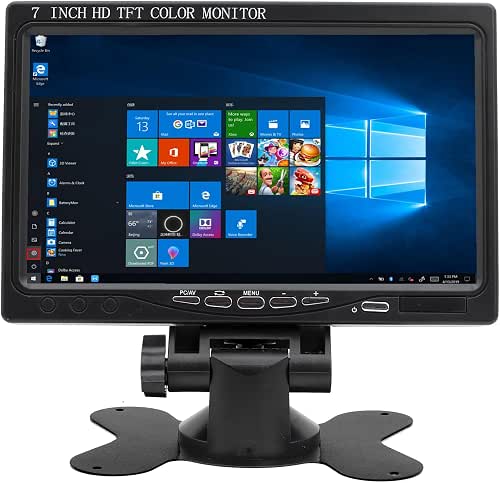
| Compact Workhorse | Display Size: 7-inch | Resolution: 1024 x 600 | Panel Type / Viewing Angle: IPS, 178° viewing angle | VIEW LATEST PRICE | Read Our Analysis |
| 7-Inch Portable HDMI/VGA IPS Monitor with Speakers |

| Field & CCTV Ready | Display Size: 7-inch | Resolution: 1024 x 600 | Panel Type / Viewing Angle: IPS, 178° viewing angle | VIEW LATEST PRICE | Read Our Analysis |
| WGK 15.6″ Portable 1080P Monitor with Speakers |

| Premium Secondary Screen | Display Size: 15.6-inch | Resolution: 1920 x 1080 (FHD) | Panel Type / Viewing Angle: IPS A‑grade, 178° viewing angle | VIEW LATEST PRICE | Read Our Analysis |
| KYY 15.6″ FHD Portable USB-C HDMI Gaming Monitor |

| Gamer-Friendly Pick | Display Size: 15.6-inch | Resolution: 1920 x 1080 (FHD) | Panel Type / Viewing Angle: IPS, 178° viewing angle | VIEW LATEST PRICE | Read Our Analysis |
More Details on Our Top Picks
Yxk 15.6″ 1080P Portable USB-C HDMI Monitor
If you need a lightweight travel display that plugs straight into laptops, phones, or consoles, the Yxk 15.6″ 1080P portable monitor is built for you: its 15.6″ IPS FHD panel with HDR and low-blue-light filtering delivers crisp, color-accurate visuals while two full-featured USB-C ports and a mini HDMI keep setup simple and driver-free. You’ll appreciate the 178° viewing angle, ultra-thin zero-frame design (0.31 inch), and 1.43 lb weight for easy carrying. Use mirror, extended, or second-screen modes for presentations, gaming, or productivity. Built-in speakers and a kickstand round out a plug-and-play, travel-ready package.
- Display Size:15.6-inch
- Resolution:1920 x 1080 (FHD)
- Panel Type / Viewing Angle:IPS, 178° viewing angle
- HDMI Input:Mini HDMI port
- Built-in Audio:Two built-in speakers
- Portability / Power Options:Ultra-slim, 1.43 lb, USB-C plug-and-play
- Additional Feature:Ultra-thin zero-frame design
- Additional Feature:Built-in kickstand
- Additional Feature:HDR support
7″ Portable HDMI IPS Monitor with Speakers
For a user who needs a compact, high‑quality on‑the‑go display, this 7″ portable HDMI IPS monitor with built‑in speakers is a great choice-its 1024×600 IPS panel accepts 1080p input, delivers 400 cd/m² brightness and wide 178° viewing so you’ll get clear, accurate images from almost any angle. You’ll connect via full‑size HDMI, VGA, or AV, and use audio from the speakers or an output jack. The OSD and remote let you rotate and tweak settings in multiple languages, and the durable controls resist wear. It’s ideal for Raspberry Pi, DSLR field work, gaming, CCTV, or a mini TV.
- Display Size:7-inch
- Resolution:1024 x 600
- Panel Type / Viewing Angle:IPS, 178° viewing angle
- HDMI Input:Full-size HDMI port
- Built-in Audio:Built-in speakers (audio output available)
- Portability / Power Options:Portable 7″ design, powered via HDMI/VGA (standard monitor)
- Additional Feature:Remote-control operation
- Additional Feature:15-pin VGA input
- Additional Feature:400 cd/m² brightness
7-Inch Portable HDMI/VGA IPS Monitor with Speakers
Choose this 7-inch HDMI/VGA IPS monitor when you need a lightweight, portable display that handles Raspberry Pi projects, CCTV setups, and on-set monitoring with equal ease. You get a 1024×600 IPS panel with 178° viewing, 500 nits brightness, and built-in speakers-no extra audio output. Inputs include HDMI, VGA, AV, and BNC (BNC is for CVBS; AHD/TVI/CVI needs an adapter). Power it via DC 12V/1A or Micro USB 5V/2A from a power bank for field use. The aluminum shell is scratch-resistant, brightness is adjustable, and it’s well suited for security, cameras, DVRs, and small studio monitoring.
- Display Size:7-inch
- Resolution:1024 x 600
- Panel Type / Viewing Angle:IPS, 178° viewing angle
- HDMI Input:HDMI input (full-size)
- Built-in Audio:Built-in speakers (no extra audio output)
- Portability / Power Options:Portable 7″, dual power: DC 12V or Micro USB 5V (works with power banks)
- Additional Feature:BNC (CVBS) input
- Additional Feature:Dual power options
- Additional Feature:500 nits brightness
WGK 15.6″ Portable 1080P Monitor with Speakers
Gamers and mobile professionals who need a vivid, travel-ready secondary screen will appreciate the WGK 15.6″ Portable Monitor’s sharp 1080p IPS panel and HDR support. You’ll get a 15.6″ FHD, 16:9 A-grade IPS display with 178° viewing, HDR, and Low Blue Light to cut eye strain. It’s plug-and-play via HDMI or full-featured USB-C/Thunderbolt 3/4; use an external 5V 2A charger if your source can’t power it. Two USB-C ports, a mini HDMI, built-in speakers, adjustable stand, VESA mount, and copy/extend modes make it ideal for travel, gaming, and productivity.
- Display Size:15.6-inch
- Resolution:1920 x 1080 (FHD)
- Panel Type / Viewing Angle:IPS A‑grade, 178° viewing angle
- HDMI Input:Mini HDMI port
- Built-in Audio:Two built-in speakers
- Portability / Power Options:Portable 15.6″, 2.38 lb, USB-C / HDMI (external charger option if needed)
- Additional Feature:VESA mountable
- Additional Feature:Adjustable stand orientations
- Additional Feature:External charger support
KYY 15.6″ FHD Portable USB-C HDMI Gaming Monitor
If you need a lightweight second screen that travels as well as your laptop, the KYY 15.6″ FHD portable monitor is a smart pick-its two full‑function USB‑C ports and mini‑HDMI make it ideal for creators, streamers, and anyone who wants plug‑and‑play dual‑monitor setups on the go. You get a 15.6″ IPS panel at 1920×1080 with HDR, 178° viewing, excellent color, and smooth gaming performance. Blue‑light reduction and no‑flicker tech ease long sessions. At 0.3″ thick and 1.7 lb it’s ultra‑portable; the magnetic PU leather cover doubles as a stand. Two speakers, 3.5mm input, portrait support, and simple wheel controls round it out.
- Display Size:15.6-inch
- Resolution:1920 x 1080 (FHD)
- Panel Type / Viewing Angle:IPS, 178° viewing angle
- HDMI Input:Mini HDMI port
- Built-in Audio:Two built-in stereo speakers
- Portability / Power Options:Ultra-slim 0.3″ thick, 1.7 lb, USB-C plug-and-play
- Additional Feature:Smart cover stand
- Additional Feature:3.5 mm audio input
- Additional Feature:Menu control wheel
Factors to Consider When Choosing HDMI Mini Monitors
When choosing an HDMI mini monitor, you’ll want to balance screen size and resolution with how and where you’ll use it. Check ports and compatibility, plus brightness, HDR support, power options for portability, and built-in audio and controls. Prioritize the features that matter most for your setup so you get the right mix of performance and convenience.
Screen Size & Resolution
Pick a screen size and resolution that match how you’ll use the monitor: smaller 7–8 inch units keep things ultra-portable for field work or Raspberry Pi projects, while 15–16 inch mini monitors give you a laptop-like workspace suited to productivity and gaming. Choose size to balance portability and usability: tiny displays are easy to carry but limit readable area. Match resolution to size and task: 1024×600 can work on a 7-inch screen for camera monitoring or preview, but 1920×1080 (FHD) is preferable on 15–16 inch panels for crisp text and detailed images. Watch pixel density-higher PPI preserves clarity at close range. Also pick a 16:9 aspect ratio for standard video and gaming to avoid cropping or letterboxing.
Port And Compatibility
Although small monitors look simple, their port selection determines whether they’ll work with your gear out of the box. Check available video inputs-mini‑HDMI, full‑size HDMI, or USB‑C with DisplayPort Alt Mode-so you avoid adapters. Verify if USB‑C ports are full‑featured (supporting DP Alt Mode and sufficient power delivery) versus data‑only, since that affects both video and charging. Confirm supported input resolutions and frame rates (for example, 1080p@60Hz) so your source displays natively. Look for audio options-3.5 mm out/in or built‑in speakers-and whether audio passes through the chosen video input if you need sound. Finally, if you use legacy gear, make certain VGA, composite/BNC availability or plan for reliable adapters/converters for compatibility.
Brightness And HDR
Don’t underestimate brightness and HDR-how many nits a mini monitor can sustain has a direct effect on visibility in bright environments and on whether HDR actually improves image quality. You’ll typically see 300–500 nits in portable monitors; aim for 400–500 nits if you need outdoor or brightly lit usability. HDR only helps if peak nits and color gamut are sufficient, so check both specifications. Prefer models that list peak and sustained (typical) brightness, since fleeting peaks won’t reflect real-world HDR performance. Balance visibility with eye comfort: higher brightness can increase strain unless the monitor offers low-blue-light modes or auto-brightness. Finally, remember higher brightness draws more power on battery setups, so verify power draw at your expected brightness level.
Power And Portability
Plan for power and portability up front, since a mini monitor’s usefulness outside the desk depends on how you power it and how easily you carry it. Check power inputs-USB‑C PD, Micro‑USB 5V, or DC 12V-to match your laptop or power bank and avoid bulky adapters. Confirm whether the display can run solely from a host USB‑C or needs an external charger (5V 2A or 12V 1A) so you can plan extra sources. Compare weight and thickness-portable models usually sit between ~1.4–2.7 lb and 0.3–0.31 in-to choose something truly travelable. Note built‑in stands, smart covers, or VESA mounts since they affect packability and may require extra mounting gear. Finally, check power draw and nits to estimate battery runtime.
Audio And Controls
Because tiny screens rarely deliver room-filling sound, check whether the mini monitor includes built-in speakers and how loud and stereo-capable they are, and confirm a 3.5 mm jack or audio-out option so you can plug in headphones or external speakers when needed. Also verify audio passthrough or separate output with USB-C/Alt‑Mode, since input mode can change routing. Note where volume controls live-buttons, wheel, or OSD-and prefer accessible placement to avoid fumbling during use. Assess OSD control method (physical buttons, rotary dial, or remote) and look for shortcut keys for quick mute/volume adjustments. Finally, make sure menus are clear and multilingual if you need them; simple, well-located audio controls improve portability and day-to-day convenience.




