

Most people don’t realize that some heavy-duty printing calculators can run thousands of calculations daily without the usual smudges or jams. You’ll appreciate how features like thermal vs ribbon printing, two-color output, and edit/reprint change your workflow and reduce errors. Stick around to compare models that balance speed, durability, and business tools so you can pick the one that actually fits your desk and tasks.
| CATIGA Thermal Printing Calculator SP-2401 |

| Fast & Clear | Printing Type: Thermal (ink-free tape) | Display Digits / Size: 12-digit extra-large fluorescent display | Power Options: (Not explicitly listed – likely AC powered; thermal printers typically AC) | VIEW LATEST PRICE | Read Our Analysis |
| Sharp EL-1197PIII Color Printing Calculator with Clock |

| Reliable Classic | Printing Type: Two-color ink ribbon | Display Digits / Size: 12-digit display | Power Options: AC powered | VIEW LATEST PRICE | Read Our Analysis |
| CATIGA 2025 Printing Adding Machine Calculator with Paper Roll |

| Portable Workhorse | Printing Type: Two-color ink roller (replaceable IR-40T) | Display Digits / Size: Up to 12 digits (4-inch screen) | Power Options: AC adapter or 4 AA batteries | VIEW LATEST PRICE | Read Our Analysis |
| Canon Office Products MP27DII Desktop Printing Calculator |

| Business Powerhouse | Printing Type: Two-color ink ribbon | Display Digits / Size: 12-digit fluorescent display | Power Options: (Not explicitly listed – standard desktop AC power) | VIEW LATEST PRICE | Read Our Analysis |
| Monroe UltimateX Executive Printing Calculator with Edit/Reprint |
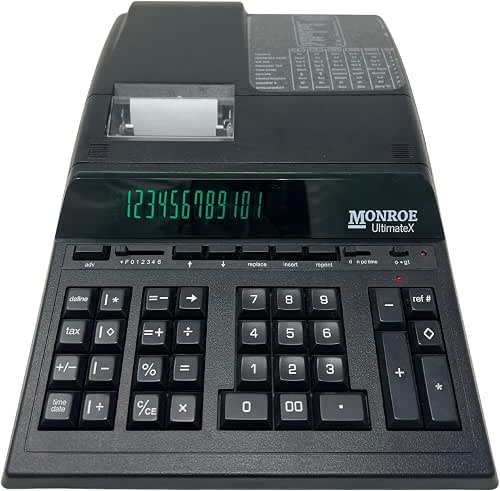
| Professional Grade | Printing Type: Two-color ink ribbon (ribbon cartridge) | Display Digits / Size: 12-digit (heavy-duty executive use) | Power Options: AC power (power cord included) and internal battery for memory/operations | VIEW LATEST PRICE | Read Our Analysis |
More Details on Our Top Picks
CATIGA Thermal Printing Calculator SP-2401
If you need a fast, reliable desktop calculator for heavy daily use, the CATIGA SP-2401 delivers with ink-free thermal printing at 8 lines per second and a large 12-digit fluorescent display-so you’ll get smudge-free tape records and easy-to-read results without dealing with cartridges. You’ll appreciate the commercial-grade build, full-sized tactile keyboard, and classic 10-key layout for precise data entry. It handles tax calculations and shows time and date on a built-in clock and calendar. At about 2.12 pounds and compact packaging, it’s portable for office moves. With a 4.3-star average from 209 reviews, it’s a solid choice.
- Printing Type:Thermal (ink-free tape)
- Display Digits / Size:12-digit extra-large fluorescent display
- Power Options:(Not explicitly listed – likely AC powered; thermal printers typically AC)
- Business Functions:Tax calculation, clock/calendar, commercial-grade functions
- Printing Speed / Performance:8.0 lines per second (thermal), claimed 3–5× faster
- Intended Use / Form Factor:Desktop/office thermal printing calculator (adding machine style)
- Additional Feature:Ink-free thermal printing
- Additional Feature:Extra-large fluorescent display
- Additional Feature:Full-sized tactile keyboard
Sharp EL-1197PIII Color Printing Calculator with Clock
Choose the Sharp EL-1197PIII when you need a durable, fast printing calculator that handles heavy daily workloads-its 12-digit display, two-color printing, and built-in clock/calendar make it ideal for accountants, bookkeepers, and small business owners who log transactions and totals all day. You’ll get AC-powered reliability, a grand total function for batch summaries, and clear two-color output to spot positives and negatives instantly. At 4.73 pounds it feels substantial on your desk, and the compact footprint won’t hog space. With thousands of reviewers and ongoing availability, it’s a practical, proven choice for routine, high-volume calculation tasks.
- Printing Type:Two-color ink ribbon
- Display Digits / Size:12-digit display
- Power Options:AC powered
- Business Functions:Grand total, clock/calendar, heavy-duty functions
- Printing Speed / Performance:(Not specified numerically in summary; described as heavy duty color printing)
- Intended Use / Form Factor:Heavy-duty desktop printing calculator
- Additional Feature:Two-color printing
- Additional Feature:AC powered only
- Additional Feature:Grand total function
CATIGA 2025 Printing Adding Machine Calculator with Paper Roll
For anyone who needs a reliable printed record of calculations, the CATIGA 2025 is built to handle heavy use with its two-color printer and easy-to-load paper roll. You’ll work in sequential-entry mode-press keys in order for operations-so the included manual’s tutorials help you master that flow. The 4-inch, 12-digit display is clear and gentle on your eyes, while curved ergonomic keys keep typing comfortable. It runs on AC power or four AA batteries for portability. An on/off switch, replaceable IR-40T ink roller, and upgraded 2025 design make it a practical adding machine for busy desks.
- Printing Type:Two-color ink roller (replaceable IR-40T)
- Display Digits / Size:Up to 12 digits (4-inch screen)
- Power Options:AC adapter or 4 AA batteries
- Business Functions:Sequential adding-machine functions, tutorials, business-friendly keys
- Printing Speed / Performance:(Not specified numerically; two-color roller printer)
- Intended Use / Form Factor:Adding machine (desktop) with paper roll – office use
- Additional Feature:Sequential entry operation
- Additional Feature:Easy-to-load paper
- Additional Feature:Two-color ink roller
Canon Office Products MP27DII Desktop Printing Calculator
Busy professionals who need reliable, high-volume printouts will appreciate the Canon MP27DII’s heavy-duty build and two-color ink ribbon, which keeps reports and calculations clear and easy to read. You’ll get a 12-digit fluorescent, extra-large display that reduces errors and speeds entry. The MP27DII handles tax, business, profit-margin, and time calculations, plus clock and calendar functions, so you won’t switch devices. At 5.4 x 10.4 x 18.2 inches and 3.8 pounds, it sits solidly on your desk without dominating space. With a 4.4-star average from 133 reviews and continued availability, it’s a dependable choice.
- Printing Type:Two-color ink ribbon
- Display Digits / Size:12-digit fluorescent display
- Power Options:(Not explicitly listed – standard desktop AC power)
- Business Functions:Tax, business, profit margin, time calculations, clock/calendar
- Printing Speed / Performance:(Not specified numerically; heavy-duty printing model)
- Intended Use / Form Factor:Desktop printing calculator for business professionals
- Additional Feature:Profit/time calculation
- Additional Feature:Two-color ink ribbon
- Additional Feature:Extra-large fluorescent display
Monroe UltimateX Executive Printing Calculator with Edit/Reprint
If you need a heavy-duty printing calculator that lets you edit and reprint recent entries, the Monroe UltimateX Executive delivers-edit and reprint up to 99 lines with two-color output (black for positives, red for negatives) and a fast 5 lines-per-second printer so you can correct mistakes and keep clear audit trails without slowing down your workflow. You’ll appreciate IKT soft keys, two independent 4-key memories, and a layout that places adding machine controls on the right and calculator keys on the left. It handles VAT, price/price mode, running subtotals, two-column addition, enclosed paper roll, and lifetime phone support.
- Printing Type:Two-color ink ribbon (ribbon cartridge)
- Display Digits / Size:12-digit (heavy-duty executive use)
- Power Options:AC power (power cord included) and internal battery for memory/operations
- Business Functions:VAT/tax, price/price mode, running subtotal, truncate, multiple advanced business functions
- Printing Speed / Performance:5 lines per second (print speed)
- Intended Use / Form Factor:Executive heavy-duty desktop printing calculator (professional/accountant)
- Additional Feature:Edit and reprint tape
- Additional Feature:Individual Key Switch (IKT)
- Additional Feature:Enclosed paper roll
Factors to Consider When Choosing Heavy Duty Printing Calculators
When choosing a heavy duty printing calculator, you’ll want to weigh printing speed and quality alongside display size and legibility so your outputs are clear and fast. Consider durability, build, and power options for reliability and portability in daily use. Don’t forget advanced calculation features to make certain the unit handles your specific tasks.
Printing Speed And Quality
Consider print speed and output quality together, since both determine how well a heavy-duty printing calculator will handle high-volume, audit-ready work. You’ll want a model rated 5–8 LPS if you process lots of tapes; faster printers cut wait time versus 1–2 LPS units. Also check printing mechanism: thermal gives crisp, ink-free output while ribbon/ink-roll systems can offer two-color printing to flag negatives. Prioritize high contrast and smudge resistance so records stay legible for audits. Two-color capability improves error spotting on dense tapes. Finally, factor consumable costs and maintenance-ribbon replacements, specific thermal paper sizes, and paper longevity affect ongoing quality and total cost of ownership. Choose the balance that matches your workflow and budget.
Display Size And Legibility
Often you’ll want a display that shows at least 10–12 digits so large-value calculations never get truncated. You should favor extra-large, high-contrast screens-fluorescent or backlit-to cut eye strain during long sessions. Bigger font size and an expanded screen area make numbers and symbols easier to read, which helps if your vision isn’t perfect. Look for bright, even illumination and anti-glare properties so digits stay clear under different lighting. Also check display angle and placement: it should offer a clear sightline from a seated position to reduce neck strain and input errors. Prioritize legibility features that match your workspace lighting and viewing height so you minimize mistakes and fatigue.
Durability And Build
Legibility won’t matter if the machine fails under regular use, so you should put equal weight on build quality and durability. Choose housings made of metal or reinforced plastic and aim for units around 3–4 pounds or heavier; that mass resists desk vibration and wear. Inspect key mechanisms – individual switches or tactile full‑sized keys rated for high cycle counts – since keys fail first in heavy use. Prefer protected paper/tape compartments or enclosed roll designs to keep dust and debris out of the printer mechanism. Verify the printing system uses durable consumables (thermal or replaceable ribbon/roller) with widely available replacements and ink resistance. Finally, favor models with simple, replaceable service parts and clear maintenance access to minimize downtime and extend service life.
Power Options And Portability
Think about how and where you’ll use the calculator: pick a model that runs on AC, batteries, or both so it can stay powered at a desk or go mobile when you need it. Check power modes so you know if it can run continuously or operate away from outlets. Note battery type and count – AA cells versus a specific rechargeable – and estimated life to plan replacements or charging. Confirm hot-swap support so you won’t interrupt long print jobs when changing cells. Account for printing power draw: faster or two-color/thermal mechanisms consume more energy and shorten runtime on battery. Finally, prefer devices with auto power-off or sleep modes to preserve charge during intermittent use and extend between-recharge intervals.
Advanced Calculation Features
With power sorted, you’ll want to focus on calculation capabilities that speed work and reduce errors. Pick models with two-color printing so positives and negatives stand out on long tapes. Favor edit and reprint functions that let you correct entries and reprint up to many lines (some handle up to 99), cutting rework and easing audits. Choose multiple memory registers and independent memory keys to store intermediates, run parallel calculations, and recall totals without losing current work. Make sure specialized financial functions-tax, VAT, profit-margin, price/price mode, time calculations, and grand total-match your workflows. Finally, opt for large-digit displays (up to 12 digits) and clear indicators, like lamps or on-screen flags, to minimize entry errors during complex sequences.




