

You might not know that Hisense’s 2026 lineup includes mini‑LED models that hit up to 5,000 nits for rooms with lots of light, and that matters if you want peak HDR in daylight. If you care about gaming, color accuracy, or a simple smart setup, these five picks cover everything from budget Full HD sets to flagship mini‑LEDs with native 165 Hz panels. Keep going to see which size and features match how you watch and play.
| Hisense 40″ QD4 Hi-QLED FHD Smart Fire TV |

| Compact Performance | Display Type: QD (Hi‑QLED) LCD with Full Array LED | Resolution: Full HD (1080p) | HDR / Advanced Picture Modes: (Not specified HDR) – Hi‑QLED color + Full Array | CHECK LATEST PRICE | Read Our Analysis |
| Hisense 65″ QLED 4K S7N CanvasTV (65S7N) |

| Design-Focused Premium | Display Type: QLED (Quantum Dot) 4K | Resolution: 4K UHD | HDR / Advanced Picture Modes: Dolby Vision HDR + Filmmaker Mode | CHECK LATEST PRICE | Read Our Analysis |
| Hisense 40″ A4 Series FHD Smart Fire TV |

| Best Budget Compact | Display Type: FHD LCD with Full Array LED | Resolution: Full HD (1080p) | HDR / Advanced Picture Modes: (Not specified HDR) – Natural Color Enhancer | CHECK LATEST PRICE | Read Our Analysis |
| Hisense 85″ U8 4K Mini-LED Google Smart TV |

| Ultimate Home Theater | Display Type: QLED (Quantum Dot) with MiniLED Pro | Resolution: 4K UHD | HDR / Advanced Picture Modes: Total HDR Solution (Dolby Vision IQ, HDR10+ Adaptive, HDR10, HLG) | CHECK LATEST PRICE | Read Our Analysis |
| Hisense 65″ U8 Mini-LED 4K Google Smart TV |
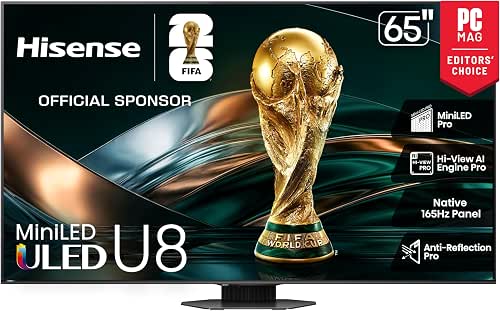
| High-Performance Performer | Display Type: QLED (Quantum Dot) with MiniLED Pro | Resolution: 4K UHD | HDR / Advanced Picture Modes: Total HDR Solution (Dolby Vision IQ, HDR10+ Adaptive, HDR10, HLG) | CHECK LATEST PRICE | Read Our Analysis |
More Details on Our Top Picks
Hisense 40″ QD4 Hi-QLED FHD Smart Fire TV
If you want a compact TV that still delivers punchy colors and smooth performance for everyday watching and gaming, the Hisense 40″ QD4 Hi-QLED FHD Smart Fire TV is a great pick. You’ll notice Hi-QLED color that makes skin tones and landscapes feel real, thanks to quantum dot tech. The Full HD LCD with full array LED backlight keeps images sharp and bright, and DTS Virtual:X gives dialogue clarity plus a roomy soundstage. In game mode your inputs feel instant with 16 ms lag, so you act faster. Alexa is built in for voice control, apps, and smart home commands.
- Display Type:QD (Hi‑QLED) LCD with Full Array LED
- Resolution:Full HD (1080p)
- HDR / Advanced Picture Modes:(Not specified HDR) – Hi‑QLED color + Full Array
- Gaming Features:Game Mode (16 ms input lag)
- Smart Platform / Voice:Fire TV with Alexa built‑in (Alexa Voice Remote)
- Audio Technology:DTS Virtual:X
- Additional Feature:Slim bezel design
- Additional Feature:Alexa built-in remote
- Additional Feature:Hi-QLED Quantum Dot
Hisense 65″ QLED 4K S7N CanvasTV (65S7N)
You’ll love the Hisense 65″ QLED 4K S7N CanvasTV if you want a TV that feels like a gallery piece and still plays like a high-end gaming and home cinema display. You get a 65-inch QLED with Quantum Dot and Dolby Vision HDR, so colors pop and highlights sing. The Hi-Matte screen cuts glare and gives digital art texture, while Art Mode and magnetic teak frame make it look lived-in. Gaming shines with 144 Hz Game Mode Pro, VRR, FreeSync and low latency features, plus a Game Bar for quick tweaks. Google TV organizes apps, and 2.0.2 audio fills the room.
- Display Type:QLED (Quantum Dot) 4K
- Resolution:4K UHD
- HDR / Advanced Picture Modes:Dolby Vision HDR + Filmmaker Mode
- Gaming Features:144 Hz Game Mode Pro, VRR 48–144 Hz, FreeSync Pro, ALLM
- Smart Platform / Voice:Google TV
- Audio Technology:Multi‑channel 2.0.2 surround sound
- Additional Feature:Art Mode display
- Additional Feature:Magnetic interchangeable frames
- Additional Feature:UltraSlim flush mount
Hisense 40″ A4 Series FHD Smart Fire TV
Looking for a reliable, budget-friendly TV that still delivers crisp detail and easy smart features? You’ll like the Hisense 40″ A4 Series FHD Smart Fire TV. Its Full HD 1080p panel with Full Array LED backlight gives sharper, brighter images and even lighting. Natural Color Enhancer makes greens pop, so nature scenes feel alive. DTS Virtual:X boosts dialogue and creates a wider soundstage for movies and shows. Game Mode drops input lag to 16 ms, so your controls feel responsive. Alexa is built in, so you can speak to find content, check scores, or set timers without hassle.
- Display Type:FHD LCD with Full Array LED
- Resolution:Full HD (1080p)
- HDR / Advanced Picture Modes:(Not specified HDR) – Natural Color Enhancer
- Gaming Features:Game Mode (16 ms input lag)
- Smart Platform / Voice:Fire TV with Alexa built‑in
- Audio Technology:DTS Virtual:X
- Additional Feature:Natural Color Enhancer
- Additional Feature:2025 model designation
- Additional Feature:Compact 40-inch form
Hisense 85″ U8 4K Mini-LED Google Smart TV
For anyone who wants a giant living-room centerpiece that handles bright rooms, blockbuster movies, and serious gaming, the Hisense 85″ U8 4K Mini-LED Google Smart TV delivers. You’ll get a MiniLED Pro backlight with up to 5,000 nits and 5,600 local dimming zones, so highlights pop and blacks stay deep even in daylight. The QLED panel shows over a billion shades, and several HDR formats keep films faithful. Gamers will love the native 165 Hz panel, VRR support, FreeSync, ALLM, and an enhanced game bar. Dolby Atmos and a 4.1.2 speaker layout add real immersion.
- Display Type:QLED (Quantum Dot) with MiniLED Pro
- Resolution:4K UHD
- HDR / Advanced Picture Modes:Total HDR Solution (Dolby Vision IQ, HDR10+ Adaptive, HDR10, HLG)
- Gaming Features:Native 165 Hz, VRR 48–165 Hz, Game Booster/VRR, FreeSync Pro, ALLM
- Smart Platform / Voice:Google Smart TV (2025) with voice support
- Audio Technology:4.1.2‑channel with Dolby Atmos (DTS‑powered features)
- Additional Feature:IMAX Enhanced certification
- Additional Feature:Native 165 Hz panel
- Additional Feature:Hi-View AI Engine Pro
Hisense 65″ U8 Mini-LED 4K Google Smart TV
If you want a TV that makes movies and games look like they were crafted for a premium theater, the Hisense 65″ U8 Mini-LED 4K Google Smart TV delivers that experience with serious brightness and color. You’ll see stunning highlights thanks to MiniLED Pro reaching up to 5000 nits and 5600 local dimming zones, while QLED quantum dots show over a billion Pantone validated shades. The Hi-View AI Engine Pro tunes picture and sound automatically, and motion stays smooth on the native 165 Hz panel with VRR and Game Booster support. Audio uses 4.1.2 channels with Dolby Atmos and IMAX Enhanced.
- Display Type:QLED (Quantum Dot) with MiniLED Pro
- Resolution:4K UHD
- HDR / Advanced Picture Modes:Total HDR Solution (Dolby Vision IQ, HDR10+ Adaptive, HDR10, HLG)
- Gaming Features:Native 165 Hz, VRR 48–165 Hz, Game Booster/VRR, FreeSync Pro, ALLM
- Smart Platform / Voice:Google Smart TV with voice support
- Audio Technology:4.1.2‑channel with Dolby Atmos (DTS‑powered features)
- Additional Feature:Pantone-validated color
- Additional Feature:Anti-Reflection Pro coating
- Additional Feature:IMAX Enhanced certification
Factors to Consider When Choosing Hisense TVs
When you pick a Hisense TV, start by checking the display resolution and type because that shapes sharpness and panel behavior, and then look at HDR and color performance to see how lifelike images will feel. Pay attention to brightness and local dimming along with gaming features and low latency so fast scenes stay clear and input lag doesn’t slow you down. Also make sure the smart platform and voice controls fit your habits so you can stream, search, and control the set easily.
Display Resolution & Type
Because your living room, gaming setup, and budget all matter, choosing the right display resolution and panel type on a Hisense TV can change how you enjoy movies and games. You’ll pick Full HD for smaller screens and normal seating because it stays sharp and makes sense financially. If you sit closer or want a big screen, choose 4K for finer detail and a more immersive picture. Consider QLED quantum dot enhancements when you want richer, truer hues and a huge color range. Look for Mini LED or Full Array Local Dimming if you want stronger contrast and brighter highlights with deeper blacks. Also check native refresh rate and variable refresh support for smoother motion in games. Finally favor anti reflection coatings and high peak nit values for bright rooms.
HDR And Color Performance
You’ve already looked at resolution and panel type, so now let’s focus on how a Hisense TV actually shows color and brightness in real scenes. You want wide color gamut tech like quantum dot enhancements because they create over a billion shades. That gives richer hues and stronger color volume so skin tones and landscapes feel real. Also check HDR format support. Dolby Vision, HDR10 Plus, HDR10, and HLG handle metadata differently, so broader support helps with scene by scene tone mapping.
Next, notice color management features such as Pantone validation, higher native color bit depth, and color enhancers. These reduce banding and keep subtle gradients smooth. Finally, look for advanced tone mapping, HDR remastering, and anti reflection coatings to preserve color accuracy in bright rooms.
Brightness And Dimming
If you want a TV that looks great in both dark nights and sunny afternoons, brightness and dimming matter a lot, and they work together to shape every scene you watch. You’ll want high peak nits so HDR highlights pop and the screen stays visible in bright rooms. At the same time, local dimming zones control contrast and reduce blooming around bright objects. Think about backlight tech too. MiniLED panels deliver stronger sustained brightness and more uniform light than standard LED. Also check anti-reflection coatings and matte layers since they cut glare and make high peak nits more useful in daylight. Finally, look for consistent tone mapping across SDR and HDR formats so details stay clear without clipping, especially with Dolby Vision or HDR10 content.
Gaming Features And Latency
When you want a TV that keeps your games feeling fast and fair, low input lag and smart refresh tech matter most, and they work together to make every frame count. You should pick a Hisense with input lag under 20 ms in Game Mode so controls feel instant. Look for native 120 Hz or higher panels and VRR support to cut tearing and smooth motion. Adaptive sync like FreeSync or G-Sync support helps when frame rates jump, especially with a wide VRR range such as 48–144+ Hz. Auto Low Latency Mode makes setup easy by switching modes for consoles or PC. Also check motion smoothing or MEMC settings; you can tune or turn them off so responsiveness stays priority.
Smart Platform And Voice
Curious how the smart platform and voice features will affect your day-to-day TV use? You should first check which platform the TV uses, like Google TV, a Fire-based option, or a proprietary OS, because that decides which apps show up and how the interface feels. Next, confirm built-in voice assistants and remote features such as wake-word support, backlit keys, and a dedicated voice button so you can control the TV hands-free and in the dark. Also verify app availability and whether you can sideload apps, since not every platform carries every service. Look for multi-platform voice and Matter support to link smart-home routines. Finally, consider responsiveness and update policies for ongoing security, bug fixes, and new features.
Audio Quality And Formats
Think about audio like the invisible half of your TV experience, because great sound pulls you into a film or game just as much as a sharp picture does. You should seek immersive formats such as Dolby Atmos and DTS variants so sound moves around and above you. Next, check built-in channel layouts like 2.0, 2.1, or 4.1.2 and note if the set has a subwoofer or up-firing drivers for deeper bass and vertical staging. Compare peak and sustained wattage and whether a dedicated amplifier boosts dynamic headroom. Look for processing tools like virtual surround and dialog enhancement that sharpen voices and adapt to rooms. Finally, confirm outputs such as HDMI eARC, optical, or Bluetooth and codec passthrough for lossless or object-based audio to external gear.
Design And Mounting Options
Pick a spot and picture how the TV will sit there, because design and mounting shape both your room’s look and how well the set performs. Measure the TV thickness and bezel style so you know whether a slim, low profile panel will give you that modern, nearly flush wall appearance. Then check the VESA mount pattern and weight rating to match wall mounts or articulate arms for safe installation. Think about included mounting hardware and whether you need an ultra slim flush mount or a two person hang system to make installation easier. Also account for ventilation clearance and access to ports and power when you place the TV. Finally, factor in viewing height and tilt or swivel options to reduce glare and reach eye level.
Connectivity And Ports
When you plan where the TV will live, check the ports and connections so you won’t be stuck fumbling for adapters later. You’ll want at least three HDMI ports and one HDMI 2.1-capable port to handle 4K at 120Hz and variable refresh rates for smooth gaming. Also look for optical audio out or eARC via HDMI so your soundbar or receiver can play Dolby Atmos and multichannel tracks without trouble. Make sure USB Type A or C ports exist for media files, firmware updates, and powering streaming sticks. Built-in dual-band Wi Fi plus an Ethernet jack keeps streaming steady for high bitrate 4K HDR. Finally, verify Bluetooth, antenna input, and composite or component options so older gear still works.


