

If you want a keyboard that’s easy to see and pleasant to type on, these six illuminated models are worth a close look. You’ll find options with crisp white or colorful backlighting, durable PBT keycaps, tactile or linear switches, and large-print legends for accessibility. They’re wired for reliability and fit a range of uses from gaming to heavy typing-so keep going to see which one matches your needs.
| Logitech G413 SE Mechanical Backlit Gaming Keyboard |

| Best for Gamers | Backlighting: White LED backlighting | Connection Type: Wired (USB) | Full-size Layout / Number Pad: Full-size (also available TKL variant) | VIEW LATEST PRICE | Read Our Analysis |
| X9 Large Print Backlit USB Wired Keyboard |

| Best for Visibility | Backlighting: 7-color backlight (4 brightness levels) | Connection Type: Wired USB | Full-size Layout / Number Pad: Full-size 107-key including number pad | VIEW LATEST PRICE | Read Our Analysis |
| Large Print Backlit USB Wired Full-Size Keyboard |

| Best for Seniors | Backlighting: 7-color backlight (3 brightness levels) | Connection Type: Wired USB | Full-size Layout / Number Pad: Full-size 104-key with numeric keypad | VIEW LATEST PRICE | Read Our Analysis |
| SABLUTE Backlit Wired Keyboard with Phone Holder |

| Best for Multitaskers | Backlighting: 7-color backlight with auto-cycle and static modes (3 brightness levels) | Connection Type: Wired USB (plug-and-play) | Full-size Layout / Number Pad: Full-size layout (built-in phone holder; large-print) | VIEW LATEST PRICE | Read Our Analysis |
| Logitech K845 Mechanical Illuminated USB Keyboard (TTC Red) |
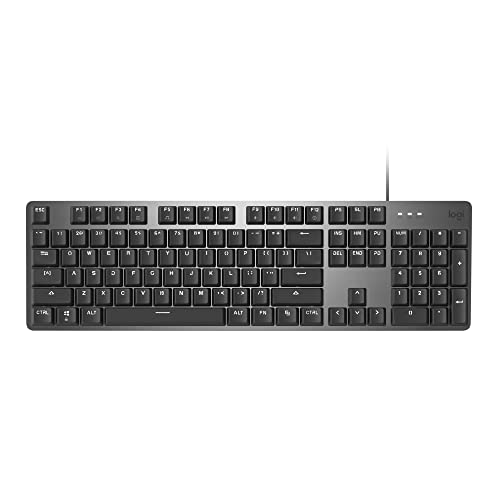
| Professional Mechanical Pick | Backlighting: White backlighting (5 lighting patterns) | Connection Type: USB corded (wired) | Full-size Layout / Number Pad: Full-size 104-key with number pad | VIEW LATEST PRICE | Read Our Analysis |
| Perixx PERIBOARD-317 Wired Backlit USB Keyboard |
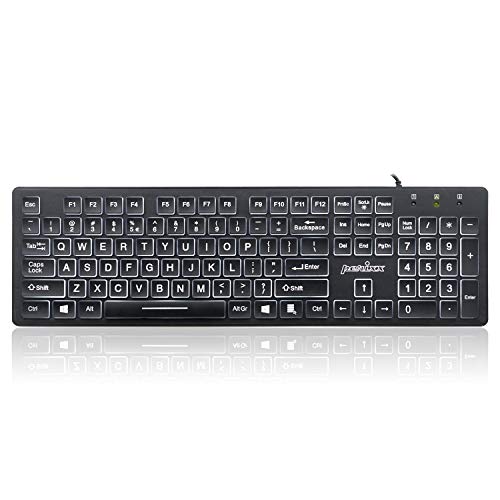
| Quiet Everyday Favorite | Backlighting: White LED backlighting (adjustable brightness) | Connection Type: Wired USB-A (5.25-ft cable) | Full-size Layout / Number Pad: Standard full-size wired keyboard | VIEW LATEST PRICE | Read Our Analysis |
More Details on Our Top Picks
Logitech G413 SE Mechanical Backlit Gaming Keyboard
If you want a durable, no-nonsense gaming board with clear white illumination, the Logitech G413 SE delivers: its brushed aluminum-magnesium top and PBT keycaps resist flex and wear, tactile mechanical switches give responsive feedback for fast play, and a wired connection with 6-key rollover guarantees your simultaneous inputs register reliably. You’ll appreciate the crisp white LED backlight that improves visibility without flashy distractions. Twelve FN shortcuts put media, volume, lighting, and Windows lock at your fingertips. The finish feels premium, and the TKL variant suits compact setups. It’s a straightforward, long-lasting choice if you value performance and understated style.
- Backlighting:White LED backlighting
- Connection Type:Wired (USB)
- Full-size Layout / Number Pad:Full-size (also available TKL variant)
- Large / Readable Key Legends:PBT keycaps with standard legends (clear white backlit visibility)
- Plug-and-Play / No Drivers:Wired simple setup (no special software mentioned)
- Target Users / Use Cases:Gamers / performance-focused users
- Additional Feature:Aluminum-magnesium top case
- Additional Feature:PBT heat-resistant keycaps
- Additional Feature:Tactile mechanical switches
X9 Large Print Backlit USB Wired Keyboard
The X9 Large Print Backlit USB Wired Keyboard is ideal for anyone who needs clearer keys and reliable illumination-especially seniors, students, and visually impaired users who want a confident, comfortable typing experience. You’ll appreciate the large, bold print for quick character recognition and the customizable backlight with seven colors and four brightness levels for low-light work. Its full-size 107-key layout includes a number pad and 12 shortcut keys to speed tasks, while the wired USB connection guarantees dependable performance across PCs, Chromebooks, and laptops. It’s plug-and-play-no software needed-and built for daily use, making it a practical, thoughtful gift.
- Backlighting:7-color backlight (4 brightness levels)
- Connection Type:Wired USB
- Full-size Layout / Number Pad:Full-size 107-key including number pad
- Large / Readable Key Legends:Large, bold print on keys
- Plug-and-Play / No Drivers:Plug-and-play, no software required
- Target Users / Use Cases:Seniors, visually impaired, students, general users
- Additional Feature:107-key full-size layout
- Additional Feature:12 shortcut keys
- Additional Feature:7-color lighting modes
Large Print Backlit USB Wired Full-Size Keyboard
You’ll appreciate the large-print backlit keyboard if you need clearer, easier-to-read keys-its typefaces are about four times bigger than standard, making it ideal for seniors, visually impaired users, classrooms, and shared workspaces. You’ll get a full-size QWERTY 104-key layout with numeric keypad, foldable feet to ease wrist angle, and familiar spacing so you won’t relearn typing. The USB wired plug-and-play connection works with Windows, Mac (multimedia keys limited), and Raspberry Pi. Choose from seven backlight colors and three brightness levels for low-light use. It’s spill-resistant, rated over 5 million keystrokes, and built for communal and long-term use.
- Backlighting:7-color backlight (3 brightness levels)
- Connection Type:Wired USB
- Full-size Layout / Number Pad:Full-size 104-key with numeric keypad
- Large / Readable Key Legends:Fonts 4× larger than standard
- Plug-and-Play / No Drivers:Plug-and-play USB, no drivers required
- Target Users / Use Cases:Elderly, visually impaired, schools, special needs, libraries
- Additional Feature:Foldable feet underside
- Additional Feature:Spill-resistant design
- Additional Feature:5M+ keystroke lifespan
SABLUTE Backlit Wired Keyboard with Phone Holder
Need a keyboard that prioritizes readability and simple controls? The SABLUTE Backlit Wired Keyboard gives you 3X larger fonts for easy spotting, ideal for seniors, students, offices, and special needs settings. You’ll get seven LED colors with auto-cycle or static modes, three brightness levels, and a memory function that restores your last lighting. One-key controls change colors or modes fast. Ergonomic touches include a foldable stand, wrist rest, and a built-in holder for phones or tablets up to 11.5″. It’s plug-and-play USB-no drivers, no charging-and adds one-touch Sleep/Privacy for instant secure standby.
- Backlighting:7-color backlight with auto-cycle and static modes (3 brightness levels)
- Connection Type:Wired USB (plug-and-play)
- Full-size Layout / Number Pad:Full-size layout (built-in phone holder; large-print)
- Large / Readable Key Legends:Fonts 3× larger than standard
- Plug-and-Play / No Drivers:Plug-and-play USB, no drivers needed
- Target Users / Use Cases:Elderly, visually impaired, students, office/schools (multi-device use)
- Additional Feature:Built-in phone/tablet holder
- Additional Feature:Foldable wrist rest
- Additional Feature:One-key sleep/privacy
Logitech K845 Mechanical Illuminated USB Keyboard (TTC Red)
If you spend long hours typing and want a solid, no-frills illuminated keyboard, the Logitech K845 with TTC Red switches delivers a responsive, quiet linear feel suited to both work and casual gaming. You’ll appreciate the modern aluminum top case and slim front profile that keep the full-size 104-key layout compact. The number pad and FN keys stay handy while five white backlighting patterns improve visibility in dim rooms. Strong adjustable tilt legs let you set 4–8 degrees of incline. Wired USB connectivity guarantees stable performance, and Windows compatibility keeps setup simple. It’s a durable, straightforward choice for focused typists.
- Backlighting:White backlighting (5 lighting patterns)
- Connection Type:USB corded (wired)
- Full-size Layout / Number Pad:Full-size 104-key with number pad
- Large / Readable Key Legends:Standard legends (white backlight for visibility)
- Plug-and-Play / No Drivers:USB corded connection (no drivers specified)
- Target Users / Use Cases:Typists/gamers seeking mechanical switches (general productivity)
- Additional Feature:Aluminum top case
- Additional Feature:Adjustable 4–8° tilt legs
- Additional Feature:Multiple switch options
Perixx PERIBOARD-317 Wired Backlit USB Keyboard
The Perixx PERIBOARD-317 is a smart pick for seniors and visually impaired users who want a full-size, backlit keyboard with oversized, high-contrast legend printing that’s four times larger than standard keys. You’ll get a low-profile, comfortable typing surface measuring 17.32 × 5.04 × 1.18 inches and weighing 1.15 lb, with durable ABS key printing and membrane switches rated for 10 million keystrokes. White LED backlighting is bright, even, and adjustable (note: backlight toggles Scroll Lock behavior). A 5.25-ft USB-A cable provides plug-and-play Windows compatibility, and a 12-month limited warranty covers support and RMA processing.
- Backlighting:White LED backlighting (adjustable brightness)
- Connection Type:Wired USB-A (5.25-ft cable)
- Full-size Layout / Number Pad:Standard full-size wired keyboard
- Large / Readable Key Legends:Large print keys (4× larger than standard)
- Plug-and-Play / No Drivers:Plug-and-play, no drivers/software required
- Target Users / Use Cases:Seniors, visually impaired, schools, libraries, general daily use
- Additional Feature:Low-profile quiet keys
- Additional Feature:5.25-ft USB cable
- Additional Feature:12-month limited warranty
Factors to Consider When Choosing Illuminated Keyboards
When choosing an illuminated keyboard, you’ll want to check brightness and lighting modes to match your environment and preferences. Consider switch type, keycap material, and layout/size for feel and durability. Also confirm connectivity and compatibility with your devices so everything works smoothly.
Brightness And Modes
Although you might not always notice it, backlight brightness and mode options shape how comfortable and efficient your typing is in low light. You’ll want multiple brightness levels so you can dial intensity to the room and reduce eye strain during long sessions. Look for keyboards with static and dynamic modes-single colors, color cycling, and preset patterns-to balance visibility and personal style. Customizable colors let you highlight key groups for faster recognition or better accessibility if you have visual challenges. Memory functions are handy: they save your preferred brightness and mode so you don’t reset them each time. Prioritize adjustable backlighting that’s easy to change on the fly, because quick control keeps you focused and typing accurately at night.
Switch Type Preference
Because your typing feel shapes speed and comfort, pick switches that match how you work and play. Decide between mechanical and membrane: mechanical offers distinct tactile feedback and longer durability, while membrane is quieter and softer but wears faster. Within mechanical, choose tactile for feedback without noise, linear for smooth, fast presses, or clicky for audible confirmation if you don’t mind sound. Match actuation force and travel distance to your habits-lighter actuation helps fast gaming, heavier can reduce accidental presses during heavy typing. Remember switch choice influences responsiveness and accuracy, so test if possible. Some illuminated keyboards let you swap or choose switches to balance comfort, performance, and longevity for your setup.
Keycap Material Durability
Switch choice affects feel and performance, but keycap material shapes how your board looks and lasts under heavy use and lighting. You’ll want PBT for long-term durability: it resists heat, wear, fading, and retains a textured feel that helps legends stay legible with backlighting. ABS feels smoother initially but will develop shine and wear down faster under heavy typing or gaming. Also check printing method-dye-sublimated or double-shot legends won’t fade the way surface-printed legends do. Consider coatings and build quality to avoid cracking, discoloration, or loss of structural integrity after millions of mechanical presses and constant illumination. Choosing PBT with durable legend methods gives you consistent backlit visibility and longer-lasting aesthetics.
Layout And Size
When you pick an illuminated keyboard, the layout and size determine how it fits your desk, workflow, and comfort-full-size boards give you a numeric keypad and extra keys for productivity, while tenkeyless (TKL) and compact layouts free up mouse space and boost portability. Decide whether you need a 104–107 key full-size for spreadsheets, shortcuts, or large-print illuminated keys for accessibility. If you prioritize mouse movement, travel, or minimalist setups, TKL or compact designs reduce clutter without sacrificing essential function keys. Consider ergonomic variants that reshape key placement for comfort but may change reach and desk footprint. Match layout choice to multitasking demands, ergonomic goals, and how much desk space you can dedicate to your keyboard for daily use.
Connectivity And Compatibility
Layout and size affect where you place the keyboard, but connectivity and compatibility determine whether it will actually work with your setup. Most illuminated keyboards use wired USB for steady, low-latency input, so if you want reliability, choose USB models. Many are plug-and-play, so you won’t need extra software to get basic typing and backlighting. Still, check OS support: Windows variants are broadly covered, macOS often works but may limit multimedia keys, and some models list Linux or Raspberry Pi compatibility. Verify that backlight controls and function keys function on your device. A few keyboards offer multi-device pairing or specialized drivers for advanced customization, but simpler wired options prioritize wide compatibility across PCs, laptops, and other USB-enabled gear.
Frequently Asked Questions
Are Illuminated Keyboards Compatible With macOS Function Keys?
Yes – think of the keyboard as a ship and macOS as its harbor: you’ll usually dock fine, but you’ll need adapters or remapping software for full function-key harmony, and some lighting features might require specific drivers.
Do Backlit Keyboards Drain Laptop Batteries Faster?
Yes – backlit keyboards use extra power, so they can drain your laptop battery faster. You’ll notice bigger impact at higher brightness or with RGB effects, but modern laptops usually minimize that difference with efficient LEDs and controls.
Can Illuminated Keyboards Be Customized With Third-Party Keycaps?
Yes – you can swap many illuminated keyboards’ keycaps; just picture RGB under translucent legends glowing through new caps. You’ll need compatible stem type, proper profile, and sometimes replacement stabilizers or diffuser-friendly keycaps for best lighting.
Are There Illuminated Keyboards Specifically for Left-Handed Users?
Yes – you can find illuminated keyboards designed for left-handed users, offering left-side macro clusters, asymmetric layouts, or fully split RGB boards you can orient. You’ll get customizable lighting and ergonomics tailored to left-handed typing.
How Reliable Are Wireless Illuminated Keyboards for Gaming Latency?
They can be incredibly reliable – but wait: connection type matters. If you use low-latency wireless (proprietary 2.4GHz dongle or Bluetooth Low Energy with gaming profile), you’ll barely notice delay in fast-paced games.




