

Funny enough, you might have been shopping for a laptop the same week these i7 10th Gen models hit renewed listings, and that coincidence could save you time and money. You’ll want a machine that keeps tabs, VMs, and spreadsheets responsive without hiccups, and these picks balance CPU, RAM, and storage for serious multitasking. Keep going to see which models match your workflow and portability needs.
| Dell Latitude 5510 15.6″ Laptop i7-10610U (Renewed) |

| Business Workhorse | Processor: Intel Core i7-10610U (10th Gen) | RAM: 16 GB DDR4 | Storage Type & Capacity: 512 GB M.2 NVMe SSD | VIEW LATEST PRICE | Read Our Analysis |
| Lenovo ThinkPad X13 Touchscreen Laptop i7 (Renewed) |

| Mobile Powerhouse | Processor: Intel Core i7-10610U (10th Gen) | RAM: 16 GB DDR4 | Storage Type & Capacity: 512 GB SSD | VIEW LATEST PRICE | Read Our Analysis |
| Dell Inspiron 15 3530 i7-1355U Laptop 16GB 1TB |
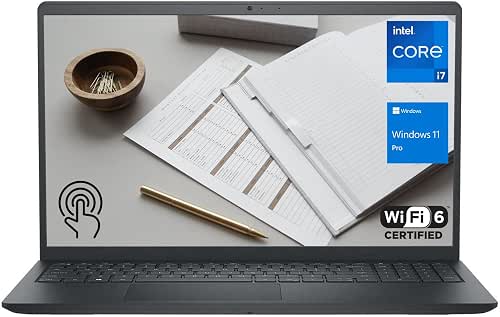
| Performance Multitasker | Processor: Intel Core i7-1355U (13th Gen) – NOTE: listing gives 13th Gen i7 (different generation) | RAM: 16 GB DDR4 | Storage Type & Capacity: 1 TB PCIe NVMe M.2 SSD | VIEW LATEST PRICE | Read Our Analysis |
| Dell Latitude 5310 Laptop i7-10610U 16GB 512GB |

| Compact Professional | Processor: Intel Core i7-10610U (10th Gen) | RAM: 16 GB DDR4 SDRAM | Storage Type & Capacity: 512 GB SSD | VIEW LATEST PRICE | Read Our Analysis |
| Dell Latitude 5511 Laptop – i7 16GB 512GB (Renewed) |

| Heavy-Duty Performer | Processor: Intel Core i7-10850H (10th Gen) | RAM: 16 GB DDR4 | Storage Type & Capacity: 512 GB NVMe SSD | VIEW LATEST PRICE | Read Our Analysis |
More Details on Our Top Picks
Dell Latitude 5510 15.6″ Laptop i7-10610U (Renewed)
If you need a dependable workhorse for business tasks and light content creation, the renewed Dell Latitude 5510 with an Intel Core i7-10610U is a smart pick-its quad‑core i7, 16 GB RAM, and 512 GB NVMe SSD deliver snappy multitasking and fast storage in a durable, business-ready 15.6″ chassis running Windows 11 Pro. You’ll get a 15.6″ FHD display, integrated Intel graphics, webcam, and a battery that keeps you mobile at 3.88 pounds. Connectivity covers Wi‑Fi 802.11ac, Bluetooth, Thunderbolt, USB 3.1, HDMI, and Type‑C. Certified refurbished units include inspection and a minimum 90‑day warranty.
- Processor:Intel Core i7-10610U (10th Gen)
- RAM:16 GB DDR4
- Storage Type & Capacity:512 GB M.2 NVMe SSD
- Operating System:Windows 11 Pro
- Display Size / Resolution:15.6″ FHD (1920 x 1080)
- Wireless Connectivity:Wi‑Fi 802.11 a/b/g/n/ac, Bluetooth
- Additional Feature:Thunderbolt and Type-C
- Additional Feature:15.6″ FHD display
- Additional Feature:Certified refurbished warranty
Lenovo ThinkPad X13 Touchscreen Laptop i7 (Renewed)
Choose the Lenovo ThinkPad X13 Touchscreen if you need a compact, business-ready laptop that handles heavy multitasking-its Intel Core i7-10610U, 16 GB RAM, and 512 GB SSD deliver fast boots, smooth spreadsheet and data-analysis work, and responsive multitasking in a lightweight 1.22 kg chassis. You’ll get a 13.3-inch FHD touchscreen, integrated graphics, Windows 11 Pro with multilingual support, and robust connectivity including Thunderbolt-capable USB-C, USB-A, HDMI, and microSD. Security features like a fingerprint reader and dTPM 2.0 protect sensitive data. The spill-resistant ThinkPad keyboard aids long sessions; battery and adapter are included.
- Processor:Intel Core i7-10610U (10th Gen)
- RAM:16 GB DDR4
- Storage Type & Capacity:512 GB SSD
- Operating System:Windows 11 Pro (multilanguage)
- Display Size / Resolution:13.3″ FHD touchscreen (1920 x 1080)
- Wireless Connectivity:Wi‑Fi 802.11ac / 802.11ax, Bluetooth
- Additional Feature:13.3″ FHD touchscreen
- Additional Feature:Fingerprint reader security
- Additional Feature:Lightweight 2.7 lb design
Dell Inspiron 15 3530 i7-1355U Laptop 16GB 1TB
For professionals who need long battery life, a responsive touch display, and solid everyday performance, the Dell Inspiron 15 3530 with an Intel Core i7-1355U delivers a balanced, portable workhorse. You get a 15.6″ FHD anti-glare touchscreen, Intel Iris Xe graphics, and a 10-core, 12-thread CPU that boosts to 5.0 GHz for demanding tasks. With 16 GB DDR4 (expandable to 64 GB) and a 1 TB PCIe NVMe SSD (configurable larger), you’ll handle multitasking and storage-heavy projects. Windows 11 Pro, Wi‑Fi 6, FHD webcam, SD reader, and a 41 WHr battery round out a versatile daily machine.
- Processor:Intel Core i7-1355U (13th Gen) – NOTE: listing gives 13th Gen i7 (different generation)
- RAM:16 GB DDR4
- Storage Type & Capacity:1 TB PCIe NVMe M.2 SSD
- Operating System:Windows 11 Pro
- Display Size / Resolution:15.6″ FHD (1920 x 1080) touchscreen
- Wireless Connectivity:Wi‑Fi 6 (2×2/160) Gig+, Bluetooth
- Additional Feature:1 TB PCIe NVMe
- Additional Feature:FHD 1080p webcam
- Additional Feature:Wi‑Fi 6 support
Dell Latitude 5310 Laptop i7-10610U 16GB 512GB
The Dell Latitude 5310 is a compact, business-ready 13.3-inch laptop that’ll suit professionals who need strong multitasking on the go-its 10th Gen Intel Core i7-10610U, 16 GB of RAM, and 512 GB SSD deliver responsive performance and quick boot times while staying portable. You’ll get a renewed unit running Windows 11 Pro, a Full HD non-touch display, and Intel integrated graphics for everyday productivity. With quad-core processing (1.8 GHz base, up to 4.9 GHz turbo), Wi‑Fi and Bluetooth, and a 1 lithium-ion battery, it balances performance, battery life, and portability in a black chassis.
- Processor:Intel Core i7-10610U (10th Gen)
- RAM:16 GB DDR4 SDRAM
- Storage Type & Capacity:512 GB SSD
- Operating System:Windows 11 Pro (also listed as Windows 10 Pro)
- Display Size / Resolution:13.3″ FHD (1920 x 1080)
- Wireless Connectivity:Wi‑Fi and Bluetooth
- Additional Feature:13.3″ Full HD display
- Additional Feature:Compact 13.3″ form factor
- Additional Feature:Renewed unit with battery
Dell Latitude 5511 Laptop – i7 16GB 512GB (Renewed)
If you need a durable, no-nonsense business laptop that handles heavy multitasking, the renewed Dell Latitude 5511 with an Intel Core i7‑10850H, 16 GB RAM and a 512 GB NVMe SSD delivers-it’s built to withstand daily travel and power through spreadsheets, virtual meetings, and photo edits. You’ll get six cores and twelve threads with high boost clocks, integrated UHD Graphics 630, and a reinforced carbon‑fiber/magnesium chassis. The 15.6‑inch HD anti‑glare display, backlit keyboard, Windows 11 Pro, gigabit Ethernet, Thunderbolt 3, HDMI and ample USB ports make connectivity easy. At about 1.89 kg, it balances durability and portability.
- Processor:Intel Core i7-10850H (10th Gen)
- RAM:16 GB DDR4
- Storage Type & Capacity:512 GB NVMe SSD
- Operating System:Windows 11 Pro (multilanguage)
- Display Size / Resolution:15.6″ HD (listed max 1366 x 768) – note: lower resolution than others
- Wireless Connectivity:Wi‑Fi and Bluetooth
- Additional Feature:Backlit keyboard
- Additional Feature:RJ‑45 gigabit Ethernet
- Additional Feature:Reinforced magnesium/carbon chassis
Factors to Consider When Choosing Intel Core i7 10th Gen Laptops
When choosing an Intel Core i7 10th Gen laptop, you’ll want to weigh performance and multithreading against real-world battery life to match your workload. Check display quality and size for clarity and comfort, and confirm the ports and expandability you need for peripherals and future upgrades. Also consider build quality and durability so the machine holds up to travel and daily use.
Performance And Multithreading
Consider how an i7‑10th‑gen handles threads and sustained clocks before you buy: you’ll get 4 cores and 8 threads on many mobile i7s, so Hyper‑Threading boosts multitasking and parallel work versus dual‑core chips. Check base and Turbo Boost speeds (common base ~1.8–2.7 GHz, Turbo to ~4.9–5.0 GHz); Turbo helps short single‑thread bursts, but sustained multi‑core clocks matter more for prolonged jobs. Inspect TDP and the laptop’s cooling-lower‑TDP SKUs and weak cooling let the chip throttle, cutting multithreaded throughput. Factor CPU cache and IPC improvements too: larger L3 and higher IPC reduce latency and raise per‑core efficiency. Finally, compare real multi‑core benchmarks (Cinebench R20/R23, SPEC) rather than relying on model names alone.
Battery Life Expectations
Battery life can make or break the real-world appeal of an Intel Core i7 10th‑Gen laptop, so you’ll want to match your expectations to the CPU family, display, and battery size. For U‑series i7 models you can expect roughly 6–12 hours on mixed productivity tasks with 40–60 Wh packs; H‑series chips typically drop that to about 3–7 hours because they draw more power. Displays and touchscreens affect consumption by 10–40%, so higher‑resolution or brighter panels will shorten runtimes. Battery capacity (Wh) is the biggest hardware determinant-systems under 40 Wh often sit below six hours. Finally, tweak power plans, enable Intel Speed Shift, and limit background tasks to regain several hours of practical use.
Display Quality And Size
Although screen size and panel quality might seem like secondary specs, they’ll shape how you actually use an i7 10th‑Gen laptop-13–14″ FHD models hit the sweet spot for portability and productivity, while 15.6″ panels give you more workspace for spreadsheets and multitasking. Pick at least Full HD (1920×1080) to keep text sharp and show more vertical content than older 1366×768 screens. Favor IPS or WVA panels for better color accuracy and wide viewing angles-useful for collaboration or media tasks. Decide on touch only if you’ll use pen or touch regularly, since it adds weight, cost, and power draw. Finally, aim for 300+ nits and an anti‑glare/matte finish to cut reflections and help outdoor or brightly lit office visibility.
Port Selection And Expandability
After you’ve settled on screen size and panel quality, check the ports and upgrade options so your i7 laptop actually fits your workflow. Make sure it has at least one USB-C with Thunderbolt 3 or USB 3.2 Gen 2 for fast transfers and external displays. Count USB-A ports (3.1/3.2) for legacy gear so you’re not juggling hubs. Confirm a full-size HDMI or DisplayPort-or USB-C with DisplayPort Alt Mode-so external monitors run at the resolutions and refresh rates you need. Look for expandable storage: an M.2 PCIe NVMe slot or accessible 2.5″ bay, plus an SD/microSD reader if you move media often. Finally, verify Ethernet or a docking connector for reliable wired networking and easy peripheral expansion.
Build Quality And Durability
Durability matters as much as specs when you pick an i7 10th‑Gen laptop: check the chassis material (aluminum, magnesium alloy, or carbon fiber) and any MIL‑STD‑810G claims so you know how well it resists drops and everyday wear. You should also inspect hinge construction and rated open/close cycles; sturdy, metal‑reinforced hinges cut screen wobble and prevent sag over time. Test the keyboard and deck for spill resistance, key travel, and stability, since heavy typists need reliable input surfaces. Examine ports and vents for metal linings, rubber grommets, and secure fan mounts to make sure repeated plugging and thermal cycling won’t loosen components. Finally, favor models with accessible RAM/storage panels, standard screws, and modular parts to simplify repairs and upgrades.
Security And Connectivity
Good build quality keeps your laptop running longer, but you also need strong security and modern connectivity to protect data and keep peripherals working smoothly. Look for hardware security like TPM 2.0, firmware TPM, secure boot, and fingerprint readers so you can enable BitLocker and use biometric login without extra hurdles. Verify the vendor provides regular BIOS/UEFI and driver updates to close vulnerabilities. For wireless, choose Wi‑Fi 6 (802.11ax) or at least 802.11ac and Bluetooth 5.x for lower latency and more reliable connections. Prefer laptops with Thunderbolt/USB‑C (DisplayPort/USB4/Thunderbolt) plus HDMI to support docks and multiple external displays. If you need rock‑solid networking, get an RJ‑45 jack or a compatible docking solution for wired, high‑bandwidth, low‑latency links.




