

Imagine shaving milliseconds off your plays with a compact keypad that feels like an extension of your hand-it’s a small upgrade with big impact. You’ll want gear that’s tactile, customizable and comfy for long sessions. I’ll walk you through five pro‑favored options and what makes each one stand out so you can pick the right fit for your setup.
| Redragon K585 DITI One-Handed RGB Mechanical Gaming Keypad |
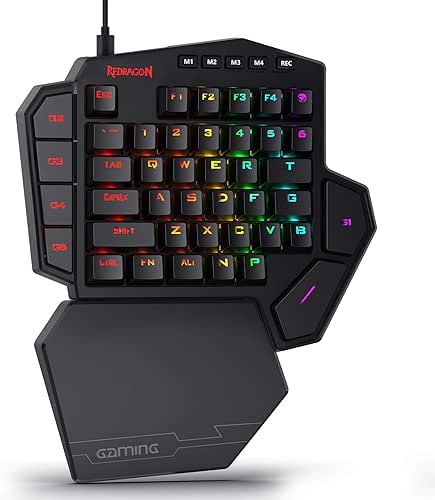
| Best for Customization | Form Factor: One-handed, 42-key mini keypad (40% style) | Connectivity: Wired USB Type-C | Backlighting: RGB (16.8 million colors, 5 modes) | VIEW LATEST PRICE | Read Our Analysis |
| Rottay Mechanical USB Numeric Keypad (Blue LEDs) |

| Compact Number Pad | Form Factor: Numeric keypad, 22-key compact pad | Connectivity: Wired USB (gold-plated) | Backlighting: Blue backlit (3 modes) | VIEW LATEST PRICE | Read Our Analysis |
| AZERON Cyborg II Programmable One-Handed Gaming Keypad |

| Pro-Level Precision | Form Factor: One-handed, medium-sized gaming keypad (right-handed) | Connectivity: Wired USB (device-focused, replaces left-hand keyboard) | Backlighting: RGB lighting per profile (customizable via software) | VIEW LATEST PRICE | Read Our Analysis |
| MOTOSPEED K27 27-Key One-Handed Mechanical Gaming Keypad |
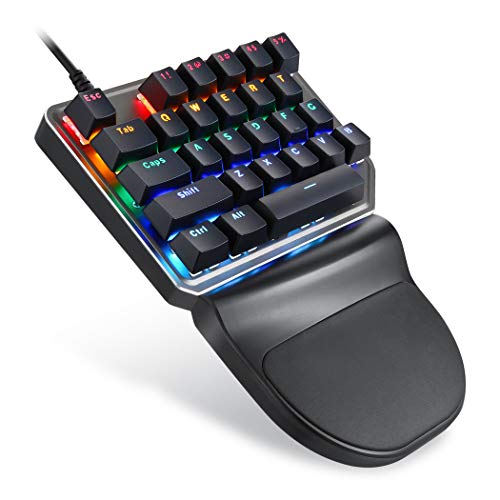
| Versatile Workhorse | Form Factor: One-handed, 27-key mini keypad | Connectivity: Wired USB | Backlighting: RGB (9 backlight modes) | VIEW LATEST PRICE | Read Our Analysis |
| RedThunder Wireless One-Handed RGB Mini Gaming Keypad |
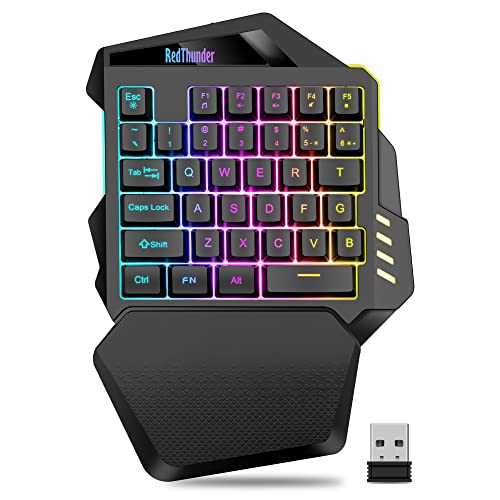
| Best Wireless Pick | Form Factor: One-handed, 40% mini keypad (35 keys) | Connectivity: Wireless 2.4 GHz (with detachable USB-C charging cable) | Backlighting: RGB (7 colors; breath & static modes) | VIEW LATEST PRICE | Read Our Analysis |
More Details on Our Top Picks
Redragon K585 DITI One-Handed RGB Mechanical Gaming Keypad
If you want a compact, performance-focused keypad for MMO or FPS play, the Redragon K585 DITI delivers: its one-handed 42-key layout and detachable magnetic wrist rest keep your hand comfortable and all critical commands within reach. You’ll get tactile Redragon Brown switches with a satisfying bump and reduced noise, plus an upgraded hot-swappable socket so you can customize switches without soldering. Seven programmable macro keys let you chain actions quickly. Five RGB modes and 16.8 million colors personalize lighting, while the Type-C wired connection guarantees low latency. A convenient USB pass-through lets you plug in a mouse or headset adapter.
- Form Factor:One-handed, 42-key mini keypad (40% style)
- Connectivity:Wired USB Type-C
- Backlighting:RGB (16.8 million colors, 5 modes)
- Programmability / Macros:Seven programmable macro keys (on-device)
- Switch Type / Key Mechanism:Redragon Brown mechanical switches; hot-swappable sockets
- Ergonomics / Wrist Support:Detachable magnetic wrist rest
- Additional Feature:USB pass-through port
- Additional Feature:Hot-swappable sockets
- Additional Feature:Detachable magnetic wristrest
Rottay Mechanical USB Numeric Keypad (Blue LEDs)
Choose the Rottay Mechanical USB Numeric Keypad if you want a compact, clicky keypad that boosts typing precision and gaming macros with tactile blue switches and bright blue backlighting. You get 22 keys-Num, ESC, Tab, Delete and a calculator shortcut-on mechanical blue switches that give audible clicks and quick actuation, ideal for typing, coding, and strategy games. It’s plug-and-play with no drivers. Blue backlight offers full, breathing, or off modes (Esc+Del toggles) and shines evenly. ABS keycaps resist fading for 50M presses; gold-plated USB and magnetic ring guarantee stable data. Works on Windows; numeric keys partly work on Mac/Chromebook.
- Form Factor:Numeric keypad, 22-key compact pad
- Connectivity:Wired USB (gold-plated)
- Backlighting:Blue backlit (3 modes)
- Programmability / Macros:Shortcut keys (calculator) and basic function keys; plug & play (limited programmability)
- Switch Type / Key Mechanism:Mechanical Blue switches (non hot-swappable)
- Ergonomics / Wrist Support:15° tilt and stepped keycaps for comfort
- Additional Feature:Gold-plated USB interface
- Additional Feature:Calculator shortcut key
- Additional Feature:15° tilted design
AZERON Cyborg II Programmable One-Handed Gaming Keypad
For gamers who want to replace their left-hand keyboard with a compact, highly customizable controller, the AZERON Cyborg II puts 30 individually wired inputs and a Hall Effect analog thumbstick at your fingertips so you can play FPS, MOBA, or RPG titles with precise, drift-free movement and per-profile macros. You get 30 mappable inputs, six on-device layouts, and limitless profiles via Azeron software. The Hall Effect stick supports true 360° analog or WASD-style control, mid-click, and mouse functions with tunable dead zones, sensitivity, cones, and smoothing. Adjustable parts, 3D-printed customization, RGB per profile, and a redesign ready for future upgrades complete the package.
- Form Factor:One-handed, medium-sized gaming keypad (right-handed)
- Connectivity:Wired USB (device-focused, replaces left-hand keyboard)
- Backlighting:RGB lighting per profile (customizable via software)
- Programmability / Macros:30 mappable inputs, macros, multiple on-device profiles
- Switch Type / Key Mechanism:Individually wired buttons (configurable inputs); Hall Effect analog thumbstick (analog input)
- Ergonomics / Wrist Support:Multiple adjustable parts; ergonomic, customizable fit
- Additional Feature:Hall Effect thumbstick
- Additional Feature:Per-button wiring
- Additional Feature:On-device layout storage
MOTOSPEED K27 27-Key One-Handed Mechanical Gaming Keypad
Gamers and power users who need a compact, programmable control pad will appreciate the MOTOSPEED K27’s 27 tactile, clicky blue switches and full macro programmability. You get fast, precise actuation with audible feedback and 50 million keystroke durability. The ABS chassis and non-fading legends stay reliable, while stepped keycaps and a spring-type ergonomic build reduce fatigue. It’s USB wired, plug-and-play, and compatible with PC, Mac, Linux, Android, and older Windows versions. Nine RGB backlight modes and FN combos let you tweak lighting and brightness. Lightweight and portable, the K27 suits gamers, laptop users, financial pros, and anyone missing a numpad.
- Form Factor:One-handed, 27-key mini keypad
- Connectivity:Wired USB
- Backlighting:RGB (9 backlight modes)
- Programmability / Macros:Fully programmable keys (FN combos for functions)
- Switch Type / Key Mechanism:Blue mechanical switches
- Ergonomics / Wrist Support:Stepped keycaps and wrist-care design
- Additional Feature:9 RGB backlight modes
- Additional Feature:Multi-platform compatibility
- Additional Feature:FN key backlight controls
RedThunder Wireless One-Handed RGB Mini Gaming Keypad
If you want a compact, portable keypad that prioritizes low-latency wireless play, the RedThunder Wireless One-Handed RGB Mini is built for fast-paced sessions and tight setups. You get a 2.4 GHz high-speed connection and fast membrane keys with very low response time, so input feels immediate during intense moments. The one-handed 40% layout packs 35 dedicated gaming keys into a small, ergonomic chassis with a large wrist rest for comfort. A 2000 mAh battery delivers 15–20 hours with lighting enabled and recharges via detachable USB-C in about 8 hours. RGB backlighting offers seven colors with breath and static modes.
- Form Factor:One-handed, 40% mini keypad (35 keys)
- Connectivity:Wireless 2.4 GHz (with detachable USB-C charging cable)
- Backlighting:RGB (7 colors; breath & static modes)
- Programmability / Macros:Dedicated gaming keys (intended for game mapping; likely programmable)
- Switch Type / Key Mechanism:Fast membrane keys (low latency)
- Ergonomics / Wrist Support:Ergonomic shape with large wrist rest
- Additional Feature:2.4 GHz wireless
- Additional Feature:2000 mAh battery
- Additional Feature:Fast charging USB-C
Factors to Consider When Choosing Keypad PC Gaming Keyboards
When choosing a keypad, you’ll want to take into account form factor and ergonomics so it fits your hand and playstyle. Think about switch type and feel, key count and layout, and how programmable the keys and macros are. Also check connectivity options and latency to make sure performance meets your needs.
Form Factor & Ergonomics
Because your hands are the interface between you and the game, picking the right form factor and ergonomic features matters: choose a one-handed or 40% mini layout based on whether you need full macro coverage or maximum portability, check for adjustable or detachable wrist rests and stepped keycaps to reduce strain, and confirm device tilt, keycap profile (about 15° and sculpted profiles are common), size, and key spacing match your palm and finger reach so you don’t overextend during long sessions. Pick one-handed keypads (27–42 keys) if you need concentrated controls; choose ~35-key 40% minis when you prioritize travel and desk space. Prioritize modularity-removable rests, configurable thumb controls, and customizable key placement-so you can fine-tune reach and reduce repetitive strain.
Switch Type & Feel
Although switch choice might seem like a small detail, it fundamentally shapes how your keypad feels and performs: tactile, linear, and clicky switches give different feedback and noise; actuation force and travel affect speed versus accidental presses; hot‑swappable sockets let you swap feels without soldering; and lifespan ratings (commonly 50M+ keystrokes) hint at long-term durability. You’ll pick tactile for a noticeable bump, linear for smooth rapid inputs, or clicky if audible confirmation helps your timing. Check actuation force (grams) and travel to balance speed against mispresses. Hot‑swap sockets let you test different profiles without tools, extending usefulness as your preferences change. For analog needs, prefer Hall Effect sensors for precise, drift‑free sensing over simple digital on/off switches.
Key Count & Layout
If you want a keypad that fits your playstyle and hand size, start by matching key count and layout to the functions you actually use: 22–42 keys cover everything from basic movement and primary abilities to full macro banks, but denser layouts trade reach for compactness and can increase mispress risk. Pick a key count that handles movement, core abilities, and any extra actions without needless extras. Check layout density and spacing-compact designs save desk space but can force awkward reaches. Look for thumb inputs or an analog stick to offload common actions and reduce finger burden. Assess keycap sculpting and stepped rows to aid finger placement on tight grids. Finally, balance physical keys with profile switching so you don’t sacrifice accuracy for versatility.
Programmability & Macros
Once you’ve settled on key count and layout, look at how programmable the keypad is-more keys and multiple macro layers let you map complex combos and switch profiles per game. Check how many programmable keys and macro layers the device supports so you can store distinct setups per title. Verify macros can include multi-step actions-keystrokes, delays, mouse clicks and modifiers-and whether you can record them on-device or only via companion software. Favor per-key remapping and on-device profile storage so your custom layouts travel without installed software. Confirm macro editing tools like adjustable delays, loop/repeat options and conditional triggers for precise timing. Finally, consider export/import, onboard memory and cloud sync to back up and transfer profiles.
Connectivity & Latency
Because your keypad’s connection method and its measured latency directly affect aiming, timing, and macro reliability, you should prioritize connectivity when choosing a gaming keypad. Wired USB-C typically gives the lowest latency-often under 1 ms with 1000 Hz polling-so it’s the go-to for competitive play. 2.4 GHz wireless dongles can be nearly as fast (1–4 ms) but need a clear path to the receiver and solid firmware to prevent packet loss. Bluetooth tends to be higher and more variable (6–30+ ms), so avoid it for latency-sensitive titles. Check polling/report rates-500–1000 Hz cuts input lag but raises USB/CPU usage. Also test devices under active gaming conditions, since power-saving modes or RGB can introduce added latency or microstutter.
Battery Life & Charging
Consider battery life and charging a core part of your keypad decision-varying capacities (mAh) and real-world runtimes mean you should match quoted continuous-use hours (often 10–20+ hours) to your typical sessions, prioritize USB-C fast-charge specs or sub-8-hour recharge times, and prefer models that let you play wired while charging to avoid downtime and preserve battery cycles. Compare mAh ratings and manufacturer runtime claims against how long you actually play. Favor USB-C and quick time-to-full if you charge often. Check passthrough/wired-play support to keep sessions uninterrupted and reduce charge cycles. Use power-saving features-lower RGB brightness, sleep timers, per-key lighting-to stretch real-world battery life. Finally, consider battery type and replaceability; swappable cells or clear cycle-life ratings improve long-term value.
Lighting & Customization
How much control do you want over lighting? Decide if per-key RGB matters – it gives precise customization and game-specific feedback, unlike zone lighting. Check color depth (16.8 million colors), available effects (static, breathing, reactive) and how many modes you can choose for the visual variety you like. Make sure the keypad’s software can save multiple lighting profiles and supports on-device storage so your setups persist without the app running. Confirm you can toggle brightness and cycle modes via hotkeys or key combos on the device itself for quick adjustments mid-game. If you’re using a wireless keypad, weigh RGB intensity against battery life and verify the advertised runtime with lighting enabled to avoid surprises.
Build Quality & Durability
When you pick a keypad, build quality determines how long it stays reliable under heavy use: look for mechanical switches rated ≥50 million keystrokes, durable ABS or PBT keycaps, and a reinforced PCB or metal plate to prevent flex and keycap shine. Also confirm whether switches are hot‑swappable or soldered-hot‑swap sockets make repairs and customization far easier. Inspect connection quality: gold‑plated USB contacts, a sturdy Type‑C port, or a secure wireless module reduce signal issues and mechanical failure. For wireless units, check battery cycle ratings. Finally, review warranty terms and any documented component lifespans; good manufacturers publish switch ratings, port durability, and battery data so you can judge expected longevity and repairability before buying.




