

If your right hand tends to hog the mouse, it might be time to even the playing field with a left-handed model. You’ll want something that fits your grip, reduces strain, and tracks precisely without fuss. I’ll walk through seven strong options for 2026-ranging from soft-angled vertical designs to compact wireless winners-so you can find the feel and features that suit your workflow and comfort.
| Logitech Lift Left-Handed Ergonomic Wireless Mouse (Graphite) |
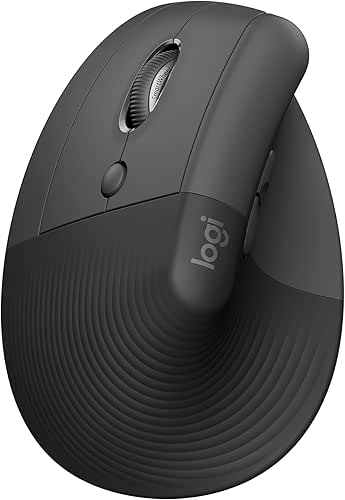
| Best Ergonomic Pick | Handedness: Left-handed | Ergonomic design: Vertical/ergonomic (57° angle, promotes natural forearm posture) | Connectivity type: Wireless (Bluetooth or Logi Bolt USB) | VIEW LATEST PRICE | Read Our Analysis |
| SANWA Left-Handed Ergonomic Vertical Mouse (Black) |

| Budget Vertical Winner | Handedness: Left-handed | Ergonomic design: Vertical/contoured ergonomic shape (neutral handshake position) | Connectivity type: Wired USB (plug-and-play) | VIEW LATEST PRICE | Read Our Analysis |
| Logitech Signature M650 Left-Handed Wireless Mouse |

| Quiet Productivity Pick | Handedness: Left-handed | Ergonomic design: Ergonomic left-handed shape with thumb area and rubber grips | Connectivity type: Wireless (Bluetooth Low Energy or Logi Bolt USB) | VIEW LATEST PRICE | Read Our Analysis |
| SUNGI Left-Handed Ergonomic Wireless Vertical Mouse |

| RSI-Friendly Choice | Handedness: Left-handed | Ergonomic design: Vertical ergonomic (handshake position, thumb rests) | Connectivity type: Wireless (2.4GHz USB receiver) | VIEW LATEST PRICE | Read Our Analysis |
| ELECOM EX-G Left-Handed Wireless Ergonomic Trackball Mouse |

| Best Trackball Option | Handedness: Left-handed | Ergonomic design: Ergonomic thumb-control trackball design | Connectivity type: Wireless (2.4GHz USB) | VIEW LATEST PRICE | Read Our Analysis |
| Perixx Perimice-719L Left-Handed Wireless Vertical Mouse |
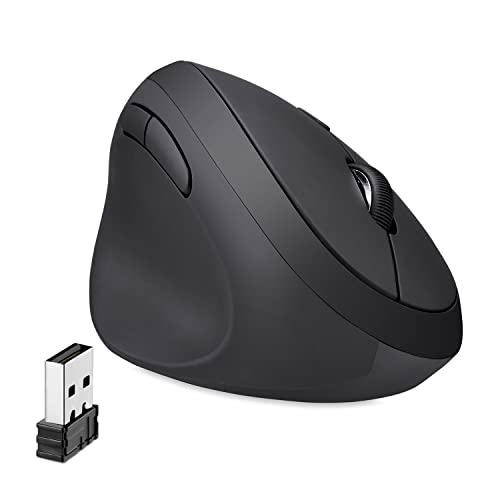
| Silent Office Pick | Handedness: Left-handed | Ergonomic design: Vertical ergonomic (handshake position, for small hands) | Connectivity type: Wireless (2.4GHz nano USB receiver) | VIEW LATEST PRICE | Read Our Analysis |
| WishLotus Left-Handed Wired USB Laser Engraved Mouse |

| Compact Wired Value | Handedness: Left-handed | Ergonomic design: Left-handed ergonomic compact design (circular streamline) | Connectivity type: Wired (mini USB) | VIEW LATEST PRICE | Read Our Analysis |
More Details on Our Top Picks
Logitech Lift Left-Handed Ergonomic Wireless Mouse (Graphite)
If you have a small to medium left hand and spend long hours at the computer, the Logitech Lift Left is built to keep you comfortable and focused: its 57-degree vertical angle and snug thumb rest encourage a natural forearm posture, whisper-quiet clicks and a SmartWheel cut distractions, and Bluetooth or Logi Bolt wireless options make it easy to plug into Windows, macOS, iPadOS, or a laptop. You’ll get an ergo-certified shape with a softly textured grip that supports day-long use. Four customizable buttons streamline tasks, the SmartWheel scrolls smoothly, and the Graphite finish looks professional while reducing strain.
- Handedness:Left-handed
- Ergonomic design:Vertical/ergonomic (57° angle, promotes natural forearm posture)
- Connectivity type:Wireless (Bluetooth or Logi Bolt USB)
- Buttons / controls:Four customizable buttons + SmartWheel
- Adjustable sensitivity (DPI):Not specified (precision scrolling via SmartWheel; no DPI listed)
- Platform compatibility:Windows, macOS, iPadOS, laptops, PCs (Bluetooth or Logi Bolt)
- Additional Feature:Ergo-certified by ergonomists
- Additional Feature:SmartWheel seamless scrolling
- Additional Feature:Whisper-quiet clicks
SANWA Left-Handed Ergonomic Vertical Mouse (Black)
For left-handers who need a compact, posture-friendly option, the SANWA Left-Handed Ergonomic Vertical Mouse (Black) puts the wrist in a neutral handshake position to cut muscle tension while fitting smaller hands comfortably. You’ll get a contoured vertical shape built specifically for left-handed use, rounded to suit small palms. Four DPI settings (1000/1600/2400/3200) and blue LED tracking give responsive control across various surfaces. Six buttons include Back and Forward for smoother browsing, though those two disable on recent Macs. It’s plug-and-play via USB with no drivers or batteries, and supports Windows and older macOS versions-limited Apple compatibility.
- Handedness:Left-handed
- Ergonomic design:Vertical/contoured ergonomic shape (neutral handshake position)
- Connectivity type:Wired USB (plug-and-play)
- Buttons / controls:Six buttons (including forward/back)
- Adjustable sensitivity (DPI):Adjustable DPI: 1000 / 1600 / 2400 / 3200
- Platform compatibility:Windows (many versions) and older macOS (limited; forward/back disabled on newer Macs)
- Additional Feature:Blue LED tracking
- Additional Feature:Six-button layout
- Additional Feature:Plug-and-play USB power
Logitech Signature M650 Left-Handed Wireless Mouse
Left-handed users who want a quiet, customizable everyday mouse will appreciate the Logitech Signature M650 Left-Handed Wireless Mouse, which combines SilentTouch clicks with up to two years of battery life. You can connect via Bluetooth Low Energy or the Logi Bolt USB receiver to Chromebook, PC, or Mac. The ergonomic left-handed shape, soft thumb area, and rubber side grips keep your hand comfortable during long sessions. Use Logitech Options+ on Windows or macOS to customize side buttons and assign shortcuts like back/forward or copy/paste. SmartWheel gives precise line-by-line scrolling and a flickable fast-scroll mode for long pages.
- Handedness:Left-handed
- Ergonomic design:Ergonomic left-handed shape with thumb area and rubber grips
- Connectivity type:Wireless (Bluetooth Low Energy or Logi Bolt USB)
- Buttons / controls:Side buttons (customizable) + SmartWheel
- Adjustable sensitivity (DPI):Not specified (precision SmartWheel; DPI not listed)
- Platform compatibility:Chromebook, PC, Mac (Bluetooth or Logi Bolt; Options+ support on Windows/macOS)
- Additional Feature:SilentTouch 90% quieter
- Additional Feature:Up to 2 years battery
- Additional Feature:Switchable fast/line scrolling
SUNGI Left-Handed Ergonomic Wireless Vertical Mouse
Choose the SUNGI if you want a simple, comfortable vertical mouse that’s built for small to medium hands and helps reduce wrist strain during long sessions. You get a handshake grip, thumb rests, and rubber-oil coating that ease RSI and fatigue. It pairs wirelessly via a 2.4GHz USB receiver-no Bluetooth or software-working with Windows, Android, and Linux. DPI switches let you pick 800, 1200, or 1600, and next/previous buttons speed web navigation. It runs on two AAA batteries (not included) and sleeps after 10 minutes to save power. A 12-month warranty and support back the purchase.
- Handedness:Left-handed
- Ergonomic design:Vertical ergonomic (handshake position, thumb rests)
- Connectivity type:Wireless (2.4GHz USB receiver)
- Buttons / controls:Next/previous buttons (plus primary buttons)
- Adjustable sensitivity (DPI):Adjustable DPI: 800 / 1200 / 1600
- Platform compatibility:Windows (multiple), Android, Linux
- Additional Feature:Rubber-oil coated surface
- Additional Feature:Auto sleep power-saving
- Additional Feature:12-month warranty
ELECOM EX-G Left-Handed Wireless Ergonomic Trackball Mouse
If you need a precision-focused trackball built specifically for southpaws, the ELECOM EX-G delivers-its left-handed ergonomic shape and thumb-controlled ball let you navigate long work sessions with minimal hand movement. You get optical tracking with a gaming-grade sensor, DPI toggle between 750 and 1500, and a 2.4GHz USB wireless link compatible with Windows and macOS. Six physical buttons plus tilt-scroll offer customizable shortcuts via ELECOM Mouse Assistant. The black ball rides on three 2.5mm artificial ruby bearings for smooth, low-dust rolling and is removable for cleaning; a red replacement ball is sold separately. Compact, 5.3oz without battery.
- Handedness:Left-handed
- Ergonomic design:Ergonomic thumb-control trackball design
- Connectivity type:Wireless (2.4GHz USB)
- Buttons / controls:Six physical buttons + tilt scroll
- Adjustable sensitivity (DPI):DPI switch: 750 / 1500
- Platform compatibility:Windows 8.1/10/11 and macOS 10.10 (specific notes)
- Additional Feature:Removable trackball cleaning
- Additional Feature:Tilt horizontal scroll
- Additional Feature:Artificial ruby bearings
Perixx Perimice-719L Left-Handed Wireless Vertical Mouse
For southpaw users with smaller hands who want a quieter, ergonomically angled option, the Perixx Perimice‑719L delivers a comfortable handshake position and compact fit. You’ll get wireless 2.4 GHz connectivity with a nano USB receiver and plug‑and‑play compatibility for Windows 7, 8, and 10, plus a 10 m range. The vertical design and six buttons reduce muscular strain and help prevent repetitive strain injury. An optical sensor and DPI switch (800/1200/1600) give precise control. Silent‑click buttons keep noise low in public places. The package includes the mouse, receiver, and a 12‑month limited warranty.
- Handedness:Left-handed
- Ergonomic design:Vertical ergonomic (handshake position, for small hands)
- Connectivity type:Wireless (2.4GHz nano USB receiver)
- Buttons / controls:Six-button design (including DPI switch)
- Adjustable sensitivity (DPI):DPI switch: 800 / 1200 / 1600
- Platform compatibility:Windows 7/8/10 (compatible; plug-and-play)
- Additional Feature:10m wireless range
- Additional Feature:Silent-click buttons
- Additional Feature:Nano USB receiver included
WishLotus Left-Handed Wired USB Laser Engraved Mouse
Left-handed users who want a compact, no-fuss mouse will appreciate the WishLotus C632, which puts a true left-hand button layout and a tactile, durable design front and center. You’ll get a small, ergonomic C632 with a matte-sanded finish for improved grip and comfort, plus a transparent laser-engraved logo that glows under blue light. It uses a real left-hand hardware layout, plugs into mini USB for instant use, and works well with laptops and common setups. The 800 DPI optical sensor with Agilent chip offers stable, precise control; tactile switches rated for 5 million clicks and bottom weighting boost longevity and feel.
- Handedness:Left-handed
- Ergonomic design:Left-handed ergonomic compact design (circular streamline)
- Connectivity type:Wired (mini USB)
- Buttons / controls:Standard left-handed buttons (hardware-reversed primary/secondary)
- Adjustable sensitivity (DPI):800 DPI
- Platform compatibility:Generic OS support for plug-and-play laptops/PCs (wired USB)
- Additional Feature:Laser-engraved glowing logo
- Additional Feature:Tactile 5M-click switches
- Additional Feature:Weighted bottom design
Factors to Consider When Choosing Left-Handed Computer Mice
When choosing a left-handed mouse, you’ll want to prioritize fit and handedness so the shape and size match your grip. Look for ergonomic features, reliable connectivity, and a button layout that supports customization. Also check sensor accuracy and adjustable DPI to guarantee precise tracking.
Handedness And Fit
Although many mice claim ambidexterity, choosing one built specifically for left use guarantees button placement and contours match your hand, reducing awkward reach and strain. You should pick a size-small, medium, or large-that fits your palm and finger length so you don’t overstretch or curl unnaturally. Look for handedness-specific thumb rests and textured grips designed for left-hand positioning; they give a secure hold during long sessions and help you maintain control. Prioritize shapes that support natural hand positioning to protect wrist and forearm posture, but avoid diving into specific ergonomic feature details here. By selecting a left-handed model that matches your hand size and orientation, you’ll prevent the inefficiency and discomfort of using ambidextrous or right-handed mice.
Ergonomic Design Features
Because your hand’s shape determines how comfortable a mouse will feel, focus on ergonomic features that support your left hand’s natural posture and movement. Choose a left-handed mouse contoured to fit your palm to reduce fatigue during long sessions. Consider vertical designs that promote a handshake wrist and forearm posture to minimize strain and lower RSI risk. Look for models that position the hand at an angled orientation-around 57 degrees is common-to maintain neutral muscle alignment. Thumb rests, soft textured grips, and sculpted shapes give targeted support for small to medium hands, preventing pressure points. Finally, check button placement so your fingers sit naturally; customized layouts cut awkward reaches and improve comfort and longevity of use.
Connectivity Options Available
If you want a fuss-free setup or maximum mobility, connectivity is a key decision: wired USB mice give rock-solid, plug-and-play reliability with no batteries, while wireless options-Bluetooth Low Energy or proprietary 2.4 GHz dongles-let you cut the cord at the cost of battery management and potential compatibility differences between Windows, macOS, Linux, and mobile devices. Choose wired if you prioritize consistent latency, zero battery fuss, and simple compatibility. Pick Bluetooth for easy pairing with laptops and phones, but confirm OS support and expected range. Opt for a 2.4 GHz dongle when you need lower latency and don’t mind carrying a receiver. Check whether wireless models use replaceable or rechargeable batteries and verify driver support for your platform.
Button Layout And Customization
When you pick a left-handed mouse, pay close attention to how the buttons are laid out and what you can change-these choices directly affect comfort and workflow. Left-handed designs reverse traditional right-handed arrangements so primary and thumb buttons sit naturally under your fingers. You’ll find four to six buttons on most models, giving you extra shortcuts for navigation and productivity. Many mice include customization software that lets you reassign buttons for actions like back, forward, copy, or paste and build personalized profiles. Note that some special buttons are disabled on certain platforms to avoid conflicts, so check compatibility before buying. Prioritize a layout that matches your grip and a software suite that supports your operating system and workflow.
Sensor Accuracy And DPI
How precise do you need your cursor to be? Sensor accuracy determines how faithfully your mouse translates hand movement into on-screen motion. Optical and laser sensors are common; choose a high-quality sensor to cut jitter and keep tracking stable across surfaces. DPI (dots per inch) measures cursor travel per inch of movement, so adjustable DPI lets you tune sensitivity for tasks-low DPI for pixel-level precision, higher DPI for swift navigation. Look for mice offering a broad DPI range (for example, 750 to 3200+ DPI) and on-the-fly DPI switching so you can change settings without interrupting work or play. Customizable DPI combined with accurate sensors reduces unnecessary hand motion, improving comfort and performance over long sessions.
Power And Battery Life
Although you’ll focus on shape and sensors, battery life can make or break your day-so pick a mouse that matches how you work. Decide whether you want wireless freedom or a wired connection that removes battery worries entirely. For wireless left-handed mice, note battery type-AA/AAA disposables offer quick swaps, while built-in lithium-ion batteries let you recharge but may require cables or docks. Look at advertised life: some models last months, others up to two years depending on usage and tech. Prefer models with power-saving or auto-sleep modes to stretch runtime. Also check how fast and easy it is to swap or recharge batteries to avoid downtime during critical tasks. Balance convenience, runtime, and your workflow.
Compatibility And Drivers
Battery and shape matter, but your mouse won’t do much if it won’t communicate with your system-so check compatibility and drivers next. Make sure the model supports your OS-Windows, macOS, Linux, iPadOS, or Android-and verify driver availability for your specific version. Decide whether you need Bluetooth, a USB receiver, or a wired USB plug based on your ports and workflow. Confirm if the mouse is truly plug-and-play or if it needs manufacturer software for button mapping, DPI stages, or firmware updates. Note any platform limitations: some features may be disabled on older or unsupported OS releases. Double-check driver download pages and update schedules so your left-handed mouse stays functional and fully customizable.
Frequently Asked Questions
Do Left-Handed Mice Work on macOS Without Extra Drivers?
Yes – most left-handed mice work on macOS without extra drivers; macOS recognizes standard HID mice and maps buttons, though you might need third-party utilities for advanced button remapping or custom DPI profiles to get full functionality.
Can Left-Handed Mice Be Used Ambidextrously by Right-Handers?
Like a glove, yes – you can use left-handed mice ambidextrously as a right-hander, but you’ll need to adjust grip and button layout, and you might retrain muscle memory; some models switch buttons or offer remapping.
Are Left-Handed Trackballs Better for Small Desk Spaces?
Yes – left-handed trackballs can be better for small desks because you’ll keep your hand stationary while moving the ball, saving surface space, reducing arm fatigue, and positioning controls compactly for efficient, cramped setups.
Do Left-Handed Wireless Mice Have Higher Latency Than Wired Ones?
Like a whispered wire, no – you won’t always notice higher latency with left-handed wireless mice; modern tech often matches wired speeds, but cheap dongles or Bluetooth can add delay, so pick low-latency RF or gaming-grade models.
Can Gaming Profiles Be Saved Onboard on Left-Handed Mice?
Yes – many left-handed gaming mice let you save profiles onboard, so you can store DPI, button mappings, macros, and lighting without software. You’ll switch profiles hardware-side, keeping settings across PCs and sessions.




