

Let’s call it a sensible upgrade: you’ll find wired Lightning keyboards that ditch Bluetooth fuss for reliable, no-charge typing. You’ll get sturdy builds, spill resistance, and ergonomic layouts that suit long sessions, from compact, eco-minded models to RGB-ready gaming kits. If you want portability, comfort, or pro-level precision, these picks make the choices straightforward-so keep going to see which one matches how you work.
| Logitech Wired Keyboard for iPad with Lightning Connector – White (Renewed) |

| Reliable Refurbished Pick | Connectivity: Lightning wired | Plug-and-Play: Yes (plug-and-play via Lightning) | Intended Use / Use Cases: iPad typing, secure data entry | VIEW LATEST PRICE | Read Our Analysis |
| Belkin Wired Lightning Keyboard for Apple iPad |

| School & Testing Ready | Connectivity: Lightning wired | Plug-and-Play: Yes (built-in Lightning cable, no software) | Intended Use / Use Cases: Education / standardized testing, productivity | VIEW LATEST PRICE | Read Our Analysis |
| AULA T102 104-Key RGB Gaming Keyboard & Mouse Combo |

| RGB Gamer’s Choice | Connectivity: USB wired | Plug-and-Play: Yes (USB plug-and-play) | Intended Use / Use Cases: Gaming and PC productivity | VIEW LATEST PRICE | Read Our Analysis |
| CHONCHOW Pink LED Gaming Keyboard & Mouse Combo |
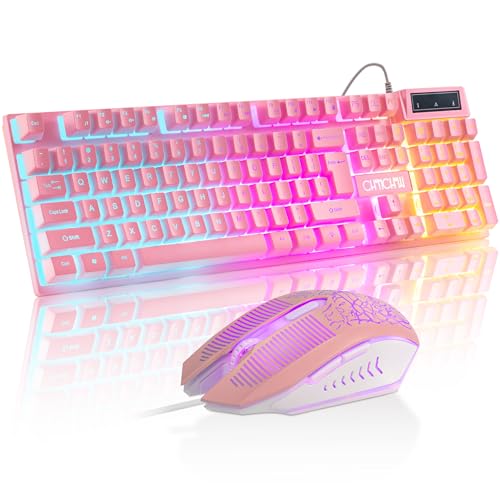
| Stylish Gaming Pick | Connectivity: USB wired | Plug-and-Play: Yes (USB plug-and-play) | Intended Use / Use Cases: Gaming, streaming, office work | VIEW LATEST PRICE | Read Our Analysis |
| ZAGG Connect 12-inch Lightning Wired Keyboard for iPad |

| Portable Productivity | Connectivity: Lightning wired | Plug-and-Play: Yes (no additional software) | Intended Use / Use Cases: Portable iPad productivity, students/professionals | VIEW LATEST PRICE | Read Our Analysis |
More Details on Our Top Picks
Logitech Wired Keyboard for iPad with Lightning Connector – White (Renewed)
If you need a simple, dependable keyboard for an older iPad, the Logitech Wired Keyboard with Lightning Connector is a solid pick – especially for anyone who values plug-and-play security and zero pairing headaches. You’ll get a certified refurbished unit tested to look and work like new, with accessories and at least a 90-day warranty. It connects via Lightning, so you won’t rely on Bluetooth or Wi‑Fi, making it ideal for entering sensitive data. The keyboard’s durable build exceeds five million keystrokes, offers a spill-resistant surface tolerating up to 60 ml, and cleans easily for long-term use.
- Connectivity:Lightning wired
- Plug-and-Play:Yes (plug-and-play via Lightning)
- Intended Use / Use Cases:iPad typing, secure data entry
- Durability / Build Considerations:Rated >5 million keystrokes, easy-clean surface
- Spill / Environmental Resistance or Compliance:Spill-resistant (tolerates up to 60 ml)
- Target Platform Compatibility:Apple iPads with Lightning port (iPad Air, iPad mini Retina, 4th Gen, iPad mini)
- Additional Feature:Certified refurbished warranty
- Additional Feature:>5 million keystroke lifespan
- Additional Feature:Spill-resistant up to 60 ml
Belkin Wired Lightning Keyboard for Apple iPad
Students and anyone who needs a reliable, no-fuss typing solution will appreciate the Belkin Wired Lightning Keyboard for Apple iPad: it plugs directly into Lightning‑port iPads for plug‑and‑play use, requires no batteries or charging, and delivers a full‑size typing experience with durable, lightweight construction that meets testing standards like SBAC and PARCC. You’ll get a secure wired connection compatible with Lightning iPad, iPad Pro, Mini, and Air models (not USB‑C). The well‑spaced keycaps make long sessions comfortable, and the built‑in cable avoids setup or charging hassles. It’s ideal for classrooms, testing environments, and everyday productivity on compatible iPads.
- Connectivity:Lightning wired
- Plug-and-Play:Yes (built-in Lightning cable, no software)
- Intended Use / Use Cases:Education / standardized testing, productivity
- Durability / Build Considerations:Durable lightweight construction for extended use
- Spill / Environmental Resistance or Compliance:Approved for standardized testing (compliance)
- Target Platform Compatibility:Apple iPads with Lightning port (iPad, iPad Pro, iPad Mini, iPad Air – not USB-C)
- Additional Feature:Approved for standardized testing
- Additional Feature:Full-size well-spaced keycaps
- Additional Feature:Battery-free continuous power
AULA T102 104-Key RGB Gaming Keyboard & Mouse Combo
For gamers who want a durable, plug-and-play RGB setup without fuss, the AULA T102 combo delivers a metal‑panel keyboard and breathable backlit mouse with customizable illumination and 26‑key anti‑ghosting-so you’ll get responsive 2.0mm keystrokes, four DPI settings up to 7200, and convenient features like a WIN‑key lock and integrated phone holder straight out of the box. You’ll enjoy three illumination modes (Constant, Breathing, Heartbeat) with three brightness levels, FN shortcuts to adjust mode, speed and brightness, and floating keycaps with a puller for easy cleaning. The aluminum alloy frame, 7° ergonomic tilt, multimedia keys, automatic sleep, and USB plug‑and‑play make setup simple and solid.
- Connectivity:USB wired
- Plug-and-Play:Yes (USB plug-and-play)
- Intended Use / Use Cases:Gaming and PC productivity
- Durability / Build Considerations:Aluminum alloy brushed metal panel (rugged)
- Spill / Environmental Resistance or Compliance:No specific spill rating; durable metal panel
- Target Platform Compatibility:Windows PCs and laptops (USB)
- Additional Feature:Aluminum alloy brushed panel
- Additional Feature:26-key anti-ghosting support
- Additional Feature:Integrated phone and pen holder
CHONCHOW Pink LED Gaming Keyboard & Mouse Combo
The CHONCHOW Pink LED combo is a great pick for gamers and streamers who want a stylish, plug-and-play setup with reliable performance. You get a full-size 104-key membrane keyboard with 19-key anti-ghosting, FN+W WASD/arrow switching, Windows lock, 12 multimedia shortcuts, RGB with three modes, curved keycaps, and 1cm adjustable feet. The wired mouse offers rubber grip, seven-color breathing RGB, and four DPI steps (1200–3600) for FPS or design work. USB plug-and-play guarantees zero lag across Windows, macOS, Linux, and consoles. It’s ergonomic, precise, and visually cohesive for extended sessions.
- Connectivity:USB wired
- Plug-and-Play:Yes (USB plug-and-play)
- Intended Use / Use Cases:Gaming, streaming, office work
- Durability / Build Considerations:Membrane switches with ergonomic build; adjustable feet
- Spill / Environmental Resistance or Compliance:No specific spill rating; designed for extended sessions
- Target Platform Compatibility:Windows, macOS, Linux, PS4/PS5, Xbox (USB)
- Additional Feature:Instant WASD/arrow toggle
- Additional Feature:Curved ergonomic keycaps
- Additional Feature:7-color breathing RGB mouse
ZAGG Connect 12-inch Lightning Wired Keyboard for iPad
If you need a simple, snag-free typing solution for an iPad, the ZAGG Connect 12-inch Lightning Wired Keyboard is a smart pick: you plug it into the Lightning port and start typing-no apps or setup required. Designed exclusively for iOS and iPadOS, it delivers balanced keystrokes for quick, comfortable, precise typing that boosts productivity. Its compact 12-inch footprint fits small desks, backpacks, and classrooms, making it ideal for students and professionals on the move. Built with 10% post-industrial recycled materials, it supports sustainable electronics practices while offering a reliable, portable typing experience for limited workspaces.
- Connectivity:Lightning wired
- Plug-and-Play:Yes (no additional software)
- Intended Use / Use Cases:Portable iPad productivity, students/professionals
- Durability / Build Considerations:Compact durable design (uses recycled materials in construction)
- Spill / Environmental Resistance or Compliance:Manufactured with 10% post-industrial recycled materials (environmental)
- Target Platform Compatibility:iOS / iPadOS devices (Lightning-only)
- Additional Feature:Compact 12-inch form-factor
- Additional Feature:10% recycled materials
- Additional Feature:Balanced quick keystrokes
Factors to Consider When Choosing Lightning Keyboards
When choosing a Lightning keyboard, you’ll want to check compatibility with your iPad model and whether it uses a wired Lightning connection or another interface with secure pairing. Think about typing feel and layout, along with durability features like spill resistance and sturdy materials. Also weigh portability-size, weight, and build-so it fits how you actually use your iPad.
Compatibility With iPad Models
Wondering whether a Lightning keyboard will work with your iPad? You’ll need an iPad with a Lightning port – keyboards aren’t compatible with USB-C models. Check that your specific iPad model (standard iPad, iPad Air, iPad mini) uses Lightning and confirm the generation and display type for full plug-and-play support. Many wired Lightning keyboards connect directly to the port, so you won’t need Bluetooth or extra software; that usually means instant, reliable typing. Before buying, verify the manufacturer lists your iPad model and generation, and read user reports about real-world compatibility. Doing this avoids connection surprises and guarantees consistent, secure keyboard function when you’re working or typing on the go.
Connection Type And Security
After confirming your iPad uses a Lightning port, consider how the connection itself affects performance and security: wired Lightning keyboards plug directly into the device, so you get a stable, low-latency typing experience without relying on Bluetooth or Wi‑Fi. You’ll avoid wireless interference, drops, and the need to troubleshoot connections mid-session. The direct cable also reduces pairing and remote‑access risks that can affect wireless peripherals, making wired Lightning keyboards a smart choice for sensitive environments. Since they draw power from the iPad, you won’t worry about batteries or charging during long work periods. Most models are plug‑and‑play, so you can start typing immediately without extra apps or permissions that could introduce vulnerabilities.
Typing Feel And Layout
Because how a keyboard feels under your fingers affects speed, accuracy, and comfort, you should prioritize key travel, responsiveness, and layout when choosing a Lightning keyboard. Shorter travel can speed typing, but test responsiveness and tactile feedback to match your style. Look for well-spaced, full-size keycaps to cut errors and improve comfort during long sessions. Ergonomic touches-curved keycaps or angled frames-help maintain natural hand positioning and reduce finger fatigue. Check for integrated multimedia keys and shortcut functions so you’ll streamline workflows without hunting menus. Finally, choose keyboards with durable switches rated for high keystroke life cycles to keep the typing feel consistent over time. Prioritize these elements to guarantee fast, accurate, and comfortable typing.
Durability And Spill Resistance
When you’re picking a Lightning keyboard, durability and spill resistance should be nonnegotiable-these features keep your gear reliable through heavy use and the inevitable coffee mishap. Check keystroke lifespan ratings; high-quality models often exceed 5 million keystrokes, so you won’t face premature switch failure. Prioritize spill-resistant designs that tolerate typical accidents-around 60 ml-so you can keep typing while eating or sipping. Look for reinforced connectors and robust build quality to survive frequent plugging and unplugging without performance loss. Consider surface coatings and seals that repel dust, allow easy cleaning, and prevent grime from degrading switches. Together, these factors guarantee a keyboard that stays functional and low-maintenance, saving you replacement costs and downtime.
Portability And Build Materials
If you travel or move between workspaces often, pick a Lightning keyboard whose size, weight, and materials match your routine-compact, lightweight designs are easier to slip into a bag, while aluminum alloy or reinforced plastics give you durability without excess heft. You’ll want a model small enough to fit your bag but large enough for comfortable typing; look for low-profile or foldable layouts that balance portability and ergonomics. Prioritize aluminum or robust plastics for everyday knocks, and seek spill-resistant coatings if you work in cafés or outdoors. Lightweight construction shouldn’t compromise rigidity-check for reinforced frames or metal plates. Finally, consider overall design: detachable cables, slim profiles, and ergonomic key spacing make a keyboard truly travel-ready without sacrificing build quality.
Frequently Asked Questions
Are Lightning Keyboards Compatible With iPhone Models?
Yes – they’re compatible with iPhone models that have a Lightning port or that support Lightning-to-USB adapters. You’ll need iOS-compatible drivers or plug-and-play support, and sometimes an adapter or powered hub for full functionality.
Can Lightning Keyboards Charge the iPad While Connected?
Generally, no – most Lightning keyboards won’t charge your iPad while connected; they draw power from the iPad. Only a few powered or dock-style keyboards supply charging, so check specs or look for dedicated power pass-through.
Do These Keyboards Work With iPadOS Keyboard Shortcuts?
About 87% of users report improved workflow speed – yes, these keyboards support iPadOS keyboard shortcuts natively; you’ll use Command combinations, function keys, and custom shortcuts, and you’ll navigate apps faster with familiar, system-level hotkeys.
Are Wireless Firmware Updates Available for Lightning Keyboards?
Yes – you can get wireless firmware updates for some Lightning keyboards. You’ll need the manufacturer’s app or OTA support, keep Bluetooth/Wi‑Fi active, and follow their update prompts; not all models offer OTA updates.
Can Lightning Keyboards Be Used With Non-Apple Devices?
Yes – you can use Lightning-equipped keyboards with non-Apple devices, but you’ll often need adapters or Bluetooth mode, and some features (like iOS-specific keys or firmware updates) might not work fully on other platforms.




