

You’re trying to pick a Linksys router that actually fits your home – not just the latest specs. I’ll compare five models across coverage, device handling, wired speeds, and features like mesh and VPN so you can narrow choices fast. Whether you want low-latency Wi‑Fi 6 for gaming or Wi‑Fi 7 for future‑proof NAS and multi‑gig needs, there’s a clear fit ahead – keep going to see which one matches your priorities.
| Linksys MR20EC Dual-Band WiFi 6 Router (AX3000) |

| Best for Growing Homes | Wi‑Fi Standard: Wi‑Fi 6 (AX3000) | Band Type: Dual‑band | Coverage (approx.): Up to 2,000 sq ft | CHECK LATEST PRICE | Read Our Analysis |
| Linksys E5400 AC1200 Dual-Band WiFi Router |
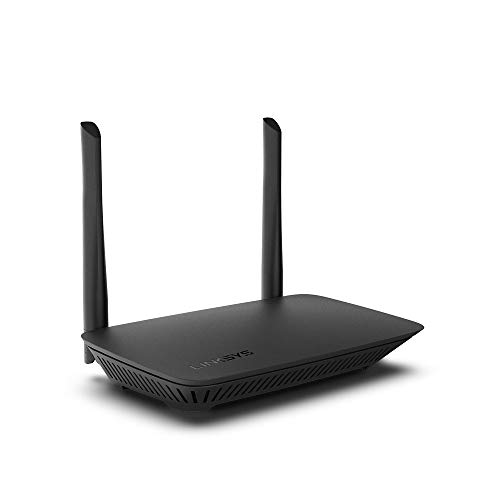
| Budget-Friendly Choice | Wi‑Fi Standard: Wi‑Fi 5 (AC1200) | Band Type: Dual‑band | Coverage (approx.): Up to 1,500 sq ft | CHECK LATEST PRICE | Read Our Analysis |
| Linksys AX2200 Dual-Band Mesh WiFi 6 Router |
| Reliable Mesh Performer | Wi‑Fi Standard: Wi‑Fi 6 (AX2200) | Band Type: Dual‑band | Coverage (approx.): Up to 1,500 sq ft | CHECK LATEST PRICE | Read Our Analysis |
| Linksys MR6350 AC1300 Dual-Band Mesh WiFi Router |
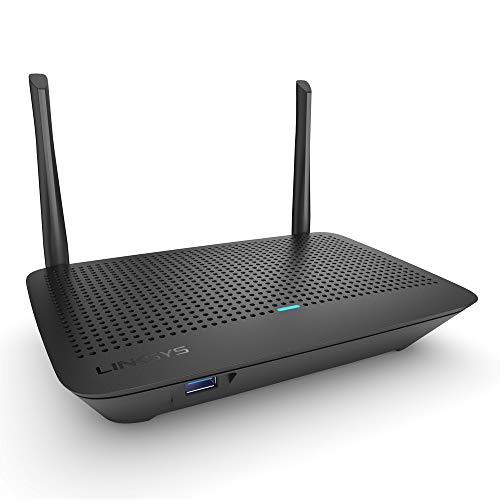
| Compact Coverage Pick | Wi‑Fi Standard: Wi‑Fi 5 (AC1300) | Band Type: Dual‑band | Coverage (approx.): Up to 1,200 sq ft | CHECK LATEST PRICE | Read Our Analysis |
| GL.iNet Flint 3e WiFi 7 Router (GL-BE6500) |

| Future-Proof Powerhouse | Wi‑Fi Standard: Wi‑Fi 7 (up to 6.5 Gbps) | Band Type: Multi‑band (Wi‑Fi 7 with multi‑band MLO) | Coverage (approx.): Up to 2,500 sq ft | CHECK LATEST PRICE | Read Our Analysis |
More Details on Our Top Picks
Linksys MR20EC Dual-Band WiFi 6 Router (AX3000)
If you need reliable whole‑home Wi‑Fi for 25+ devices-whether you game, stream 4K, or run a smart home-the Linksys MR20EC (Hydra 6) AX3000 delivers with Wi‑Fi 6 performance, Qualcomm hardware, and mesh expandability to eliminate dead zones. You’ll get dual‑band AX3000 speeds, support for up to 2,000 sq ft, and up to four times the capacity of older routers, so multiple streams stay smooth. Intelligent Mesh lets nodes boost coverage and dynamically maximize throughput. Setup’s simple via the free Linksys App, which lets you prioritize devices and manage remotely. It’s Amazon‑exclusive, designed in California, and backed by an 18‑month warranty.
- Wi‑Fi Standard:Wi‑Fi 6 (AX3000)
- Band Type:Dual‑band
- Coverage (approx.):Up to 2,000 sq ft
- Device Capacity / Supported Clients:25+ devices
- Mesh / Expandability:Intelligent Mesh; add nodes to extend
- Setup & Management:Linksys App for easy setup and remote management
- Additional Feature:Qualcomm chipset performance
- Additional Feature:Amazon exclusive model
- Additional Feature:18-month warranty
Linksys E5400 AC1200 Dual-Band WiFi Router
Choose the Linksys E5400 if you want reliable, low-latency Wi‑Fi for gaming and streaming across a typical home-its AC1200 dual-band radios deliver up to 1.2 Gbps and cover about 1,500 sq. ft., supporting 10+ devices. You get four Gigabit Ethernet ports for wired consoles and PCs, plus simultaneous connections for phones, computers, and smart home gear. WPA2 encryption, an SPI firewall, and guest network isolate visitors (up to 10). Parental controls let you set time limits and block sites. Setup uses a browser-based, visual wizard. Linksys backing includes U.S. phone support and an 18-month Amazon-exclusive warranty.
- Wi‑Fi Standard:Wi‑Fi 5 (AC1200)
- Band Type:Dual‑band
- Coverage (approx.):Up to 1,500 sq ft
- Device Capacity / Supported Clients:10+ devices
- Mesh / Expandability:(Not specified as mesh) Standalone router with guest network (no mesh stated)
- Setup & Management:Browser‑based setup with visual instructions
- Additional Feature:4 Gigabit Ethernet ports
- Additional Feature:WPA2 + SPI firewall
- Additional Feature:Browser-based visual setup
Linksys AX2200 Dual-Band Mesh WiFi 6 Router
For households that need low-latency performance for gaming and seamless 4K streaming across many devices, the Linksys AX2200 Dual-Band Mesh WiFi 6 Router delivers fast AX2200 speeds and intelligent mesh technology to eliminate dead zones and keep more than 15 devices connected across roughly 1,500 sq ft. You’ll get WiFi 6 dual-band efficiency and a Qualcomm chipset that keeps latency low and throughput stable. Add nodes to expand coverage without reconfiguring. Setup is simple with the free Linksys App, and you can remotely view and prioritize devices. Designed in California, Linksys backs it with decades of support and US phone assistance.
- Wi‑Fi Standard:Wi‑Fi 6 (AX2200)
- Band Type:Dual‑band
- Coverage (approx.):Up to 1,500 sq ft
- Device Capacity / Supported Clients:15+ devices
- Mesh / Expandability:Intelligent Mesh; add nodes to extend
- Setup & Management:Linksys App for easy setup and remote management
- Additional Feature:Black color finish
- Additional Feature:Released 2024
- Additional Feature:Qualcomm chipset stability
Linksys MR6350 AC1300 Dual-Band Mesh WiFi Router
The Linksys MR6350 AC1300 is ideal when you need reliable, whole-room WiFi that’s easy to expand-its Intelligent Mesh Technology lets you add nodes to stretch coverage and wipe out dead zones across up to 1,200 sq. ft. You’ll get dual-band AC1300 speeds (up to 1.3 Gbps) and support for 12+ devices, so 4K streaming, gaming, and video calls stay smooth. Setup takes minutes with the Linksys App; you can add guest WiFi, parental controls, and manage access via Alexa. Ethernet ports provide wired connectivity, and compatibility with other Linksys Mesh products makes future expansion straightforward.
- Wi‑Fi Standard:Wi‑Fi 5 (AC1300)
- Band Type:Dual‑band
- Coverage (approx.):Up to 1,200 sq ft
- Device Capacity / Supported Clients:12+ devices
- Mesh / Expandability:Intelligent Mesh; compatible with Linksys Mesh products
- Setup & Management:Linksys App; sets up in minutes (supports guest Wi‑Fi, parental controls)
- Additional Feature:Alexa-compatible control
- Additional Feature:Supports 4K streaming
- Additional Feature:Guest WiFi & parental controls
GL.iNet Flint 3e WiFi 7 Router (GL-BE6500)
If you’re after top-tier speed and low latency for 4K/8K streaming, competitive gaming, or supporting a smart-home full of devices, the GL.iNet Flint 3e (GL-BE6500) delivers Wi‑Fi 7 performance with up to 6.5 Gbps theoretical throughput and Multi-Link Operation to keep connections smooth across bands. You’ll get DDR4 1 GB, enhanced OFDMA, 4K‑QAM, preamble puncturing, and Multi‑RUs to reduce latency in dense environments. Coverage reaches about 2,500 sq ft and supports 100+ devices. Five 2.5G Ethernet ports, WireGuard/OpenVPN up to ~680 Mbps, AdGuard Home, Bark parental controls, and easy web setup make it ideal for large homes, gaming, and remote work.
- Wi‑Fi Standard:Wi‑Fi 7 (up to 6.5 Gbps)
- Band Type:Multi‑band (Wi‑Fi 7 with multi‑band MLO)
- Coverage (approx.):Up to 2,500 sq ft
- Device Capacity / Supported Clients:100+ devices
- Mesh / Expandability:Expandable/customizable (supports wired/wireless multi‑link; plugin/DIY friendly)
- Setup & Management:Web admin panel (video tutorial) and Ethernet initial setup; supports advanced customization
- Additional Feature:Five 2.5G Ethernet ports
- Additional Feature:Built-in WireGuard/OpenVPN
- Additional Feature:AdGuard Home support
Factors to Consider When Choosing Linksys WiFi Routers
When choosing a Linksys router, think about your coverage area needs so you get reliable signal in every room. Check device capacity limits and Wi‑Fi standard (like Wi‑Fi 6/7) to match the number of gadgets and applications you run. Also prioritize speed, throughput, and strong security/privacy features to keep connections fast and protected.
Coverage Area Needs
For a reliable home network, start by measuring the square footage you need to cover and pick a Linksys router or mesh system rated for that size (aim for roughly 1,200–2,000+ sq ft for medium-to-large homes). Next, factor in layout and obstacles: multiple floors, thick walls, and dense materials like concrete or metal shrink range, so increase your coverage estimate or plan extra nodes. Pay attention to high-density zones-home offices and living rooms with streaming or gaming need stronger signals or dedicated access points to avoid weak spots. Opt for mesh-capable systems so you can add nodes as you expand or find dead zones. Place primary units centrally and elevated, keeping nodes within recommended separation and minimizing interference for best throughput.
Device Capacity Limits
Because every gadget in your home competes for airtime, check a Linksys router’s simultaneous device capacity to match your household’s active connections without slowdown. Pick models that list support for realistic counts (10, 25, 100+ devices) and consider headroom so future smart bulbs, phones, and TVs don’t overwhelm it. Don’t ignore the router’s generation and throughput: newer Wi‑Fi standards and higher Mbps/Gbps ratings mean more concurrent streams and better per‑device bandwidth. Look for efficiency features like OFDMA, MU‑MIMO, and multiple spatial streams-those let the router serve many clients at once and cut contention. Finally, align advertised capacity and coverage with your usage: heavy streaming or gaming households need both higher device limits and sufficient local bandwidth per device.
Wi‑Fi Standard Choice
Device capacity and throughput matter, but the Wi‑Fi standard your Linksys router uses will largely determine how well it handles those devices and your bandwidth needs. Pick a standard that matches your ISP plan and the capabilities of your phones, laptops, and adapters-if clients or your internet speed are limited, moving to the newest generation may yield only marginal gains. Newer standards (Wi‑Fi 6, 7) bring OFDMA, improved MU‑MIMO, and higher QAM, which increase capacity, lower latency, and improve performance in dense-device environments. For futureproofing, choose a more recent standard to extend lifespan and handle more simultaneous devices and higher-bandwidth apps. Verify client compatibility to realize the full benefits before upgrading.
Speed And Throughput
Assess throughput quickly so you’ll know whether a Linksys router can actually deliver the speeds your home needs. Start by picking the latest Wi‑Fi standard (Wi‑Fi 6 or 7) for higher theoretical throughput and better spectral efficiency with many devices. Use the AX/BE/GHz rating (AX3000, BE6500, etc.) as an ideal combined throughput estimate across bands. Check spatial streams and MU‑MIMO/OFDMA support since more streams and these technologies boost simultaneous device throughput and cut latency. Verify wired port speeds-Gigabit vs 2.5G/10G-and link aggregation options to avoid WAN/LAN bottlenecks. Finally, consider CPU cores and RAM: stronger hardware sustains higher sustained throughput, improves VPN and packet handling, and manages dozens of concurrent connections reliably.
Security And Privacy
When you’re choosing a Linksys router, prioritize security and privacy features that actually reduce risk rather than just sound good on paper: look for WPA3 (or at least WPA2‑AES) support, timely firmware updates, and controls that let you isolate guests and IoT devices. Enable automatic firmware updates and check regularly for patches to close vulnerabilities. Change the default admin username, set a strong unique password, and enable two‑factor authentication if available to prevent unauthorized configuration changes. Disable unneeded services like WPS, UPnP, and remote management to shrink your attack surface. Create a password‑protected guest network for visitors and IoT gear to keep them off your main LAN. Use integrated firewall, VPN, or network‑level DNS filtering to block malicious traffic and ads.
Mesh Expandability Options
Good security and privacy practices keep your network safe, but coverage and performance matter just as much-especially if you’ve isolated IoT devices or guests on separate SSIDs and still need reliable signal throughout the house. Check for Intelligent Mesh or equivalent support so you can add nodes to eliminate dead zones and let the system optimize speeds automatically. Verify the maximum node count and total coverage expansion to estimate how many units you’ll need. Confirm interoperability rules: must nodes be identical, or can you mix models and upgrade piecemeal? Look for robust handoff and load-balancing features-band steering, channel selection, and client steering-to keep roaming seamless. Finally, evaluate setup and management: app or web provisioning, zero-touch setup, and firmware update handling for easy deployment and maintenance.
Ports And Connectivity
Don’t overlook ports and wired connectivity-they’re what keep high-bandwidth devices and backhaul links running smoothly. Check how many and which Ethernet ports you need: gigabit LAN for TVs and consoles, a gigabit WAN for your modem, and multi-gig (2.5G/10G) if you want faster NAS access or wired backhaul. If you’ll add mesh nodes or use Ethernet backhaul, pick a router with multiple LAN ports and dedicated backhaul support so wireless capacity isn’t sacrificed. Verify USB ports (USB-A or USB-C) and protocols like USB 3.0 for external storage, printers, or cellular failover. Also look for link aggregation, PoE, VLAN tagging, dual-WAN or USB-WAN, and firmware support for port-based QoS and port forwarding.




