

You’d think a stray coffee splash could end your MacBook life forever – but it doesn’t have to. You want a protector that actually shields against drops, smudges, glare, and prying eyes without dulling colors or touch. Below are five top picks that balance toughness, clarity, and convenience, plus the key factors to weigh so you pick the right fit for your Pro.
| KEANBOLL 2-Pack Tempered Glass Screen Protector for 16.2″ MacBook Pro |

| Premium Protection | Compatibility: MacBook Pro 16.2″ (2021–2024) – A2485 / A2780 (M1–M4 series) | Mounting/Attachment Method: Adhesive/installation mounting kit (automatic adsorption) | Surface Treatment / Finish: Ultra-clear (gloss/high-definition) with oleophobic coating | VIEW LATEST PRICE | Read Our Analysis |
| Supershieldz Matte Screen Protector for MacBook Pro 16-inch |

| Anti-Glare Value | Compatibility: MacBook Pro 16″ (2019–2020) – A2141 | Mounting/Attachment Method: Film adhesive (easy install PET film) | Surface Treatment / Finish: Matte (anti-glare, anti-fingerprint) | VIEW LATEST PRICE | Read Our Analysis |
| Supershieldz MacBook Pro 13″ Screen Protectors (3-Pack) |
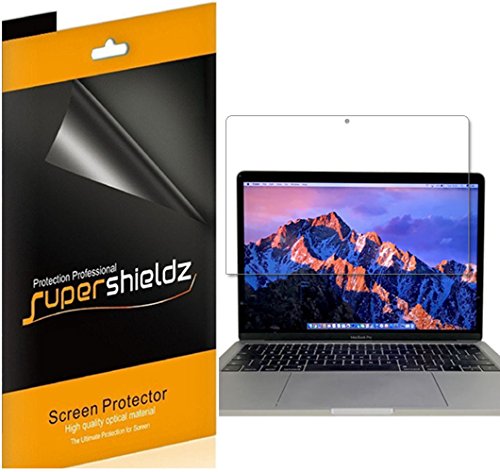
| Clear & Responsive | Compatibility: MacBook Pro 13″ (2016–2022 / M1, M2) | Mounting/Attachment Method: Film adhesive (easy install PET film) | Surface Treatment / Finish: Gloss / HD Clear (high-definition) | VIEW LATEST PRICE | Read Our Analysis |
| Magnetic Privacy & Blue Light Screen for MacBook Pro 14 |
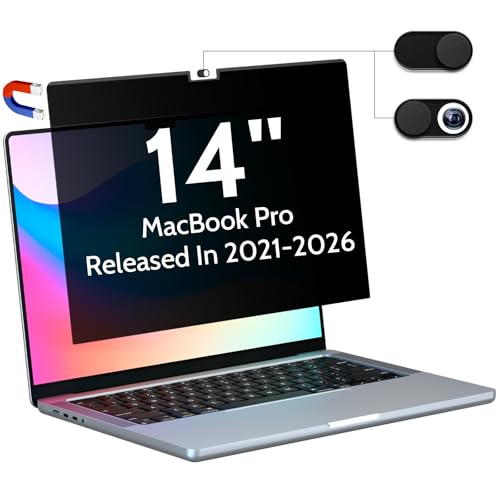
| Privacy & Blue-Light | Compatibility: MacBook Pro 14.2″ (2021–2025) – multiple A‑model numbers | Mounting/Attachment Method: Magnetic reinforced strip for quick attachment | Surface Treatment / Finish: Matte (anti-glare, anti-fingerprint) | VIEW LATEST PRICE | Read Our Analysis |
| Magnetic Privacy & Anti-Blue Light Screen for MacBook 13-inch |
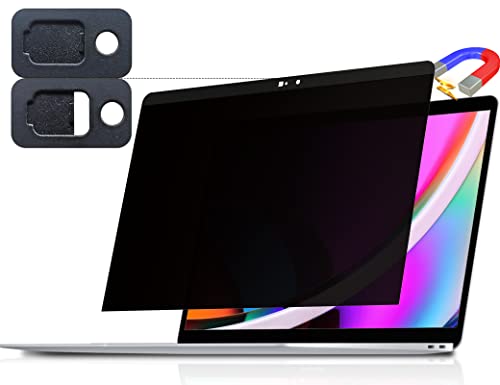
| Compact Privacy | Compatibility: MacBook Pro 13″ (2016–2022, M1, M2) and MacBook Air 13″ (2018–2021, M1) | Mounting/Attachment Method: Magnetic reinforced strip for quick attachment | Surface Treatment / Finish: Matte (anti-glare, anti-fingerprint) | VIEW LATEST PRICE | Read Our Analysis |
More Details on Our Top Picks
KEANBOLL 2-Pack Tempered Glass Screen Protector for 16.2″ MacBook Pro
If you want near-perfect clarity and tough, shatter-resistant protection for a 16.2″ MacBook Pro, the KEANBOLL 2‑pack tempered glass protector is a strong choice-it’s designed specifically for 2021–2024 16‑inch models (A2485/A2780) and delivers 9H hardness, ultra‑clear optics, and an oleophobic coating to keep fingerprints and smudges at bay. You’ll get two 2.5D rounded-edge tempered glass protectors that resist impact, prevent shattering, and preserve display fidelity without distortion. Installation’s bubble-free with automatic adsorption, and the kit includes mounting tools plus a video guide. Check retailer warranty and returns for support and coverage details.
- Compatibility:MacBook Pro 16.2″ (2021–2024) – A2485 / A2780 (M1–M4 series)
- Mounting/Attachment Method:Adhesive/installation mounting kit (automatic adsorption)
- Surface Treatment / Finish:Ultra-clear (gloss/high-definition) with oleophobic coating
- Protective Properties:9H tempered glass; explosion-proof / impact-resistant
- Included Accessories / Pack Quantity:2 tempered glass protectors + mounting kit + video guide stickers
- Anti-Fingerprint / Oleophobic Property:Oleophobic coating (reduces fingerprints, oils)
- Additional Feature:9H hardness tempered glass
- Additional Feature:Explosion-proof impact design
- Additional Feature:Includes video installation guide
Supershieldz Matte Screen Protector for MacBook Pro 16-inch
Choose the Supershieldz Matte Screen Protector if you want anti-glare performance and fingerprint resistance for your 16-inch MacBook Pro-its high-quality Japanese PET film cuts glare, preserves touch accuracy, and comes in a three-pack so you can keep a spare or replace one without hassle. You’ll get true touch sensitivity and a matte finish that reduces reflections and hides smudges while shielding your 16-inch (A2141) display from scratches, dust, and scrapes. Installation is straightforward, removal leaves no residue, and the pack’s dimensions suit the 16-inch model. Reviews average 4.3/5 from over a thousand buyers; check warranty and return terms before buying.
- Compatibility:MacBook Pro 16″ (2019–2020) – A2141
- Mounting/Attachment Method:Film adhesive (easy install PET film)
- Surface Treatment / Finish:Matte (anti-glare, anti-fingerprint)
- Protective Properties:Scratch/dust protection (PET film)
- Included Accessories / Pack Quantity:3 PET film protectors (3-pack)
- Anti-Fingerprint / Oleophobic Property:Anti-fingerprint (matte film)
- Additional Feature:Matte anti-glare finish
- Additional Feature:Japanese PET film
- Additional Feature:3-pack value bundle
Supershieldz MacBook Pro 13″ Screen Protectors (3-Pack)
Protect your 13-inch MacBook Pro with Supershieldz’s 3-pack of high-definition PET screen protectors – ideal for users who want crystal-clear display quality and real touch sensitivity without residue when removed. You’ll get three gloss-finish, HD-clear shields made from Japanese PET film that snap on cleanly and peel off without sticky residue. They preserve maximum resolution and deliver natural touch accuracy, shielding your screen from daily scratches, dust, and scrapes. Sized for MacBook Pro 13-inch models (2016–2022, including M1 and M2), they’re lightweight, easy to install, and backed by manufacturer warranty info for peace of mind.
- Compatibility:MacBook Pro 13″ (2016–2022 / M1, M2)
- Mounting/Attachment Method:Film adhesive (easy install PET film)
- Surface Treatment / Finish:Gloss / HD Clear (high-definition)
- Protective Properties:Scratch/dust protection (PET film)
- Included Accessories / Pack Quantity:3 PET film protectors (3-pack)
- Anti-Fingerprint / Oleophobic Property:Real touch sensitivity; resists residue/finger issues (clear PET)
- Additional Feature:High-definition transparency
- Additional Feature:Gloss finish (HD Clear)
- Additional Feature:Real touch sensitivity
Magnetic Privacy & Blue Light Screen for MacBook Pro 14
For anyone who works on-the-go and needs both screen privacy and eye protection, the Peslv Magnetic Privacy & Blue Light Screen for the 14″ MacBook Pro is the smart pick. You get a reinforced magnetic strip that snaps on in seconds and holds a 1:1-fit privacy layer tailored for 14.2″ models (2021–2025). It narrows viewing to ±30° for public-use privacy, keeps image clarity with a high-transmission layer, and reduces glare, scratches, fingerprints. It blocks 95% blue light and 92% UV, includes camera slides, cleaning kit, storage clip, and washable tape-portable protection without altering display fidelity.
- Compatibility:MacBook Pro 14.2″ (2021–2025) – multiple A‑model numbers
- Mounting/Attachment Method:Magnetic reinforced strip for quick attachment
- Surface Treatment / Finish:Matte (anti-glare, anti-fingerprint)
- Protective Properties:Privacy + anti-scratch layer; blocks reflected light
- Included Accessories / Pack Quantity:1 magnetic screen + cleaning kit + cloth + slide camera covers + storage clip
- Anti-Fingerprint / Oleophobic Property:Anti-fingerprint surface treatment
- Additional Feature:Magnetic one-second attachment
- Additional Feature:±30° privacy angle
- Additional Feature:Blocks 95% blue light
Magnetic Privacy & Anti-Blue Light Screen for MacBook 13-inch
If you often work in public or suffer from screen glare, this magnetic privacy and anti-blue light screen is a smart pick-it snaps on in seconds with a reinforced magnetic strip and narrows side viewing to about ±30° so only you see what’s on your 13-inch MacBook. It’s modeled 1:1 for MacBook Pro and Air 13″ (2016–2022, M1/M2) and measures 11.81 x 7.69 x 0.5 inches, weighing 5.9 ounces. The filter blocks 95% blue light and 92% UV, cuts 95% reflected glare, adds an anti-scratch layer, and includes a sliding camera cover plus cleaning kit and storage clip.
- Compatibility:MacBook Pro 13″ (2016–2022, M1, M2) and MacBook Air 13″ (2018–2021, M1)
- Mounting/Attachment Method:Magnetic reinforced strip for quick attachment
- Surface Treatment / Finish:Matte (anti-glare, anti-fingerprint)
- Protective Properties:Privacy + anti-scratch layer; blocks reflected light
- Included Accessories / Pack Quantity:1 magnetic screen + cleaning kit + cloth + washable tape + storage clip
- Anti-Fingerprint / Oleophobic Property:Anti-fingerprint surface treatment
- Additional Feature:Integrated sliding camera cover
- Additional Feature:1:1 screen-size restoration
- Additional Feature:Materials from Japan/Germany
Factors to Consider When Choosing MacBook Pro Laptop Screen Protectors
When choosing a MacBook Pro screen protector, you’ll want to check fit and compatibility to make sure it matches your model and camera placement. Consider protection level, finish (matte vs. glossy), and optical clarity so you don’t sacrifice visibility or touch response. Also think about ease of installation to avoid bubbles and repeated replacements.
Fit And Compatibility
Because MacBook Pro screens vary by diagonal, aspect ratio and notch placement, you should pick a protector that’s explicitly sized to your model year (13.3″, 14.2″, 16.2″, etc.) and matches cutouts for the camera, sensors and True Tone components so nothing’s blocked or misaligned. Also confirm bezel alignment so the ambient light sensor and notch openings line up precisely. Check the mounting style-full‑adhesive, magnetic strip, or corner tabs-so it works with thin bezels and won’t impede hinge motion or a snug case fit. Inspect thickness and edge profile (for example 2.5D rounded edges) to make sure the film sits flush, avoids lifting and prevents edge chipping. Finally, verify the added profile still lets your MacBook slide into sleeves, docks and keyboard covers without stress.
Protection Level
Once you’ve confirmed fit and alignment, assess the actual protection the screen protector provides so it does more than just look right. Check hardness ratings-9H tempered glass resists scratches and absorbs impacts better than PET film, which mainly guards against scuffs. Prefer tempered glass when you need drop and key protection; choose PET only for basic scratch defense. Look for anti-shatter or explosion-proof designs that keep fragments bonded on severe impact to protect your screen and hands. Inspect edge construction and fit precision-rounded (2.5D) edges and accurate sizing reduce perimeter chipping and distribute force more evenly during falls. Finally, verify added coatings like anti-scratch and oleophobic layers; they slow wear and make cleaning easier over time.
Screen Finish Type
Usually, you’ll choose between matte and gloss finishes based on where and how you work: matte (anti-glare) scatters reflections to ease eye strain in bright settings but softens sharpness slightly, while gloss (clear/HD) preserves color accuracy and detail at the cost of more visible fingerprints and reflections. Pick matte if you work outdoors or under strong lights and want reduced glare and less eye fatigue; expect a subtle softening and more surface drag, which can affect stylus feel. Choose gloss for photo/video or color-critical work when you need maximum brightness and crispness; it feels slicker for touch and stylus use but shows smudges and reflections. Both often include oleophobic coatings to cut fingerprints, though those wear over time.
Optical Clarity
Clarity matters more than most buyers realize: pick a protector with high visible light transmission (ideally >90%) and minimal haze (≤1–2%) so colors stay accurate and fine details remain sharp, especially for photo or video work. You’ll want optically bonded or tempered glass rather than thick PET film when minimal parallax and maximum clarity matter; bonded glass sits closer to the panel and reduces ghosting. Consider anti-reflective or matte coatings only if you need glare reduction, but know matte can slightly soften contrast and edge crispness. Verify the cut is precise and edge-aligned so you don’t get light leakage or subtle color shifts near bezels and sensors. Prioritize specs over marketing copy for reliable results.
Ease Of Installation
If you want a painless fit, pick a protector with self-adhesive or magnetic mounting and clear alignment guides so you can place it bubble-free and perfectly matched to the screen. You’ll also want materials with automatic adsorption or PET film plus an installation kit (wet/dry wipes, dust stickers, alignment frame) to cut trapped dust and air bubbles. Choose a protector thin and flexible enough for slight repositioning during placement yet rigid enough-tempered glass or firm PET-to avoid cracking while you align. Check for a peel tab or peel-off liner and clear step-by-step instructions or video guides that simplify backing removal and staged application. Finally, favor multi-packs or extras so you get a spare if the first attempt isn’t perfect.
Added Features
Once you’ve got installation down, think about extra features that tailor the protector to how you use your MacBook Pro. Privacy filters narrow the viewing angle (about ±30°) so only you see the screen, great for travel or open offices. Choose magnetic or adhesive mounting: magnetic strips snap on and off in seconds, while washable double‑sided tape gives semi‑permanent adhesion. Blue‑light and UV layers can block roughly 90–95% of blue light and 90%+ of UV, helping reduce eye strain and long‑term exposure. Anti‑glare (matte) finishes cut reflections but may slightly soften image sharpness compared with glossy films. Some protectors include integrated camera covers or slide shutters for physical webcam privacy in addition to visual screening.
Frequently Asked Questions
Can These Protectors Interfere With Touch ID or Touch Bar Functions?
They generally won’t interfere with Touch ID or Touch Bar if you apply a high-quality, precisely cut protector; you’ll want to align carefully, avoid covering sensors, and choose thin, non-conductive materials to guarantee proper function.
Are Screen Protectors Compatible With Macbook Cases or Sleeves?
Yes – most screen protectors work with cases or sleeves, but you’ll want a protector with precise edges so cases don’t lift it. Pick slim, edge-to-edge or smaller-fit protectors and test fit before fully adhering.
Do Protectors Affect Facetime Camera Clarity or AR Apps?
They generally won’t if you choose a high-quality, optically clear protector; you’ll retain FaceTime clarity and AR accuracy. Cheap or misaligned films can introduce glare, blur, or color shifts, so pick tempered glass or premium PET.
How Do Protectors Perform With External Displays or Projectors?
They generally won’t affect output to external displays or projectors, since those use digital video signals; you’ll still get full resolution and color. Thicker anti-glare films might slightly change perceived color on your laptop screen only.
Can They Be Safely Removed Without Leaving Adhesive Residue?
“An ounce of prevention is worth a pound of cure.” You can usually remove them safely; peel slowly from a corner, use heat if needed, and don’t rush-you’ll avoid residue, though some cheap adhesives might require gentle solvent cleanup.




